Just Enough Items (JEI) Optional for Just Enough Crafting Tables 26.3-1.0.2 (Fabric)
optionalMatching file found Matched file: 31.17.0.113 for Fabric 26.3
CurseForge · Minecraft mod
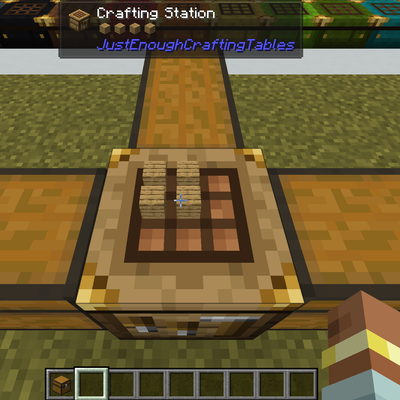
This simple mod just adds dyeable crafting tables that keeps its grid content, shows the items on top, and lets you craft from connected inventories. You can search, store, & repeat craft and JEI/EMI transfer from storage.
Quick answer
Just Enough Crafting Tables 26.3-1.0.2 (Fabric) targets 26.3 with Fabric. The project page does not say whether this file belongs on the client, dedicated server, or both. All 1 required mods have matching files.
Where it goes
The project page does not say whether this file belongs on the client, dedicated server, or both.
The source does not explicitly classify this release as client-only or server-only.
Just Enough Crafting Tables 26.3-1.0.2 (Fabric). Change the file and its required mods may change too.
Install Fabric API first. We found matching files for this game-version and loader setup. 3 come through another mod in the chain.
3 extra mods were pulled in by other dependencies. Indented rows show who needs each one. We only count dependency files that match this setup. A file for another loader does not fill the gap.
Before you install it
Built for Just Enough Crafting Tables 26.3-1.0.2 (Fabric). Pick another file and the loader, install side or required mods may change.
Use Just Enough Crafting Tables 26.3-1.0.2 (Fabric). It targets 26.3 with Fabric; another release may have different loader, side or dependency requirements.
Install Fabric API first. We found matching files for this game-version and loader setup. 3 come through another mod in the chain.
The project page does not say whether this file belongs on the client, dedicated server, or both.
Use the “Get this file” button beside Just Enough Crafting Tables 26.3-1.0.2 (Fabric). It opens that exact file at the source.
About this project
Adds dyeable crafting tables that keep what you put in it and lets you craft straight out of the storage next to it.
Place a Crafting Station beside your chests, barrels or drawers etc and open it. A panel beside the crafting grid shows what is in them. Grab what you need, craft, and put the rest back without leaving the crafting screen.
NeoForge, Minecraft 1.21.1.
The station looks like a crafting table with brass corner fittings, so you can tell it apart from a vanilla one. The slab is a half-height version that does everything the full station does, and it can be placed in water. Both of them can be dyed any of the vanilla dye colors by sneak+right clicking a dye onto them.
Items left in the crafting grid stay there when you close the screen, and they are rendered on top of the table so you can see what a station is set up for. Breaking the station makes the items drop.
Any block that stores items and touches the station (above, below or on any side) gets its own tab. Chests, barrels, drawers, backpacks, machines: if it holds items, it can show up.
Storage controllers and drawer walls with thousands of slots are shown a page at a time, with a scrollbar per page and page buttons.
@mod to search by mod and #tag to search by tag.With JEI or EMI, the recipe transfer button fills the grid from your inventory and from every connected inventory, including tabs and pages you are not looking at. Recipes show as craftable when the ingredients are in a chest next to the station. This works even when the server does not have JEI installed.
A toggle lets you pick where ingredients come from first, either your inventory, or the connected inventories. Items already in the grid are always used first.
Turn on repeat craft and shift-clicking the result keeps crafting, refilling the grid from your inventory and the connected storage each time an ingredient runs out. Leftovers like empty buckets are put away so crafting can carry on.
Sneak and right-click a station or slab with any dye to paint the wood. Dyes from other mods work too. The color stays when you break and replace it, carries over to slabs crafted from it, and washes off in a water cauldron.
The tabs, buttons and search box work with Minecraft's narrator.
Players can move the panel to the right side of the screen, turn off the items drawn on the table, and change how the mouse wheel scrolls. Button positions can be moved for packs where other mods put their own buttons on crafting screens.
Server owners can set page size, scan speed for large storage, the repeat craft limit, and whether players are allowed to put items into connected inventories from the station.
Just Enough Crafting Tables is an optional replacement for many of the Crafting Station forks and loads worlds made with it. Blocks, slabs, saved grids and items in inventories all carry over.
The switch is one way. Back up your world first. Once the world has been saved with this mod, going back to Crafting Station will lose your stations. The two mods cannot be installed together.
PolyForm Shield 1.0.0 and PolyForm Perimeter 1.0.0.
Project description from CurseForge.
Pick your setup
Choose the version and loader you play, then open the matching release.
Check the dependencies, then try the file in a copied instance before changing a world you care about.
Recent files
justenoughcraftingtables-fabric-26.3-1.0.2.jar
15 Nov 2026
justenoughcraftingtables-neoforge-26.3-1.0.2.jar
15 Nov 2026
justenoughcraftingtables-neoforge-26.1.2-1.0.2.jar
15 Nov 2026
justenoughcraftingtables-fabric-26.1.2-1.0.2.jar
15 Nov 2026
justenoughcraftingtables-forge-1.20.1-1.0.2.jar
15 Nov 2026
justenoughcraftingtables-fabric-1.20.1-1.0.2.jar
15 Nov 2026
justenoughcraftingtables-neoforge-1.21.1-1.0.2.jar
15 Nov 2026
justenoughcraftingtables-fabric-1.21.1-1.0.2.jar
15 Nov 2026
justenoughcraftingtables-neoforge-26.3-1.0.1.jar
31 Oct 2026
justenoughcraftingtables-fabric-26.3-1.0.1.jar
31 Oct 2026
justenoughcraftingtables-neoforge-26.1.2-1.0.1.jar
31 Oct 2026
justenoughcraftingtables-fabric-26.1.2-1.0.1.jar
31 Oct 2026
Looking for an older file? The official CurseForge project page is in Resources.
 mod
A technology NeoForge/Fabric mod with many machines.
 mod
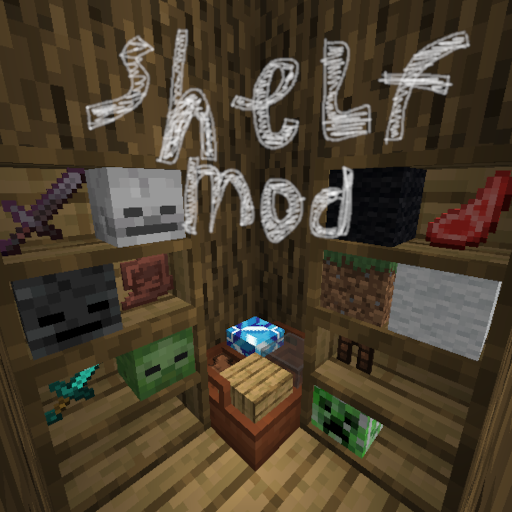
This mod lets you convieniently place items inside 2 types of shelves
 mod
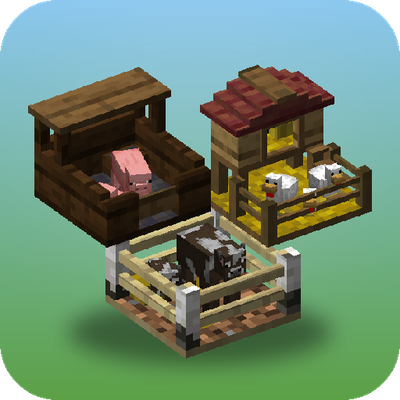
Store, breed and farm animals in a single block, with no entity lag. Pens change their look to suit what's inside, breed, milk, shear and butcher on their own, and Hopper Pens pipe out items, milk and liquid XP