Minecraft version
Back to mods 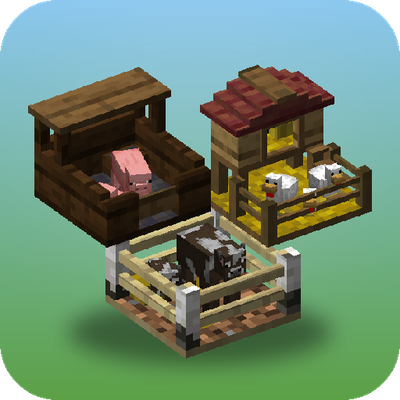
CurseForge · Minecraft mod
Penned In
Store, breed and farm animals in a single block, with no entity lag. Pens change their look to suit what's inside, breed, milk, shear and butcher on their own, and Hopper Pens pipe out items, milk and liquid XP
Choose a version Pick your version below, then grab the matching file.
Quick answer
Which Penned In release should I use?
Latest stable file pennedin-26.1.2-neoforge-1.3.0.jar
Game version 26.1.2
Loader NeoForge
Penned In pennedin-26.1.2-neoforge-1.3.0.jar targets 26.1.2 with NeoForge. The project page does not say whether this file belongs on the client, dedicated server, or both. No extra mods listed for this file.
Where it goes
Is Penned In required on the client, server, or both?
The project page does not say whether this file belongs on the client, dedicated server, or both.
Client Source doesn’t say
Dedicated server Source doesn’t say
Loader for this release NeoForge
Required install it here Optional supported, not mandatory Not supported do not install here Source doesn’t say do not assume
The source does not explicitly classify this release as client-only or server-only.
What else does Penned In pennedin-26.1.2-neoforge-1.3.0.jar need?
pennedin-26.1.2-neoforge-1.3.0.jar. Change the file and its required mods may change too.
This file does not list any required mods. Do not add a library just because a different file uses it.
This file does not list any required or optional mods.
Before you install it
Add Penned In without breaking your instance.
Built for Penned In pennedin-26.1.2-neoforge-1.3.0.jar. Pick another file and the loader, install side or required mods may change.
- 01
Stick to this file
Use pennedin-26.1.2-neoforge-1.3.0.jar. It targets 26.1.2 with NeoForge; another release may have different loader, side or dependency requirements.
- 02
Bring the mods it needs
This file does not list any required mods. Do not add a library just because a different file uses it.
- 03
Put it on the correct side
The project page does not say whether this file belongs on the client, dedicated server, or both.
- 04
Pick the file you checked
Use the “Get this file” button beside pennedin-26.1.2-neoforge-1.3.0.jar. It opens that exact file at the source.
About this project
What does Penned In add?
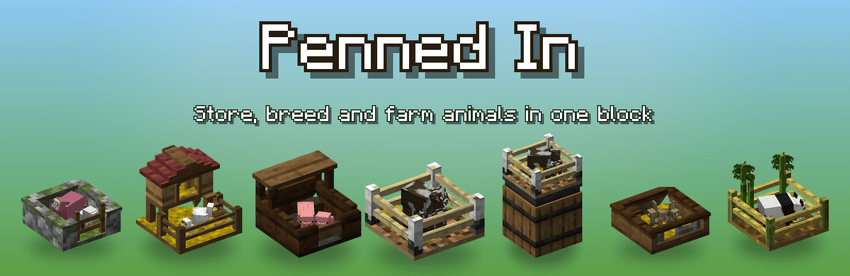
Penned In keeps your farm animals inside a single block. They're saved as data instead of live mobs, so you can run big breeding and produce farms without the entity lag. Each pen changes its look to suit what's inside, the animals move about in it, and it does the breeding, milking, shearing and butchering for you.
Features
- One block, a whole herd. Each pen holds a herd of one kind, up to 128 animals. Pens tick in batches, so a field of them costs almost nothing.
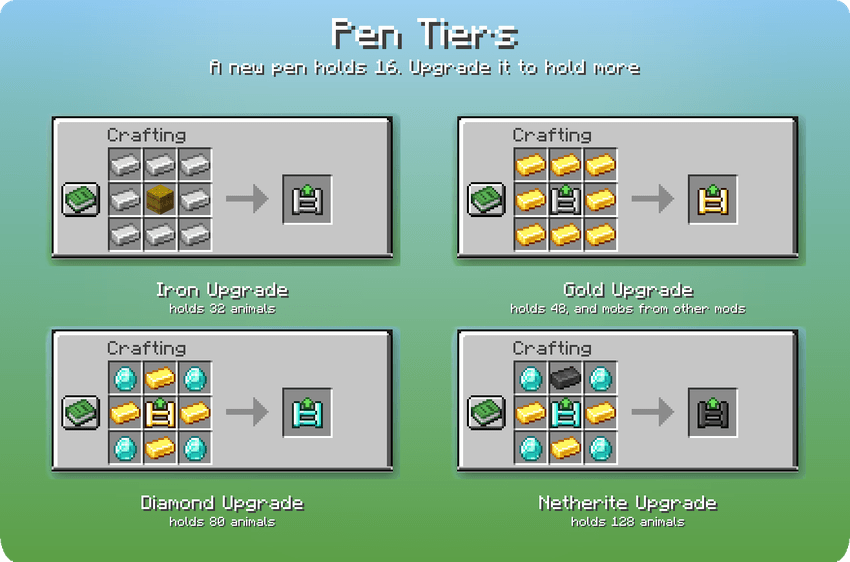
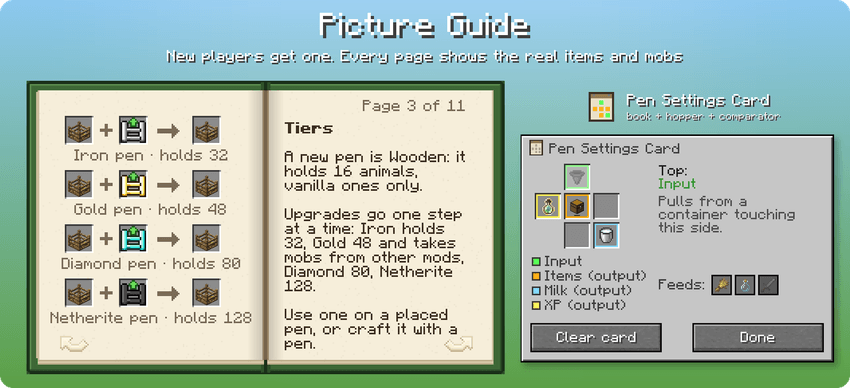
- Pen tiers. A new pen is Wooden and holds 16 vanilla animals. Upgrades take it to Iron (32), Gold (48, and mobs from other mods), Diamond (80) and Netherite (128). Use an upgrade on a placed pen or craft it with the pen item, and the animals stay inside. Pens made before tiers existed count as Netherite, so nothing gets smaller.
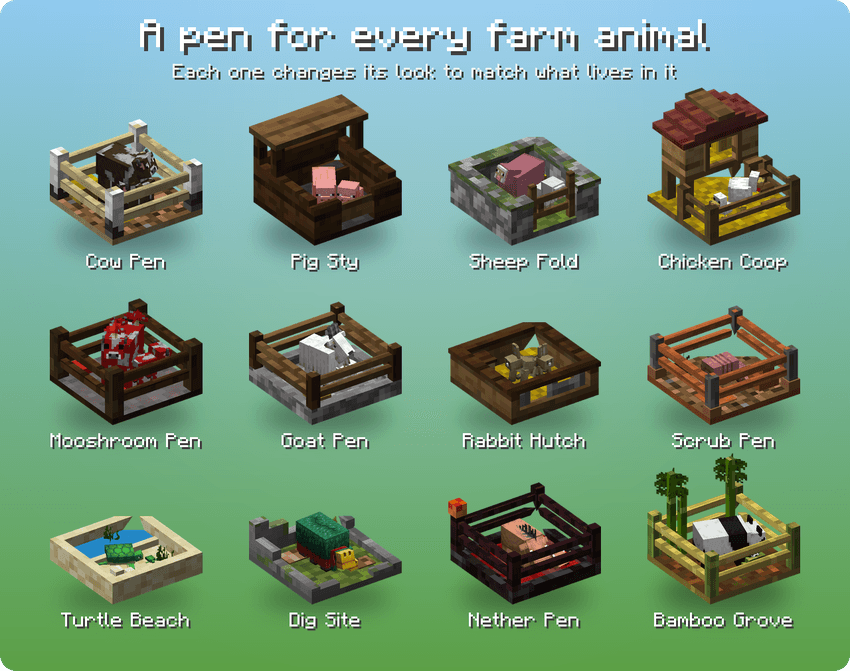
- Every farm animal. Cows, pigs, sheep, chickens, mooshrooms, goats, rabbits, armadillos, turtles, sniffers, hoglins and pandas.
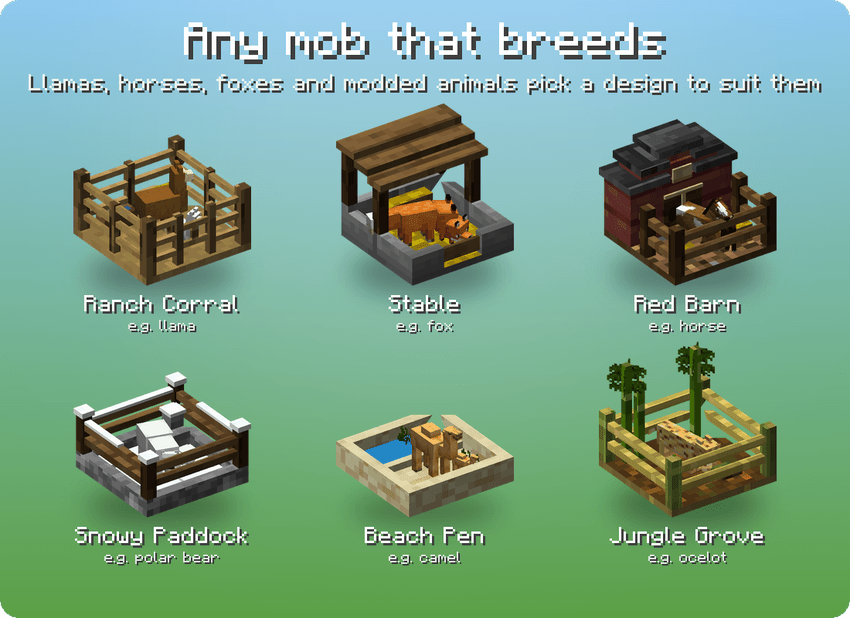
- Any other mob that breeds on food, including modded animals (in a Gold pen or better): llamas, horses, foxes, axolotls and more. Each one is stored exactly, keeping its coat, genes, stats, chest, armour and owner.
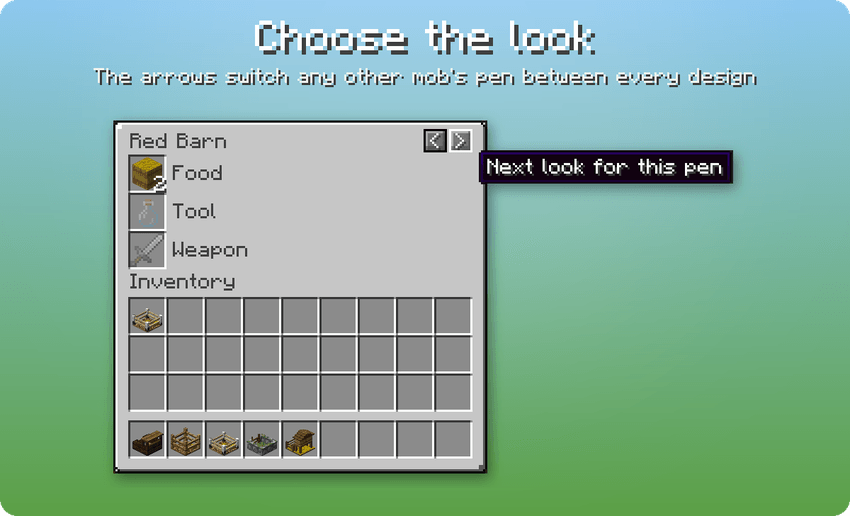
- A design for each animal. There are 12 farm pens (Pig Sty, Chicken Coop, Sheep Fold, Dig Site, Nether Pen and more) plus 18 designs for other mobs. Use the arrows in the pen's screen to change the look.
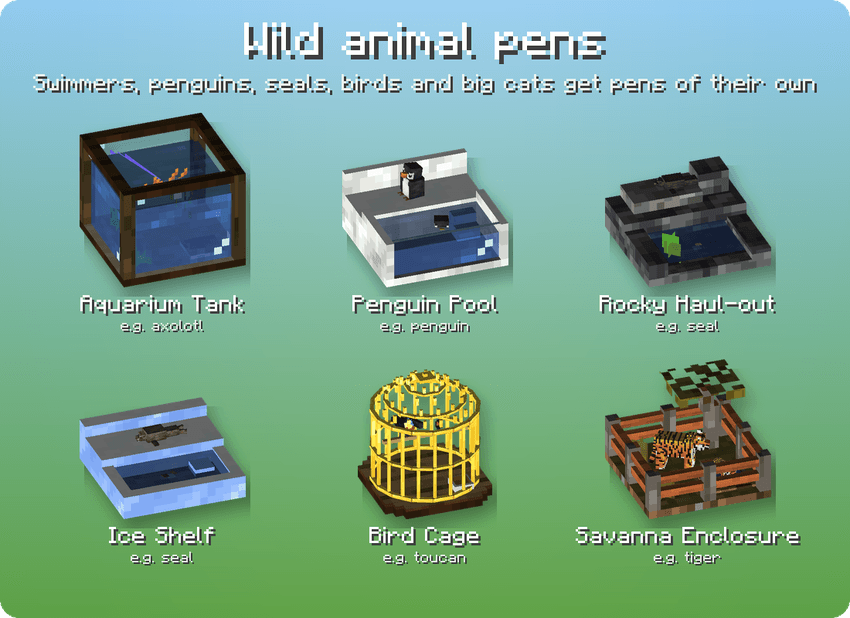
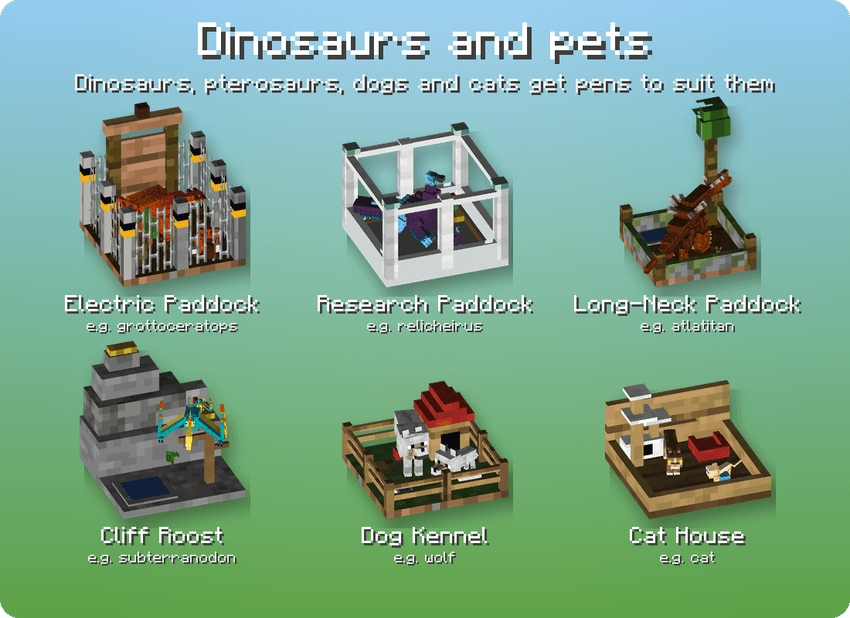
- Pens for wild animals. Aquarium Tank, Penguin Pool, Rocky Haul-out, Ice Shelf, Bird Cage, Dog Kennel, Cat House, Savanna Enclosure, and dinosaur paddocks with a Cliff Roost for pterosaurs and a Long-Neck Paddock where sauropods stretch up to a tall tree. Each mob gets the right one automatically.
- Live miniatures. The animals look around, shuffle and hop. Sheep graze, swimmers bob behind the glass, birds hop along their perch, and pens with mixed colours or variants cycle through them.
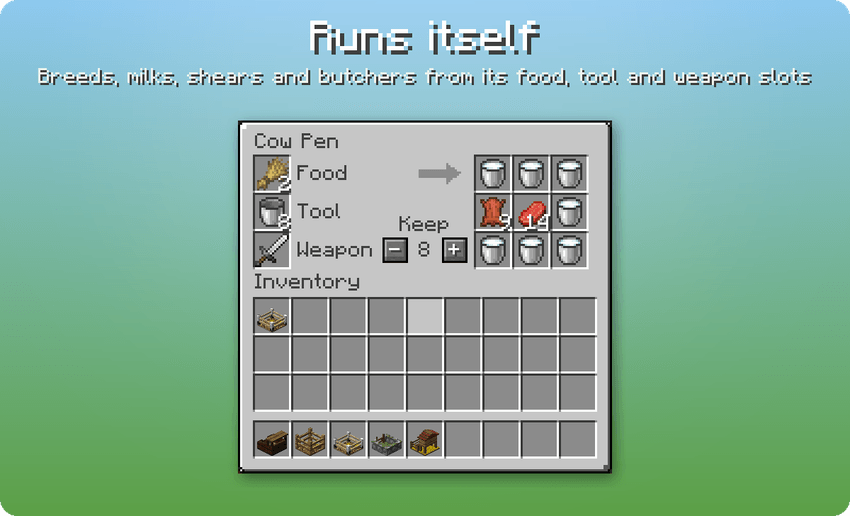
- Automatic breeding. Put food in the food slot and ready pairs breed on their own. Spare food speeds up the babies.
- The tool slot does the work. It shears sheep (each keeps its colour), milks with buckets, makes mushroom stew with bowls, and brushes scutes off armadillos with a brush.
- Natural produce. Chickens lay eggs, armadillos shed scutes, sniffers dig up seeds, baby pandas sneeze slimeballs and baby turtles drop scutes as they grow.
- Optional butchering. Put a weapon in the weapon slot and set a Keep number. Only adults above that number are taken, never babies or named animals. Looting, Fire Aspect and modded knives (Farmer's Delight) all work.
- XP is kept, not wasted. Breeding and butchering XP mends Mending gear in the slots, fills glass bottles with Bottles o' Enchanting, and otherwise stays stored in the pen.
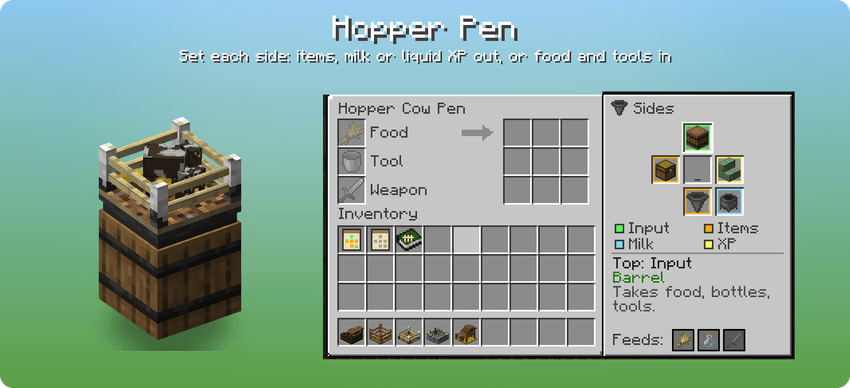
- Hopper Pen. Craft a Gold pen (or better) with a hopper. Hoppers and pipes can feed it from any side. Place it on a chest or barrel and products drop straight in.
- Set every side. A Hopper Pen's Sides panel shows all six faces and what's attached to each. Set each side to Off, Items, Milk, liquid XP or Input. Milk and XP sides fill a tank touching them, and pipes from Pipez or any other mod connect to every side. It uses whatever liquid XP your pack has.
- Input sides. An Input side pulls food, glass bottles, tools and weapons from the chest or pipe touching it, only taking what the pen can use. Toggle which of those each side takes.
- Pen Settings Card. Copy a Hopper Pen's side settings onto a card and paste them onto as many other Hopper Pens as you like. Sneak and right-click in the air to open the card and set each side by hand.
- In-game guide. New players get the Penned In Guide, a short picture book that explains everything. Craft another any time.
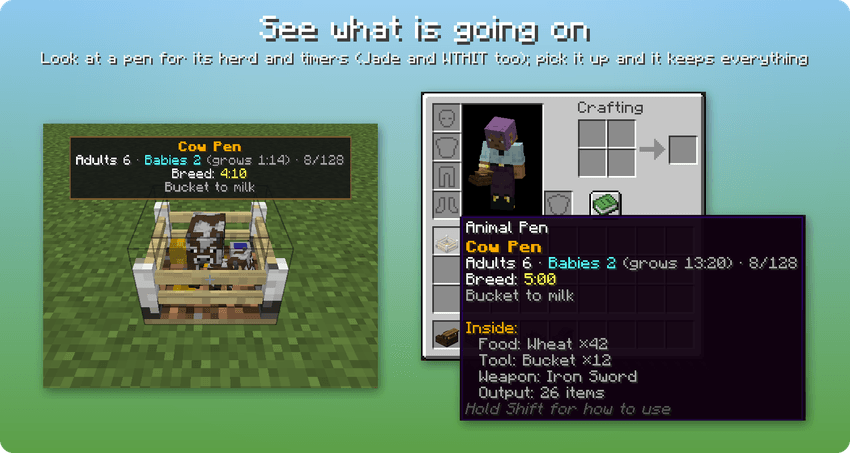
- See it at a glance. Look at a pen to see adults, babies, breed timer, grow time, stored XP and more. Jade and WTHIT are supported, and comparators read how full a pen is.
- Pick it up and it keeps everything. Like a shulker box, a picked-up pen keeps its animals, slots, outputs and XP. The item's tooltip lists what's inside.
- Easy to fill. Right-click an animal with the pen item, or lead a group up to a placed pen. Use a lead on the pen to let one back out.
- Configurable. Pen tiers and their sizes, timers, XP storage, which mobs and mods are allowed, a size limit and more can be set in the server config, or in-game from the mod's Config screen in a singleplayer world (on 1.20.1 too). A client config controls the info panel and ambient animal sounds.
- Works with modpacks. Tags control which mobs can be penned, which design a mob gets, which weapons can butcher and which items are never output.
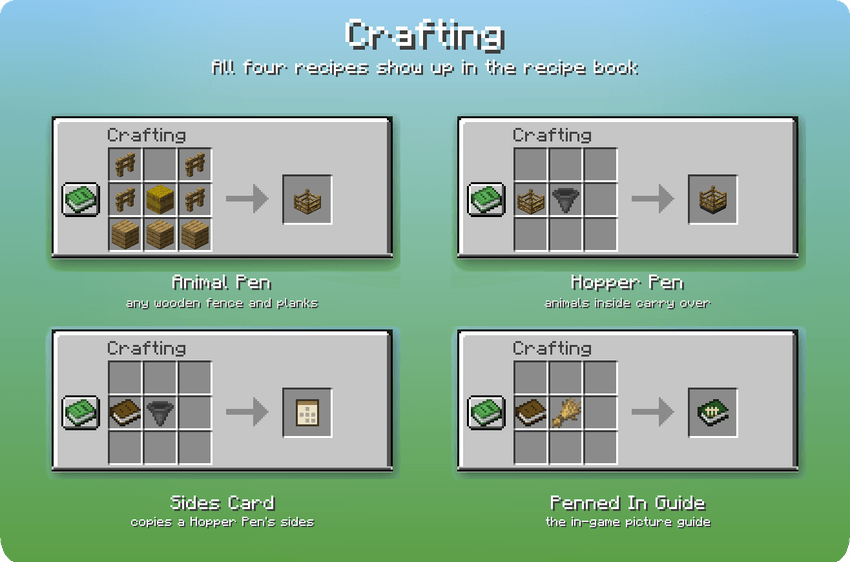
Crafting
- Animal Pen (Wooden): fence, hay bale, fence over three planks
- Iron Upgrade: 8 iron ingots around a hay bale
- Gold Upgrade: 8 gold ingots around an Iron Upgrade
- Diamond Upgrade: diamonds in the corners and gold ingots on the sides, around a Gold Upgrade
- Netherite Upgrade: as the Diamond Upgrade, with a netherite ingot at the top, around a Diamond Upgrade
- Upgrading a pen: pen + the next upgrade (shapeless), or use the upgrade on a placed pen
- Hopper Pen: Gold (or better) Animal Pen + hopper (shapeless)
- Pen Settings Card: book + hopper + comparator (shapeless)
- Penned In Guide: book + wheat (shapeless)
All recipes appear in the recipe book.
Versions
Available for Forge 1.20.1 and NeoForge 1.21.1 and 26.1.2.
In English, German, French, Spanish, Italian, Polish, Brazilian Portuguese, Russian, Simplified Chinese, Japanese and Korean.
Modpacks
You're free to include Penned In in any modpack. It's MIT licensed.
Project description from CurseForge.
Pick your setup
Penned In by Minecraft version and loader
Choose the version and loader you play, then open the matching release.
Minecraft version
1.21.1
1 loader buildMinecraft version
1.20.1
1 loader buildCheck the dependencies, then try the file in a copied instance before changing a world you care about.
Recent files
Penned In versions and loaders
pennedin-26.1.2-neoforge-1.3.0.jar
4 Nov 2026
Client Source doesn’t say Server Source doesn’t say Dependencies No extras listed Listed on Release listing
Check the 26.1.2 · NeoForge setup NeoForge26.1.2 release
pennedin-1.21.1-neoforge-1.3.0.jar
4 Nov 2026
Client Source doesn’t say Server Source doesn’t say Dependencies No extras listed Listed on Release listing
Check the 1.21.1 · NeoForge setup 1.21.1NeoForge release
pennedin-1.20.1-forge-1.3.0.jar
4 Nov 2026
Client Source doesn’t say Server Source doesn’t say Dependencies No extras listed Listed on Release listing
Check the 1.20.1 · Forge setup 1.20.1Forge release
pennedin-26.1.2-neoforge-1.2.2.jar
3 Nov 2026
Client Source doesn’t say Server Source doesn’t say Dependencies No extras listed Listed on Release listing
Check the 26.1.2 · Forge setup Forge26.1.2 release
pennedin-1.21.1-neoforge-1.2.2.jar
3 Nov 2026
Client Source doesn’t say Server Source doesn’t say Dependencies No extras listed Listed on Release listing
Check the 1.21.1 · NeoForge setup 1.21.1NeoForge release
pennedin-1.20.1-forge-1.2.2.jar
3 Nov 2026
Client Source doesn’t say Server Source doesn’t say Dependencies No extras listed Listed on Release listing
Check the 1.20.1 · Forge setup 1.20.1Forge release
pennedin-26.1.2-neoforge-1.2.1.jar
2 Nov 2026
Client Source doesn’t say Server Source doesn’t say Dependencies No extras listed Listed on Release listing
Check the 26.1.2 · NeoForge setup NeoForge26.1.2 release
pennedin-1.21.1-neoforge-1.2.1.jar
2 Nov 2026
Client Source doesn’t say Server Source doesn’t say Dependencies No extras listed Listed on Release listing
Check the 1.21.1 · NeoForge setup 1.21.1NeoForge release
pennedin-1.20.1-forge-1.2.1.jar
2 Nov 2026
Client Source doesn’t say Server Source doesn’t say Dependencies No extras listed Listed on Release listing
Check the 1.20.1 · Forge setup 1.20.1Forge release
pennedin-26.1.2-neoforge-1.2.0.jar
31 Oct 2026
Client Source doesn’t say Server Source doesn’t say Dependencies No extras listed Listed on Release listing
Check the 26.1.2 · Forge setup Forge26.1.2 release
pennedin-1.21.1-neoforge-1.2.0.jar
31 Oct 2026
Client Source doesn’t say Server Source doesn’t say Dependencies No extras listed Listed on Release listing
Check the 1.21.1 · NeoForge setup 1.21.1NeoForge release
pennedin-1.20.1-forge-1.2.0.jar
31 Oct 2026
Client Source doesn’t say Server Source doesn’t say Dependencies No extras listed Listed on Release listing
Check the 1.20.1 · Forge setup 1.20.1Forge release
Looking for an older file? The official CurseForge project page is in Resources.
 mod
CurseForge · Minecraft
SCC - Super Cool Calculator
Storage network and autocrafting that uses your existing chests and the recipes already in your pack.
 mod
CurseForge · Minecraft
Quests Visual
New visual features for FTB Quests
 mod
CurseForge · Minecraft
SCC: Calculated Farming
Grows crops, trees and bees inside a machine and sends the harvest to your SCC storage.