Minecraft version
Back to mods 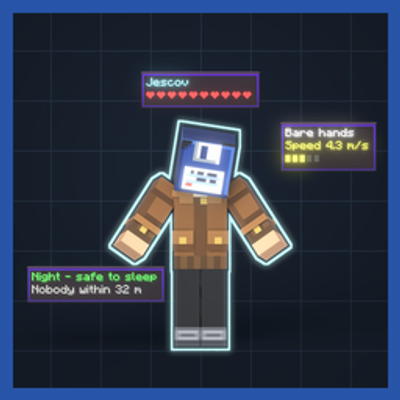
CurseForge · Minecraft mod
Builder's Vision
Press V and the world explains itself: a grey vision mode where mobs glow by kind and blocks show what they are.
Choose a version Pick your version below, then grab the matching file.
Quick answer
Which Builder's Vision release should I use?
Latest stable file Builder's Vision 1.2.0 (NeoForge 26.1.2)
Game version 26.1.2
Loader NeoForge
Builder's Vision 1.2.0 (NeoForge 26.1.2) targets 26.1.2 with NeoForge. The project page does not say whether this file belongs on the client, dedicated server, or both. No extra mods listed for this file.
Where it goes
Is Builder's Vision required on the client, server, or both?
The project page does not say whether this file belongs on the client, dedicated server, or both.
Client Source doesn’t say
Dedicated server Source doesn’t say
Loader for this release NeoForge
Required install it here Optional supported, not mandatory Not supported do not install here Source doesn’t say do not assume
The source does not explicitly classify this release as client-only or server-only.
What else does Builder's Vision 1.2.0 (NeoForge 26.1.2) need?
Builder's Vision 1.2.0 (NeoForge 26.1.2). Change the file and its required mods may change too.
This file does not list any required mods. Do not add a library just because a different file uses it.
This file does not list any required or optional mods.
Before you install it
Add Builder's Vision without breaking your instance.
Built for Builder's Vision 1.2.0 (NeoForge 26.1.2). Pick another file and the loader, install side or required mods may change.
- 01
Stick to this file
Use Builder's Vision 1.2.0 (NeoForge 26.1.2). It targets 26.1.2 with NeoForge; another release may have different loader, side or dependency requirements.
- 02
Bring the mods it needs
This file does not list any required mods. Do not add a library just because a different file uses it.
- 03
Put it on the correct side
The project page does not say whether this file belongs on the client, dedicated server, or both.
- 04
Pick the file you checked
Use the “Get this file” button beside Builder's Vision 1.2.0 (NeoForge 26.1.2). It opens that exact file at the source.
About this project
What does Builder's Vision add?
Builder's Vision
Press V. The world explains itself.
A vision mode for Minecraft, in the spirit of Red Dead's Eagle Eye: the screen goes quiet and grey, mobs glow by kind, and everything you look at tells you what the server actually knows about it - drawn in chunky, grid-snapped pixels that live in the world, not in a menu.
Information only. Nothing in this mod places, breaks, moves or damages anything. It just shows you.
The terminal - new in 1.1.0
Press ` and ask it a question. A console opens down the left; type what you want and it goes and finds it, brackets round the answer with the number written beside it.
Things you can ask:
find the best horse within 100 blocks(or justbest horse 100)fastest horse,nearest villagercount zombies within 32,find diamond orevillager selling mending,who sells diamondstamed horse,baby cow,named sheepdark spots,ripe crops,help
It is a fixed vocabulary read forgivingly, not a language model. The filler comes out, so find the best horse within 100 blocks and best horse 100 are the same sentence and neither has to be learned. It answers instantly, works offline, needs no key and no account, and it cannot invent a horse - which matters, because being exact about which horse is the whole job.
The box suggests as you type, the way the game's own command box does: arrows move, tab takes, enter sends, clicking takes. Near misses count, so horze still offers horse.
Answers are bracketed in the world and a bracket on a creature follows it - a horse will have wandered by the time you look up. Marks clear when you get to the thing, and last five minutes if you never do.
What you see
Blocks
- Look at a chest, barrel, hopper, shulker box, furnace, smoker, brewing stand or campfire and its real inventory panel floats above it - the game's own layout, with the real contents and progress arrows.
- A crafting table shows everything you could craft right now from your inventory.
- Your ender chest shows your own ender inventory (nobody else's).
- Every block gets a small card: name, the tool that mines it, light level. Crops show growth, redstone shows power, spawners show what and when, beehives show honey and bees.
- Placement preview - hold a block and a translucent ghost shows exactly how it will land: stair and log orientation, slabs, chest joining. White if it fits, red if it cannot.
- Dark spots - red patches on every floor block where a hostile could spawn once it is night. Place torches and watch them clear.
Mobs
- Cards with health, armour, "3 hits to kill" with what you are holding, whether it is targeting you, tamed, baby, and how far away it is.
- Villagers get a second card listing every trade - cost, result, sold out - before you open them.
- Animals show breeding state ("Ready to breed", "Can breed again in 3:20", "Grows up in 8:00") and what they breed with.
- Tracking cubes - hostiles get a red corner-bracket cube that follows them, bolder the closer they are.
- Paths - each mob's actual navigation path from the server, drawn along the ground.
- Combat - floating damage numbers, velocity arrows on moving mobs and dropped items, creeper and TNT fuses, despawn timers on dropped loot.
You
- A grid radar bottom-left with every known mob, your death point and your bed.
- Status lines: biome, Y, light at your feet ("mobs can spawn here"), night countdown or "safe to sleep", slime chunk, and the distance to your death point and bed.
Settings - the button at the top of the pause menu: press-to-toggle or hold, text size, range, tint strength, and a toggle for every layer.
Requires the mod on the server
Builder's Vision must be installed on the server and on every client. The server is the only honest source for chest contents, mob targets and paths, so the mod refuses to work on servers without it. Works in singleplayer out of the box.
Notes
- NeoForge 26.1.2, Java 25 (version 1.2). Forge 1.20.1, Java 17 (version 1.1).
- Server admins can cap the vision range in
serverconfig/buildersvision-server.toml. - Made by Jescov. Issues and ideas welcome on the project page.
Project description from CurseForge.
Pick your setup
Builder's Vision by Minecraft version and loader
Choose the version and loader you play, then open the matching release.
Minecraft version
1.20.1
1 loader buildCheck the dependencies, then try the file in a copied instance before changing a world you care about.
Recent files
Builder's Vision versions and loaders
Builder's Vision 1.2.0 (NeoForge 26.1.2)
buildersvision-1.2.0.jar
11 Nov 2026
Client Source doesn’t say Server Source doesn’t say Dependencies No extras listed Listed on Release listing
Check the 26.1.2 · NeoForge setup NeoForge26.1.2 release
Builder's Vision 1.1.0 (Forge 1.20.1)
buildersvision-1.1.0.jar
22 Oct 2026
Client Source doesn’t say Server Source doesn’t say Dependencies No extras listed Listed on Release listing
Check the 1.20.1 · Forge setup 1.20.1Forge release
Looking for an older file? The official CurseForge project page is in Resources.
 mod
CurseForge · Minecraft
Vistacor
A real projector that throws a live web page across whatever is in front of it, and the cinema to put around it.
 mod
CurseForge · Minecraft
Deck
Provides 200+ random upgrade cards to choose !!!
 mod
CurseForge + Modrinth · Minecraft
Seamless Ores
Universal ore variants for vanilla and modded stones, filtered by geology, so every ore blends into the stone it generates in. Supports vanilla and modded ores, keeps the same veins and drops, and works with Terralith, JEI, REI, and Jade.