Minecraft version
Back to mods 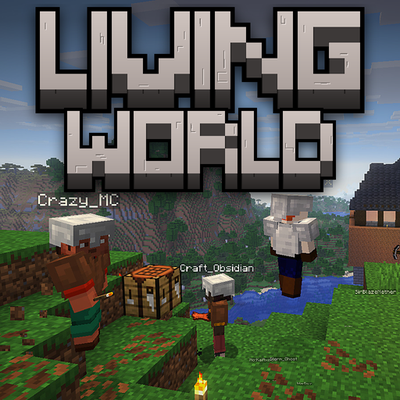
CurseForge · Minecraft mod
Living world
Fake players with skins and personalities join your world, build villages, form factions, trade, chat and fight like real players.
Choose a version Pick your version below, then grab the matching file.
Quick answer
Which Living world release should I use?
Latest stable file livingworld-1.0.0+1.20.1.jar
Game version 1.20.1
Loader Forge
Living world livingworld-1.0.0+1.20.1.jar targets 1.20.1 with Forge. The project page does not say whether this file belongs on the client, dedicated server, or both. No extra mods listed for this file.
Where it goes
Is Living world required on the client, server, or both?
The project page does not say whether this file belongs on the client, dedicated server, or both.
Client Source doesn’t say
Dedicated server Source doesn’t say
Loader for this release Forge
Required install it here Optional supported, not mandatory Not supported do not install here Source doesn’t say do not assume
The source does not explicitly classify this release as client-only or server-only.
What else does Living world livingworld-1.0.0+1.20.1.jar need?
livingworld-1.0.0+1.20.1.jar. Change the file and its required mods may change too.
This file does not list any required mods. Do not add a library just because a different file uses it.
This file does not list any required or optional mods.
Before you install it
Add Living world without breaking your instance.
Built for Living world livingworld-1.0.0+1.20.1.jar. Pick another file and the loader, install side or required mods may change.
- 01
Stick to this file
Use livingworld-1.0.0+1.20.1.jar. It targets 1.20.1 with Forge; another release may have different loader, side or dependency requirements.
- 02
Bring the mods it needs
This file does not list any required mods. Do not add a library just because a different file uses it.
- 03
Put it on the correct side
The project page does not say whether this file belongs on the client, dedicated server, or both.
- 04
Pick the file you checked
Use the “Get this file” button beside livingworld-1.0.0+1.20.1.jar. It opens that exact file at the source.
About this project
What does Living world add?
Living World
Turn any world, solo or multiplayer, into a busy multiplayer server.
Fake players join and leave throughout the day. Each one has a name, a skin and a personality, and plays like a real player: they mine, build villages block by block, fight in PvP, chat, trade, go to war, travel to the Nether and kill the dragon.
Real players, not mobs
Every fake player is a real server-side player (ServerPlayer) plugged into a fake network connection. As far as the game is concerned, nothing separates them from a human:
- name tag, entry in the Tab list with a ping, "joined / left the game" messages
- skin of the Mojang account with the same name
- believable generated names (
xXTimXx,TheBlazeEthan,_Hunter_…) - visible inventory and armor, hunger, fall damage, drowning, death messages, item drops, statistics and advancements
- play sessions of 25 to 150 minutes: they log off and come back later with their items, position and memory
Personality and PvP skill
Each fake player has a permanent personality (sprinting, bunny hopping, chattiness, curiosity, courage) and one of four PvP levels:
| Level | Share | How they fight |
|---|---|---|
| Beginner | ~30% | slow reactions, poor aim, spam-clicks, misses a lot |
| Average | ~45% | decent reactions, misses now and then |
| Good | ~20% | hits from max reach, waits for cooldown, crits, W-taps, strafes, shields, ender pearls |
| Very strong | ~5% | near-perfect aim, instant reactions, frequent pearls and golden apples |
Movement and combat
- Custom A* pathfinding: stairs, drops, swimming, ladders, doors, hazards and digging
- Real player inputs (WASD and smooth camera), sprinting, sprint-jumping, pillaring up, boats, horses, minecarts
- Sword combat with crits and W-taps, shields, bows with drop compensation and target leading, ender pearls to chase or escape, golden apples
- Faction members defend each other
Jobs and factions
Miner, lumberjack, farmer, hunter, rancher, builder, explorer, guard, raider, solo player and wanderer. Faction members switch jobs when the village needs it (no wood left? someone goes chopping trees).
- Factions appear naturally, each with its own building style, wood type and color
- Villages are built live, block by block, with clearing, foundations and scaffolding
- 61 building types × 3 levels × 6 styles (retro 1.7, classic, medieval, noob, modern, nordic)
- Villages grow through Wood, Stone and Masonry ages: buildings get upgraded, plus roads, bridges, railways between allies, signs and banners
- Up to 45% of factions grow a huge headquarters over up to 60 stages
- Gear progresses at the pace of a real player: iron after a few in-game weeks, diamonds much later, netherite for Nether veterans
Interact with them
- Right-click any fake player: reputation, daily trade, quests, duel challenge
- Reputation per faction: kill their members and they will remember you
- Chat: mention a fake player and they answer with what they are actually doing ("where are you?", "got any iron?", "1v1?")
- Alliance Pact (new item): ally with a whole faction, even a hostile one, then give orders: job, resource to gather, work at your base, escort, salary…
Server events
Wars and sieges between factions, PvP tournaments, races, Nether expeditions, Ender Dragon quests, and holiday events based on the real date (Halloween, Christmas, New Year fireworks).
Installation
- Install Forge 66 for Minecraft 26.3 (Java 25).
- Put the jar in the
mods/folder of the server and of every client (the Alliance Pact item requires the mod on both sides). - Start the world. The first fake player joins after about 20 seconds.
On a dedicated server, set pause-when-empty-seconds=-1 in server.properties so the world keeps living with no real player online.
Commands (operators)
/livingworld or /ls: spawn, spawnnamed, list, kick, kickall, role, faction create|list, war, ally, wild, showcase, mainbase.
Configuration
config/livingworld-common.toml: number of fake players online, max factions, session length, skins, griefing, hostile behavior towards real players, chat on/off, chat language (en / fr), and more.
Performance
Each fake player loads chunks like a real player and uses pathfinding. Plan for extra CPU and memory above 10 bots.
Alliance Pact recipe
Craft it in a crafting table: 4 diamonds in the corners, 4 banners (any color) on the sides and 1 End Crystal in the middle.
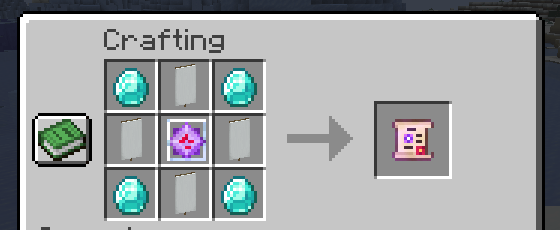
Then right-click a fake player with the pact in hand: their whole faction becomes your ally.
Project description from CurseForge.
Pick your setup
Living world by Minecraft version and loader
Choose the version and loader you play, then open the matching release.
Minecraft version
1.20.1
1 loader buildCheck the dependencies, then try the file in a copied instance before changing a world you care about.
Recent files
Living world versions and loaders
livingworld-1.0.0+1.20.1.jar
livingworld-1.0.0-1.20.1.jar
23 Nov 2026
Client Source doesn’t say Server Source doesn’t say Dependencies No extras listed Listed on Release listing
Check the 1.20.1 · Forge setup 1.20.1Forge release
Living World 1.0.0 (Forge 26.3)
livingworld-1.0.0.jar
25 Oct 2026
Client Source doesn’t say Server Source doesn’t say Dependencies No extras listed Listed on Release listing
Check the 26.3 · Forge setup Forge26.3 release
Looking for an older file? The official CurseForge project page is in Resources.
 mod
CurseForge · Minecraft
Morph of PKG
Morph into any mob or player you kill and use their abilities, variants and traits!
 mod
CurseForge · Minecraft
White Clover
A minecraft mod inspirated on Black Clover Anime, where you can keep your grimoire, choose from four classes, and cast spells using a wand
 mod
CurseForge · Minecraft
Ultimate Friendly Enderman
Have you ever wanted to tame a friendly Enderman? Build relationships, chat with custom dialogue, and turn Minecraft’s tall mystery mob into your loyal companion!