Minecraft version
Back to mods 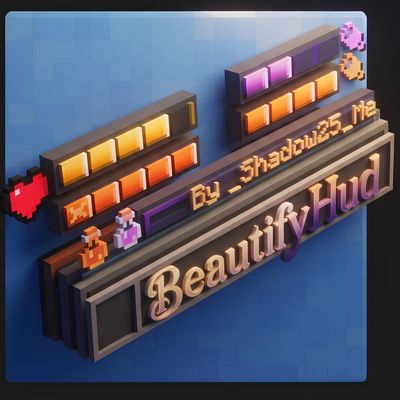
CurseForge · Minecraft mod
beautifyhud
A lightweight HUD mod that turns health, absorption, hunger and saturation into compact, color-coded bars.
Choose a version Pick your version below, then grab the matching file.
Quick answer
Which beautifyhud release should I use?
beta file beautifyhud-1.4.0.jar
Game version 1.21.1
Loader NeoForge
beautifyhud-1.4.0.jar targets 1.21.1 with NeoForge. The project page does not say whether this file belongs on the client, dedicated server, or both. No extra mods listed for this file.
Where it goes
Is beautifyhud required on the client, server, or both?
The project page does not say whether this file belongs on the client, dedicated server, or both.
Client Source doesn’t say
Dedicated server Source doesn’t say
Loader for this release NeoForge
Required install it here Optional supported, not mandatory Not supported do not install here Source doesn’t say do not assume
The source does not explicitly classify this release as client-only or server-only.
What else does beautifyhud-1.4.0.jar need?
beautifyhud-1.4.0.jar. Change the file and its required mods may change too.
This file does not list any required mods. Do not add a library just because a different file uses it.
This file does not list any required or optional mods.
Before you install it
Add beautifyhud without breaking your instance.
Built for beautifyhud-1.4.0.jar. Pick another file and the loader, install side or required mods may change.
- 01
Stick to this file
Use beautifyhud-1.4.0.jar. It targets 1.21.1 with NeoForge; another release may have different loader, side or dependency requirements.
- 02
Bring the mods it needs
This file does not list any required mods. Do not add a library just because a different file uses it.
- 03
Put it on the correct side
The project page does not say whether this file belongs on the client, dedicated server, or both.
- 04
Pick the file you checked
Use the “Get this file” button beside beautifyhud-1.4.0.jar. It opens that exact file at the source.
About this project
What does beautifyhud add?
BeautifyHUD
Clean segmented bars instead of vanilla icons. Health, hunger, armor, air and other stats are shown in a compact, color-coded stack that stays readable at a glance.
Pick a built-in theme or create your own color style, and tune every element in the in-game menu. Press H or type /hud.
Features
- Health and absorption: golden absorption hearts are shown as a separate bar above health.
- Armor: a compact steel-colored protection bar.
- Air: an aquamarine bar that appears when you are underwater.
- Mount health: a health bar for horses, camels and other rideable creatures, including modded ones.
- Experience: a thin bar above the hotbar with the exact level.
- Hotbar and crosshair: frosted-glass hotbar, animated selection highlight and a custom crosshair.
- Containers and inventory: a styled frame and slot highlight under the cursor. Container titles adapt to the theme.
UI themes
Switch the style instantly, no reload needed:
- Vanilla (default): classic light-gray containers
- Dark (Obsidian): deep dark style with embossed borders
- Midnight Navy: midnight blue with sapphire accents
- Amethyst Purple: royal purple
- Forest Emerald: deep emerald green
- Ruby Crimson: burgundy with crimson frames
- Custom Color: any color via RGB, HEX (
#RRGGBB) or presets
A live preview in the settings screen shows your changes right away. Dark textures live in an optional built-in resource pack, so Vanilla stays 100% authentic.
Hotbar side decor
Industrial Brass · RPG Gold Wings · Magic Crystals · Forged Iron · Cyber Neon · None
The tint color is customizable.
Customization
- Configure every HUD element separately
- Precise RGB and HEX color picker with swatches
- 5 bar animations: Shimmer, Pulse, Wave, Rainbow, Static
- Text settings: text colors and container label brightness
Supported mods
BeautifyHUD works on its own, and adds extra bars when these mods are installed:
- AppleSkin: a separate purple saturation bar and an animated preview of the food value you will restore. Default AppleSkin overlays are disabled.
- Iron's Spells 'n Spellbooks: a built-in mana bar in a deep blue gradient with current and max values. The default mana overlay is hidden.
- Origins / NeoOrigins: a stamina bar for wings and race abilities with a golden gradient, a wing icon and a percentage. The default overlay is disabled.
BeautifyHUD
Чистые сегментированные полоски вместо ванильных иконок. Здоровье, голод, броня, кислород и другие показатели собраны в компактный цветной блок, который читается с первого взгляда.
Выбирай одну из готовых тем или создай свой цвет и настраивай каждый элемент в игровом меню. Нажми H или введи /hud.
Особенности
- Здоровье и поглощение: золотые сердца поглощения отображаются отдельной полоской над здоровьем.
- Броня: компактная стальная полоска защиты.
- Кислород: аквамариновая полоска, которая появляется под водой.
- Здоровье маунтов: шкала для лошадей, верблюдов и других верховых существ, в том числе модовых.
- Опыт: тонкая шкала над хотбаром с точным уровнем.
- Хотбар и прицел: хотбар из «матового стекла», анимированное выделение слота и новый прицел.
- Контейнеры и инвентарь: стилизованная рамка и подсветка слота под курсором. Названия контейнеров подстраиваются под тему.
Темы интерфейса
Стиль меняется мгновенно, без перезагрузки:
- Vanilla (по умолчанию): классические светло-серые контейнеры
- Dark (Obsidian): глубокий тёмный стиль с объёмными рамками
- Midnight Navy: полночно-синий с сапфировыми акцентами
- Amethyst Purple: королевский фиолетовый
- Forest Emerald: глубокий изумрудный
- Ruby Crimson: бордовый с малиновыми рамками
- Custom Color: любой цвет через RGB, HEX (
#RRGGBB) или пресеты
Живой предпросмотр в настройках сразу показывает изменения. Тёмные текстуры вынесены в опциональный встроенный ресурспак, поэтому Vanilla остаётся на 100% ванильной.
Декор по бокам хотбара
Industrial Brass · RPG Gold Wings · Magic Crystals · Forged Iron · Cyber Neon · Без декора
Цвет подсветки настраивается.
Настройка
- Каждый элемент HUD настраивается отдельно
- Точный выбор цвета через RGB и HEX с образцами
- 5 анимаций полос: Shimmer, Pulse, Wave, Rainbow, Static
- Настройки текста: цвета и яркость подписей контейнеров
Поддерживаемые моды
BeautifyHUD работает и сам по себе, а с этими модами добавляет дополнительные полоски:
- AppleSkin: отдельная фиолетовая шкала насыщения и анимированный предпросмотр восстанавливаемой сытости. Стандартные наложения AppleSkin отключаются.
- Iron's Spells 'n Spellbooks: встроенная шкала маны в синем градиенте с текущим и максимальным значением. Стандартный оверлей скрывается.
- Origins / NeoOrigins: полоска стамины для крыльев и способностей с золотистым градиентом, иконкой крыла и процентами. Стандартный оверлей отключается.
Project description from CurseForge.
Pick your setup
beautifyhud by Minecraft version and loader
Choose the version and loader you play, then open the matching release.
Check the dependencies, then try the file in a copied instance before changing a world you care about.
Recent files
beautifyhud versions and loaders
beautifyhud-1.4.0.jar
27 Oct 2026
Client Source doesn’t say Server Source doesn’t say Dependencies No extras listed Listed on Release listing
Check the 1.21.1 · NeoForge setup 1.21.1NeoForge beta
beautifyhud-1.2.5.jar
25 Oct 2026
Client Source doesn’t say Server Source doesn’t say Dependencies No extras listed Listed on Release listing
Check the 1.21.1 · NeoForge setup 1.21.1NeoForge beta
Looking for an older file? The official CurseForge project page is in Resources.
 mod
mod CurseForge + Modrinth · Minecraft
Shoulder Surfing Reloaded
Shoulder Surfing Reloaded is a highly configurable third person camera mod for Minecraft
 mod
mod CurseForge · Minecraft
Signed & Sealed
In-game documents, stamps, hand-drawn signatures and passports with visas, border stamps, security marks and authenticity checks for roleplay servers.
 mod
mod CurseForge · Minecraft
WH: NPCs
Build NPCs in-game with a clean GUI: JRPG-style dialogues, companions, shops, reputation, combat and daily routines.