R-UI Lib Needed by Aeronautics: Fly by Instruments aeronautics_fly_by_instruments-0.2.0.jar
requiredMatching file found Matched file: r-ui-lib-neoforge-0.7.0.jar

CurseForge · Minecraft mod
Stop guessing your altitude. Avionics sensors for Create Aeronautics that turn terrain into redstone signals and CC:Tweaked data.
Quick answer
Aeronautics: Fly by Instruments aeronautics_fly_by_instruments-0.2.0.jar targets 1.21.1 with NeoForge. The project page does not say whether this file belongs on the client, dedicated server, or both. All 1 required mods have matching files.
Where it goes
The project page does not say whether this file belongs on the client, dedicated server, or both.
The source does not explicitly classify this release as client-only or server-only.
aeronautics_fly_by_instruments-0.2.0.jar. Change the file and its required mods may change too.
Install R-UI Lib first. We found matching files for this game-version and loader setup.
We only count dependency files that match this setup. A file for another loader does not fill the gap.
Before you install it
Built for Aeronautics: Fly by Instruments aeronautics_fly_by_instruments-0.2.0.jar. Pick another file and the loader, install side or required mods may change.
Use aeronautics_fly_by_instruments-0.2.0.jar. It targets 1.21.1 with NeoForge; another release may have different loader, side or dependency requirements.
Install R-UI Lib first. We found matching files for this game-version and loader setup.
The project page does not say whether this file belongs on the client, dedicated server, or both.
Use the “Get this file” button beside aeronautics_fly_by_instruments-0.2.0.jar. It opens that exact file at the source.
About this project

An addon for Create Aeronautics

Flying a Create Aeronautics ship is great until a mountain shows up out of the fog, or you try to land and have no idea how far the ground still is. Fly by Instruments adds avionics: sensor blocks you mount on your craft that measure the world around it and turn what they see into redstone signals and CC:Tweaked data.
Wire them into a lamp, a bell, a Create contraption or your own flight computer, and your ship can warn you, or react on its own, before you hit something.
Every sensor works on a moving ship as well as on the ground. It turns and tilts with your ship, never mistakes your own hull for an obstacle, and spots terrain, buildings and other ships alike.
Want a real cockpit? The experimental avionics suite adds an Avionics Computer that turns your sensors into a ground proximity warning system, a Modular Table for warning lamps, buzzers and a flight management system, and wires to tie it all together.

Three sensor blocks, each with a different job and each recognizable at a glance.
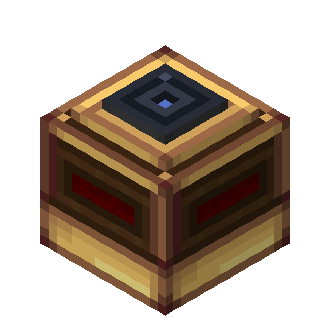
Tells you how high you are above whatever is below you. Mount it with the glass lens facing down and it keeps track of the ground under your ship, without being fooled by a lone tree or lamp post.
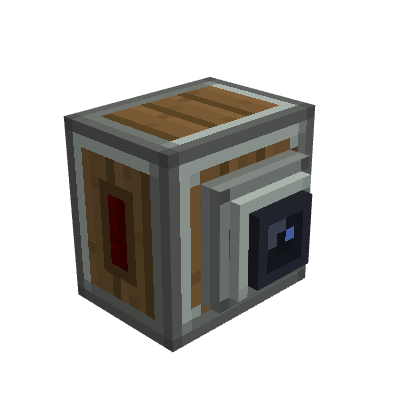
Watches what's ahead of you. Point the nozzle where you're going and it keeps an eye on everything in front of the ship.
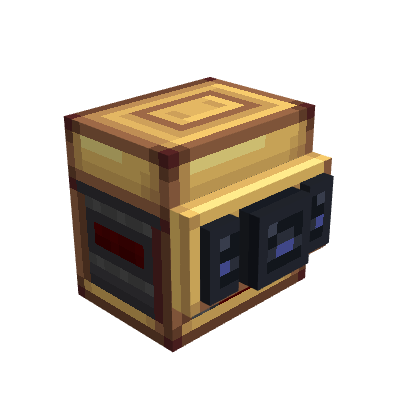
Watches ahead and to the sides, separately. Three lenses for three directions: Front, Left and Right, each with its own warning distance and its own signal.
These blocks are craftable (Wire Support and Network Bridge are creative-only), but they may still change between versions. Try them, but don't rely on them in a world you care about yet.
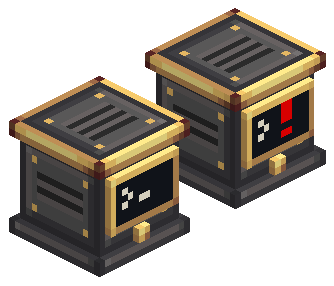
A ground proximity warning system for your ship. Connect it to your sensors and it watches them all, then warns you before you fly into trouble.
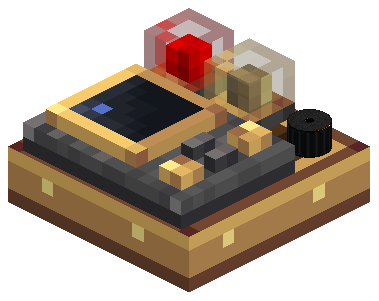
Your cockpit panel. A brass-and-wood slab with a 3 × 3 grid where you install modules.
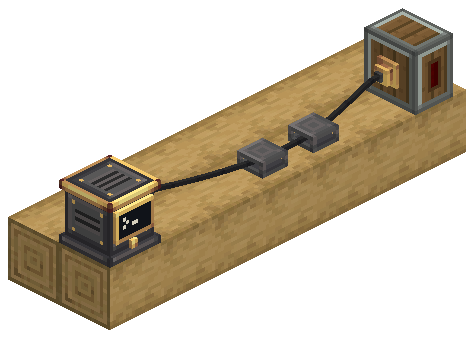
Real wires, not blocks. Mount brass Wire Connectors on your devices and iron Wire Supports along the hull, then run a black wire through them.

Right-click a sensor to open its output screen.
Heads up: on the Advanced Scanner, once one channel uses Redstone Link, the whole sensor switches to Link. Give every channel you want to use a frequency pair.
Setting up the avionics suite:
Heads up: the computer never guesses which way a scanner faces. A Terrain Scanner without a Looks at side does not count as looking ahead.
Sensors can't see into unloaded chunks. A beam that reaches one simply doesn't count, so very long ranges near the edge of the loaded world may read less than you expect.

Every sensor is a CC:Tweaked peripheral of its own. Put a computer next to it, or connect it with a wired modem, and read the raw data:
| Peripheral | Readings | Events |
|---|---|---|
radar_altimeter |
getReading(): status and altitude in blocks |
radar_altimeter_reading_changed |
terrain_scanner |
getScan(): every contact, with distance and direction |
terrain_scanner_scan_changed |
terrain_scanner_advanced |
Same as above, plus getConfiguration() and setOpeningAngle(degrees) |
Same as above, plus terrain_scanner_configuration_changed |
avionics_computer (Experimental) |
getStatus(), getSensors(), getAlerts(), plus sensitivity, inhibit and self-test |
avionics_alert_changed, avionics_status_changed, avionics_sensors_changed |
modular_table (Experimental) |
Installed modules, lamp and buzzer indications, FMS waypoints | modular_table_changed, modular_table_alert_outputs_changed |
All three also expose their redstone setup: getOutputs(), getOutputConfiguration(), setOutputRange(channel, min, max) and setLinkFrequencies(channel, first, second).
local altimeter = peripheral.find("radar_altimeter")

while true do
  local _, _, reading = os.pullEvent("radar_altimeter_reading_changed")
  if reading.status == "valid" and reading.value < 6 then
    print("TOO LOW! " .. math.floor(reading.value) .. " m")
  end
end
Full API reference: Radar Altimeter · Terrain Scanners · Computer Craft API and Lua examples.
Browse the online guide for the sensors, the Avionics Computer, the Modular Table and the Avionics Wire.

Yes. These server config options apply to every sensor in the world:
| Option | Default | What it does |
|---|---|---|
radarAltimeterMaxRange |
128 | Maximum altimeter range, in blocks (1–4096) |
terrainScannerMaxRange |
128 | Maximum scanner range, in blocks (1–4096) |
sensorScanIntervalTicks |
5 | How often sensors take a new sample, in ticks |
Longer ranges and shorter intervals cost more server time on big fleets.
For the experimental avionics suite:
| Option | Default | What it does |
|---|---|---|
maxAvionicsNetworkBlocks |
4096 | Largest avionics network, in connectors and devices |
wireMaxSpan |
24 | Longest wire span between two points, in blocks |
wireMaxPoints |
32 | Points per wire, ends included |
wireBlocksPerItem |
8 | Blocks of wire made by one Avionics Wire item |
lampLightLevel |
5 | Light given off by a lit table lamp (0 turns it off) |

The Avionics Computer, Modular Table and its modules, FMS and Avionics Wire are Experimental content. Their behavior may change between versions. See the online guide before using these blocks in a world you rely on.

Open an issue on GitHub. Your Minecraft version, the mod versions and a description of what happened help a lot. A screenshot of your redstone setup helps even more.

Yes, go ahead! Fly by Instruments is released under the MIT License. A link back to this page is appreciated.
Getting started: player guide. References: Computer Craft API and examples · sensors · all guides. Development setup: source guide. What changed in each version: CHANGELOG.
Project description from CurseForge.
Pick your setup
Choose the version and loader you play, then open the matching release.
Check the dependencies, then try the file in a copied instance before changing a world you care about.
Recent files
29 Oct 2026
26 Oct 2026
Looking for an older file? The official CurseForge project page is in Resources.
 mod
modNeo ECO AE Extension is an addon for Applied Energistics 2, Provides higher-performance components
 mod
modAdding advanced surveillance technologies to Create!
 mod
modExperience Gachas Universe in Minecraft! Gacha Waifus adds high-quality waifus with a 3-skill combat system, fluid GeckoLib animations, and authentic elemental effects. Summon your favorites and join the fight!