Minecraft version
Back to mods 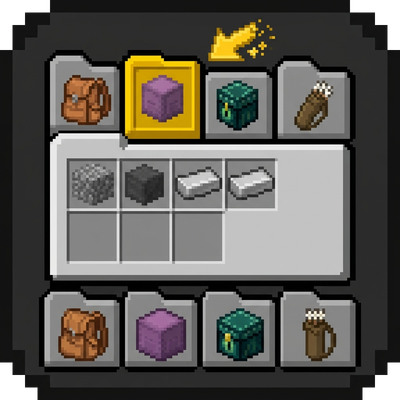
CurseForge · Minecraft mod
inventary Tabs API
Tabs around your inventory for instant access to backpacks, shulker boxes, ender chest and accessory slots, no need to hold the item.
Choose a version Pick your version below, then grab the matching file.
Quick answer
Which inventary Tabs API release should I use?
Latest stable file quickstash-1.0.0+26.3.jar
Game version 26.3
Loader NeoForge
inventary Tabs API quickstash-1.0.0+26.3.jar targets 26.3 with NeoForge. The project page does not say whether this file belongs on the client, dedicated server, or both. No extra mods listed for this file.
Where it goes
Is inventary Tabs API required on the client, server, or both?
The project page does not say whether this file belongs on the client, dedicated server, or both.
Client Source doesn’t say
Dedicated server Source doesn’t say
Loader for this release NeoForge
Required install it here Optional supported, not mandatory Not supported do not install here Source doesn’t say do not assume
The source does not explicitly classify this release as client-only or server-only.
What else does inventary Tabs API quickstash-1.0.0+26.3.jar need?
quickstash-1.0.0+26.3.jar. Change the file and its required mods may change too.
This file does not list any required mods. Do not add a library just because a different file uses it.
This file does not list any required or optional mods.
Before you install it
Add inventary Tabs API without breaking your instance.
Built for inventary Tabs API quickstash-1.0.0+26.3.jar. Pick another file and the loader, install side or required mods may change.
- 01
Stick to this file
Use quickstash-1.0.0+26.3.jar. It targets 26.3 with NeoForge; another release may have different loader, side or dependency requirements.
- 02
Bring the mods it needs
This file does not list any required mods. Do not add a library just because a different file uses it.
- 03
Put it on the correct side
The project page does not say whether this file belongs on the client, dedicated server, or both.
- 04
Pick the file you checked
Use the “Get this file” button beside quickstash-1.0.0+26.3.jar. It opens that exact file at the source.
About this project
What does inventary Tabs API add?
Quick Stash
Quick Stash puts your storages in tabs next to the inventory. Click a tab and open a shulker box, an ender chest or a backpack without taking the item out of your inventory or holding it.
Quick Stash finds the item in your inventory, armor slots, offhand or Curios slots.
How it works
- Open your inventory (or any container screen).
- Click a tab on the side of the screen.
- The storage opens. Your cursor item stays in your hand when you switch tabs.
What you get
- Shulker boxes open as tabs.
- Ender chest opens as a tab.
- Sophisticated Backpacks open in their own GUI, with upgrades.
- Ender Pouch (Ender Logistics Network) opens as a tab.
- Curios slots are supported.
- Nearby containers. Chests, crafting tables and furnaces within reach get tabs too. Up to 8 by default, the closest first.
- Last container tab (off by default). Reopens the container you used last while it is in reach.
- Safe: the slot of the open item is locked, and the server checks every open.
Controls
- F9 (on a container screen): open the tab layout editor. Move the tab rows to any edge with the mouse or the arrow keys (Shift moves 5 pixels at a time). Save the layout for this screen only or for all screens.
- Enter saves, Esc cancels, R resets the offset.
Config
config/quickstash-client.toml or the in-game mod settings:
| Option | Default | What it does |
|---|---|---|
tabs.positions (topLeft, topRight, bottomLeft, bottomRight, leftTop, leftBottom, rightTop, rightBottom) |
only topLeft |
Where the tab rows are shown. Turn on several; tabs continue into the next row when one is full. |
tabs.blacklistedScreens |
empty | Screens that never show tabs, for example BeaconScreen. |
tabs.lastContainerTab |
off | Tab for the last container you opened. |
tabs.nearbyContainerTabs |
on | Tabs for containers within reach. |
tabs.nearbyContainerLimit |
8 | How many nearby tabs to show (1 to 32). |
tabs.compactTabs |
on | Squeezes the tabs of a row together; the row opens up on mouse hover. |
For pack makers
Tabs are set up with datapacks, not code. Put a JSON file in data/<namespace>/quickstash/stash_tab/, for example in kubejs/data:
{
  "kind": "item",
  "match": { "items": "#c:shulker_boxes" },
  "handler": { "type": "quickstash:container_component", "rows": 3 },
  "category": "quickstash:portable",
  "priority": 10
}
kind:item(carried items),singleton(one tab, like the ender chest).match: which items (by id, tag or components).handler: how the storage opens. Working handlers:container_component(any item with aminecraft:containercomponent, withrowsfrom 1 to 6),ender_chest,sophisticated_backpack,ender_pouch.category:favorites,portable,equipment,personal,worldor your own.title,icon: name and icon (default to the item's own).priority: which rule wins when several match.requirements: when the tab is visible, for examplequickstash:has_item. Combine withnot,any_of,all_of.enabled:falseturns off a rule from another pack.
Add a neoforge:conditions entry with neoforge:mod_loaded to make a rule optional. A rule with the same id in your pack overrides a built-in one.
Restart the world after editing datapacks. /reload does not reload tabs.
A public Java API is in ua.meekeyn.quickstash.api.
Compatibility
- Minecraft 1.21.1, NeoForge 21.1.x
- Optional: Curios, Sophisticated Backpacks, Ender Logistics Network
License
GPL-3.0-only
Quick Stash
Quick Stash выносит ваши хранилища во вкладки рядом с инвентарём. Нажмите вкладку, и откроется шалкер, эндер-сундук или рюкзак, не доставая предмет из инвентаря и не беря его в руку.
Мод находит предмет в инвентаре, слотах брони, во второй руке или в слотах Curios.
Как это работает
- Откройте инвентарь (или любой экран контейнера).
- Нажмите вкладку сбоку экрана.
- Хранилище откроется. Предмет на курсоре остаётся у вас в руке при переключении вкладок.
Что есть
- Шалкеры открываются вкладками.
- Эндер-сундук открывается вкладкой.
- Sophisticated Backpacks открываются в своём интерфейсе, апгрейды работают.
- Ender Pouch (Ender Logistics Network) открывается вкладкой.
- Слоты Curios поддерживаются.
- Ближайшие контейнеры. Сундуки, верстаки и печи в пределах досягаемости тоже получают вкладки. По умолчанию до 8, сначала ближайшие.
- Вкладка последнего контейнера (по умолчанию выключена). Возвращает контейнер, который вы открывали последним, пока он в зоне досягаемости.
- Безопасно: слот открытого предмета заблокирован, а сервер проверяет каждое открытие.
Управление
- F9 (на экране контейнера): редактор раскладки вкладок. Двигайте ряды вкладок мышью или стрелками (Shift двигает на 5 пикселей). Сохранить раскладку можно только для этого экрана или для всех.
- Enter сохраняет, Esc отменяет, R сбрасывает смещение.
Настройки
Файл config/quickstash-client.toml или меню настроек мода:
| Параметр | По умолчанию | Что делает |
|---|---|---|
tabs.positions (topLeft, topRight, bottomLeft, bottomRight, leftTop, leftBottom, rightTop, rightBottom) |
только topLeft |
Где показывать ряды вкладок. Можно включить несколько: когда ряд заполнен, вкладки переходят в следующий. |
tabs.blacklistedScreens |
пусто | Экраны, на которых вкладок не будет, например BeaconScreen. |
tabs.lastContainerTab |
выкл. | Вкладка последнего открытого контейнера. |
tabs.nearbyContainerTabs |
вкл. | Вкладки контейнеров в пределах досягаемости. |
tabs.nearbyContainerLimit |
8 | Сколько ближайших вкладок показывать (от 1 до 32). |
tabs.compactTabs |
вкл. | Вкладки ряда сжаты; ряд раскрывается при наведении мыши. |
Для авторов паков
Вкладки настраиваются датапаком, без кода. Положите JSON-файл в data/<namespace>/quickstash/stash_tab/, например в kubejs/data:
{
  "kind": "item",
  "match": { "items": "#c:shulker_boxes" },
  "handler": { "type": "quickstash:container_component", "rows": 3 },
  "category": "quickstash:portable",
  "priority": 10
}
kind:item(предметы у игрока) илиsingleton(одна вкладка, как эндер-сундук).match: какие предметы (по id, тегу или компонентам).handler: как открывается хранилище. Работающие обработчики:container_component(любой предмет с компонентомminecraft:container,rowsот 1 до 6),ender_chest,sophisticated_backpack,ender_pouch.category:favorites,portable,equipment,personal,worldили своя.title,icon: название и иконка (по умолчанию от предмета).priority: какое правило побеждает, если подходят несколько.requirements: когда вкладка видна, напримерquickstash:has_item. Комбинируются черезnot,any_of,all_of.enabled:falseотключает чужое правило.
Чтобы правило было необязательным, добавьте neoforge:conditions с neoforge:mod_loaded. Правило с тем же id в вашем паке перекрывает встроенное.
После изменения датапака перезапустите мир. /reload вкладки не перечитывает.
Публичный Java API находится в пакете ua.meekeyn.quickstash.api.
Совместимость
- Minecraft 1.21.1, NeoForge 21.1.x
- Необязательно: Curios, Sophisticated Backpacks, Ender Logistics Network
Лицензия
GPL-3.0-only
Project description from CurseForge.
Pick your setup
inventary Tabs API by Minecraft version and loader
Choose the version and loader you play, then open the matching release.
Minecraft version
26.2
1 loader buildMinecraft version
26.1.2
1 loader buildMinecraft version
1.21.11
1 loader buildMinecraft version
1.21.1
1 loader buildCheck the dependencies, then try the file in a copied instance before changing a world you care about.
Recent files
inventary Tabs API versions and loaders
quickstash-1.0.0+26.3.jar
quickstash-1.0.0-26.3.jar
10 Nov 2026
Client Source doesn’t say Server Source doesn’t say Dependencies No extras listed Listed on Release listing
Check the 26.3 · NeoForge setup NeoForge26.3 release
quickstash-1.0.0+26.2.jar
quickstash-1.0.0-26.2.jar
10 Nov 2026
Client Source doesn’t say Server Source doesn’t say Dependencies No extras listed Listed on Release listing
Check the 26.2 · NeoForge setup NeoForge26.2 release
quickstash-1.0.0+26.1.2.jar
quickstash-1.0.0-26.1.2.jar
10 Nov 2026
Client Source doesn’t say Server Source doesn’t say Dependencies No extras listed Listed on Release listing
Check the 26.1.2 · NeoForge setup NeoForge26.1.2 release
quickstash-1.0.0+1.21.11.jar
quickstash-1.0.0-1.21.11.jar
10 Nov 2026
Client Source doesn’t say Server Source doesn’t say Dependencies No extras listed Listed on Release listing
Check the 1.21.11 · NeoForge setup NeoForge1.21.11 release
quickstash-1.0.0+1.21.1.jar
quickstash-1.0.0-1.21.1.jar
10 Nov 2026
Client Source doesn’t say Server Source doesn’t say Dependencies No extras listed Listed on Release listing
Check the 1.21.1 · NeoForge setup 1.21.1NeoForge release
Looking for an older file? The official CurseForge project page is in Resources.
 mod
CurseForge · Minecraft
Gunsmith Lib
Extensions and helper for tinkering with TaCZ.
 mod
CurseForge + Modrinth · Minecraft
LOD Server Support
Unofficial multiplayer support for Voxy: servers send distant terrain and far-away players to clients. Also fills Xaero's World Map and JourneyMap, and works with Distant Horizons servers. The same mod as Voxy Server Side.
 mod
CurseForge + Modrinth · Minecraft
FixMCStats
Mod that aims to fix multiple issues with the Minecraft statistics.🤓