Minecraft version
Back to mods 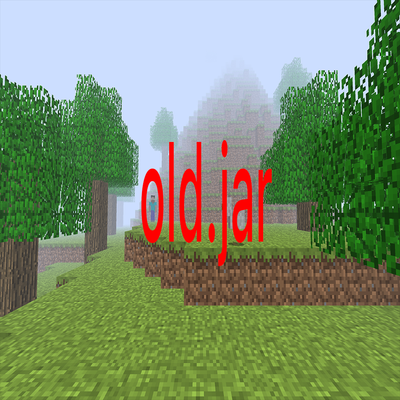
CurseForge · Minecraft mod
old.jar
a return to unsettling version dreamcore
Choose a version Pick your version below, then grab the matching file.
Quick answer
Which old.jar release should I use?
Latest stable file old.jar
Game version 1.20.1
Loader Forge
old.jar targets 1.20.1 with Forge. The project page does not say whether this file belongs on the client, dedicated server, or both. No extra mods listed for this file.
Where it goes
Is old.jar required on the client, server, or both?
The project page does not say whether this file belongs on the client, dedicated server, or both.
Client Source doesn’t say
Dedicated server Source doesn’t say
Loader for this release Forge
Required install it here Optional supported, not mandatory Not supported do not install here Source doesn’t say do not assume
The source does not explicitly classify this release as client-only or server-only.
What else does old.jar need?
old.jar. Change the file and its required mods may change too.
This file does not list any required mods. Do not add a library just because a different file uses it.
This file does not list any required or optional mods.
Before you install it
Add old.jar without breaking your instance.
Built for old.jar. Pick another file and the loader, install side or required mods may change.
- 01
Stick to this file
Use old.jar. It targets 1.20.1 with Forge; another release may have different loader, side or dependency requirements.
- 02
Bring the mods it needs
This file does not list any required mods. Do not add a library just because a different file uses it.
- 03
Put it on the correct side
The project page does not say whether this file belongs on the client, dedicated server, or both.
- 04
Pick the file you checked
Use the “Get this file” button beside old.jar. It opens that exact file at the source.
About this project
What does old.jar add?

A Minecraft mod that immerses you in the unsettling atmosphere of early Minecraft, adding entities and various dimensions, based on wonderland.jar, The Broken Script and SixAlphaSix.jar
Mod Adds:
- 17 dimensions
- 25 events
- 10 entites
- 1 new biome
- 1 ending
Warning:
This mod does not interact with your computer. This mod may contain loud sounds.
Before you install
This is a horror mod. It deliberately does things that look like bugs:
- **Fake freezes, lag spikes and a fake "Connection Lost" kick.** Your game is not broken.
- **You can lose your whole inventory** (including your Ender Chest) through an in-game event.
- **Fake players** can appear in chat and in the player list.
- **Network access:** on first launch the mod downloads the Beta 1.7.3 client and old sound files from Mojang's official servers (piston-meta.mojang.com, launcher.mojang.com, resources.download.minecraft.net) to build
its resource pack locally. Nothing is uploaded, and no downloaded code is run.
- **Settings it changes:** it turns off Forge's early loading window (`config/fml.toml`, affects the whole
instance) and on every launch sets old-style video settings (no smooth lighting, no mipmaps, render
distance 6–8, English language).
- Worlds must be created from the mod's own *Create New World* screen to get Beta terrain.
Best played alone, in singleplayer, without reading the rest.
For server owners / ARG hosts
Operators get hidden `/???` commands to trigger events, move players between places and fake join/leave
messages. Only use them on players who agreed to play an ARG.
Credits
- World generation: [Moderner Beta](https://modrinth.com/mod/moderner-beta) by icanttellyou, BlueStaggo,
bespectacled and contributors — MIT License, bundled inside this jar.
- Old textures and sounds belong to Mojang and are downloaded from Mojang's servers; they are not included in
this mod.
Not an official Minecraft product. Not approved by or associated with Mojang or Microsoft.
enjoyer404 is the official author of the mod.
Project description from CurseForge.
Pick your setup
old.jar by Minecraft version and loader
Choose the version and loader you play, then open the matching release.
Check the dependencies, then try the file in a copied instance before changing a world you care about.
Recent files
old.jar versions and loaders
old.jar
2 Nov 2026
Client Source doesn’t say Server Source doesn’t say Dependencies No extras listed Listed on Release listing
Check the 1.20.1 · Forge setup 1.20.1Forge release
old-1.2.jar
old.jar
1 Nov 2026
Client Source doesn’t say Server Source doesn’t say Dependencies No extras listed Listed on Release listing
Check the 1.20.1 · Forge setup 1.20.1Forge release
old-1.1.jar
old.jar
1 Nov 2026
Client Source doesn’t say Server Source doesn’t say Dependencies No extras listed Listed on Release listing
Check the 1.20.1 · Forge setup 1.20.1Forge release
old-1.0.jar
beta.jar
27 Oct 2026
Client Source doesn’t say Server Source doesn’t say Dependencies No extras listed Listed on Release listing
Check the 1.20.1 · Forge setup 1.20.1Forge release
Looking for an older file? The official CurseForge project page is in Resources.
 mod
CurseForge · Minecraft
Oblivion: Space Exploration
A Minecraft space mod where you explore new planets, building ships and technology, and discovering massive creatures, structures, and alien worlds.
 mod
CurseForge · Minecraft
PeruanoCraft_09
A Peruvian-themed mod featuring custom items :v
 mod
CurseForge · Minecraft
Forgotten Pages
Adds mysterious notes, newspapers, old polaroid photographs, and other documents that tell a story. You can find these items in chests in most structures.