Minecraft version
Back to mods 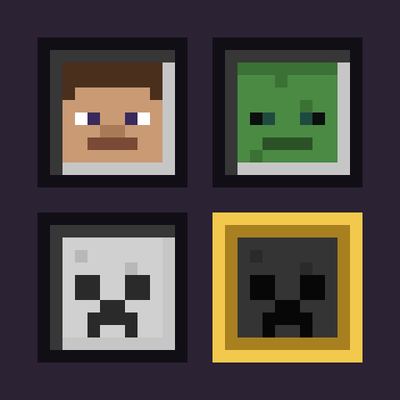
CurseForge · Minecraft mod
Mettle - Each player picks their own difficulty
Each player picks their own difficulty, and damage, hunger and monsters around them follow it.
Choose a version Pick your version below, then grab the matching file.
Quick answer
Which Mettle - Each player picks their own difficulty release should I use?
Latest stable file mettle-1.1.1.jar
Game version 1.21.1
Loader NeoForge
Mettle - Each player picks their own difficulty mettle-1.1.1.jar targets 1.21.1 with NeoForge. The project page does not say whether this file belongs on the client, dedicated server, or both. No extra mods listed for this file.
Where it goes
Is Mettle - Each player picks their own difficulty required on the client, server, or both?
The project page does not say whether this file belongs on the client, dedicated server, or both.
Client Source doesn’t say
Dedicated server Source doesn’t say
Loader for this release NeoForge
Required install it here Optional supported, not mandatory Not supported do not install here Source doesn’t say do not assume
The source does not explicitly classify this release as client-only or server-only.
What else does Mettle - Each player picks their own difficulty mettle-1.1.1.jar need?
mettle-1.1.1.jar. Change the file and its required mods may change too.
This file does not list any required mods. Do not add a library just because a different file uses it.
This file does not list any required or optional mods.
Before you install it
Add Mettle - Each player picks their own difficulty without breaking your instance.
Built for Mettle - Each player picks their own difficulty mettle-1.1.1.jar. Pick another file and the loader, install side or required mods may change.
- 01
Stick to this file
Use mettle-1.1.1.jar. It targets 1.21.1 with NeoForge; another release may have different loader, side or dependency requirements.
- 02
Bring the mods it needs
This file does not list any required mods. Do not add a library just because a different file uses it.
- 03
Put it on the correct side
The project page does not say whether this file belongs on the client, dedicated server, or both.
- 04
Pick the file you checked
Use the “Get this file” button beside mettle-1.1.1.jar. It opens that exact file at the source.
About this project
What does Mettle - Each player picks their own difficulty add?
Mettle
Per-player difficulty for NeoForge 1.21.1 servers. Each player picks Peaceful, Easy, Normal or Hard for themselves, and the damage they take, their hunger and the monsters around them follow that choice instead of the server's.
Installation
Install the mod on the server. Players do not need it: they pick their difficulty with /mettle <difficulty> in chat. Players who also install it on their client get a selector when they type /mettle.
What your difficulty changes
| Difficulty | Damage from monsters | Hunger leaves you at |
|---|---|---|
| Peaceful | None, unless you hit them first | Never hungry, health regenerates |
| Easy | Half, plus half a heart | 5 hearts |
| Normal | Normal | Half a heart |
| Hard | +50% | Can kill you |
Damage here is the damage vanilla scales with difficulty: mob attacks, their projectiles and most explosions.
Monsters also follow the difficulty of the player they are about: the one they are chasing or, if they are chasing nobody, the nearest player within 128 blocks. That covers what vanilla ties to difficulty, such as natural spawning, the gear mobs spawn with, arrow damage and accuracy, cave spider and bee poison, and zombies breaking doors and calling reinforcements on Hard. A Peaceful world still gets monsters around a player on Hard.
Peaceful
Monsters still spawn around a player on Peaceful, but they leave that player alone. Hitting one, with a weapon or an arrow, lets that monster fight back with Easy damage until it dies. Monsters the player has not hit do no damage to them, not even a creeper exploding next to them. Hunger never drops, health regenerates, and Bad Omen does not start raids, as in vanilla Peaceful.
The selector
/mettle opens it for players with the mod on their client. It is built like the F3+F4 game mode switcher: four slots with the player's own head for Peaceful, a zombie head for Easy, a skeleton skull for Normal and a wither skeleton skull for Hard. Below them, the selected difficulty's damage and the hearts hunger leaves you at. Click a slot and Done, or double-click it; arrow keys and Enter work too.
In singleplayer and on a LAN host, the vanilla difficulty button in Options changes your own difficulty.
Commands
| Command | Who | Description |
|---|---|---|
/mettle |
Everyone | Opens the selector, or tells you your difficulty in chat. |
/mettle <peaceful/easy/normal/hard> |
Everyone | Sets your own difficulty. |
/mettle <difficulty> <players> |
Operators (level 2) | Sets other players' difficulty, also on worlds where it is locked. |
The server's difficulty
/difficulty still works. Players who have never picked one follow it; players who have keep theirs. On worlds with a locked difficulty, players cannot change their own. Hardcore worlds keep everyone on Hard.
Project description from CurseForge.
Pick your setup
Mettle - Each player picks their own difficulty by Minecraft version and loader
Choose the version and loader you play, then open the matching release.
Minecraft version
1.21.1
1 loader buildCheck the dependencies, then try the file in a copied instance before changing a world you care about.
Recent files
Mettle - Each player picks their own difficulty versions and loaders
mettle-1.1.1.jar
31 Oct 2026
Client Source doesn’t say Server Source doesn’t say Dependencies No extras listed Listed on Release listing
Check the 1.21.1 · NeoForge setup 1.21.1NeoForge release
mettle-1.1.0.jar
29 Oct 2026
Client Source doesn’t say Server Source doesn’t say Dependencies No extras listed Listed on Release listing
Check the 26.3 · NeoForge setup NeoForge26.3 release
mettle-1.0.0.jar
28 Oct 2026
Client Source doesn’t say Server Source doesn’t say Dependencies No extras listed Listed on Release listing
Check the 1.21.1 · NeoForge setup 1.21.1NeoForge release
Looking for an older file? The official CurseForge project page is in Resources.
 mod
mod CurseForge + Modrinth · Minecraft
Cobblemon Pokedex Network
The mod introduces shared Pokémon discovery data, allowing players to see complete information about Pokémon scanned by others. It also adds catch info to the Pokédex, including who caught each Pokémon first and when
 mod
mod CurseForge + Modrinth · Minecraft
Super Factory Manager Retro
Build Super Factory Manager programs on a visual node canvas instead of writing SFML by hand. Drag nodes, wire them together, search items and fluids by name, and import/export programs you have already written.
 mod
mod CurseForge · Minecraft
Abyssal Levitite
Abyssal Levitite is a separate add-on for Create: Aeronautics that introduces a deep-blue levitite variant with 100× the normal lift-strength setting. Give your next flying creation a darker look and experiment with much greater lifting strength.