Minecraft version
Back to mods 
CurseForge · Minecraft mod
Pack Branding
Customize window title, menu text, colors and hide Realms button. Perfect for modpack creators.
Choose a version Pick your version below, then grab the matching file.
Quick answer
Which Pack Branding release should I use?
Latest stable file packbranding-1.3.0.jar
Game version 26.3
Loader Fabric
Pack Branding packbranding-1.3.0.jar targets 26.3 with Fabric. The project page does not say whether this file belongs on the client, dedicated server, or both. No extra mods listed for this file.
Where it goes
Is Pack Branding required on the client, server, or both?
The project page does not say whether this file belongs on the client, dedicated server, or both.
Client Source doesn’t say
Dedicated server Source doesn’t say
Loader for this release Fabric
Required install it here Optional supported, not mandatory Not supported do not install here Source doesn’t say do not assume
The source does not explicitly classify this release as client-only or server-only.
What else does Pack Branding packbranding-1.3.0.jar need?
packbranding-1.3.0.jar. Change the file and its required mods may change too.
This file does not list any required mods. Do not add a library just because a different file uses it.
This file does not list any required or optional mods.
Before you install it
Add Pack Branding without breaking your instance.
Built for Pack Branding packbranding-1.3.0.jar. Pick another file and the loader, install side or required mods may change.
- 01
Stick to this file
Use packbranding-1.3.0.jar. It targets 26.3 with Fabric; another release may have different loader, side or dependency requirements.
- 02
Bring the mods it needs
This file does not list any required mods. Do not add a library just because a different file uses it.
- 03
Put it on the correct side
The project page does not say whether this file belongs on the client, dedicated server, or both.
- 04
Pick the file you checked
Use the “Get this file” button beside packbranding-1.3.0.jar. It opens that exact file at the source.
About this project
What does Pack Branding add?
PackBranding
Make Minecraft feel like your modpack. PackBranding is a lightweight, client-side Fabric mod that lets modpack creators rebrand the game window, the main menu and the pause menu — no coding required, just a couple of config files.
Everything is optional and configurable, so you only change what you want.
⚠️ Versions older than 1.2.0 are no longer supported. Please update to the latest release.
✨ What it can do
- 🪟 Custom window title — replace the boring "Minecraft 26.2" title bar with your pack's name, using dynamic tokens.
- 📝 Menu text — show custom branded text in any of the four corners of the main menu and the pause menu, a separate text per corner.
- 🔗 Clickable links — turn part of any menu text into a link with
[label](https://…), opened via the vanilla confirmation prompt. - 🔘 Icon buttons — add your own clickable icon buttons (Discord, website, …) to the pause menu and title screen, position them anywhere in the row, and use a PNG or a built-in sprite.
- 🚫 Hide vanilla icons — remove the bug-report / feedback / player-reporting / friends icons from the pause menu and replace them with your own.
- 🎨 Full color support — hex colors (
#RRGGBB) and classic Minecraft color codes (&c,&a,&l, …). - 🔢 Dynamic tokens — automatically insert the Minecraft version, your pack version, the player name, the mod count, or any mod's version.
- 🛰️ Hide Realms — remove the Realms button and its notifications from the main menu for a cleaner look.
- 🖼️ Custom window icon — swap the window/taskbar icon for your own.
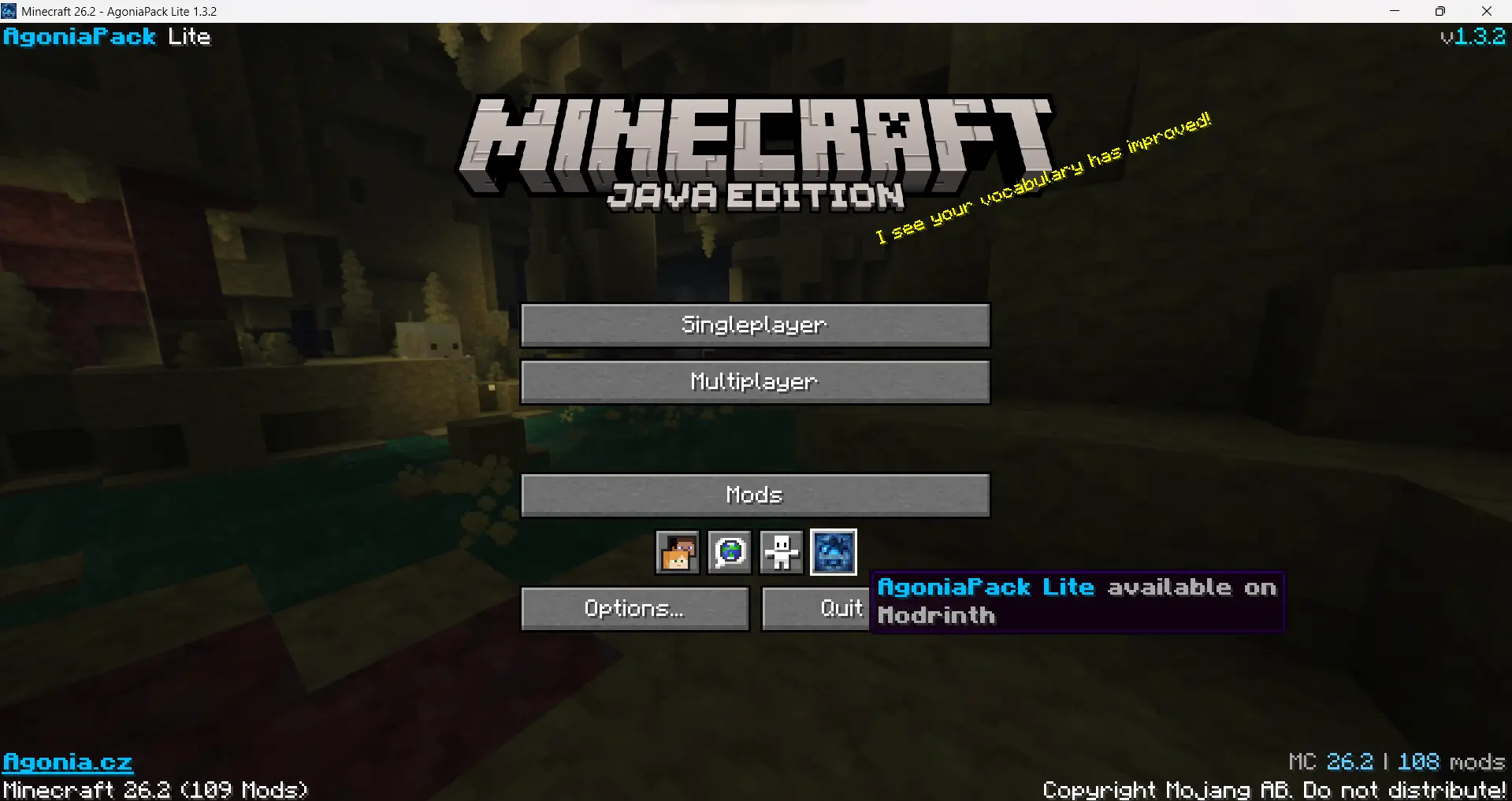
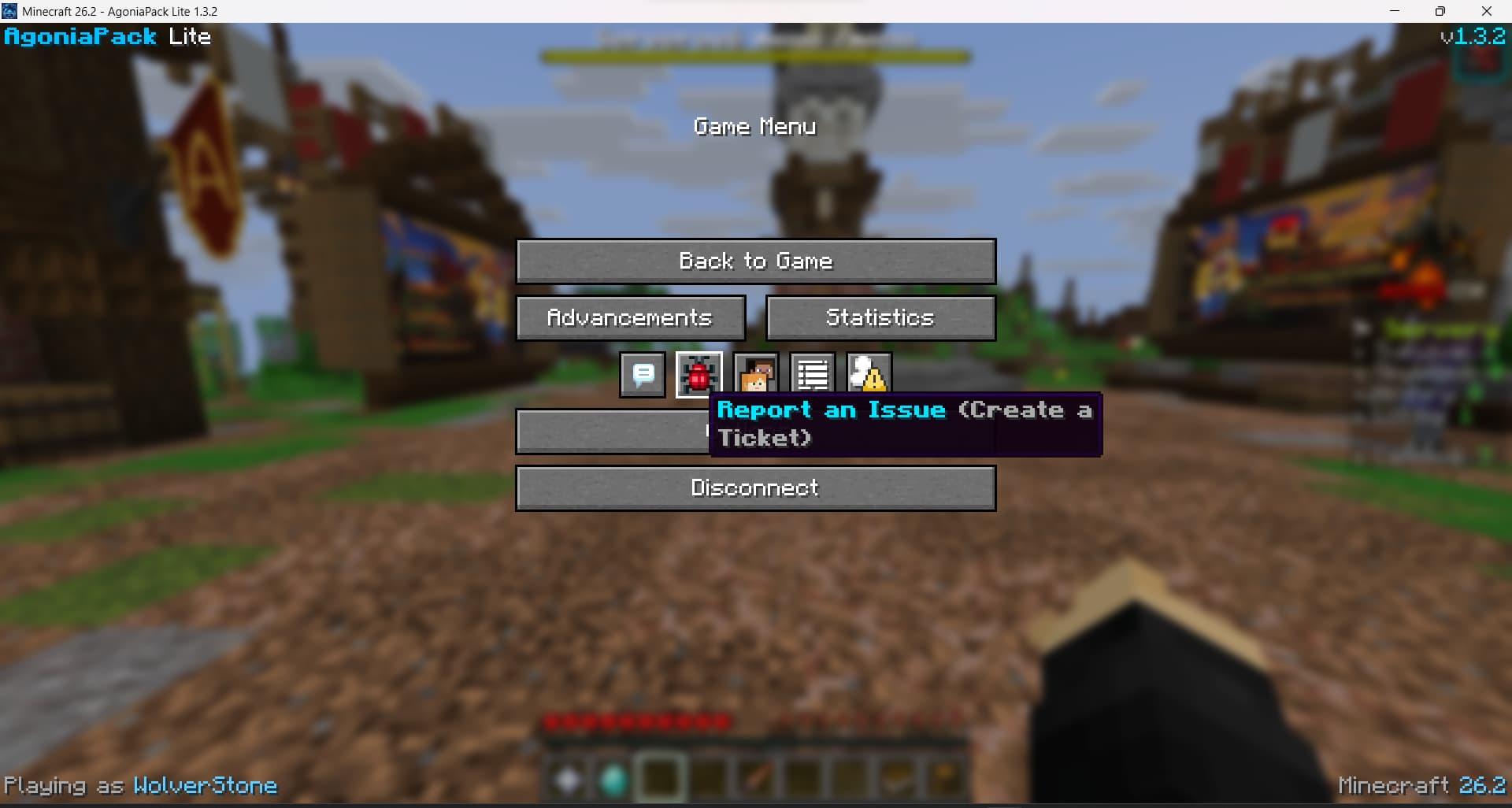
⚙️ How it works
On first launch, PackBranding creates a single config file at:
.minecraft/config/packbranding/config.json
Edit it, restart the game, and your branding is applied. A working example is generated on first run. Every section includes a _comment field explaining it (the mod ignores all _-prefixed keys, they're just in-file documentation).
config.json
{
  "packVersion": "1.0",
  "windowTitle": {
    "enabled": true,
    "title": "Minecraft {mcversion}"
  },
  "icon": {
    "enabled": false
  },
  "hideRealms": true,
  "mainMenu": {
    "enabled": true,
    "aboveCopyright": true,
    "topLeft": "&6&lMyPack",
    "topRight": "&7v{packversion}",
    "bottomLeft": "[Website](https://example.com)",
    "bottomRight": "&8| &fMC {mcversion}"
  },
  "pauseMenu": {
    "enabled": true,
    "topLeft": "&6&lMyPack",
    "topRight": "&7v{packversion}",
    "bottomLeft": "&7Playing as &f{username}",
    "bottomRight": "&8| &fMC {mcversion}"
  },
  "menuButtons": {
    "enabled": true,
    "title": [
      { "icon": "example.png", "url": "https://example.com", "tooltip": "&9Visit our website" }
    ],
    "pause": [
      { "icon": "example.png", "url": "https://example.com", "tooltip": "&9Visit our website" }
    ],
    "hidePauseIcons": []
  }
}
Each menu has four independent corners (topLeft, topRight, bottomLeft, bottomRight) — leave one empty to render nothing there. On the title screen, aboveCopyright: true keeps the bottom corners above the vanilla copyright/version line.
🔤 Formatting reference
These apply to every menu text field and tooltip.
Tokens
| Token | Replaced with |
|---|---|
{mcversion} |
Current Minecraft version |
{packversion} |
packVersion from config.json |
{username} |
Current player name |
{modcount} |
Number of loaded mods |
{modversion:modid} |
Version of a specific mod (window title only) |
Colors & styles
| Code | Meaning | Code | Meaning | |
|---|---|---|---|---|
&0–&9, &a–&f |
Standard colors | &l |
Bold | |
#RRGGBB |
Any hex color | &o |
Italic | |
&r |
Reset | &n |
Underline | |
&m |
Links
Turn part of any text into a clickable link:
[Website](https://example.com)
Clicking it opens the URL after the vanilla "Open this link?" confirmation.
🖼️ Custom icon
- Set
"icon": { "enabled": true }inconfig.json. - Provide either:
- a single square PNG at
config/packbranding/icon.png(256×256 works well), or - a split pair:
config/packbranding/icon/icon_16x16.pngandicon_32x32.png(both required).
- a single square PNG at
- Restart the game.
🔘 Icon buttons
Add clickable icon buttons to the pause menu and title screen — great for a Discord invite, your website, a wiki, etc.
- Drop icon PNGs (16×16 recommended) into
config/packbranding/buttons/. - List them under
menuButtonsinconfig.json— separately for thetitlescreen and thepause(ESC) menu:
"menuButtons": {
  "enabled": true,
  "title": [
    { "icon": "discord.png", "url": "https://discord.gg/example", "tooltip": "&9Join our Discord" }
  ],
  "pause": [
    { "icon": "website.png", "url": "https://example.com", "tooltip": "Visit our website" }
  ],
  "hidePauseIcons": ["menu.reportBugs"]
}
- Restart. Clicking a button opens its link after the vanilla "Open this link?" confirmation. Buttons with a missing icon or invalid link are skipped.
Using a built-in (vanilla) icon
Instead of a PNG file, an icon can reference a vanilla/atlas sprite by prefixing it with sprite::
{ "icon": "sprite:icon/language", "url": "https://example.com", "tooltip": "Language-style icon" }
Useful sprites: icon/language, icon/accessibility, pause_menu/bug, pause_menu/social_interactions, pause_menu/player_reporting. Sprites from other mods work too (e.g. modid:path).
Button position
Each button may set an index to place it at an exact spot in the icon row (0 = first, before the vanilla icons). Omit it (or use -1) to append at the end. This works on both the title screen and the pause menu, and the row is re-centered automatically so there are no gaps.
{ "icon": "example.png", "url": "https://example.com", "tooltip": "First!", "index": 0 }
Hiding vanilla pause icons
hidePauseIcons removes vanilla icons from the ESC menu icon row by name, so you can replace them with your own. Available keys:
| Key | Icon |
|---|---|
menu.reportBugs |
Report bugs |
menu.sendFeedback |
Give feedback |
menu.playerReporting |
Player reporting |
menu.online |
Friends |
(Icons added by other mods, like ModMenu, can't be hidden this way.)
📦 Installation
- Install Fabric Loader.
- Install Fabric API.
- Drop
packbranding-x.x.x.jarinto yourmodsfolder. - Launch once to generate
config.json, then edit it.
PackBranding is client-side only — players don't need it on the server, and it's safe to bundle in any modpack.
✅ Requirements
- Minecraft 26.2
- Fabric Loader 0.19.3+
- Fabric API
📄 License
Apache 2.0 — feel free to include it in any modpack.
Project description from CurseForge.
Pick your setup
Pack Branding by Minecraft version and loader
Choose the version and loader you play, then open the matching release.
Check the dependencies, then try the file in a copied instance before changing a world you care about.
Recent files
Pack Branding versions and loaders
packbranding-1.3.0.jar
29 Oct 2026
Client Source doesn’t say Server Source doesn’t say Dependencies No extras listed Listed on Release listing
Check the 26.3 · Fabric setup Fabric26.3 release
Looking for an older file? The official CurseForge project page is in Resources.
 mod
CurseForge · Minecraft
Turbo for Distant Horizons
Distant Horizons addon: generates distant terrain from the world noise several times faster, with real trees and structures.
 mod
CurseForge + Modrinth · Minecraft
Hodgepodge
A Hodgepodge of Fixes
 mod
CurseForge · Minecraft
MasuTab
A network-wide player list that never stops you moving: server groups, columns you choose, browse mode with player actions, layout editor, MasuGUI look.