Minecraft version
Back to mods 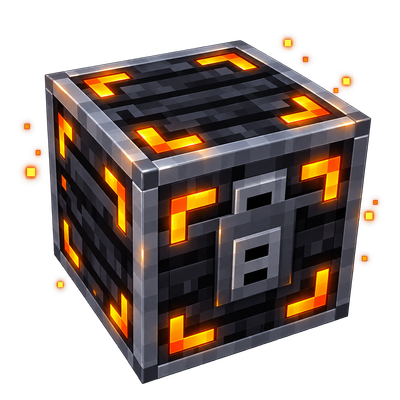
CurseForge · Minecraft mod
Padlocks&Auras
Protect your chests with PIN locks and remembered accesses, and customize your character with six cosmetic auras. Inspired by DeDsafio Minecraft by elDeD
Choose a version Pick your version below, then grab the matching file.
Quick answer
Which Padlocks&Auras release should I use?
Latest stable file Candados&Auras-Fabric-1.21.1-1.0.0.jar
Game version 1.21.1
Loader Fabric
Padlocks&Auras Candados&Auras-Fabric-1.21.1-1.0.0.jar targets 1.21.1 with Fabric. The project page does not say whether this file belongs on the client, dedicated server, or both. No extra mods listed for this file.
Where it goes
Is Padlocks&Auras required on the client, server, or both?
The project page does not say whether this file belongs on the client, dedicated server, or both.
Client Source doesn’t say
Dedicated server Source doesn’t say
Loader for this release Fabric
Required install it here Optional supported, not mandatory Not supported do not install here Source doesn’t say do not assume
The source does not explicitly classify this release as client-only or server-only.
What else does Padlocks&Auras Candados&Auras-Fabric-1.21.1-1.0.0.jar need?
Candados&Auras-Fabric-1.21.1-1.0.0.jar. Change the file and its required mods may change too.
This file does not list any required mods. Do not add a library just because a different file uses it.
This file does not list any required or optional mods.
Before you install it
Add Padlocks&Auras without breaking your instance.
Built for Padlocks&Auras Candados&Auras-Fabric-1.21.1-1.0.0.jar. Pick another file and the loader, install side or required mods may change.
- 01
Stick to this file
Use Candados&Auras-Fabric-1.21.1-1.0.0.jar. It targets 1.21.1 with Fabric; another release may have different loader, side or dependency requirements.
- 02
Bring the mods it needs
This file does not list any required mods. Do not add a library just because a different file uses it.
- 03
Put it on the correct side
The project page does not say whether this file belongs on the client, dedicated server, or both.
- 04
Pick the file you checked
Use the “Get this file” button beside Candados&Auras-Fabric-1.21.1-1.0.0.jar. It opens that exact file at the source.
About this project
What does Padlocks&Auras add?
Padlock & Auras
Protect your storage and give your character a unique look! Padlock & Auras combines PIN-protected containers with six cosmetic auras for Minecraft Java 1.20.1 on Forge.
Protect your belongings
Use a padlock on a supported container and choose a 1–4 digit PIN. Your password is sent privately to you in chat.
Remembered access: other players enter the correct PIN once to unlock future access to that padlock.
Owner keys: only the owner can remove a padlock with a key and recover it.
Fresh permissions: removing and replacing a padlock clears previously authorized guests.
Storage protection: locked containers resist breaking, explosions, piston movement and standard hopper or Forge inventory automation.
Supports vanilla single chests, double chests, trapped chests, barrels and shulker boxes. Locked chests receive a detailed black-and-orange metallic appearance with an animated lid. Removing the padlock restores their original appearance.
Six cosmetic auras
Choose from 67, Heart, Symphony, Matrix, Mystic Eye and Thunder.
Right-click an aura item to toggle its effect without consuming it. Combine multiple auras and use third-person view to see your character’s effects. Your equipped auras are remembered when you reconnect, change dimensions or respawn.
Items and crafting
Padlocks: craft five using five Phora Chips and four copper blocks:
C B C
B C B
C B C
C = Phora Chip · B = Copper Block
Reusable key: place a Phora Chip directly to the left of a copper ingot in the crafting grid.
Phora Chips and aura items have no crafting recipes. They are available in the mod’s creative tab or through /give commands, allowing map makers and server administrators to control their distribution.
Useful commands
/cya— Show help./cya recetas— Unlock the padlock and key recipes in your recipe book./cya auras off— Turn off all your auras./cya unlock <x> <y> <z>— Remove a padlock administratively; requires operator permission level 2.
Requirements
Minecraft Java 1.20.1
Forge 47.4.28 or a later 47.x release
Java 17
Install on both the client and server for multiplayer.
No GeckoLib or other additional libraries are required.
English and Spanish translations are included. The mod uses standard Forge events and inventory interfaces; compatibility with every third-party mod or hybrid plugin server is not guaranteed.
Credits & acknowledgments
Author: JorFerLam
Special thanks to fulanito.
Inspired by DeDsafio Minecraft 4 by elDeD. This is an independent fan project.
Full resource credits and license notices are included in the mod.
Not an official Minecraft product. Not approved by or associated with Mojang or Microsoft.
Project description from CurseForge.
Pick your setup
Padlocks&Auras by Minecraft version and loader
Choose the version and loader you play, then open the matching release.
Minecraft version
1.20.1
1 loader buildCheck the dependencies, then try the file in a copied instance before changing a world you care about.
Recent files
Padlocks&Auras versions and loaders
Candados&Auras-Fabric-1.21.1-1.0.0.jar
CandadosYAuras-Fabric-1.21.1-1.0.2.jar
29 Oct 2026
Client Source doesn’t say Server Source doesn’t say Dependencies No extras listed Listed on Release listing
Check the 1.21.1 · Fabric setup Fabric1.21.1 release
Candados&Auras-Forge-1.20.1-1.0.0.jar
CandadosYAuras-Forge-1.20.1-1.0.2.jar
29 Oct 2026
Client Source doesn’t say Server Source doesn’t say Dependencies No extras listed Listed on Release listing
Check the 1.20.1 · Forge setup 1.20.1Forge release
Looking for an older file? The official CurseForge project page is in Resources.
 mod
CurseForge + Modrinth · Minecraft
Tooltip Overhaul
Every tooltip, more modern, sharper, cleaner.
 mod
CurseForge · Minecraft
TrailWright
This mod adds gradual, ragged footpaths. Walk a route often and grass wears to dirt, and coarse dirt, turning to mud near water.
 mod
CurseForge · Minecraft
Sophisticated Backpacks Cinematic Interactions
Cinematic Interactions for Sophisticated Backpacks: press the backpack key to swing the bag off your back, set it on the floor, open it up and rummage through it by hand. Drag items into your inventory or out onto the floor.