Minecraft version
Back to mods 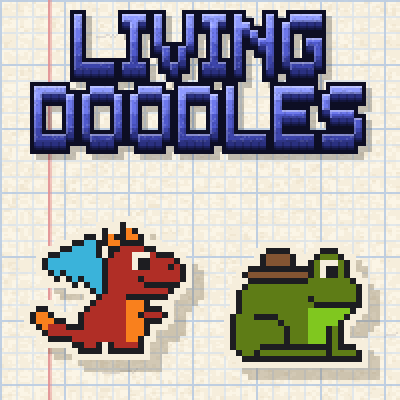
CurseForge · Minecraft mod
Living Doodles
Draw a creature in your sketchbook and it comes to life: a paper pet whose powers come from the inks you drew it with.
Choose a version Pick your version below, then grab the matching file.
Quick answer
Which Living Doodles release should I use?
Latest stable file Living Doodles 1.0.2
Game version 1.21.1, 26.2, 26.3
Loader NeoForge
Living Doodles 1.0.2 targets 1.21.1, 26.2, 26.3 with NeoForge. The project page does not say whether this file belongs on the client, dedicated server, or both. No extra mods listed for this file.
Where it goes
Is Living Doodles required on the client, server, or both?
The project page does not say whether this file belongs on the client, dedicated server, or both.
Client Source doesn’t say
Dedicated server Source doesn’t say
Loader for this release NeoForge
Required install it here Optional supported, not mandatory Not supported do not install here Source doesn’t say do not assume
The source does not explicitly classify this release as client-only or server-only.
What else does Living Doodles 1.0.2 need?
Living Doodles 1.0.2. Change the file and its required mods may change too.
This file does not list any required mods. Do not add a library just because a different file uses it.
This file does not list any required or optional mods.
Before you install it
Add Living Doodles without breaking your instance.
Built for Living Doodles 1.0.2. Pick another file and the loader, install side or required mods may change.
- 01
Stick to this file
Use Living Doodles 1.0.2. It targets 1.21.1, 26.2, 26.3 with NeoForge; another release may have different loader, side or dependency requirements.
- 02
Bring the mods it needs
This file does not list any required mods. Do not add a library just because a different file uses it.
- 03
Put it on the correct side
The project page does not say whether this file belongs on the client, dedicated server, or both.
- 04
Pick the file you checked
Use the “Get this file” button beside Living Doodles 1.0.2. It opens that exact file at the source.
About this project
What does Living Doodles add?

Draw a creature in your sketchbook, tear out the page, and it comes to life. Your doodle hops off the paper as a little paper friend that follows you around, and every ink you drew it with gives it a power.


Craft a sketchbook from a book and a piece of charcoal, and draw on a 32 × 32 page of graph paper with a pencil, an eraser and a fill bucket: shift-click draws a straight line, the middle mouse button (or Alt-click) picks up an ink from the page, and Ctrl+Z and Ctrl+Y undo and redo. Doodles walk to the right, the way the little arrow on the page points; the flip button turns a drawing round. The icons under the page show the powers your drawing will have and how strong each one is, and the heart how sturdy it will be.


Press the button under the page and your doodle unfolds out of it, right in front of you. It takes a sheet of paper and one dye of each colour you used; the black charcoal pencil is free.


Every ink gives its power, and the more of your drawing is in that ink, the stronger the power:
- Red fights monsters, purple shoots magic sparks, gray takes less damage.
- Pink heals you, white mends itself.
- Green harvests ripe crops and replants them, brown fetches items, magenta makes animals follow it.
- Yellow glows and lights up the dark, light blue gives it paper wings, lime makes it bouncy, light gray swift.
- Blue swims, cyan freezes water, orange is fireproof.


Right-click your doodle with an empty hand to open its card. Click its name to give it a new one, and the little eye shows the name above its head or hides it. Tell it to follow you, stay or wander about, patch it up with a sheet of paper, take everything it carries in its pocket (what you put in, it delivers), or fold it back into its page. Both mouse buttons press the card's buttons.


Tell a doodle to stay and it gets to work right there. A green-thumbed frog harvests and replants your field, helps the young crops grow and fills the chest beside it, a fetching snail tidies up the drops, and brave or magic doodles guard the spot.


They have a life of their own, too: doodles dance when a jukebox plays nearby, and walking ones open doors to follow you.


They are paper, after all: water makes a doodle soggy and slow until it dries (quicker by a campfire or a lit furnace), and fire burns it fast, unless you drew it in blue or orange ink. Patch a hurt doodle with a sheet of paper, or fold it into its page to carry it (sneak and use it) and use the page on the ground to let it out again. Redraw it with the sketchbook whenever you like, or hold a page in your other hand as you open the sketchbook to trace it. A beaten doodle crumples into its page (a page that survives even lava), and a sheet of paper smooths it out again.


- Install NeoForge for Minecraft 1.21.1, 26.2 or 26.3 and put the jar in your
modsfolder. - Craft a sketchbook: a book and a piece of charcoal (or coal).
- Bring paper and the dyes you want to draw with, use the sketchbook and draw.
- Right-click your doodle with an empty hand to open its card (its name, orders and pocket), sneak and use it to fold it up, and sneak and look at it to see its health and powers.

- One jar for NeoForge on Minecraft 1.21.1, 26.2 and 26.3; needed on both the client and the server.
- Twelve ready-made doodles hide in village chests.
- A server config switches off the cost of paper and dyes, gardening, fetching, the light of glowing doodles and water damage, and sets how many doodles a player may have.
- Eight advancements and 21 languages.
License: MDFL 1.0 · ✅ Modpacks · ✅ Videos & streams · ✅ Compatibility addons · ❌ Reuploads · ❌ Modified copies
All the creative work and in-game testing are done by the mod's creator. AI is just a handy tool working in the background to help generate code and support the project.
Project description from CurseForge.
Pick your setup
Living Doodles by Minecraft version and loader
Choose the version and loader you play, then open the matching release.
Minecraft version
26.2
1 loader buildMinecraft version
1.21.1
1 loader buildCheck the dependencies, then try the file in a copied instance before changing a world you care about.
Recent files
Living Doodles versions and loaders
Living Doodles 1.0.2
livingdoodles-1.0.2.jar
8 Nov 2026
Client Source doesn’t say Server Source doesn’t say Dependencies No extras listed Listed on Release listing
Check the 26.3 · NeoForge setup 1.21.1NeoForge26.226.3 release
Living Doodles 1.0.1
livingdoodles-1.0.1.jar
7 Nov 2026
Client Source doesn’t say Server Source doesn’t say Dependencies No extras listed Listed on Release listing
Check the 26.3 · NeoForge setup 1.21.1NeoForge26.226.3 release
Living Doodles 1.0.0
livingdoodles-1.0.0.jar
29 Oct 2026
Client Source doesn’t say Server Source doesn’t say Dependencies No extras listed Listed on Release listing
Check the 26.3 · NeoForge setup 1.21.1NeoForge26.226.3 release
Looking for an older file? The official CurseForge project page is in Resources.
 mod
CurseForge · Minecraft
Limiar Paranormal - FanMade - Ordem Paranormal
Investigative horror: create your agent, gather clues, guard your sanity and solve paranormal cases.
 mod
CurseForge · Minecraft
Vanilla Backport Extras
Add-on for VanillaBackport on 1.21.1: Ice Caves, Wilderness Bound, Copper Age, Mounts of Mayhem, 26.x babies and new visuals.
 mod
CurseForge · Minecraft
Truce Dialogue and Town Lib
Dialogue tree library for Minecraft mods