Minecraft version
Back to mods 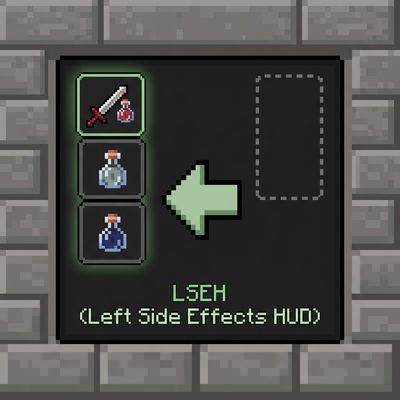
CurseForge · Minecraft mod
Left Side Effects HUD Placement
Moves status effect icons and timers to the left side of your screen and repositions them neatly outside the inventory window, replacing the default right-side layout.
Choose a version Pick your version below, then grab the matching file.
Quick answer
Which Left Side Effects HUD Placement release should I use?
Latest stable file left_side_effect_hud_placement-1.2.0-forge-1.20.1.jar
Game version 1.20.1
Loader Forge
Left Side Effects HUD Placement left_side_effect_hud_placement-1.2.0-forge-1.20.1.jar targets 1.20.1 with Forge. The project page does not say whether this file belongs on the client, dedicated server, or both. No extra mods listed for this file.
Where it goes
Is Left Side Effects HUD Placement required on the client, server, or both?
The project page does not say whether this file belongs on the client, dedicated server, or both.
Client Source doesn’t say
Dedicated server Source doesn’t say
Loader for this release Forge
Required install it here Optional supported, not mandatory Not supported do not install here Source doesn’t say do not assume
The source does not explicitly classify this release as client-only or server-only.
What else does Left Side Effects HUD Placement left_side_effect_hud_placement-1.2.0-forge-1.20.1.jar need?
left_side_effect_hud_placement-1.2.0-forge-1.20.1.jar. Change the file and its required mods may change too.
This file does not list any required mods. Do not add a library just because a different file uses it.
This file does not list any required or optional mods.
Before you install it
Add Left Side Effects HUD Placement without breaking your instance.
Built for Left Side Effects HUD Placement left_side_effect_hud_placement-1.2.0-forge-1.20.1.jar. Pick another file and the loader, install side or required mods may change.
- 01
Stick to this file
Use left_side_effect_hud_placement-1.2.0-forge-1.20.1.jar. It targets 1.20.1 with Forge; another release may have different loader, side or dependency requirements.
- 02
Bring the mods it needs
This file does not list any required mods. Do not add a library just because a different file uses it.
- 03
Put it on the correct side
The project page does not say whether this file belongs on the client, dedicated server, or both.
- 04
Pick the file you checked
Use the “Get this file” button beside left_side_effect_hud_placement-1.2.0-forge-1.20.1.jar. It opens that exact file at the source.
About this project
What does Left Side Effects HUD Placement add?
This lightweight mod repositions your active status effect icons and timers away from the cluttered right side of the screen, moving them neatly to the left edge during gameplay and seamlessly adjusting them next to your inventory screen when open.
In-Game HUD Repositioning: Moves all status effect icons to a clean, vertically-centered column on the left side of the screen.
Smart Inventory Integration: Automatically hides the intrusive default right-side inventory panel and shifts effects cleanly just outside the top-left corner of the open inventory window.
Clear Timers: Displays precise remaining time text directly under each effect icon (including infinite and flashing low-duration effects).
Grouped Layout: Separates beneficial and harmful effects into distinct, organized columns.
Project description from CurseForge.
Pick your setup
Left Side Effects HUD Placement by Minecraft version and loader
Choose the version and loader you play, then open the matching release.
Check the dependencies, then try the file in a copied instance before changing a world you care about.
Recent files
Left Side Effects HUD Placement versions and loaders
left_side_effect_hud_placement-1.2.0-forge-1.20.1.jar
1 Nov 2026
Client Source doesn’t say Server Source doesn’t say Dependencies No extras listed Listed on Release listing
Check the 1.20.1 · Forge setup 1.20.1Forge release
left_side_effect_hud_placement-1.1.0-forge-1.20.1.jar
31 Oct 2026
Client Source doesn’t say Server Source doesn’t say Dependencies No extras listed Listed on Release listing
Check the 1.20.1 · Forge setup 1.20.1Forge release
left_side_effect_hud_placement-1.0.0-forge-1.20.1.jar
30 Oct 2026
Client Source doesn’t say Server Source doesn’t say Dependencies No extras listed Listed on Release listing
Check the 1.20.1 · Forge setup 1.20.1Forge release
Looking for an older file? The official CurseForge project page is in Resources.
 mod
CurseForge · Minecraft
Haki Realm
Haki Realm is a big addon for Mine Mine no Mi (Forge 1.20.1). It reworks Haki from the ground up, then builds a whole world around it
 mod
CurseForge · Minecraft
NolusLe's Jojo Weapon
a mod add some jojo item into minecraft
 mod
CurseForge · Minecraft
Doomsday Decoration
Added some pure decorative blocks.