Minecraft version
Back to mods 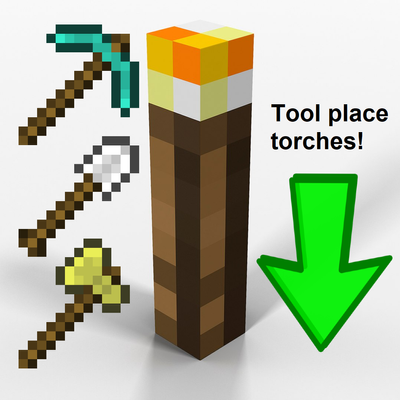
CurseForge · Minecraft mod
Freely Torches Placement
Allows you to place freely common or/and redstone torches, when you are holding any: pickaxe, shovel or axe
Choose a version Pick your version below, then grab the matching file.
Quick answer
Which Freely Torches Placement release should I use?
Latest stable file FreelyTorchesPlacement-1.8.9-2.0.0.jar
Game version 1.8.9
Loader Forge
Freely Torches Placement FreelyTorchesPlacement-1.8.9-2.0.0.jar targets 1.8.9 with Forge. The project page does not say whether this file belongs on the client, dedicated server, or both. No extra mods listed for this file.
Where it goes
Is Freely Torches Placement required on the client, server, or both?
The project page does not say whether this file belongs on the client, dedicated server, or both.
Client Source doesn’t say
Dedicated server Source doesn’t say
Loader for this release Forge
Required install it here Optional supported, not mandatory Not supported do not install here Source doesn’t say do not assume
The source does not explicitly classify this release as client-only or server-only.
What else does Freely Torches Placement FreelyTorchesPlacement-1.8.9-2.0.0.jar need?
FreelyTorchesPlacement-1.8.9-2.0.0.jar. Change the file and its required mods may change too.
This file does not list any required mods. Do not add a library just because a different file uses it.
This file does not list any required or optional mods.
Before you install it
Add Freely Torches Placement without breaking your instance.
Built for Freely Torches Placement FreelyTorchesPlacement-1.8.9-2.0.0.jar. Pick another file and the loader, install side or required mods may change.
- 01
Stick to this file
Use FreelyTorchesPlacement-1.8.9-2.0.0.jar. It targets 1.8.9 with Forge; another release may have different loader, side or dependency requirements.
- 02
Bring the mods it needs
This file does not list any required mods. Do not add a library just because a different file uses it.
- 03
Put it on the correct side
The project page does not say whether this file belongs on the client, dedicated server, or both.
- 04
Pick the file you checked
Use the “Get this file” button beside FreelyTorchesPlacement-1.8.9-2.0.0.jar. It opens that exact file at the source.
About this project
What does Freely Torches Placement add?
English
What exactly does this mod do?
It allows you to place regular torches and redstone torches by right-clicking whilst holding any pickaxe, shovel or axe. Now there’s no need to constantly switch back and forth between your tool and a torch, or search for a torch in your inventory; they’ll be automatically consumed whenever you right-click whilst holding one of these types of tools.
In the mod’s settings, you can enable or disable tools for placing torches, as well as choose which types of torches will be placed: by default, only common torches, but you can enable only redstone torches, or both option. Torches are consumed first from the hotbar, from left to right, and then from the inventory – from left to right and from top to bottom. By default, all three tools are enabled for placement.
Why did I create this mod? I got fed up with constantly breaking my rhythm whilst mining in caves or tunnels, having to switch back and forth between torches and tools all the time. This routine was, in fact, the reason I created the mod.
In the video, you can see the difference after installing the mod.
I created this mod. I've thoroughly tested the mod for bugs and fixed them, but if you find a bug or an incompatibility with any other mod, please let us know in the comments - we’ll try to fix it in future versions!
You are free to use this and our other mods anywhere you like, customize them to your liking, include them in your mod packs, port them to other versions, and so on. Just be sure to credit the mod’s author.
That's all I wanted to share, thanks for reading to the end! <3
P.S. Paulie
Русский
Что конкретно делает этот мод?
Он позволяет устанавливать обычные и факелы из красного камня (редстоуна) правой кнопкой мыши, когда вы держите в руке любую кирку, лопату или топор. Теперь больше ненужно постоянно переключаться с инструмента на факел и обратно, или искать факелы в инвентаре, они будут автоматически расходоваться, пока вы нажимаете ПКМ с одим из этих типов инструментов.
В настройках мода можно включать или выключать инструменты для размещения факелов, а также выбирать какие типы факелов будут размещаться: по умолчанию только обычные факелы, но можно включить только факелы из красного камня, или оба варианта. Факелы расходуются сначало в хотбаре, слева на право, а потом из инвентаря - слево на право и сверху в низ. По умолчанию все три инструмента включены для размещения.
Зачем я создал этот мод? Мне надоело постояно сбивать ритм при добыче ресурсов в пещерах или тонелях, постоянно переключаясь между факелами и инструментами. Эта рутина - фактически и стала причиной создания мода.
На видео можете увидеть разницу после установки мода.
Я сделал этот мод. Тщательно проверил мод на наличие багов и исправили их, но если вы обнаружите баг или несовместимость с каким-либо другим модом, пожалуйста, сообщите мне об этом в комментариях - я постараюсь исправить это в будущих версиях!
Вы можете свободно использовать этот и другие наши моды где угодно, редактировать их код по своему усмотрению, включать в свои сборки модов, портировать на другие версии и так далее. Просто не забудьте указать автора мода.
Это всё, чем я хотел поделиться, спасибо, что дочитали до конца! <3
П.С. Паули
Project description from CurseForge.
Pick your setup
Freely Torches Placement by Minecraft version and loader
Choose the version and loader you play, then open the matching release.
Check the dependencies, then try the file in a copied instance before changing a world you care about.
Recent files
Freely Torches Placement versions and loaders
FreelyTorchesPlacement-1.8.9-2.0.0.jar
2 Nov 2026
Client Source doesn’t say Server Source doesn’t say Dependencies No extras listed Listed on Release listing
Check the 1.8.9 · Forge setup Forge1.8.9 release
FreelyTorchesPlacement-1.8.9-1.0.0.jar
31 Oct 2026
Client Source doesn’t say Server Source doesn’t say Dependencies No extras listed Listed on Release listing
Check the 1.8.9 · Forge setup Forge1.8.9 release
Looking for an older file? The official CurseForge project page is in Resources.
 mod
CurseForge + Modrinth · Minecraft
Uncraft Everything
Crafted wrong item? Uncraft everything with this mod!
 mod
CurseForge + Modrinth · Minecraft
ModernFix
All-in-one mod that improves performance, reduces memory usage, and fixes many bugs. Compatible with all your favorite performance mods!
 mod
CurseForge · Minecraft
Noisy Neighbors
Silence those noisy neighbors in Minecraft. Control each mob’s volume and how often it makes sounds. Easily create sound zones to quiet your farms while staying immersed in the rest of your Minecraft world.