Minecraft version
Back to mods 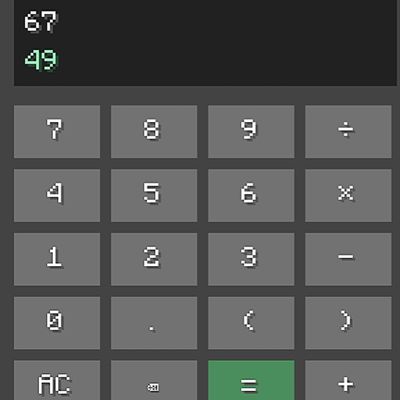
CurseForge · Minecraft mod
INVENTORY CALCULATOR
THIS MOD ADDS A CALCULATOR BESIDES YOUR INVENTORY
Choose a version Pick your version below, then grab the matching file.
Quick answer
Which INVENTORY CALCULATOR release should I use?
Latest stable file invcalculator-neoforge 26.2-1.0.0.jar
Game version 26.2
Loader NeoForge
INVENTORY CALCULATOR invcalculator-neoforge 26.2-1.0.0.jar targets 26.2 with NeoForge. The project page does not say whether this file belongs on the client, dedicated server, or both. No extra mods listed for this file.
Where it goes
Is INVENTORY CALCULATOR required on the client, server, or both?
The project page does not say whether this file belongs on the client, dedicated server, or both.
Client Source doesn’t say
Dedicated server Source doesn’t say
Loader for this release NeoForge
Required install it here Optional supported, not mandatory Not supported do not install here Source doesn’t say do not assume
The source does not explicitly classify this release as client-only or server-only.
What else does INVENTORY CALCULATOR invcalculator-neoforge 26.2-1.0.0.jar need?
invcalculator-neoforge 26.2-1.0.0.jar. Change the file and its required mods may change too.
This file does not list any required mods. Do not add a library just because a different file uses it.
This file does not list any required or optional mods.
Before you install it
Add INVENTORY CALCULATOR without breaking your instance.
Built for INVENTORY CALCULATOR invcalculator-neoforge 26.2-1.0.0.jar. Pick another file and the loader, install side or required mods may change.
- 01
Stick to this file
Use invcalculator-neoforge 26.2-1.0.0.jar. It targets 26.2 with NeoForge; another release may have different loader, side or dependency requirements.
- 02
Bring the mods it needs
This file does not list any required mods. Do not add a library just because a different file uses it.
- 03
Put it on the correct side
The project page does not say whether this file belongs on the client, dedicated server, or both.
- 04
Pick the file you checked
Use the “Get this file” button beside invcalculator-neoforge 26.2-1.0.0.jar. It opens that exact file at the source.
About this project
What does INVENTORY CALCULATOR add?
Inventory Calculator
Required Version:
Minecraft Java Edition: 26.2
Mod Loader: NeoForge
Required NeoForge Version: 26.2.0.90 or newer
About
Inventory Calculator adds a fully functional arithmetic calculator directly beside your Minecraft player inventory. No need to open another app or leave your game just to perform a quick calculation!
The calculator features a compact, draggable interface designed to fit naturally into Minecraft's vanilla-style GUI.
Features
Inventory Integration: Access the calculator directly from a button beside your player inventory.
Compact GUI: A clean and compact calculator interface.
Draggable Window: Move the calculator panel wherever you want.
Keyboard Support: Enter calculations using your keyboard.
Mouse Support: Click the on-screen buttons to enter expressions.
Basic Operations: Addition (+), subtraction (-), multiplication (×) and division (÷).
Advanced Expressions: Supports parentheses and decimal numbers.
Operator Precedence: Calculates expressions using standard mathematical rules.
Negative Numbers: Supports negative values and unary operators.
AC / Clear: Clear the current calculation.
Backspace: Remove the last entered character.
Copy Result: Copy your calculated result to the clipboard.
Enter Key: Calculate expressions instantly.
Escape Key: Close the calculator panel.
Calculation Memory: Remembers your last calculation when reopening the inventory.
Inventory Safe: Does not change, move or modify your inventory items.
Why Use It?
Whether you're calculating building dimensions, item quantities, resource requirements or doing quick mathematics while playing, Inventory Calculator lets you do it without leaving Minecraft.
A small utility designed to make everyday calculations easier.
Made by MODSFINDER
Project description from CurseForge.
Pick your setup
INVENTORY CALCULATOR by Minecraft version and loader
Choose the version and loader you play, then open the matching release.
Check the dependencies, then try the file in a copied instance before changing a world you care about.
Recent files
INVENTORY CALCULATOR versions and loaders
invcalculator-neoforge 26.2-1.0.0.jar
invcalculator-neoforge-26.2-1.0.0.jar
1 Nov 2026
Client Source doesn’t say Server Source doesn’t say Dependencies No extras listed Listed on Release listing
Check the 26.2 · NeoForge setup NeoForge26.2 release
Looking for an older file? The official CurseForge project page is in Resources.
 mod
CurseForge · Minecraft
Create: Plushie Factory
Create: Plushie Factory adds Create compatibility to automate all your favorite Plushie mods!
 mod
Modrinth · Minecraft
Day Counter
A Minecraft mod that counts the days
 mod
CurseForge · Minecraft
QNet
Industrial tech from the first dynamo to dimensional rifts: build animated multiblock factories, run simulated reactors from fission to fusion and mine virtual dimensions with rift gates. Recipes adapt to other mods’ materials.