Minecraft version
Back to mods 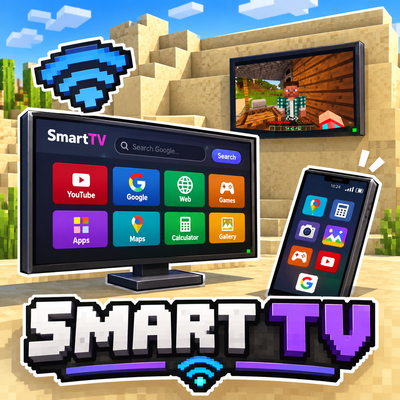
CurseForge · Minecraft mod
Smart TV
Adds functional smart TVs and a smartphone with a built-in web browser, Google search, YouTube, games, and useful applications to Minecraft
Choose a version Pick your version below, then grab the matching file.
Quick answer
Which Smart TV release should I use?
Latest stable file smarttv-1.6.0.jar
Game version 1.20.1
Loader Forge
Smart TV smarttv-1.6.0.jar targets 1.20.1 with Forge. The project page does not say whether this file belongs on the client, dedicated server, or both. No extra mods listed for this file.
Where it goes
Is Smart TV required on the client, server, or both?
The project page does not say whether this file belongs on the client, dedicated server, or both.
Client Source doesn’t say
Dedicated server Source doesn’t say
Loader for this release Forge
Required install it here Optional supported, not mandatory Not supported do not install here Source doesn’t say do not assume
The source does not explicitly classify this release as client-only or server-only.
What else does Smart TV smarttv-1.6.0.jar need?
smarttv-1.6.0.jar. Change the file and its required mods may change too.
This file does not list any required mods. Do not add a library just because a different file uses it.
This file does not list any required or optional mods.
Before you install it
Add Smart TV without breaking your instance.
Built for Smart TV smarttv-1.6.0.jar. Pick another file and the loader, install side or required mods may change.
- 01
Stick to this file
Use smarttv-1.6.0.jar. It targets 1.20.1 with Forge; another release may have different loader, side or dependency requirements.
- 02
Bring the mods it needs
This file does not list any required mods. Do not add a library just because a different file uses it.
- 03
Put it on the correct side
The project page does not say whether this file belongs on the client, dedicated server, or both.
- 04
Pick the file you checked
Use the “Get this file” button beside smarttv-1.6.0.jar. It opens that exact file at the source.
About this project
What does Smart TV add?
Smart TV — Modern Electronics in Minecraft
Bring modern technology into your Minecraft world with Smart TV! This mod adds functional televisions and a smartphone, turning your Minecraft home into a smart home.
📺 Smart TVs
Choose between two types of functional televisions:
- Floor-Standing TV: A modern television that you can place anywhere in your home.
- Wall-Mounted TV: A wall-mounted television that saves space and looks great in any interior.
Both televisions feature a built-in web browser, allowing you to search Google and visit websites directly inside Minecraft!
📱 Smartphone
The mod also adds a functional smartphone with several built-in applications:
- Google: Search the web and visit websites.
- YouTube: Watch videos.
- Maps: Explore maps.
- Calculator: Perform calculations.
- Camera: Use the camera application.
- Gallery: Browse images.
- Games: Play games directly on your smartphone.
🌐 Browse the Internet in Minecraft
With built-in browser functionality, you can access websites through both televisions and the smartphone without leaving your Minecraft world.
🎮 Compatibility
Check the supported Minecraft version and mod loader in the project files - сurrently, only 1.20.1 Forge is supported.
The mod also has dependencies: MCEF. It must be downloaded for the mod to work: https://www.curseforge.com/minecraft/mc-mods/mcef/files/5828196
Turn your Minecraft house into a modern smart home with Smart TV!
Project description from CurseForge.
Pick your setup
Smart TV by Minecraft version and loader
Choose the version and loader you play, then open the matching release.
Check the dependencies, then try the file in a copied instance before changing a world you care about.
Recent files
Smart TV versions and loaders
smarttv-1.6.0.jar
7 Nov 2026
Client Source doesn’t say Server Source doesn’t say Dependencies No extras listed Listed on Release listing
Check the 1.20.1 · Forge setup 1.20.1Forge release
smarttv-1.5.0.jar
1 Nov 2026
Client Source doesn’t say Server Source doesn’t say Dependencies No extras listed Listed on Release listing
Check the 1.20.1 · Forge setup 1.20.1Forge release
Looking for an older file? The official CurseForge project page is in Resources.
 mod
CurseForge · Minecraft
Blacksmith Workshop
A real blacksmith experience with a multi-step process to create tools
 mod
CurseForge + Modrinth · Minecraft
World Portal
Create custom world portal to travel between dimensions.
 mod
CurseForge + Modrinth · Minecraft
Diorama
A minimap and world map drawn at an angle, like a model of your world on a table. Towers stand up, cliffs have faces and trees cast shadows.