Quick answer
Which AppliedSwatches Companion - AE2 Addon release should I use?
Latest stable file AppliedSwatches Companion 0.2.2
Game version 26.1.2
Loader NeoForge
AppliedSwatches Companion - AE2 Addon AppliedSwatches Companion 0.2.2 targets 26.1.2 with NeoForge. The project page does not say whether this file belongs on the client, dedicated server, or both. All 3 required mods have matching files.
Where it goes
Is AppliedSwatches Companion - AE2 Addon required on the client, server, or both?
The project page does not say whether this file belongs on the client, dedicated server, or both.
Client Source doesn’t say
Dedicated server Source doesn’t say
Loader for this release NeoForge
Required install it here Optional supported, not mandatory Not supported do not install here Source doesn’t say do not assume
The source does not explicitly classify this release as client-only or server-only.
What else does AppliedSwatches Companion - AE2 Addon AppliedSwatches Companion 0.2.2 need?
AppliedSwatches Companion 0.2.2. Change the file and its required mods may change too.
Install Applied Energistics 2, AppliedSwatches - AE2 Addon, GuideME first. We found matching files for this game-version and loader setup. 12 come through another mod in the chain.
2 listed on this file 12 pulled in by those mods
Matching file found Matched file: AE2 26.1.14-beta [NEOFORGE]
Matching file found Matched file: AppliedSwatches 0.2.7
Jade 🔍 Needed by Applied Energistics 2 pulled inMatching file found Matched file: [NeoForge 26.1.X] 26.1.12
EMI Needed by Applied Energistics 2 pulled inNo matching file
Matching file found Matched file: TheOneProbe - 26.1.2_neo-14.0.1
Matching file found Matched file: [NeoForge 26.1.2] v26.1.819
WTHIT Needed by Applied Energistics 2 pulled inNo matching file
GuideME Needed by Applied Energistics 2 pulled inMatching file found Matched file: GuideME 26.1.17-beta
Matching file found Matched file: 29.54.0.123 for NeoForge 26.1.2
Matching file found Matched file: [NeoForge 26.1] v26.1.154
No matching file
Matching file found Matched file: [NeoForge 26.1.2] v20.1.18
Matching file found Matched file: MezzConfig 0.7.1 for NeoForge 26.1.2
Matching file found Matched file: MezzConfig GUI mc26.1.2-0.8.1 for NeoForge
12
extra mods were pulled in by other dependencies.
Indented rows show who needs each one. We only count dependency files that match this setup. A file for another loader does not fill the gap.
Before you install it
Add AppliedSwatches Companion - AE2 Addon without breaking your instance.
Built for AppliedSwatches Companion - AE2 Addon AppliedSwatches Companion 0.2.2. Pick another file and the loader, install side or required mods may change.
- 01
Stick to this file
Use AppliedSwatches Companion 0.2.2. It targets 26.1.2 with NeoForge; another release may have different loader, side or dependency requirements.
- 02
Bring the mods it needs
Install Applied Energistics 2, AppliedSwatches - AE2 Addon, GuideME first. We found matching files for this game-version and loader setup. 12 come through another mod in the chain.
- 03
Put it on the correct side
The project page does not say whether this file belongs on the client, dedicated server, or both.
- 04
Pick the file you checked
Use the “Get this file” button beside AppliedSwatches Companion 0.2.2. It opens that exact file at the source.
About this project
What does AppliedSwatches Companion - AE2 Addon add?
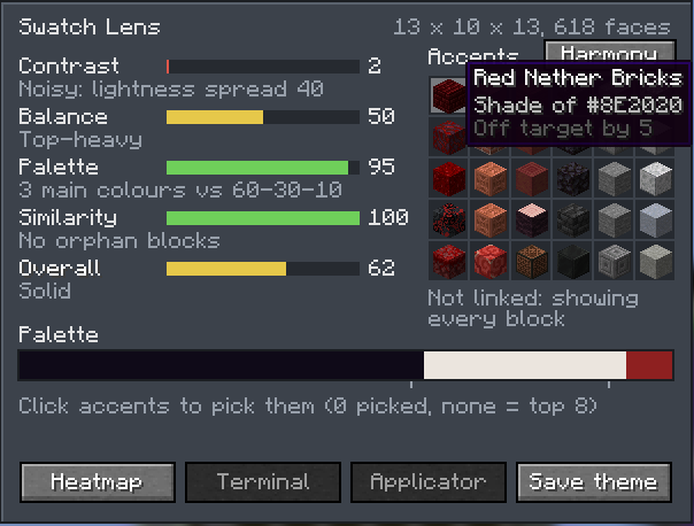
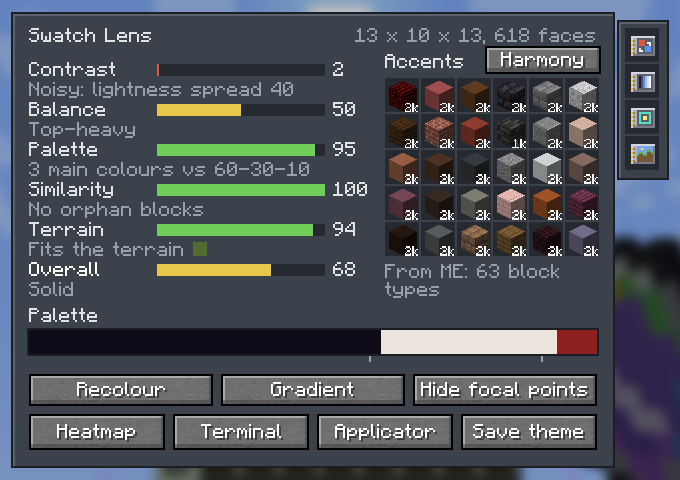
AppliedSwatches Companion is an addon for AppliedSwatches and Applied Energistics 2. Point the Swatch Lens at a build and it shows how the build reads: contrast, visual weight, palette and pattern. Then it suggests accent blocks that fit, straight from your ME network.
The scores come from real design theory: lightness contrast, visual weight balance, the 60-30-10 colour rule and Gestalt similarity. Colours are worked out in CIELAB from the textures you actually see, so resource packs count.
Swatch Lens
- Sneak + use on a Swatch or Theme Terminal to link the lens to its ME network
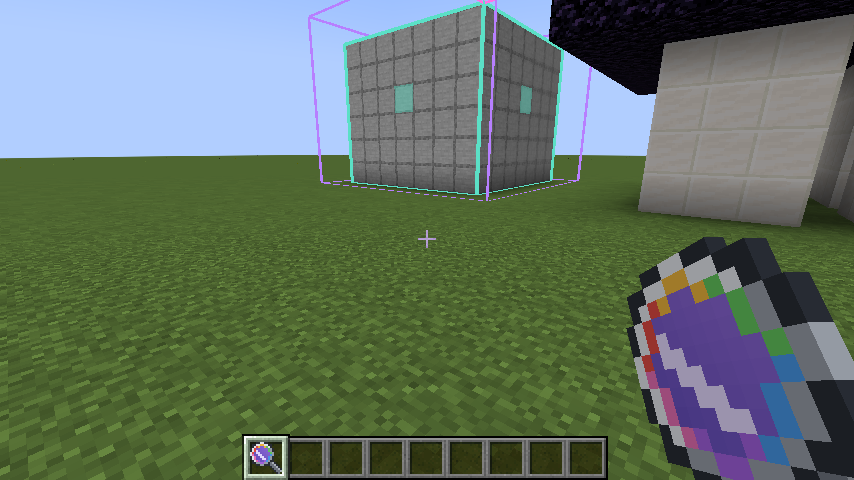
- Sneak + use a block for corner A, use a block for corner B (up to 64 blocks per side)
- Use in the air to scan; sneak + use in the air to clear
Scores
- Contrast: enough light and dark to show shape, without harsh jumps
- Balance: visual weight centred and slightly low, not leaning or top-heavy
- Palette: how close the colour split is to 60-30-10
- Similarity: one-off "orphan" blocks that break the pattern
- Terrain (Surroundings Module): how the build's colours fit the land around it
- Overall: the average of all the scores
Heatmap
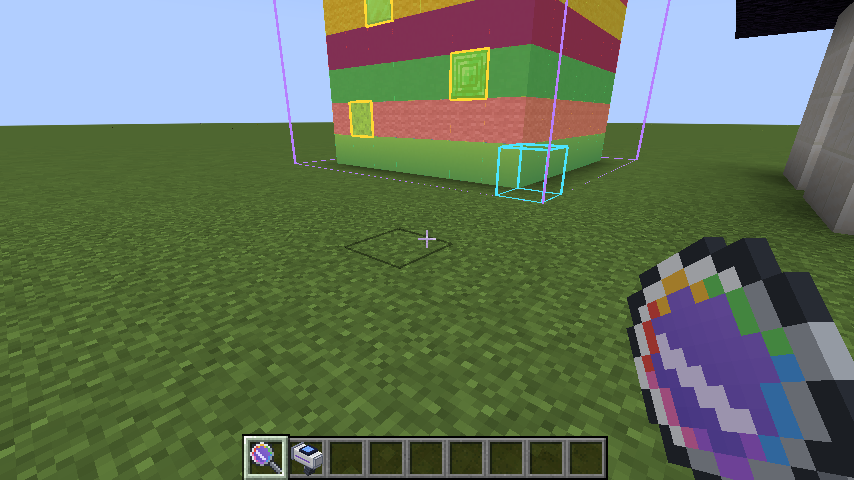
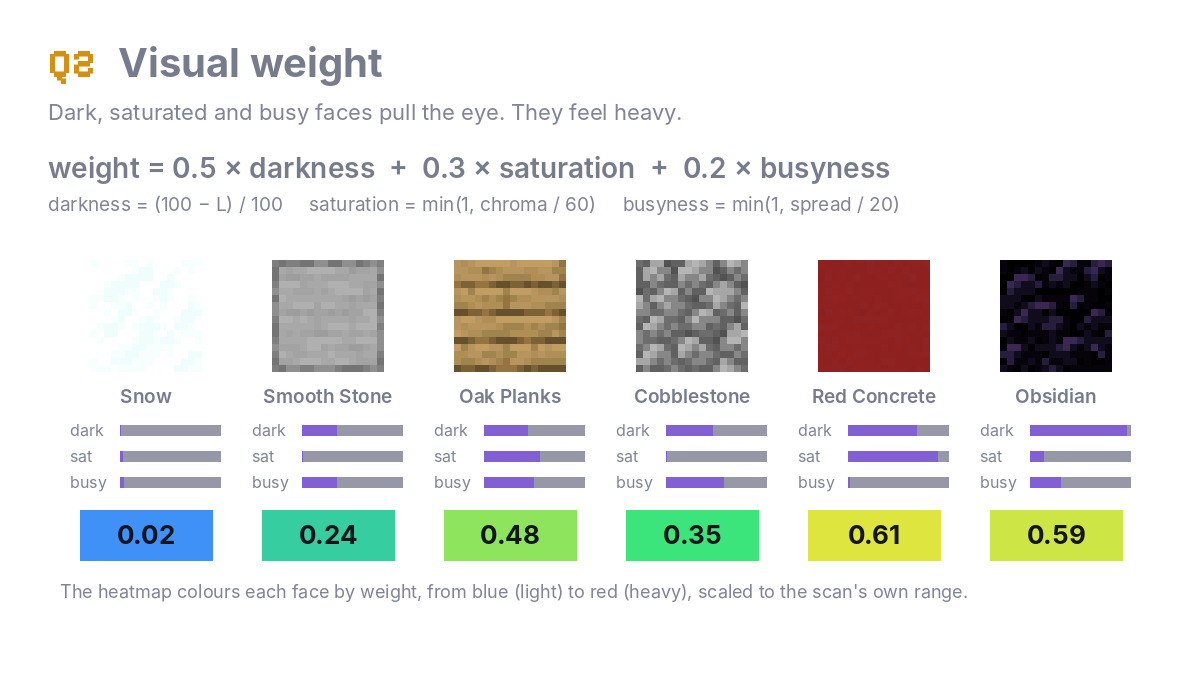
Tints every visible face from blue (light) to red (heavy) and outlines orphan blocks in yellow, so you can see exactly what's pulling the eye.
Accents
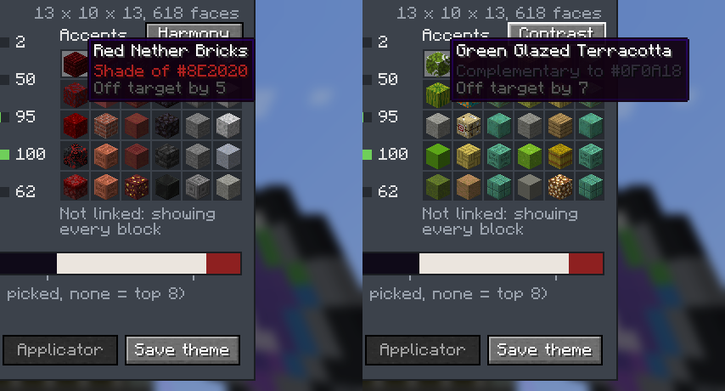
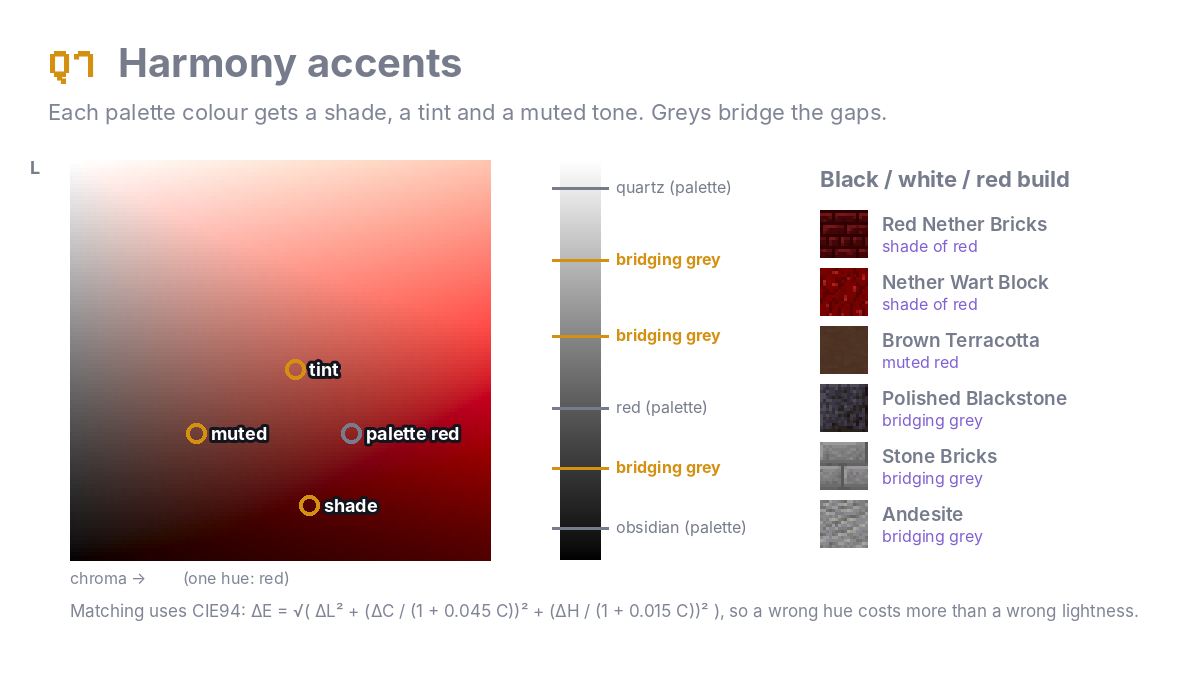
- Harmony (default): shades, tints and muted tones of your build's own colours, plus greys that bridge big gaps. A black, white and red build gets charcoal, greys and maroons.
- Contrast: complementary colours for a deliberate pop
- Linked and online: only blocks in your ME network, with amounts
- Terminal pulls 64 of each pick into the terminal's output
- Applicator loads the picks into your Swatch Applicator
- Save theme writes the palette and accents as an AppliedSwatches theme
Modules
Cards that add features to the lens, like AE2's upgrade cards. Install them in the module panel on the right of the Lens screen, or right-click a module onto the lens.
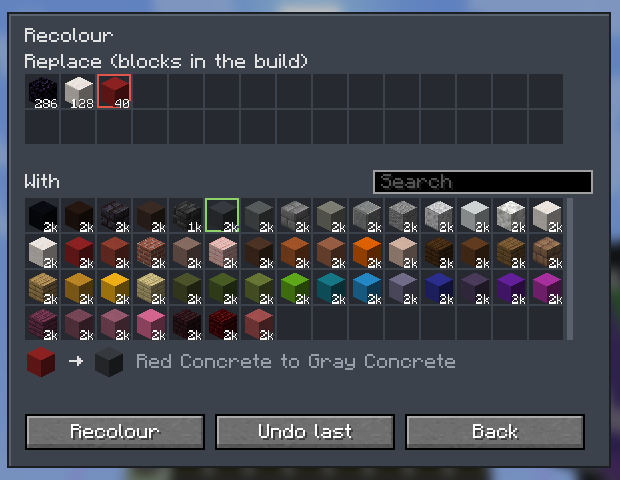
- Recolour Module: swap a block across the whole build, along with its stairs, slabs and walls. New blocks come out of ME and the old ones go back in, and you can undo the last swap.
- Gradient Module: pick a start block and an end block, and the lens fills 3 to 9 steps between them from your ME stock. Send the ramp to the terminal or load it into a Swatch Applicator.
- Focal Point Module: outlines plain, light stretches of the build and marks where an accent would catch the eye.
- Surroundings Module: adds a Terrain score that compares your palette with the blocks in a 16-block ring around the build.
How it works
Full explanations with diagrams are in the README FAQ.
Requirements
- Minecraft 1.21.1, NeoForge 21.1+
- Applied Energistics 2 (19.0.27 or newer)
- AppliedSwatches (0.2.3 or newer)
- Install on both client and server
Recipe
- Swatch Lens: fluix crystal on top, glass on each side of a spyglass, amethyst shard below
- Recolour Module: advanced card, formation core, annihilation core (shapeless)
- Gradient Module: basic card, white dye, black dye (shapeless)
- Focal Point Module: basic card, glow ink sac (shapeless)
- Surroundings Module: basic card, compass (shapeless)
Project description from CurseForge.
Pick your setup
AppliedSwatches Companion - AE2 Addon by Minecraft version and loader
Choose the version and loader you play, then open the matching release.
Minecraft version
26.3
1
loader build Minecraft version
26.2
1
loader build Minecraft version
26.1.2
1
loader build Minecraft version
1.21.1
1
loader build Check the dependencies, then try the file in a copied instance before changing a world you care about.
Recent files
AppliedSwatches Companion - AE2 Addon versions and loaders
appliedswatches_companion-0.2.2-26.3.jar
12 Nov 2026
Client Source doesn’t say Server Source doesn’t say Dependencies 2 required · 2 unchecked Listed on Release listing
Check the 26.3 · NeoForge setup → appliedswatches_companion-0.2.2-26.2.jar
12 Nov 2026
Client Source doesn’t say Server Source doesn’t say Dependencies 2 required · 2 unchecked Listed on Release listing
Check the 26.2 · NeoForge setup → appliedswatches_companion-0.2.2-26.1.2.jar
12 Nov 2026
Client Source doesn’t say Server Source doesn’t say Dependencies 3 required · matched Listed on Release listing
Check the 26.1.2 · NeoForge setup → appliedswatches_companion-0.2.2.jar
12 Nov 2026
Client Source doesn’t say Server Source doesn’t say Dependencies 2 required · 2 unchecked Listed on Release listing
Check the 1.21.1 · NeoForge setup → appliedswatches_companion-0.2.1-26.3.jar
9 Nov 2026
Client Source doesn’t say Server Source doesn’t say Dependencies 2 required · 2 unchecked Listed on Release listing
Check the 26.3 · NeoForge setup → appliedswatches_companion-0.2.1-26.2.jar
9 Nov 2026
Client Source doesn’t say Server Source doesn’t say Dependencies 2 required · 2 unchecked Listed on Release listing
Check the 26.2 · NeoForge setup → appliedswatches_companion-0.2.1.jar
5 Nov 2026
Client Source doesn’t say Server Source doesn’t say Dependencies 2 required · 2 unchecked Listed on Release listing
Check the 1.21.1 · NeoForge setup → appliedswatches_companion-0.2.1-26.1.2.jar
5 Nov 2026
Client Source doesn’t say Server Source doesn’t say Dependencies 2 required · 2 unchecked Listed on Release listing
Check the 26.1.2 · NeoForge setup → appliedswatches_companion-0.2.0-26.1.2.jar
4 Nov 2026
Client Source doesn’t say Server Source doesn’t say Dependencies 2 required · 2 unchecked Listed on Release listing
Check the 26.1.2 · NeoForge setup → appliedswatches_companion-0.2.0.jar
4 Nov 2026
Client Source doesn’t say Server Source doesn’t say Dependencies 2 required · 2 unchecked Listed on Release listing
Check the 1.21.1 · NeoForge setup → appliedswatches_companion-0.1.2-26.1.2.jar
3 Nov 2026
Client Source doesn’t say Server Source doesn’t say Dependencies 2 required · 2 unchecked Listed on Release listing
Check the 26.1.2 · NeoForge setup → appliedswatches_companion-0.1.2.jar
3 Nov 2026
Client Source doesn’t say Server Source doesn’t say Dependencies 2 required · 2 unchecked Listed on Release listing
Check the 1.21.1 · NeoForge setup → 
 mod
 mod
 mod