Minecraft version
Back to mods 
CurseForge · Minecraft mod
Mega Torch
A giant torch that stops hostile mobs from spawning in a huge radius. Adjustable radius and zone shape, mob filters, spawn-reason rules and admin tools.
Choose a version Pick your version below, then grab the matching file.
Quick answer
Which Mega Torch release should I use?
Latest stable file megatorch-1.0.2+26.3.jar
Game version 26.3
Loader Fabric
Mega Torch megatorch-1.0.2+26.3.jar targets 26.3 with Fabric. The project page does not say whether this file belongs on the client, dedicated server, or both. No extra mods listed for this file.
Where it goes
Is Mega Torch required on the client, server, or both?
The project page does not say whether this file belongs on the client, dedicated server, or both.
Client Source doesn’t say
Dedicated server Source doesn’t say
Loader for this release Fabric
Required install it here Optional supported, not mandatory Not supported do not install here Source doesn’t say do not assume
The source does not explicitly classify this release as client-only or server-only.
What else does Mega Torch megatorch-1.0.2+26.3.jar need?
megatorch-1.0.2+26.3.jar. Change the file and its required mods may change too.
This file does not list any required mods. Do not add a library just because a different file uses it.
This file does not list any required or optional mods.
Before you install it
Add Mega Torch without breaking your instance.
Built for Mega Torch megatorch-1.0.2+26.3.jar. Pick another file and the loader, install side or required mods may change.
- 01
Stick to this file
Use megatorch-1.0.2+26.3.jar. It targets 26.3 with Fabric; another release may have different loader, side or dependency requirements.
- 02
Bring the mods it needs
This file does not list any required mods. Do not add a library just because a different file uses it.
- 03
Put it on the correct side
The project page does not say whether this file belongs on the client, dedicated server, or both.
- 04
Pick the file you checked
Use the “Get this file” button beside megatorch-1.0.2+26.3.jar. It opens that exact file at the source.
About this project
What does Mega Torch add?
Mega Torch adds a craftable torch that blocks natural mob spawning in a large area around it. Everything can be adjusted in game, and the config file is fully commented.
Features
- Blocks spawning inside a radius: 96 blocks by default, adjustable in game between 16 and 256.
- Three zone shapes: sphere, cylinder (protects caves at any depth) and cube. Each torch has its own shape.
- Change radius and shape while looking at the torch: keys
]and[for the radius (Shift for bigger steps) and\for the shape. Right-click with an empty hand to see the border drawn with particles. - Choose what gets blocked: mob categories (monsters, animals, aquatic, ambient), spawn reasons (natural, chunk generation, patrols, spawners, events, golems, reinforcements...) and a per-mob whitelist and blacklist with tags and wildcards.
- Radius and shape stay with the item when you break the torch and place it again.
- Server tools:
/megatorch listopens a chest menu with every torch (who placed it, coordinates, click to teleport), plusreloadandpurge. Changes can be restricted to operators and creative players, or to the player who placed the torch. - Lightweight: the check run on every spawn attempt allocates nothing, and the decision for each mob type is cached.
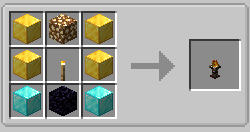
Crafting
- Top row: gold block, glowstone block, gold block
- Middle row: gold block, torch, gold block
- Bottom row: diamond block, obsidian, diamond block
Commands
/megatorch radius add <n>and/megatorch radius set <n>: change the radius of the torch you look at./megatorch shape next|previous|sphere|cylinder|cuboid: change its shape./megatorch list [page]: chest menu with all torches (operators and creative players)./megatorch reload: reload the config without restarting (admins)./megatorch purge: remove stale entries from the registry (admins)./megatorch restrict true|false: limit radius and shape changes to operators and creative players (admins).
Configuration
Two files in config/: megatorch-server.json (radius, shape, mob categories, spawn reasons, lists, display) and megatorch-client.json (keys). Both are commented in English and Spanish, and new options are added to them automatically. If a file has a syntax error it is not overwritten: the error is printed in logs/latest.log and, with /megatorch reload, the previous configuration is kept.
For public servers, consider enabling restrict_change_to_ops_and_creative and only_placer_can_change.
Notes and limitations
- Mobs that come with structures when a world is generated (villages, temples...) are not blocked.
- Patrols, events, golems and reinforcements are detected when the mob enters the world. This part is experimental.
- Other mods that spawn mobs through unusual paths may bypass the torch
Project description from CurseForge.
Pick your setup
Mega Torch by Minecraft version and loader
Choose the version and loader you play, then open the matching release.
Minecraft version
26.2
1 loader buildMinecraft version
26.1.2
1 loader buildMinecraft version
26.1.1
1 loader buildMinecraft version
26.1
1 loader buildCheck the dependencies, then try the file in a copied instance before changing a world you care about.
Recent files
Mega Torch versions and loaders
megatorch-1.0.2+26.3.jar
megatorch-1.0.2-26.3.jar
6 Nov 2026
Client Source doesn’t say Server Source doesn’t say Dependencies No extras listed Listed on Release listing
Check the 26.3 · Fabric setup Fabric26.3 release
megatorch-1.0.2+26.1.2.jar
megatorch-1.0.2-26.1.2.jar
4 Nov 2026
Client Source doesn’t say Server Source doesn’t say Dependencies No extras listed Listed on Release listing
Check the 26.1.2 · Fabric setup Fabric26.126.1.126.1.2 release
megatorch-1.0.2+26.2.jar
megatorch-1.0.2-26.2.jar
4 Nov 2026
Client Source doesn’t say Server Source doesn’t say Dependencies No extras listed Listed on Release listing
Check the 26.2 · Fabric setup Fabric26.2 release
megatorch-1.0.1+mc26.1+26.1.2.jar
megatorch-1.0.1-mc26.1-26.1.2.jar
3 Nov 2026
Client Source doesn’t say Server Source doesn’t say Dependencies No extras listed Listed on Release listing
Check the 26.1.2 · Fabric setup Fabric26.126.1.126.1.2 release
megatorch-1.0.1+26.2.jar
megatorch-1.0.1-26.2.jar
3 Nov 2026
Client Source doesn’t say Server Source doesn’t say Dependencies No extras listed Listed on Release listing
Check the 26.2 · Fabric setup Fabric26.2 release
Looking for an older file? The official CurseForge project page is in Resources.
 mod
CurseForge + Modrinth · Minecraft
Antarchy
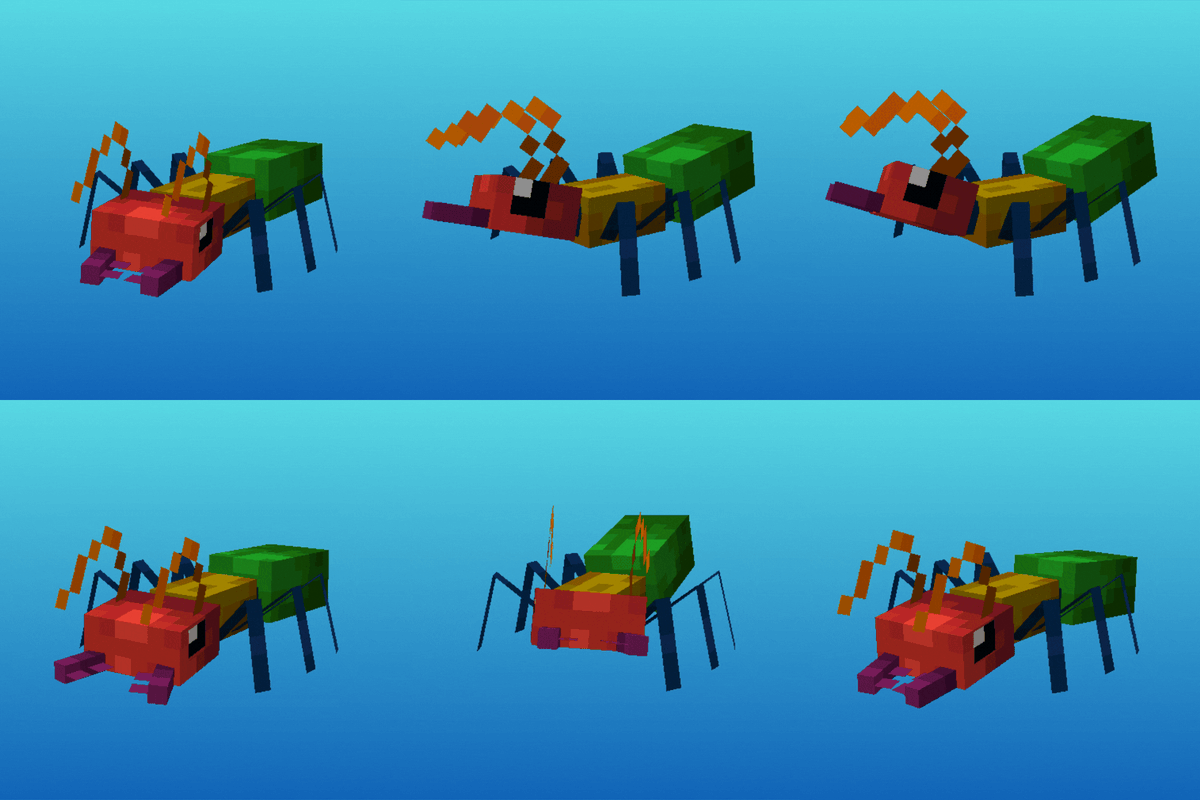
Adding 45+ mobs, 8+ bosses, 3 fleshed out dimensions, and more
 mod
CurseForge · Minecraft
SCP: Secure & Craft
Blink and SCP-173 moves. Survive night breaches in abandoned Foundation sites: keycard doors, MTF squads, Chaos raiders, sanity and hallucinations, and a growing roster of SCPs hunting you.
 mod
CurseForge · Minecraft
Firelight - Flickering Torches, Campfires & Other Fires
Torches, lanterns, candles, campfires and fire flicker softly, each flame on its own rhythm. Client-side, for Fabric, NeoForge and Forge. Works with Sodium and Embeddium. Compatible with shaders!