Minecraft version
Back to mods 
CurseForge · Minecraft mod
Villager Reroller
Automatically rerolls a librarian's trades until it offers the enchanted book you want at a price you accept.
Choose a version Pick your version below, then grab the matching file.
Quick answer
Which Villager Reroller release should I use?
Latest stable file Villager Reroller 1.0.1 for NeoForge 1.20.2
Game version 1.20.2
Loader NeoForge
Villager Reroller 1.0.1 for NeoForge 1.20.2 targets 1.20.2 with NeoForge. The project page does not say whether this file belongs on the client, dedicated server, or both. No extra mods listed for this file.
Where it goes
Is Villager Reroller required on the client, server, or both?
The project page does not say whether this file belongs on the client, dedicated server, or both.
Client Source doesn’t say
Dedicated server Source doesn’t say
Loader for this release NeoForge
Required install it here Optional supported, not mandatory Not supported do not install here Source doesn’t say do not assume
The source does not explicitly classify this release as client-only or server-only.
What else does Villager Reroller 1.0.1 for NeoForge 1.20.2 need?
Villager Reroller 1.0.1 for NeoForge 1.20.2. Change the file and its required mods may change too.
This file does not list any required mods. Do not add a library just because a different file uses it.
This file does not list any required or optional mods.
Before you install it
Add Villager Reroller without breaking your instance.
Built for Villager Reroller 1.0.1 for NeoForge 1.20.2. Pick another file and the loader, install side or required mods may change.
- 01
Stick to this file
Use Villager Reroller 1.0.1 for NeoForge 1.20.2. It targets 1.20.2 with NeoForge; another release may have different loader, side or dependency requirements.
- 02
Bring the mods it needs
This file does not list any required mods. Do not add a library just because a different file uses it.
- 03
Put it on the correct side
The project page does not say whether this file belongs on the client, dedicated server, or both.
- 04
Pick the file you checked
Use the “Get this file” button beside Villager Reroller 1.0.1 for NeoForge 1.20.2. It opens that exact file at the source.
About this project
What does Villager Reroller add?
Stop rerolling by hand. Start trading.
Ever spent twenty minutes breaking and placing a lectern, hoping a librarian finally offers Mending? Villager Reroller does it for you. It breaks the lectern, places it again, checks the book on offer and keeps going until it finds the enchantment you want at a price you're happy with. Then it stops with the trade screen open, so you can buy it.
📚 Works with every book a librarian can sell, including enchantments from other mods.
🔥 What it does
📖 Pick what you want
Open the menu with V. Every enchantment sits in a drop-down section (Swords & Axes, Tools, Armor, Boots, Bow, Trident, Mace...) with its own icon. Set each one to Want, Ignore or Avoid, or use Want all and Avoid all at the top. Hover any enchantment to see what it does, what it works on and the cheapest price it can have.
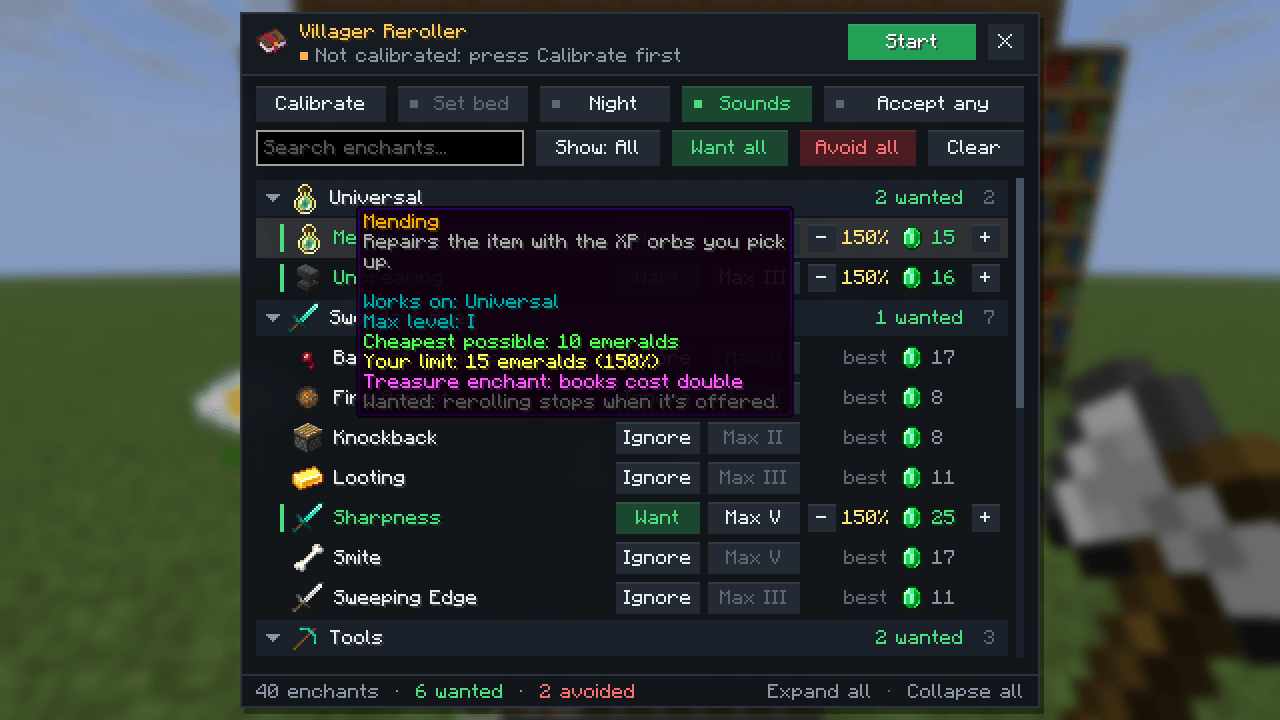
💎 Set your price
The cheapest possible price for a book is 100%. Choose how far above that you'll pay: 150% accepts anything up to one and a half times the best price. The emerald next to it shows the exact limit, so you always know what you're accepting. You can also pick the lowest level you'll take (max level only by default).
🎯 Calibrate once
Press Calibrate and do the routine by hand one time: place the lectern, right-click the villager, break the lectern, and if you like, right-click your bed. Chat tells you each step. The mod remembers the spots and repeats them for you.
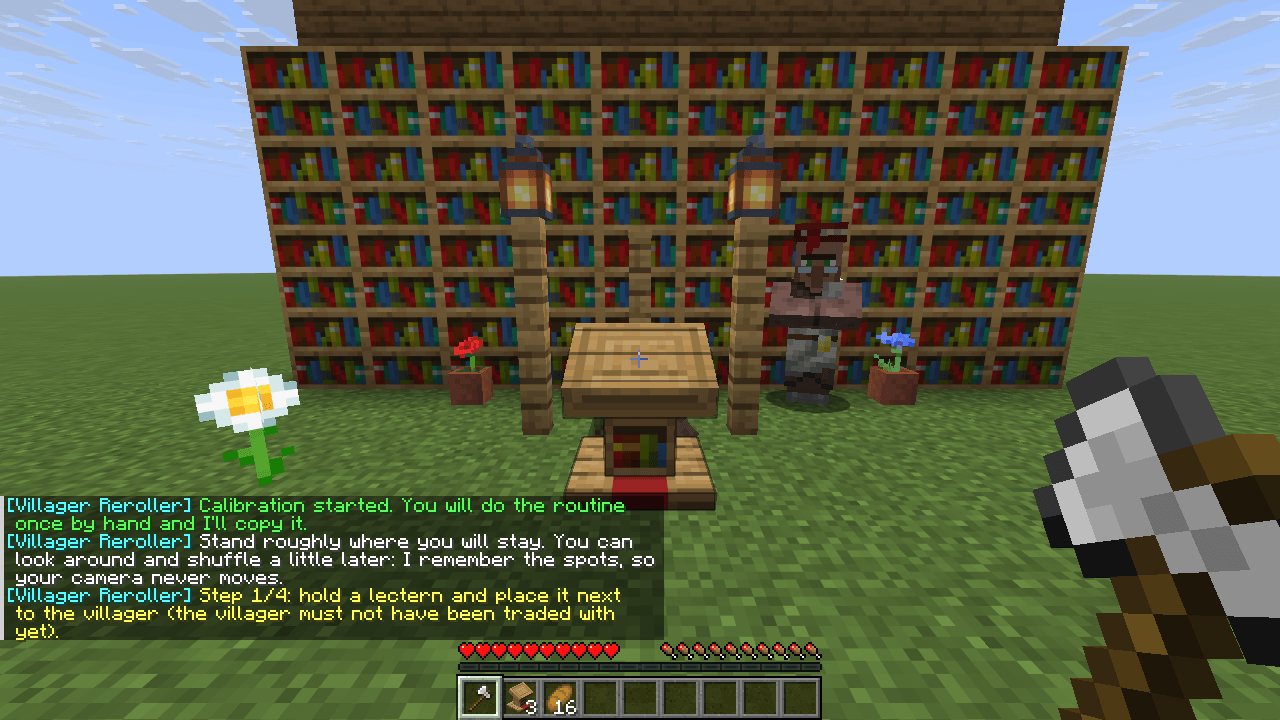
⚡ It rerolls for you
Press B and watch. It breaks and places the lectern, waits for the villager to take the job, opens the trades and checks the book, over and over. When it finds a match it stops with the trade screen open and the lectern left in place, and plays a little fanfare.
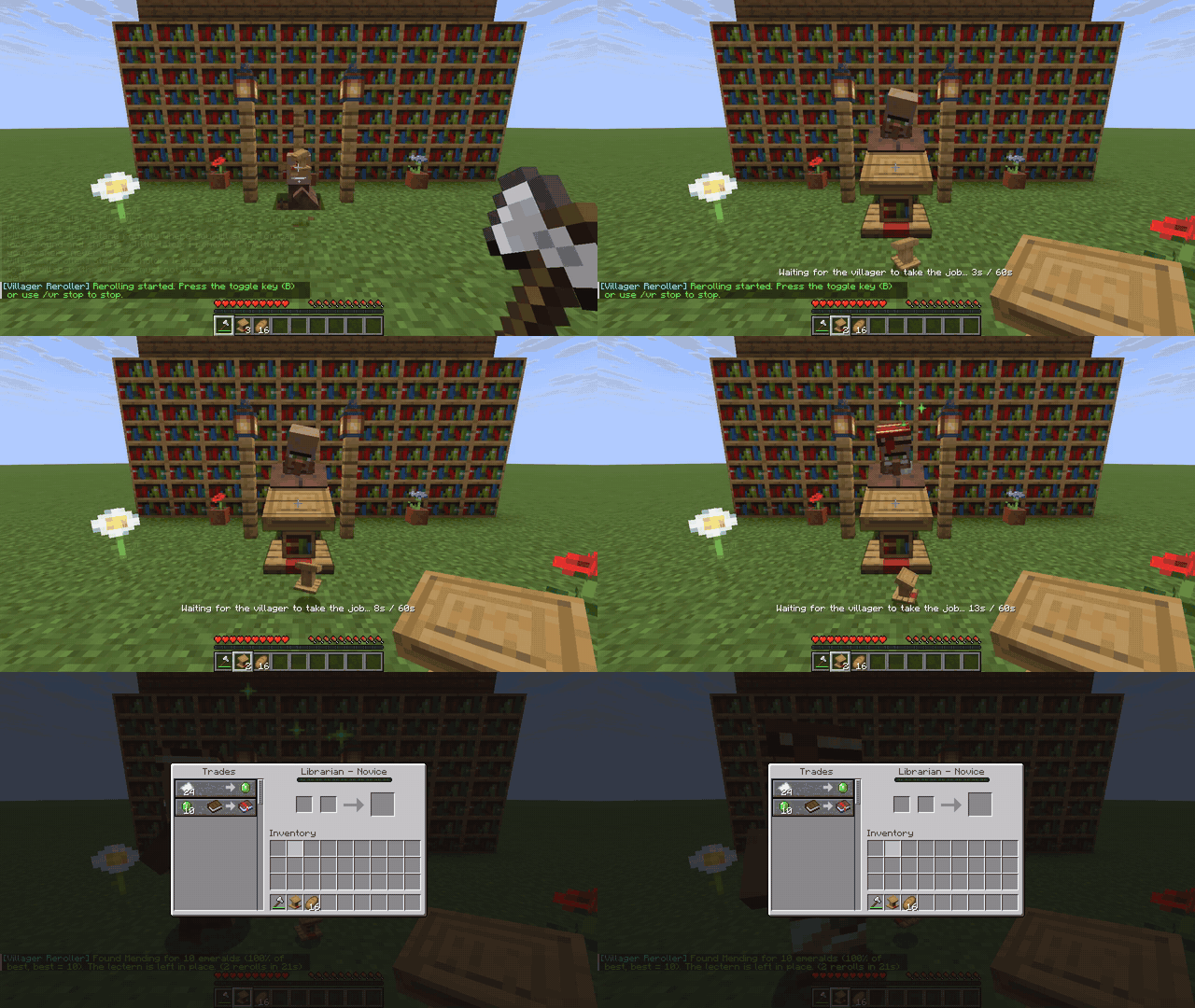
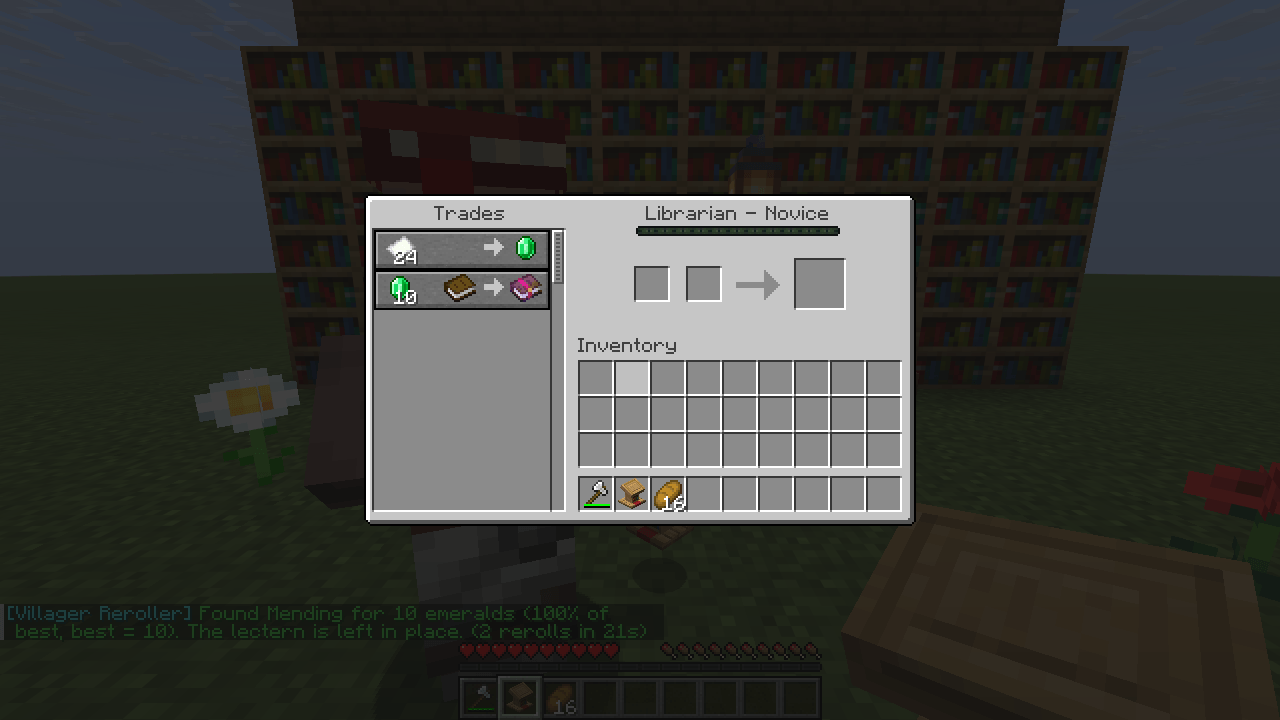
🎥 Your camera never moves
The mod uses the spots it remembered, so it never turns your view. Look around, check your inventory or shuffle a little while it works.
⏳ Patient with slow villagers
Villagers sometimes take a while to notice a new lectern. The mod keeps waiting (up to 60 seconds), and if the villager still hasn't taken the job it places the lectern again instead of giving up. If a broken lectern gets stuck somewhere, it carries on with the spare lecterns in your hotbar.
🌙 Sleeps through the night
At night villagers go to bed instead of taking jobs. The mod sleeps in your bed, walks you back to the exact spot you were standing on and carries on. No bed? It waits for morning and resumes by itself.
🔔 Sounds
A chime when rerolling starts, a low note when it stops, and a fanfare when your book is found. Turn them off in the menu.
🛡 Safety stops
It stops by itself if you take damage, open another screen, move out of reach, or the trades stop changing (the villager was already traded with). Press B any time to stop it yourself.
🎲 Accept any enchant
Not picky? Turn on Accept any and the mod stops on any enchantment you haven't marked Avoid, as long as it's within that enchantment's own price limit.
💾 It remembers
Your choices are saved, so they're there next time you play.
🎮 Controls
| Key | What it does |
|---|---|
| V | Open the menu |
| B | Start or stop rerolling |
| Right-click | On a Want / level button: go back a step |
Change any key in Options → Controls.
Commands: /vr (menu), /vr calibrate, /vr start, /vr stop, /vr status, /vr setbed, /vr skipbed (not on Fabric 1.15 or Forge before 1.18.2 - the menu and keys do everything there)
📦 Requirements
- Fabric: Minecraft 1.15.2 and 1.16.1 – 26.3 (needs Fabric Loader and Fabric API)
- Forge: Minecraft 1.15.2 – 26.3
- NeoForge: Minecraft 1.20.2 – 26.3
- Pick the file for your loader and Minecraft version.
- Client-side only, so nothing needs installing on the server.
- A villager that has never been traded with, and a lectern or two in your hotbar.
⚠ This mod automates actions. It's fine in single-player and on servers that allow it, but many servers ban automation, so check the rules first. Please report anything odd on GitHub.
❤️ Support the mod

Villager Reroller is free. Donations keep the mod up to date with fixes, new Minecraft versions and new features. Donate with PayPal - any amount helps. Thank you!
🎮 Play on the creator's server
Logic Survival (play.logicsurvival.fyi) is the survival server run by the maker of this mod. Heads up: the mod adds Logic Survival to the end of your Multiplayer server list once, the first time it starts. If you don't want it, just delete it there - it won't come back by itself (the Server button in the menu (V) can add it again).
Project description from CurseForge.
Pick your setup
Villager Reroller by Minecraft version and loader
Choose the version and loader you play, then open the matching release.
Minecraft version
26.2
2 loader buildsMinecraft version
26.1.2
1 loader buildMinecraft version
26.1.1
2 loader buildsMinecraft version
26.1
1 loader buildMinecraft version
1.21.11
1 loader buildMinecraft version
1.21.10
2 loader buildsMinecraft version
1.21.9
2 loader buildsMinecraft version
1.21.8
2 loader buildsMinecraft version
1.21.7
2 loader buildsMinecraft version
1.21.6
2 loader buildsMinecraft version
1.21.5
2 loader buildsShowing the newest 12 of 35 game versions. Older files are in the list below.
Check the dependencies, then try the file in a copied instance before changing a world you care about.
Recent files
Villager Reroller versions and loaders
Villager Reroller 1.0.1 for NeoForge 1.20.2
villager-reroller-1.0.1-neoforge-1.20.2.jar
13 Nov 2026
Client Source doesn’t say Server Source doesn’t say Dependencies No extras listed Listed on Release listing
Check the 1.20.2 · NeoForge setup 1.20.2NeoForge release
Villager Reroller 1.0.1 for NeoForge 1.20.4
villager-reroller-1.0.1-neoforge-1.20.4.jar
13 Nov 2026
Client Source doesn’t say Server Source doesn’t say Dependencies No extras listed Listed on Release listing
Check the 1.20.4 · NeoForge setup 1.20.4NeoForge release
Villager Reroller 1.0.1 for NeoForge 1.20.3
villager-reroller-1.0.1-neoforge-1.20.3.jar
13 Nov 2026
Client Source doesn’t say Server Source doesn’t say Dependencies No extras listed Listed on Release listing
Check the 1.20.3 · NeoForge setup NeoForge1.20.3 release
Villager Reroller 1.0.1 for NeoForge 1.20.5
villager-reroller-1.0.1-neoforge-1.20.5.jar
13 Nov 2026
Client Source doesn’t say Server Source doesn’t say Dependencies No extras listed Listed on Release listing
Check the 1.20.5 · NeoForge setup 1.20.5NeoForge release
Villager Reroller 1.0.1 for NeoForge 1.21.1
villager-reroller-1.0.1-neoforge-1.21.1.jar
13 Nov 2026
Client Source doesn’t say Server Source doesn’t say Dependencies No extras listed Listed on Release listing
Check the 1.21.1 · NeoForge setup 1.21.1NeoForge release
Villager Reroller 1.0.1 for NeoForge 1.21
villager-reroller-1.0.1-neoforge-1.21.jar
13 Nov 2026
Client Source doesn’t say Server Source doesn’t say Dependencies No extras listed Listed on Release listing
Check the 1.21 · NeoForge setup 1.21NeoForge release
Villager Reroller 1.0.1 for NeoForge 1.20.6
villager-reroller-1.0.1-neoforge-1.20.6.jar
13 Nov 2026
Client Source doesn’t say Server Source doesn’t say Dependencies No extras listed Listed on Release listing
Check the 1.20.6 · NeoForge setup 1.20.6NeoForge release
Villager Reroller 1.0.1 for NeoForge 1.21.2
villager-reroller-1.0.1-neoforge-1.21.2.jar
13 Nov 2026
Client Source doesn’t say Server Source doesn’t say Dependencies No extras listed Listed on Release listing
Check the 1.21.2 · NeoForge setup NeoForge1.21.2 release
Villager Reroller 1.0.1 for NeoForge 1.21.3
villager-reroller-1.0.1-neoforge-1.21.3.jar
13 Nov 2026
Client Source doesn’t say Server Source doesn’t say Dependencies No extras listed Listed on Release listing
Check the 1.21.3 · NeoForge setup 1.21.3NeoForge release
Villager Reroller 1.0.1 for NeoForge 1.21.4
villager-reroller-1.0.1-neoforge-1.21.4.jar
13 Nov 2026
Client Source doesn’t say Server Source doesn’t say Dependencies No extras listed Listed on Release listing
Check the 1.21.4 · NeoForge setup 1.21.4NeoForge release
Villager Reroller 1.0.1 for NeoForge 1.21.5
villager-reroller-1.0.1-neoforge-1.21.5.jar
13 Nov 2026
Client Source doesn’t say Server Source doesn’t say Dependencies No extras listed Listed on Release listing
Check the 1.21.5 · NeoForge setup 1.21.5NeoForge release
Villager Reroller 1.0.1 for NeoForge 1.21.6
villager-reroller-1.0.1-neoforge-1.21.6.jar
13 Nov 2026
Client Source doesn’t say Server Source doesn’t say Dependencies No extras listed Listed on Release listing
Check the 1.21.6 · NeoForge setup 1.21.6NeoForge release
Looking for an older file? The official CurseForge project page is in Resources.
 mod
CurseForge · Minecraft
Build Blueprint
See any build as see-through ghost blocks in your world, with a materials list, layers and build copying.
 mod
CurseForge + Modrinth · Minecraft
Tridot
A Minecraft Mod API to simplify your dev needs!
 mod
CurseForge + Modrinth · Minecraft
ModernFix
All-in-one mod that improves performance, reduces memory usage, and fixes many bugs. Compatible with all your favorite performance mods!