Architectury API Needed by Nearby Inventory Tabs-Neoforge-26.1.2-1.0.0
requiredMatching file found Matched file: [NeoForge 26.1.2] v20.2.19
CurseForge · Minecraft mod
Instantly access and switch between nearby inventories with convenient tabs, without opening each container individually!
Quick answer
Nearby Inventory Tabs-Neoforge-26.1.2-1.0.0 targets 26.1.2 with NeoForge. The project page does not say whether this file belongs on the client, dedicated server, or both. All 2 required mods have matching files.
Where it goes
The project page does not say whether this file belongs on the client, dedicated server, or both.
The source does not explicitly classify this release as client-only or server-only.
Nearby Inventory Tabs-Neoforge-26.1.2-1.0.0. Change the file and its required mods may change too.
Install Architectury API, NightLib first. We found matching files for this game-version and loader setup.
We only count dependency files that match this setup. A file for another loader does not fill the gap.
Before you install it
Built for Nearby Inventory Tabs-Neoforge-26.1.2-1.0.0. Pick another file and the loader, install side or required mods may change.
Use Nearby Inventory Tabs-Neoforge-26.1.2-1.0.0. It targets 26.1.2 with NeoForge; another release may have different loader, side or dependency requirements.
Install Architectury API, NightLib first. We found matching files for this game-version and loader setup.
The project page does not say whether this file belongs on the client, dedicated server, or both.
Use the “Get this file” button beside Nearby Inventory Tabs-Neoforge-26.1.2-1.0.0. It opens that exact file at the source.
About this project
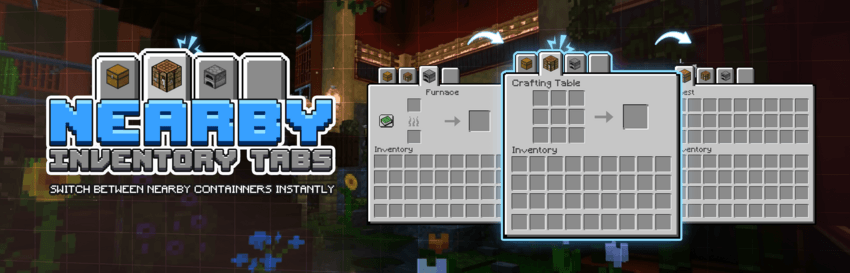
Nearby Inventory Tabs makes inventory management faster and more convenient by adding a simple tab system to your inventory interface. Instantly switch between nearby containers with just one click, without constantly closing and reopening inventories.

Nearby Inventory Tabs is fully compatible with Chest Labels, allowing you to assign custom labels to your chests and easily identify them. Combine both mods for an even better storage experience: organize your chests with custom names and quickly navigate between inventories using tabs!
⚙️ Requirements
Want to play with friends?
Get your own Minecraft server today and enjoy endless adventures with your friends! With top performance and reliable uptime, our servers guarantee a smooth and fun gaming experience for everyone. Use code THEWIZARDfor a 25% discount!

Project description from CurseForge.
Pick your setup
Choose the version and loader you play, then open the matching release.
Check the dependencies, then try the file in a copied instance before changing a world you care about.
Recent files
Nearby-Inventory-Tabs-Neoforge-26.1.2-1.0.0.jar
4 Nov 2026
Nearby-Inventory-Tabs-Fabric-26.1.2-1.0.0.jar
4 Nov 2026
Nearby-Inventory-Tabs-Neoforge-1.21.1-1.0.0.jar
4 Nov 2026
Nearby-Inventory-Tabs-Fabric-1.21.1-1.0.0.jar
4 Nov 2026
Nearby-Inventory-Tabs-Forge-1.20.1-1.0.0.jar
4 Nov 2026
Nearby-Inventory-Tabs-Fabric-1.20.1-1.0.0.jar
4 Nov 2026
Looking for an older file? The official CurseForge project page is in Resources.
 mod
Deployer is a Create library addon that extends logistics, gauges, and fluid systems while prioritizing stability over compatibility.
 mod
Provides Vanilla-style "fly by instrument" support for elytra flight
 mod
Radioactive hazards into Minecraft