Pocket Door Needed by Pocket Links! pocketlinks-1.1.2 for mc1.12.2
requiredMatching file found Matched file: pocketdoor-1.11.0 for mc1.12.2
CurseForge · Minecraft mod
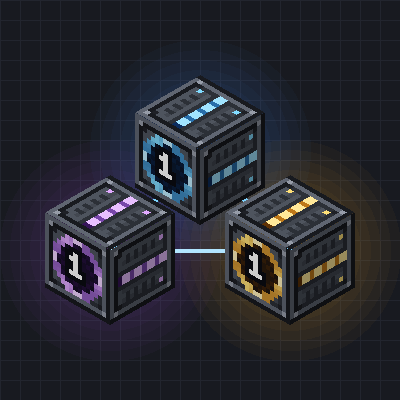
An add-on for Pocket Door: Item, Fluid and Energy Links join your pocket to the world outside, so the machines inside can feed from and into your base.
Quick answer
Pocket Links! pocketlinks-1.1.2 for mc1.12.2 targets 1.12.2 with Forge. The project page does not say whether this file belongs on the client, dedicated server, or both. All 1 required mods have matching files.
Where it goes
The project page does not say whether this file belongs on the client, dedicated server, or both.
The source does not explicitly classify this release as client-only or server-only.
pocketlinks-1.1.2 for mc1.12.2. Change the file and its required mods may change too.
Install Pocket Door first. We found matching files for this game-version and loader setup.
We only count dependency files that match this setup. A file for another loader does not fill the gap.
Before you install it
Built for Pocket Links! pocketlinks-1.1.2 for mc1.12.2. Pick another file and the loader, install side or required mods may change.
Use pocketlinks-1.1.2 for mc1.12.2. It targets 1.12.2 with Forge; another release may have different loader, side or dependency requirements.
Install Pocket Door first. We found matching files for this game-version and loader setup.
The project page does not say whether this file belongs on the client, dedicated server, or both.
Use the “Get this file” button beside pocketlinks-1.1.2 for mc1.12.2. It opens that exact file at the source.
About this project
Every link block is one end. Two ends of the same kind on the same channel of the same pocket are one shared buffer: whatever goes in at one end comes out at the other, in whichever dimension the ends stand. Pipes, hoppers, tanks, cables and storage mods treat an end like an ordinary chest, tank or battery, so Mekanism, AE2, Pipez, Create, Thermal, Ender IO and friends connect to it like to any machine. No pipe mod at all? Set one end to pull from the chest behind it and the other to push into the chest behind it.
Craft a blank Link Card (paper, two iron nuggets, a redstone torch) and combine it with one item:
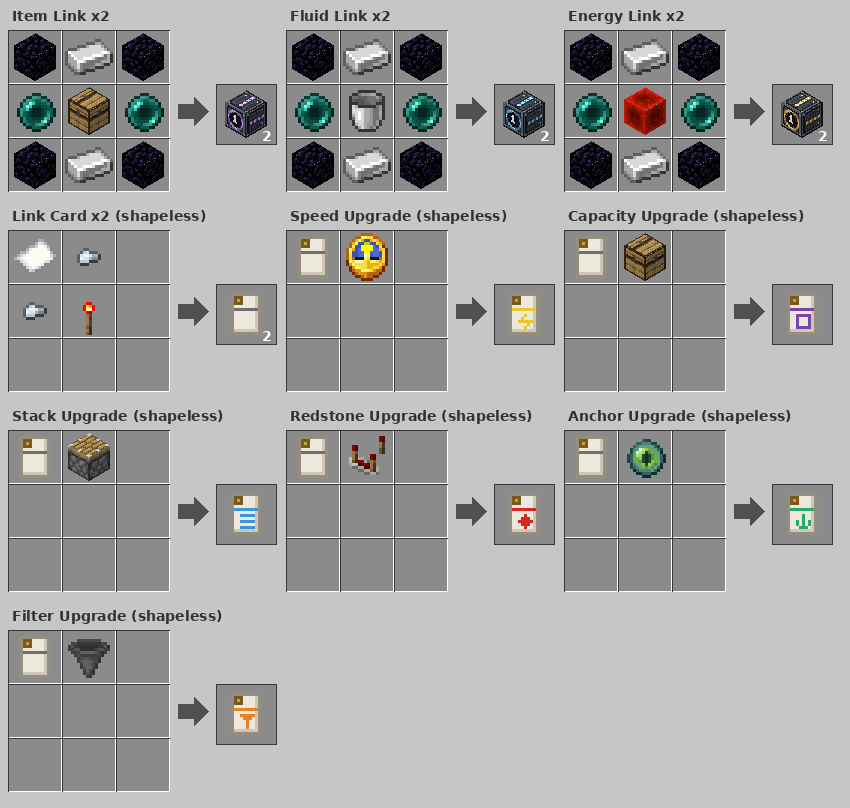
pocketlinks-common.toml, pocketlinks.cfg on 1.12.2): buffer sizes, push/pull rates, outside-to-outside links, Anchor on/off, a cap on cards per end.pocketlinks:item_link, fluid_link, energy_link, link_card, *_upgrade; no keybinds, commands or packets; all ingredients are tags.Project description from CurseForge.
Pick your setup
Choose the version and loader you play, then open the matching release.
Check the dependencies, then try the file in a copied instance before changing a world you care about.
Recent files
pocketlinks-1.1.2-mc1.12.2.jar
6 Nov 2026
pocketlinks-1.1.2-mc1.20.1.jar
6 Nov 2026
pocketlinks-1.1.2-mc1.21.1.jar
6 Nov 2026
pocketlinks-1.1.2-mc26.2.jar
6 Nov 2026
Looking for an older file? The official CurseForge project page is in Resources.
 mod
A calm Frutiger Aero dimension: glossy meadows, glass cities, floating bubbles, Poolrooms and an Aero OS computer that takes you there.
 mod
Additional Hatches that let Modern Industrialization multiblocks draw on other mods mid-recipe: Replication matter, Create stress, PneumaticCraft air and heat, Mekanism chemicals and Tempad chronons. Each integration is optional.
 mod
Crop Climates is an add-on for Cold Sweat that makes crop growth consider the environment.