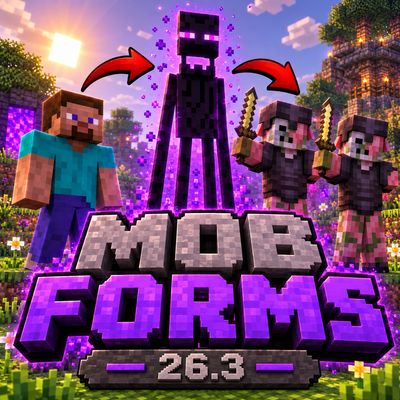
Mob Forms: Become Any Mob
Defeat a mob. Take its form. Live as it for real.
Mob Forms is not a skin swap. When you transform, you get the mob's size, hearts, damage, speed, sounds, animations, powers and even its temper, and the world reacts to what you are. Hunt as a Warden, soar as a Ghast, explode as a Creeper, collect pollen as a Bee or sneak past a village as a Zombie, as long as you have earned the form.
Highlights
- Almost every mob is playable, with all its real variants: baby zombies, villagers of every biome and profession, husks, strays, bogged, every cat, sheep color and more.
- Real powers on the R key: Creeper explosions, Blaze fireballs, the Warden's sonic boom, the Guardian's laser, Shulker bullets and many more.
- Mobs with real personality: hit an Enderman and it becomes furious. Hit a Zombified Piglin and the whole horde comes for revenge. Attack a wild Wolf and the pack defends it.
- Hidden behaviors: forms follow the secret rules of the real mobs. Piglins zombify outside the Nether, zombies turn into Drowned underwater, lightning changes villagers and pigs, and the undead are healed by Harming potions.
- The world reacts to you: as a Zombie, villagers flee. As a Skeleton, other undead leave you alone. As a Villager, zombies hunt you down.
- Real survival: each form has its own diet, inventory size and way of living.
- Favorites and Quick transform: keep your favorite forms at hand and switch in a second with a radial wheel.
- Fully configurable: every feature can be turned on or off, with Easy, Medium and Hard presets.
- Translated into 61 languages.
How It Works
1. Find Xenita
Xenita is a glowing lilac ore, as rare as gold. Look for it deep underground in stone and deepslate, from the bottom of the world up to Y 32. It is most common around Y -16.
- Raw Xenita: mine Xenita Ore with a stone pickaxe or better.
- Xenita Ingot: smelt Raw Xenita in a furnace or blast furnace.
2. Craft the Shapeshifter Amulet
- Corners: Gold Ingot
- Sides: Xenita Ingot
- Center: Redstone Dust
The recipe unlocks in your recipe book as soon as you pick up Xenita.
3. Collect forms
Kill any mob with the amulet in your inventory and its form is saved forever. Its body bursts into lilac particles and a small spinning preview pops up on screen. Every variant counts as a different form (color, baby, biome, tamed...), so go hunting!
4. Transform
Right-click with the amulet to open the form selector. Mobs with several variants open their own tab, and you can search any mob by name.
The amulet has 13 uses. Most forms cost 1 use, strong forms cost 5 (Warden, Iron Golem, Ravager, Elder Guardian, Piglin Brute, Evoker) and bosses cost 8 (Wither, Ender Dragon). The cost is shown under each mob.
Turning back into a human is always free and does not need the amulet: just press H.
Controls
- Right-click with the amulet: open the form selector.
- R: use your form's ability.
- H: turn back into a human.
- G: tap it to open the selector (in creative mode or with "Transform without amulet"). Hold it to open the Quick transform wheel.
- Left Alt (hold): walk slowly, like mobs do when they wander.
- Crouch: special actions for some forms (the Armadillo rolls up, the Fox gets ready to pounce, the Bee collects pollen). A hint in the corner tells you what you can do.
You can change every key in Controls, where Mob Forms has its own section.
Favorites and Quick Transform
- Click the star on any form to add it to your Favorites tab.
- Click the lightning icon to add it to the Quick transform bar (up to 9 forms), and reorder them with the arrows.
- Hold G to open a wheel with those forms: point at a mob and release the key to transform. You can also click a mob or press 1 to 9.
- Your lists are saved and work in every world.
Mobs With Personality
Your form does not just look like the mob, it behaves like it.
- Enderman: get hit and you lose your temper. You shake, let out the famous stare scream, run faster and hit harder for a while. If you carry a block, you swing it with your arms when you attack.
- Zombified Piglin: get hit and you raise your arms and speed up. You never fight alone: every Zombified Piglin nearby joins the hunt.
- Wolf: if something attacks you as a wild wolf, the nearby pack gets angry and goes after it.
- Anger belongs to the form: change into another mob and the anger is gone.
- Shulker: it cannot move. It hides in its shell (+20 armor, arrows bounce off), peeks out to attack and teleports away when hurt.
- Ender Dragon: real flight animations, wing flaps and growls. Its wings push away everything they touch and its head bites.
- Warden: blind like the real one, it finds you by sound. It hears vibrations, clicks its tendrils and roars.
- Rabbit moves by hopping. Frog jumps, croaks, shoots its tongue and swims. Fox crouches and pounces.
- Wither: its side heads turn toward wherever the main head is looking.
Abilities (R key)
Every mob with an ability shows an icon on screen with its cooldown. Each form keeps its own cooldown.
- Creeper: swells, flashes white and explodes. You go down with it!
- Enderman: teleport (3 s).
- Blaze: small fireball (1 s).
- Ghast: large fireball, with its real mouth animation (3 s).
- Wither: wither skull (2 s).
- Ender Dragon: dragon fireball (5 s).
- Witch: Potion of Harming (3 s).
- Snow Golem: snowball (1 s).
- Llama: spit (2 s).
- Breeze: wind charge (2 s).
- Evoker: line of fangs (5 s).
- Warden: sonic boom (5 s).
- Drowned: trident (2 s).
- Guardian and Elder Guardian: charging laser beam (5 s).
- Shulker: homing bullet, just look toward your target (2 s).
- Pufferfish: puff up and sting everything around you (10 s).
- Axolotl: play dead, regenerate and nobody attacks you (60 s).
Mobs Info explains what every ability does.
Infinite arrows
Hold the mob's weapon and shoot without spending arrows:
- Skeleton: normal arrows (bow).
- Stray: Slowness arrows (bow).
- Bogged: Poison arrows (bow).
- Parched: Weakness arrows (bow).
- Pillager: normal arrows (crossbow).
Special attacks
- Iron Golem: raises its arms and launches enemies into the air.
- Hoglin and Zoglin: headbutt that throws enemies away.
- Ravager: brutal bite with extra knockback.
- Warden: crushing hit with strong knockback.
- Goat: ram that sends enemies flying.
- Polar Bear: rears up on two legs to strike.
- Bee and Cave Spider: poison (except on Easy).
- Wither Skeleton: applies Wither.
- Husk: causes Hunger with an empty hand.
- Burning Zombie: sets its target on fire.
Hidden Behaviors
Forms copy the rules that the real mobs follow behind the scenes.
- Conversions: a Piglin, Piglin Brute or Hoglin outside the Nether zombifies after 15 seconds. A Zombie that stays underwater becomes a Drowned, a Husk becomes a Zombie and a Skeleton stuck in powder snow becomes a Stray.
- Lightning: a Villager becomes a Witch, a Pig becomes a Zombified Piglin, a Mooshroom changes color, a Creeper gets charged, a Turtle dies and a Copper Golem loses its rust.
- Growing up: babies grow into adults and a Tadpole becomes a Frog. A Zombie Villager can be cured with Weakness and a Golden Apple.
- Undead: Healing potions hurt you and Harming potions heal you. Smite hits you harder, and so do Bane of Arthropods and Impaling on the right forms.
- Immunities: each form is immune to the same effects as the real mob. The Witch resists magic, some mobs never freeze or can walk on powder snow, and the Goat takes less fall damage.
- Creaking: your Creaking Heart moves to the nearest tree. Mobs that want to kill you will try to destroy it, and if it breaks, you die.
Live Like the Real Mob
- Body: you get the mob's height, hearts, damage and walking speed.
- Health bar: your hearts become a bar in the mob's own color, and it refills with an effect when you change form.
- Sounds: real footsteps, ambient, hurt and death sounds. Baby mobs have high-pitched voices.
- Animations: walking, attacking, bow drawing and special animations, also in first person with the mob's own arms, paws or fins.
- Flight: flying mobs can fly, each at its own speed. The Ghast floats slowly and the Chicken glides.
- Water mobs: fish and dolphins flop on land. The Dolphin holds its breath for about 2 minutes and leaps at the surface. The Axolotl dries out unless it rains. Water mobs never show air bubbles underwater.
- Undead: zombies and skeletons burn in daylight unless you wear a helmet.
- Enderman: water hurts it and it teleports to dodge projectiles.
- Slimes and Magma Cubes only move by hopping. Spiders climb walls and cobwebs do not slow them down.
- Bee: collect pollen from flowers, drip nectar that makes crops grow and fly inside beehives to leave honey. If you sting, you lose your stinger and die, just like a real bee.
- Armadillo: crouch to roll up and take less damage.
- Daily habits: chickens lay eggs, sheep regrow their wool and can be sheared, pandas sneeze, the Snow Golem melts in hot places, the Strider gets cold out of lava, the Ravager breaks leaves, the Vex flies through walls, arrows bounce off the Breeze, and parrots and allays dance to music.
- Elder Guardian: curses nearby players with Mining Fatigue.
- ...and much more!
Real Survival
Every rule can be turned on or off, or set at once with the Easy, Medium and Hard presets.
- Real diet: each form eats its favorite food. Skeletons eat bones, cows eat wheat, foxes eat berries and meat. The hunger bar shows that food instead of drumsticks. You can choose whether other food is not allowed, allowed with a penalty, or allowed freely.
- Eat from the world: animals eat grass, crops, berries, flowers or their food lying on the ground. A small hint tells you when something is edible.
- Inventory by body: humanoids keep their 36 slots, donkeys and llamas get 24, large mobs 9, medium mobs 4, small mobs 2, fish and the Allay 1, and bosses 3. The inventory screen shrinks to fit, and your other items are kept safe until you turn human again.
- Hands: only forms with hands can craft and use things like doors, chests and buttons.
- Amulet cost: strong forms and bosses cost more uses.
- Hard healing: strong forms cannot heal by eating.
Mobs Info
Open it from the top-right corner of the selector. It shows every mob with its head icon: health, damage, speed, favorite food, ability, inventory slots, amulet cost and traits. Use the search bar to find any mob. Mobs you have not unlocked yet appear as "???".
The World Reacts to You
- A hostile mob only attacks you if it would attack the real mob you are.
- As a Zombie, villagers run away from you, and a villager you kill becomes a Zombie Villager.
- As a Villager, zombies chase you.
- Piglins, axolotls, frogs, dolphins, wolves and more react to your form just like they would to the real mob.
- Turn on "Hostile mobs" if you want monsters to attack you like in the normal game, whatever your form.
Xenita Gear
- Xenita tools: sword, pickaxe, axe, shovel and hoe, stronger than iron (400 durability, faster mining and more damage).
- Xenita Sword: every hit has a 20% chance to transform the mob into a related one: zombie to husk or drowned, skeleton to stray or bogged, spider to cave spider, cow to mooshroom, pig to zombified piglin, villager to witch, and more.
- Block of Xenita: works as a beacon base.
- Block of Raw Xenita: compact storage for your ore.
Everything is in its own Mob Forms tab in creative mode.
Settings
Open Options, then Mob Forms..., or click the lilac button in the form selector.
- Difficulty preset: Easy, Medium, Hard or Custom. Changing any option sets it to Custom.
- Configuration: real mob behavior, real movement, Warden blindness, real diet, eating other food, inventory by body, crafting and using only with hands, amulet cost, hard healing, hostile mobs, transform without amulet, Piglins zombify outside the Nether and first-person hands.
- Controls: change the ability, human and slow walk keys, or open all game controls.
- Interface: the ability icon, its text and screen corner, the dynamic health bar and new mob notices.
- Credits: the mod's author and links.
In creative mode, the selector also has an "Unlock all" button that unlocks every variant of every mob.
Installation
You need Minecraft Java 26.3, Fabric Loader 0.20.1 or newer, Fabric API and Java 25.
- Install Fabric Loader for Minecraft 26.3.
- Download Fabric API for Minecraft 26.3.
- Download the Mob Forms .jar file.
- Open your
.minecraft folder and go to mods. Create it if it does not exist.
- Copy both files there.
- Open the launcher and pick the Fabric profile.
On Windows, type %appdata%\.minecraft in the File Explorer address bar to open the folder.
To play on a server, install the mod on the server and on every player's game.
Credits and License
Mob Forms was created by LucasPY855. All rights reserved.
More projects: CurseForge · Modrinth
You may not modify the mod, re-upload it, sell it, use its code or remove the credits without written permission from the author. You may download and play it for personal use from its official pages.
Minecraft is a trademark of Mojang AB. This mod is not affiliated with Mojang or Microsoft.
Mob Forms: Conviértete en Cualquier Mob
Derrota a un mob. Toma su forma. Vive como él de verdad.
Mob Forms no es un simple cambio de aspecto. Al transformarte, tienes el tamaño, los corazones, el daño, la velocidad, los sonidos, las animaciones, los poderes y hasta el carácter del mob, y el mundo reacciona a lo que eres. Caza como un Warden, vuela como un Ghast, explota como un Creeper, junta polen como una Abeja o cruza una aldea como Zombi, siempre que te hayas ganado esa forma.
Lo Más Destacado
- Casi todos los mobs son jugables, con todas sus variantes reales: zombis bebé, aldeanos de cada bioma y oficio, husks, strays, bogged, cada gato, cada color de oveja y más.
- Poderes reales con la tecla R: explosiones de Creeper, bolas de fuego de Blaze, el rayo sónico del Warden, el láser del Guardián, las balas del Shulker y muchos más.
- Mobs con personalidad real: golpea a un Enderman y se pone furioso. Golpea a un Piglin zombificado y toda la horda viene a vengarse. Ataca a un Lobo salvaje y la manada lo defiende.
- Comportamientos ocultos: las formas siguen las reglas secretas de los mobs reales. Los piglins se zombifican fuera del Nether, los zombis se vuelven ahogados bajo el agua, los rayos cambian a aldeanos y cerdos, y a los no-muertos los curan las pociones de daño.
- El mundo reacciona a ti: siendo Zombi, los aldeanos huyen. Siendo Esqueleto, los demás no-muertos te dejan en paz. Siendo Aldeano, los zombis te persiguen.
- Supervivencia real: cada forma tiene su propia dieta, su tamaño de inventario y su manera de vivir.
- Favoritos y Transformación rápida: ten tus formas favoritas a mano y cambia en un segundo con un menú circular.
- Totalmente configurable: cada función se puede activar o desactivar, con presets Fácil, Medio y Difícil.
- Traducido a 61 idiomas.
Cómo Funciona
1. Encuentra Xenita
La Xenita es un mineral lila brillante, tan raro como el oro. Búscala en lo profundo, en piedra y pizarra profunda, desde el fondo del mundo hasta la capa Y 32. Es más común cerca de la capa Y -16.
- Xenita en bruto: pica la mena de Xenita con pico de piedra o mejor.
- Lingote de Xenita: cocina Xenita en bruto en un horno o alto horno.
2. Fabrica el Amuleto Cambiaformas
- Esquinas: Lingote de oro
- Lados: Lingote de Xenita
- Centro: Polvo de redstone
La receta aparece en tu libro de recetas en cuanto recoges Xenita.
3. Colecciona formas
Mata cualquier mob con el amuleto en tu inventario y su forma queda guardada para siempre. Su cuerpo estalla en partículas lilas y aparece en pantalla una pequeña vista del mob girando. Cada variante cuenta como una forma distinta (color, cría, bioma, domesticado...), ¡así que sal de cacería!
4. Transfórmate
Haz clic derecho con el amuleto para abrir el selector de formas. Los mobs con varias variantes abren su propia pestaña, y puedes buscar cualquier mob por su nombre.
El amuleto tiene 13 usos. La mayoría de las formas cuestan 1 uso, las formas fuertes cuestan 5 (Warden, Gólem de hierro, Devastador, Guardián anciano, Piglin bruto, Evocador) y los jefes cuestan 8 (Wither, Dragón del End). El costo aparece debajo de cada mob.
Volver a ser humano siempre es gratis y no necesita el amuleto: solo presiona H.
Controles
- Clic derecho con el amuleto: abrir el selector de formas.
- R: usar la habilidad de tu forma.
- H: volver a ser humano.
- G: tócala para abrir el selector (en creativo o con "Transformarse sin amuleto"). Mantenla para abrir el menú de Transformación rápida.
- Alt izquierdo (mantener): caminar despacio, como los mobs cuando pasean.
- Agacharse: acciones especiales de algunas formas (el Armadillo se enrolla, el Zorro se prepara para abalanzarse, la Abeja junta polen). Un aviso en la esquina te dice qué puedes hacer.
Puedes cambiar todas las teclas en Controles, donde Mob Forms tiene su propia sección.
Favoritos y Transformación Rápida
- Haz clic en la estrella de cualquier forma para agregarla a tu pestaña de Favoritos.
- Haz clic en el rayo para agregarla a la barra de Transformación rápida (hasta 9 formas), y ordénalas con las flechas.
- Mantén G para abrir un círculo con esas formas: apunta a un mob y suelta la tecla para transformarte. También puedes hacer clic en un mob o usar las teclas 1 a 9.
- Tus listas se guardan y valen en todos los mundos.
Mobs Con Personalidad
Tu forma no solo se ve como el mob, también se comporta como él.
- Enderman: si te golpean, pierdes la paciencia. Tiemblas, sueltas el famoso grito, corres más rápido y pegas más fuerte por un rato. Si llevas un bloque, lo mueves con los brazos al atacar.
- Piglin zombificado: si te golpean, levantas los brazos y aceleras. Nunca peleas solo: todos los Piglins zombificados cercanos se unen a la cacería.
- Lobo: si te atacan siendo lobo salvaje, la manada cercana se enoja y va por el agresor.
- El enojo es de la forma: si cambias a otro mob, el enojo desaparece.
- Shulker: no puede moverse. Se esconde en su caparazón (+20 de armadura, las flechas rebotan), se asoma para atacar y se teletransporta cuando lo hieren.
- Dragón del End: animaciones de vuelo reales, aleteos y rugidos. Sus alas empujan todo lo que tocan y su cabeza muerde.
- Warden: es ciego como el real y te encuentra por el sonido. Oye las vibraciones, mueve sus antenas y ruge.
- El Conejo se mueve saltando. La Rana salta, croa, lanza la lengua y nada. El Zorro se agacha y se abalanza.
- Wither: sus cabezas laterales giran hacia donde mira la cabeza principal.
Habilidades (tecla R)
Cada mob con habilidad muestra un icono en pantalla con su recarga. Cada forma guarda su propia recarga.
- Creeper: crece, parpadea en blanco y explota. ¡Y tú con él!
- Enderman: teletransporte (3 s).
- Blaze: bola de fuego pequeña (1 s).
- Ghast: bola de fuego grande, con su animación real de la boca (3 s).
- Wither: calavera del Wither (2 s).
- Dragón del End: bola de aliento de dragón (5 s).
- Bruja: poción de daño (3 s).
- Gólem de nieve: bola de nieve (1 s).
- Llama: escupitajo (2 s).
- Breeze: carga de viento (2 s).
- Evocador: colmillos en línea (5 s).
- Warden: rayo sónico (5 s).
- Ahogado: tridente (2 s).
- Guardián y Guardián anciano: rayo láser que se carga (5 s).
- Shulker: bala que persigue sola, basta con mirar hacia el blanco (2 s).
- Pez globo: se infla y pica a todo lo que lo rodea (10 s).
- Ajolote: se hace el muerto, se cura y nadie lo ataca (60 s).
Mobs Info explica qué hace cada habilidad.
Flechas infinitas
Lleva el arma del mob y dispara sin gastar flechas:
- Esqueleto: flechas normales (arco).
- Esqueleto errante: flechas de lentitud (arco).
- Bogged: flechas venenosas (arco).
- Parched: flechas de debilidad (arco).
- Saqueador: flechas normales (ballesta).
Golpes especiales
- Gólem de hierro: levanta los brazos y lanza a los enemigos por el aire.
- Hoglin y zoglin: cabezazo que los manda lejos.
- Devastador: mordida brutal con más empuje.
- Warden: golpe aplastante con mucho empuje.
- Cabra: embestida que manda a volar.
- Oso polar: se para en dos patas para golpear.
- Abeja y araña de cueva: envenenan (salvo en dificultad fácil).
- Esqueleto del Wither: da el efecto Wither.
- Husk: da hambre al golpear sin nada en la mano.
- Zombi en llamas: prende fuego a quien golpea.
Comportamientos Ocultos
Las formas copian las reglas que los mobs reales siguen por dentro.
- Conversiones: un Piglin, Piglin bruto o Hoglin fuera del Nether se zombifica a los 15 segundos. Un Zombi que se queda bajo el agua se vuelve Ahogado, un Husk se vuelve Zombi y un Esqueleto atrapado en nieve en polvo se vuelve Esqueleto errante.
- Rayos: el Aldeano se vuelve Bruja, el Cerdo se vuelve Piglin zombificado, la Champiñaca cambia de color, el Creeper queda cargado, la Tortuga muere y el Gólem de cobre pierde el óxido.
- Crecer: las crías crecen y el Renacuajo se vuelve Rana. El Aldeano zombi se puede curar con Debilidad y una Manzana dorada.
- No-muertos: las pociones de curación te dañan y las de daño te curan. Golpeo te hace más daño, igual que Perdición de los artrópodos y Empalamiento en las formas que corresponden.
- Inmunidades: cada forma es inmune a los mismos efectos que el mob real. La Bruja resiste la magia, algunos mobs no se congelan o caminan sobre la nieve en polvo, y la Cabra recibe menos daño por caída.
- Crepitante: tu corazón de crepitante se traslada al árbol más cercano. Los mobs que quieren matarte intentarán destruirlo, y si se rompe, mueres.
Vive Como el Mob Real
- Cuerpo: tienes la altura, los corazones, el daño y la velocidad al caminar del mob.
- Barra de vida: tus corazones se convierten en una barra del color del mob, y se rellena con un efecto al cambiar de forma.
- Sonidos: pasos, sonidos de ambiente, de daño y de muerte reales. Las crías tienen voz aguda.
- Animaciones: caminar, golpear, tensar el arco y animaciones especiales, también en primera persona con los brazos, patas o aletas del propio mob.
- Vuelo: los mobs voladores pueden volar, cada uno a su velocidad. El Ghast flota despacio y la Gallina planea.
- Mobs de agua: peces y delfines coletean en tierra. El Delfín aguanta unos 2 minutos fuera del agua y salta en la superficie. El Ajolote se seca si no llueve. Los mobs de agua no muestran burbujas bajo el agua.
- No-muertos: zombis y esqueletos se queman de día, salvo que lleves casco.
- Enderman: el agua le hace daño y se teletransporta para esquivar proyectiles.
- Slimes y cubos de magma solo se mueven saltando. Las Arañas trepan paredes y las telarañas no las frenan.
- Abeja: junta polen de las flores, gotea néctar que hace crecer los cultivos y entra volando en las colmenas a dejar miel. Si picas, pierdes el aguijón y mueres, igual que una abeja real.
- Armadillo: agáchate para enrollarte y recibir menos daño.
- Hábitos diarios: la gallina pone huevos, la oveja recupera la lana y se puede esquilar, el panda estornuda, el gólem de nieve se derrite en lugares calurosos, el lavagante tiene frío fuera de la lava, el devastador rompe hojas, el vex atraviesa paredes, las flechas rebotan en el breeze, y los loros y allays bailan con la música.
- Guardián anciano: maldice a los jugadores cercanos con Fatiga minera.
- ...¡y mucho más!
Supervivencia Real
Cada regla se puede activar o desactivar, o elegir de una vez con los presets Fácil, Medio y Difícil.
- Dieta real: cada forma come su comida favorita. Los esqueletos comen huesos, las vacas trigo, los zorros bayas y carne. La barra de hambre muestra esa comida en lugar de muslos. Puedes elegir si otra comida no se permite, se permite con castigo o se permite sin castigo.
- Comer del mundo: los animales comen pasto, cultivos, bayas, flores o su comida tirada en el suelo. Un pequeño aviso te dice cuando algo se puede comer.
- Inventario según el cuerpo: los humanoides tienen sus 36 espacios, burros y llamas 24, los mobs grandes 9, los medianos 4, los chicos 2, los peces y el Allay 1, y los jefes 3. La pantalla de inventario se achica, y tus demás cosas se guardan hasta que vuelves a ser humano.
- Manos: solo las formas con manos pueden fabricar y usar cosas como puertas, cofres y botones.
- Costo del amuleto: las formas fuertes y los jefes gastan más usos.
- Curación difícil: las formas fuertes no se curan comiendo.
Mobs Info
Ábrelo desde la esquina de arriba a la derecha del selector. Muestra cada mob con el icono de su cabeza: vida, daño, velocidad, comida favorita, habilidad, espacios de inventario, costo del amuleto y rasgos. Usa la barra de búsqueda para encontrar cualquier mob. Los mobs que todavía no conseguiste aparecen como "???".
El Mundo Reacciona a Ti
- Un mob hostil solo te ataca si también atacaría al mob real que eres.
- Siendo Zombi, los aldeanos huyen de ti, y un aldeano que matas se convierte en Aldeano zombi.
- Siendo Aldeano, los zombis te persiguen.
- Piglins, ajolotes, ranas, delfines, lobos y más reaccionan a tu forma igual que con el mob real.
- Activa "Mobs hostiles" si quieres que los monstruos te ataquen como en el juego normal, sea cual sea tu forma.
Equipo de Xenita
- Herramientas de Xenita: espada, pico, hacha, pala y azada, más fuertes que las de hierro (400 de durabilidad, pican más rápido y hacen más daño).
- Espada de Xenita: cada golpe tiene un 20% de probabilidad de transformar al mob en uno pariente: zombi a husk o ahogado, esqueleto a esqueleto errante o bogged, araña a araña de cueva, vaca a champiñaca, cerdo a piglin zombificado, aldeano a bruja, y más.
- Bloque de Xenita: sirve como base de faro.
- Bloque de Xenita en bruto: guarda tu mineral en poco espacio.
Todo está en su propia pestaña Mob Forms en el modo creativo.
Configuración
Abre Opciones y luego Mob Forms..., o haz clic en el botón lila del selector de formas.
- Preset de dificultad: Fácil, Medio, Difícil o Personalizado. Cambiar cualquier opción lo deja en Personalizado.
- Configuración: comportamiento real, movimiento real, ceguera del Warden, dieta real, comer otra comida, inventario según el cuerpo, fabricar y usar solo con manos, costo del amuleto, curación difícil, mobs hostiles, transformarse sin amuleto, piglins se zombifican fuera del Nether y manos en primera persona.
- Controles: cambia las teclas de habilidad, de volver a humano y de caminar despacio, o abre todos los controles del juego.
- Interfaz: el icono de habilidad, su texto y su esquina, la barra de vida dinámica y los avisos de mob nuevo.
- Créditos: el autor del mod y sus enlaces.
En modo creativo, el selector también tiene el botón "Desbloquear todo", que desbloquea todas las variantes de cada mob.
Instalación
Necesitas Minecraft Java 26.3, Fabric Loader 0.20.1 o más nuevo, Fabric API y Java 25.
- Instala Fabric Loader para Minecraft 26.3.
- Descarga Fabric API para Minecraft 26.3.
- Descarga el archivo .jar de Mob Forms.
- Abre la carpeta
.minecraft y entra en mods. Si no existe, créala.
- Copia ahí los dos archivos.
- Abre el lanzador y elige el perfil de Fabric.
En Windows, escribe %appdata%\.minecraft en la barra de direcciones del explorador de archivos para abrir la carpeta.
Para jugar en un servidor, instala el mod en el servidor y en cada jugador.
Créditos y Licencia
Mob Forms fue creado por LucasPY855. Todos los derechos reservados.
Más proyectos: CurseForge · Modrinth
No está permitido modificar el mod, volver a subirlo, venderlo, usar su código ni quitar los créditos sin permiso escrito del autor. Puedes descargarlo y jugarlo para uso personal desde sus páginas oficiales.
Minecraft es una marca de Mojang AB. Este mod no está afiliado a Mojang ni a Microsoft.
Project description from CurseForge.
 mod
 mod
 mod