Minecraft version
Back to mods 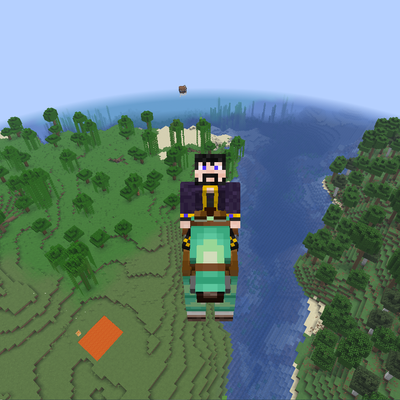
CurseForge · Minecraft mod
Equinabilites
Set horse armors to allow water/lava walking or flying! Equip armor on Skeleton Horses! Adjust speeds!
Choose a version Pick your version below, then grab the matching file.
Quick answer
Which Equinabilites release should I use?
Latest stable file equinabilities-1.0.1.jar
Game version 26.2
Loader NeoForge
Equinabilites equinabilities-1.0.1.jar targets 26.2 with NeoForge. The project page does not say whether this file belongs on the client, dedicated server, or both. No extra mods listed for this file.
Where it goes
Is Equinabilites required on the client, server, or both?
The project page does not say whether this file belongs on the client, dedicated server, or both.
Client Source doesn’t say
Dedicated server Source doesn’t say
Loader for this release NeoForge
Required install it here Optional supported, not mandatory Not supported do not install here Source doesn’t say do not assume
The source does not explicitly classify this release as client-only or server-only.
What else does Equinabilites equinabilities-1.0.1.jar need?
equinabilities-1.0.1.jar. Change the file and its required mods may change too.
This file does not list any required mods. Do not add a library just because a different file uses it.
This file does not list any required or optional mods.
Before you install it
Add Equinabilites without breaking your instance.
Built for Equinabilites equinabilities-1.0.1.jar. Pick another file and the loader, install side or required mods may change.
- 01
Stick to this file
Use equinabilities-1.0.1.jar. It targets 26.2 with NeoForge; another release may have different loader, side or dependency requirements.
- 02
Bring the mods it needs
This file does not list any required mods. Do not add a library just because a different file uses it.
- 03
Put it on the correct side
The project page does not say whether this file belongs on the client, dedicated server, or both.
- 04
Pick the file you checked
Use the “Get this file” button beside equinabilities-1.0.1.jar. It opens that exact file at the source.
About this project
What does Equinabilites add?
Equinabilities is one of my favorite mods. Attempts to bring skeleton horses up to parity with regular horses, and allows for water walking (not frostwalking), lava walking or happy ghast style flying horses.
Designed to work with both vanilla and modded horse armor, Equinabilities lets server owners decide which armor grants which abilities.
Pegasus Flight
Give horses the ability to fly using designated armor
Intuitive, Elytra-style activation: press Space again while airborne
Once flying, your horse handles much like a fast Happy Ghast
Water Walking
Ride across the surface of water without creating ice
Works with skeleton horses, overriding their normal underwater movement
Lava Walking
Ride across the surface of lava
Protect appropriately equipped mounts from lava and fire damage
Customization
Customize horse movement speed and health.
Configure skeleton horse armor compatibility and attributes.
Configure which horse armor grants each ability.
Assign multiple abilities to the same armor.
All special armor abilities are disabled by default. Server owners can enable them by assigning abilities to specific armor items in the configuration file.
Whether you want a single legendary flying mount, specialized water and lava mounts, or an entire stable of magical horses, the choice is yours.
Installation: Both client and server
Project description from CurseForge.
Pick your setup
Equinabilites by Minecraft version and loader
Choose the version and loader you play, then open the matching release.
Check the dependencies, then try the file in a copied instance before changing a world you care about.
Recent files
Equinabilites versions and loaders
equinabilities-1.0.1.jar
7 Nov 2026
Client Source doesn’t say Server Source doesn’t say Dependencies No extras listed Listed on Release listing
Check the 26.2 · NeoForge setup NeoForge26.2 release
Looking for an older file? The official CurseForge project page is in Resources.
 mod
CurseForge + Modrinth · Minecraft
LOD Server Support
Unofficial multiplayer support for Voxy: servers send distant terrain and far-away players to clients. Also fills Xaero's World Map and JourneyMap, and works with Distant Horizons servers. The same mod as Voxy Server Side.
 mod
CurseForge + Modrinth · Minecraft
FixMCStats
Mod that aims to fix multiple issues with the Minecraft statistics.🤓
 mod
CurseForge · Minecraft
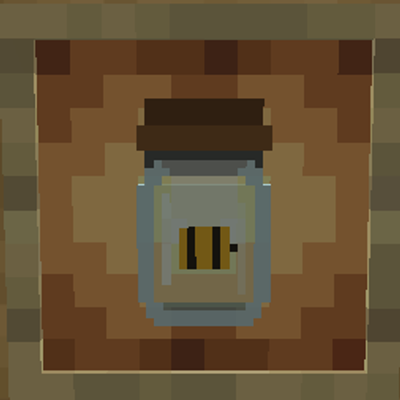
TaxiaCraft Bee Jar
TaxiaCraft Bee Jar is a lightweight Fabric beekeeping utility that makes capturing, transporting and relocating bees simple without turning the mechanic into a free resource generator.