Minecraft version
Back to mods 
CurseForge · Minecraft mod
Retractable Fences
Adds retractable variants of the vanilla fences that can be used as doors, gates, and more!
Choose a version Pick your version below, then grab the matching file.
Quick answer
Which Retractable Fences release should I use?
beta file retractable_fences-1.1.1-forge-1.20.1.jar
Game version 1.20.1
Loader Forge
Retractable Fences retractable_fences-1.1.1-forge-1.20.1.jar targets 1.20.1 with Forge. The project page does not say whether this file belongs on the client, dedicated server, or both. No extra mods listed for this file.
Where it goes
Is Retractable Fences required on the client, server, or both?
The project page does not say whether this file belongs on the client, dedicated server, or both.
Client Source doesn’t say
Dedicated server Source doesn’t say
Loader for this release Forge
Required install it here Optional supported, not mandatory Not supported do not install here Source doesn’t say do not assume
The source does not explicitly classify this release as client-only or server-only.
What else does Retractable Fences retractable_fences-1.1.1-forge-1.20.1.jar need?
retractable_fences-1.1.1-forge-1.20.1.jar. Change the file and its required mods may change too.
This file does not list any required mods. Do not add a library just because a different file uses it.
This file does not list any required or optional mods.
Before you install it
Add Retractable Fences without breaking your instance.
Built for Retractable Fences retractable_fences-1.1.1-forge-1.20.1.jar. Pick another file and the loader, install side or required mods may change.
- 01
Stick to this file
Use retractable_fences-1.1.1-forge-1.20.1.jar. It targets 1.20.1 with Forge; another release may have different loader, side or dependency requirements.
- 02
Bring the mods it needs
This file does not list any required mods. Do not add a library just because a different file uses it.
- 03
Put it on the correct side
The project page does not say whether this file belongs on the client, dedicated server, or both.
- 04
Pick the file you checked
Use the “Get this file” button beside retractable_fences-1.1.1-forge-1.20.1.jar. It opens that exact file at the source.
About this project
What does Retractable Fences add?
Retractable Fences
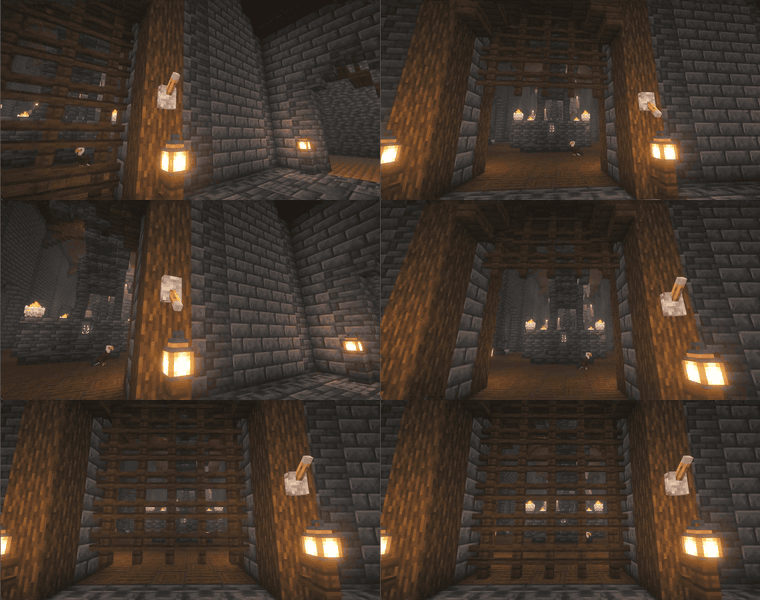
Turn any fence into a castle portcullis. Build a wall of retractable fences, click it, and watch every column slide smoothly up into its top fence, leaving only the top row as a lintel. Click again (or wait a few seconds) and it comes back down.
Works with any fence from any mod: a retractable fence copies the look and connections of the fence it was made from.
Features
- Smooth animation: the whole gate rises and lowers together, and each fence hides inside the top fence of its column. Nothing pokes through the blocks above.
- Any fence, any mod: vanilla fences and fences from other mods keep their original appearance and connections. Fences added later work too.
- Auto-close: the gate closes by itself after 12 seconds (configurable), or with another click.
- Safe closing: mobs and players standing under the gate are pushed aside like a piston would. If there is no room, the gate opens again.
- Winch: a hand-cranked winch that controls up to 8 gates from up to 32 blocks away. Crank it by hand or power it with redstone.
- Redstone links: link a gate to any block that emits a signal: levers, buttons, pressure plates, sculk sensors, calibrated sculk sensors, and redstone blocks from other mods. A lever keeps it open while powered; a button, plate or sensor opens it and it closes by itself.
- Secure: a linked gate ignores direct clicks, so nobody can open your castle from outside.
- Gate inspector: click a gate with the Linker to see which fences belong to it, and which ones are missing a mechanism.
- Custom sounds: wooden creaks while moving and a wooden thud at the end.
- JEI support: recipes for every compatible fence.
- Lightweight: no per-tick work while gates are idle.
How to use
- Craft Retractable Fences: 1 Mechanism + 1 to 4 identical fences (shapeless) gives the same number of Retractable Fences. You can also use a Mechanism directly on a placed fence.
- Build a gate: stack them into a wall. All touching retractable fences form one gate (up to 256 blocks and 24 high).
- Open it: right-click any fence of the gate.
- Remote control: take the Linker, click a Winch or any redstone source, then click the gate. Sneak + click the gate with the Linker to unlink.
Recipes
- Mechanism: iron ingot + redstone dust + string (shapeless).
- Retractable Fence: 1 Mechanism + 1 to 4 identical fences (shapeless).
- Winch: stick on
Project description from CurseForge.
Pick your setup
Retractable Fences by Minecraft version and loader
Choose the version and loader you play, then open the matching release.
Check the dependencies, then try the file in a copied instance before changing a world you care about.
Recent files
Retractable Fences versions and loaders
retractable_fences-1.1.1-forge-1.20.1.jar
9 Nov 2026
Client Source doesn’t say Server Source doesn’t say Dependencies No extras listed Listed on Release listing
Check the 1.20.1 · Forge setup 1.20.1Forge beta
Looking for an older file? The official CurseForge project page is in Resources.
 mod
CurseForge · Minecraft
Profet's Timber
Chop one log and the whole tree comes down, cartoon style: it creaks, tips over, bursts into leaves and pops apart into its drops. Only needed on the server.
 mod
CurseForge · Minecraft
Mantislight
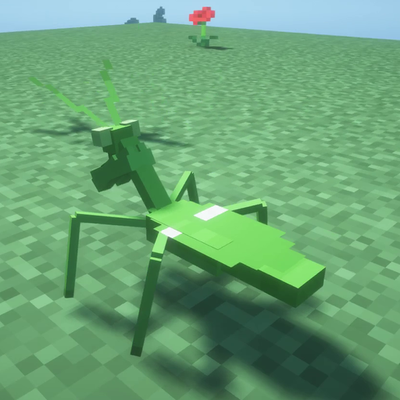
Eleven real praying mantises that blend in: catch them, keep them in enclosures, raise them from egg case to adult, and raise a Vigil that keeps watch.
 mod
CurseForge · Minecraft
Simple Location Marking
Simple Location Marking is a lightweight, client-side location marking mod for Minecraft Fabric, directly inspired by the Waypoints feature of Xaero's Minimap.