Minecraft version
Back to mods 
CurseForge · Minecraft mod
Better PlayTime
Player playtime stats and leaderboards for Minecraft servers. Check total time played, first and last join dates, and rankings for online and offline players.
Choose a version Pick your version below, then grab the matching file.
Quick answer
Which Better PlayTime release should I use?
Latest stable file better-playtime-forge-1.21-1.0.0.jar
Game version 1.21
Loader Forge
Better PlayTime better-playtime-forge-1.21-1.0.0.jar targets 1.21 with Forge. The project page does not say whether this file belongs on the client, dedicated server, or both. No extra mods listed for this file.
Where it goes
Is Better PlayTime required on the client, server, or both?
The project page does not say whether this file belongs on the client, dedicated server, or both.
Client Source doesn’t say
Dedicated server Source doesn’t say
Loader for this release Forge
Required install it here Optional supported, not mandatory Not supported do not install here Source doesn’t say do not assume
The source does not explicitly classify this release as client-only or server-only.
What else does Better PlayTime better-playtime-forge-1.21-1.0.0.jar need?
better-playtime-forge-1.21-1.0.0.jar. Change the file and its required mods may change too.
This file does not list any required mods. Do not add a library just because a different file uses it.
This file does not list any required or optional mods.
Before you install it
Add Better PlayTime without breaking your instance.
Built for Better PlayTime better-playtime-forge-1.21-1.0.0.jar. Pick another file and the loader, install side or required mods may change.
- 01
Stick to this file
Use better-playtime-forge-1.21-1.0.0.jar. It targets 1.21 with Forge; another release may have different loader, side or dependency requirements.
- 02
Bring the mods it needs
This file does not list any required mods. Do not add a library just because a different file uses it.
- 03
Put it on the correct side
The project page does not say whether this file belongs on the client, dedicated server, or both.
- 04
Pick the file you checked
Use the “Get this file” button beside better-playtime-forge-1.21-1.0.0.jar. It opens that exact file at the source.
About this project
What does Better PlayTime add?
Greetings!
Welcome to Better PlayTime!
Created by Shakonsss
Make playtime tracking better! Check total time played, explore your server’s leaderboard, and view player join dates, all in one lightweight, server-side Minecraft mod.
Check out my profile for more mods and future updates. [Recommended]
Features

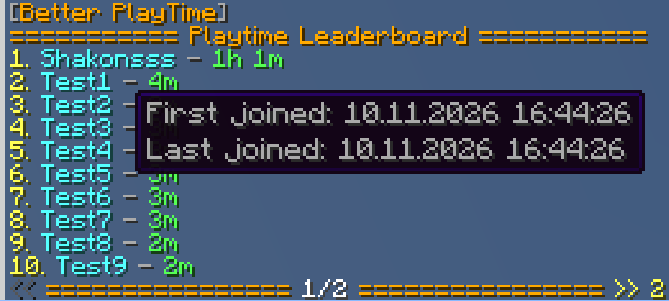
Total Playtime
View your time played in days, hours and minutes. Better PlayTime reads existing vanilla statistics, so players keep their recorded playtime even when the mod is installed later.
Offline Leaderboards
See how your community ranks, including players who are currently offline. Browse pages using clickable navigation buttons.
Player Information
Hover over a player’s name in the command output to see their first and most recent connection.
Customizable Messages
Edit messages, use & color codes, or add your own language files.
Vanilla Client Support
Install the mod on the server only. Players do not need to install anything.
Commands
/playtime— View your total playtime and leaderboard position./playtime <player>— Check another known player’s statistics./playtime -top [page]— Open the playtime leaderboard./playtime -about— View author information./playtime -reload— Reload settings and messages; requires administrative permission.
/pt is the default alias.
Additional aliases can be configured. Alias changes require a server restart.
Configuration
Files are generated automatically inside config/BetterPlayTime/:
config.json— Language, players per page, cache duration, command cooldown and aliases.userdata.json— Player join dates, date format and timezone.
Choose your preferred date order and use automatic timezone detection, a supported country shortcut, or a full timezone name.
Use /pt -reload after editing settings or messages.
Installation
- Download the file matching your Minecraft version and Mod loader.
- Install the required loader and dependencies listed on that file’s download page.
- Stop your server, place the JAR in the
modsfolder, then start it.
Requirements
- A supported Minecraft Java Edition version.
- The matching mod loader.
- Fabric API when using the Fabric version.
- The Java version required by your Minecraft release.
Stop the server completely, place the JAR in the mods folder, then start it.
LuckPerms is optional. Fabric Permissions API is bundled.
Permissions
Regular playtime and leaderboard commands are available to everyone.
betterplaytime.others— View another player’s statistics. Allowed by default.betterplaytime.reload— Reload configuration and messages. Defaults to operators with permission level 2.
Good to Know
- Playtime follows vanilla Minecraft statistics and includes AFK time.
- Deleted or reset statistics cannot be reconstructed.
- Historical first connection dates may be unknown for players who joined before installation. Administrators can enter known dates manually.
- Offline statistics refresh according to the configured cache interval.
Supported Languages
Better PlayTime includes six languages at this moment:
 English (
en_us, default) Romanian (
ro_ro) Spanish (
es_es) German (
de_de) French (
fr_fr) Polish (
pl_pl)
Copyright © 2026 Shakonsss.
Do not reupload, redistribute, or publish edited versions without permission. Third-party dependencies retain their respective licenses.
Created by Shakonsss.
Have fun!
Check Also: Catan In Minecraft BE [NEW]
Project description from CurseForge.
Pick your setup
Better PlayTime by Minecraft version and loader
Choose the version and loader you play, then open the matching release.
Minecraft version
26.2
1 loader buildMinecraft version
1.21.11
1 loader buildMinecraft version
1.21.1
2 loader buildsMinecraft version
1.21
2 loader buildsCheck the dependencies, then try the file in a copied instance before changing a world you care about.
Recent files
Better PlayTime versions and loaders
better-playtime-forge-1.21-1.0.0.jar
13 Nov 2026
Client Source doesn’t say Server Source doesn’t say Dependencies No extras listed Listed on Release listing
Check the 1.21 · Forge setup 1.21Forge release
better-playtime-forge-1.21.1-1.0.0.jar
13 Nov 2026
Client Source doesn’t say Server Source doesn’t say Dependencies No extras listed Listed on Release listing
Check the 1.21.1 · Forge setup Forge1.21.1 release
better-playtime-fabric-1.21-1.0.0.jar
13 Nov 2026
Client Source doesn’t say Server Source doesn’t say Dependencies 1 required · 1 unchecked Listed on Release listing
Check the 1.21 · Fabric setup 1.21Fabric release
better-playtime-fabric-1.21.1-1.0.0.jar
13 Nov 2026
Client Source doesn’t say Server Source doesn’t say Dependencies 1 required · 1 unchecked Listed on Release listing
Check the 1.21.1 · Fabric setup Fabric1.21.1 release
better-playtime-fabric-1.21.11-1.0.0.jar
13 Nov 2026
Client Source doesn’t say Server Source doesn’t say Dependencies 1 required · 1 unchecked Listed on Release listing
Check the 1.21.11 · Fabric setup Fabric1.21.11 release
better-playtime-fabric-26.3-1.0.0.jar
13 Nov 2026
Client Source doesn’t say Server Source doesn’t say Dependencies 1 required · 1 unchecked Listed on Release listing
Check the 26.3 · Fabric setup Fabric26.3 release
better-playtime-fabric-26.2-1.0.0.jar
13 Nov 2026
Client Source doesn’t say Server Source doesn’t say Dependencies 1 required · 1 unchecked Listed on Release listing
Check the 26.2 · Fabric setup Fabric26.2 release
Looking for an older file? The official CurseForge project page is in Resources.
 mod
CurseForge + Modrinth · Minecraft
My Totem Sounds (MTS)
Client-side mod that links custom Totem of Undying names to sounds from Resource Packs. If a matching sound exists, it plays when the totem activates.
 mod
CurseForge · Minecraft
Klsts' Rebalance
Adds and rebalances tools/armors
 mod
CurseForge · Minecraft
NEO Ascension - Racial Eyes
Automatically gives vampires red, dragons blue, and vampire-dragon hybrids purple glowing eyes, with full Punchy Moves facial animation integration.