Minecraft version
Back to mods 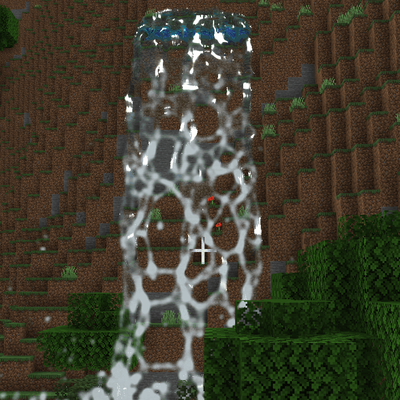
CurseForge · Minecraft mod
Realistic Fluids Simulation
Live-simulated water, lava and slime that splash, flow, stick and react to each other.
Choose a version Pick your version below, then grab the matching file.
Quick answer
Which Realistic Fluids Simulation release should I use?
Latest stable file Realistic Fluids 1.0.1 (Fabric 1.21.1)
Game version 1.21.1
Loader Fabric
Realistic Fluids Simulation Realistic Fluids 1.0.1 (Fabric 1.21.1) targets 1.21.1 with Fabric. The project page does not say whether this file belongs on the client, dedicated server, or both. No extra mods listed for this file.
Where it goes
Is Realistic Fluids Simulation required on the client, server, or both?
The project page does not say whether this file belongs on the client, dedicated server, or both.
Client Source doesn’t say
Dedicated server Source doesn’t say
Loader for this release Fabric
Required install it here Optional supported, not mandatory Not supported do not install here Source doesn’t say do not assume
The source does not explicitly classify this release as client-only or server-only.
What else does Realistic Fluids Simulation Realistic Fluids 1.0.1 (Fabric 1.21.1) need?
Realistic Fluids 1.0.1 (Fabric 1.21.1). Change the file and its required mods may change too.
This file does not list any required mods. Do not add a library just because a different file uses it.
This file does not list any required or optional mods.
Before you install it
Add Realistic Fluids Simulation without breaking your instance.
Built for Realistic Fluids Simulation Realistic Fluids 1.0.1 (Fabric 1.21.1). Pick another file and the loader, install side or required mods may change.
- 01
Stick to this file
Use Realistic Fluids 1.0.1 (Fabric 1.21.1). It targets 1.21.1 with Fabric; another release may have different loader, side or dependency requirements.
- 02
Bring the mods it needs
This file does not list any required mods. Do not add a library just because a different file uses it.
- 03
Put it on the correct side
The project page does not say whether this file belongs on the client, dedicated server, or both.
- 04
Pick the file you checked
Use the “Get this file” button beside Realistic Fluids 1.0.1 (Fabric 1.21.1). It opens that exact file at the source.
About this project
What does Realistic Fluids Simulation add?
Realistic Fluids
Live-simulated water, lava and slime for Minecraft. These fluids actually flow, splash, stick and react to each other.
Realistic Fluids adds particle-based fluids that look like the well-known Blender fluid renders. Vanilla water and lava are not replaced. The realistic fluids only appear where *you* place them with the special buckets or spring blocks.
Features
Water
- Real fluid simulation. Water collides with blocks, bounces off them, runs over edges and fills basins and caves all the way down.
- Hard impacts, like the foot of a waterfall, spray in all directions and leave white foam.
- The water has a smooth, closed surface with refraction, depth colouring, reflections, sun glint and foam.
- You can swim in it. From 0.5 blocks deep it works like normal water. Jumping in causes no fall damage, flowing water drags you along, and there is a proper underwater view.
- Players, animals, boats and minecarts push the water aside.
Lava
- Lava is thick and slow. It creeps down stairs as a glowing tongue instead of splashing.
- It glows by itself. Thin flows and edges cool down to dark red.
- Lava + water: the water boils away in clouds of steam. The lava is quenched and hardens into real basalt blocks.
- It burns you like vanilla lava. Fire Resistance protects you.
- Slime that touches lava burns away.
Slime
- Slime is a green, glossy gel that holds together.
- It is sticky. Throw it at a wall or ceiling and it clings there, then slowly oozes down.
- It is bouncy for players. If you fall into slime, it throws you back up like a slime block and you take no fall damage.
- Walking through slime slows you down.
Items and blocks
- Pour buckets (water, lava, slime): hold right-click to pour a stream. Sneak + right-click throws a big splash.
- Block buckets (water, lava, slime): these work like a normal bucket. Right-click a block to place one block's worth of fluid.
- Spring: a block that emits fluid forever, perfect for waterfalls.
- Right-click with an empty hand to set the strength (1–5).
- Right-click with any realistic bucket to switch between water, lava and slime.
- Power it with redstone to switch it off.
- Drain: a block that swallows any realistic fluid that touches it.
- All buckets are infinite. Everything is craftable and has its own creative tab.
In-game settings
Press O (rebindable) or type /realisticfluids menu to open the settings screen. It has these options:
- quality preset (Low / Medium / High / Ultra)
- screen-space reflections
- water murkiness
- sounds
- splash strength
- gravity
- simulation distance
- CPU threads
Other commands:
/realisticfluids clearremoves all realistic fluids on your client./realisticfluids statsshows the particle count and timings./realisticfluids quality <low|medium|high|ultra>sets the quality preset directly.
Performance
Performance was the top priority:
- The simulation runs next to the game on its own threads. The game and render thread never wait for it.
- Resting fluid goes to sleep and costs almost nothing. A resting lake of 357,000 particles needs about 2.4 ms per step on 6 threads.
- Only particles that actually moved are sent to the graphics card.
- There is no particle limit. If a huge amount of fluid moves at once, the fluid runs in slow motion while your FPS stay stable.
Good to know
- Fluids are simulated on each client and are not saved when you leave the world or change dimension. Springs keep running.
- Multiplayer: install the mod on the server and on every client. Players see each other's fluids. Each client simulates on its own, so small details can differ between players.
- Tested with the vanilla graphics settings "Fancy" and "Fabulous!". Sodium is untested. Iris shader packs are not supported.
- Only players interact with the fluids (swimming, burning, bouncing). Mobs are not affected.
- The game rule
realisticLavaSolidifies(defaulttrue) controls whether realistic lava may create basalt blocks. - Settings are stored in
config/realisticfluids.json.
Recipes
- Realistic Water Bucket (Pour): bucket + prismarine crystals + prismarine shard
- Realistic Lava Bucket (Pour): bucket + magma block + blaze powder
- Realistic Slime Bucket (Pour): bucket + 2 slime balls
- Block buckets: put a pour bucket into the crafting grid to get the block bucket, and the other way round.
- Spring: stone bricks, prismarine shards and a Realistic Water Bucket
- Drain (×2): iron bars above a hopper
Requirements
- Minecraft 1.21.1
- Fabric Loader 0.16 or newer
- Fabric API
- Java 21
Project description from CurseForge.
Pick your setup
Realistic Fluids Simulation by Minecraft version and loader
Choose the version and loader you play, then open the matching release.
Check the dependencies, then try the file in a copied instance before changing a world you care about.
Recent files
Realistic Fluids Simulation versions and loaders
Realistic Fluids 1.0.1 (Fabric 1.21.1)
realistic-fluids-fabric-mc1.21.1-1.0.1.jar
12 Nov 2026
Client Source doesn’t say Server Source doesn’t say Dependencies No extras listed Listed on Release listing
Check the 1.21.1 · Fabric setup Fabric1.21.1 release
Realistic Fluids 1.0.0 (Fabric 1.21.1)
realistic-fluids-fabric-mc1.21.1-1.0.0.jar
11 Nov 2026
Client Source doesn’t say Server Source doesn’t say Dependencies No extras listed Listed on Release listing
Check the 1.21.1 · Fabric setup Fabric1.21.1 release
Looking for an older file? The official CurseForge project page is in Resources.
 mod
CurseForge + Modrinth · Minecraft
Universal Grid
Adds a Universal Grid for Refined Storage
 mod
CurseForge · Minecraft
Varied Commodities Redux
A modern port of Varied Commodities by Noppes.
 mod
CurseForge · Minecraft
Minecolonies Iron's Integration
Integration mod between MineColonies and Iron's Spells 'n Spellbooks & Iron's Arms 'n Artifice for Minecraft 1.21.1 (NeoForge).