Minecraft version
Back to mods 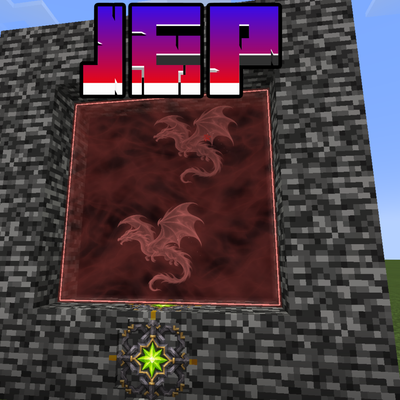
CurseForge · Minecraft mod
Just Epic Portals
Portals, Just Epic Portals
Choose a version Pick your version below, then grab the matching file.
Quick answer
Which Just Epic Portals release should I use?
Latest stable file JustEpicPortals-1.21.1-1.1.1.jar
Game version 1.21.1
Loader NeoForge
Just Epic Portals JustEpicPortals-1.21.1-1.1.1.jar targets 1.21.1 with NeoForge. The project page does not say whether this file belongs on the client, dedicated server, or both. No extra mods listed for this file.
Where it goes
Is Just Epic Portals required on the client, server, or both?
The project page does not say whether this file belongs on the client, dedicated server, or both.
Client Source doesn’t say
Dedicated server Source doesn’t say
Loader for this release NeoForge
Required install it here Optional supported, not mandatory Not supported do not install here Source doesn’t say do not assume
The source does not explicitly classify this release as client-only or server-only.
What else does Just Epic Portals JustEpicPortals-1.21.1-1.1.1.jar need?
JustEpicPortals-1.21.1-1.1.1.jar. Change the file and its required mods may change too.
This file does not list any required mods. Do not add a library just because a different file uses it.
This file does not list any required or optional mods.
Before you install it
Add Just Epic Portals without breaking your instance.
Built for Just Epic Portals JustEpicPortals-1.21.1-1.1.1.jar. Pick another file and the loader, install side or required mods may change.
- 01
Stick to this file
Use JustEpicPortals-1.21.1-1.1.1.jar. It targets 1.21.1 with NeoForge; another release may have different loader, side or dependency requirements.
- 02
Bring the mods it needs
This file does not list any required mods. Do not add a library just because a different file uses it.
- 03
Put it on the correct side
The project page does not say whether this file belongs on the client, dedicated server, or both.
- 04
Pick the file you checked
Use the “Get this file” button beside JustEpicPortals-1.21.1-1.1.1.jar. It opens that exact file at the source.
About this project
What does Just Epic Portals add?
Portals to transport players where they need to go.
40 Frame types!
16 Colors!
14 Designs!
Portal Info:
- Portal frames must be the same block, no mixing block types within the same frame
- Portals can be as small as 1 x 2, just large enough for a player to walk through, and as large as 9 x 9
- Linked portals can be different frame types
- Corners are optional/decoration
- One Portal Anchor is required per portal frame, any location within the frame
- Sneak Right-click while holding PAC (Portal Anchor Core) on the anchor block of the first portal. Right click the second portal's anchor block to link
- Portals can be vertical in any of the 4 directions, laying down flat or upside-down to 'jump' in to
- Travel begins instantly although the destination chunks may need time to load as you enter them
- You can bring your mount, occupied vehicles or leashed animals
- Anchors can be right-clicked to open a GUI. Set the portal for your Self, for your Team or for Everyone. Adjust options like nearby
- A 'nearby' mode will teleport mob entities when an approved player enters the portal and has a 4 block range
- Pets that are following you come through with you if they are within 13 blocks, with or without Nearby. Sitting pets stay behind, unless Nearby is on and they are within 4 blocks.
- Compatible with Minecraft Teams, FTB Teams and Open Parties and Claims! You can set portals so only your team can use them. Server Operators can set portals for any teams found.
- Server operators and pack makers can make portals require advancements: vanilla, modded or custom ones from a datapack. Pack makers can also set rules for every portal of a frame type in the config or a datapack, for example "all bedrock portals require The End?".
- Custom colors are created by right clicking a portal while holding a compatible dye item
- Custom designs are created by right clicking a portal while holding a compatble design item. Use JEI’s JEP Portal Design category to see recipes
Fully compatible with Just Epic Dimensions and is the perfect way to transport yourself and your friends to the Epic Dimensions you create!
Curseforge.com is the ONLY site that is authorized to serve downloads of the mod. Any copies found elsewhere are fraudulent and may contain malware. Stay safe and only use curseforge.com for your mod and modpack downloads.
I cannot guarantee modpack-specific troubleshooting, compatibility fixes, or integration support. Modpack maintainers are responsible for issues arising from their particular combination of mods and configurations.
Project description from CurseForge.
Pick your setup
Just Epic Portals by Minecraft version and loader
Choose the version and loader you play, then open the matching release.
Check the dependencies, then try the file in a copied instance before changing a world you care about.
Recent files
Just Epic Portals versions and loaders
JustEpicPortals-1.21.1-1.1.1.jar
29 Nov 2026
Client Source doesn’t say Server Source doesn’t say Dependencies No extras listed Listed on Release listing
Check the 1.21.1 · NeoForge setup 1.21.1NeoForge release
JustEpicPortals-1.21.1-1.1.0.jar
29 Nov 2026
Client Source doesn’t say Server Source doesn’t say Dependencies No extras listed Listed on Release listing
Check the 1.21.1 · NeoForge setup 1.21.1NeoForge release
JustEpicPortals-1.21.1-1.0.0.jar
24 Nov 2026
Client Source doesn’t say Server Source doesn’t say Dependencies No extras listed Listed on Release listing
Check the 1.21.1 · NeoForge setup 1.21.1NeoForge release
Looking for an older file? The official CurseForge project page is in Resources.
 mod
CurseForge + Modrinth · Minecraft
Refined Wireless Upgrades
Expands your Refined Storage Wireless Grid with automatic inventory transfers, block picking, item collection, and additional energy capacity upgrades
 mod
CurseForge · Minecraft
Chalk Unofficial Fork
Chalk allows you to draw marks for easier navigation in caves or structures, or as decoration
 mod
CurseForge · Minecraft
Albion Mastery
A weapon mastery system for any 1.20.1 Forge or 1.21.1 NeoForge modpack: every gun, blade, spell and bow you already have levels up as you fight, with trade-off specializations, mastery ranks and leaderboards.