Fabric API Needed by Build Your Own Gravity 1.0.0 (Fabric, MC 1.21.1)
requiredMatching file found Matched file: [1.21.1] Fabric API 0.116.18+1.21.1
CurseForge · Minecraft mod
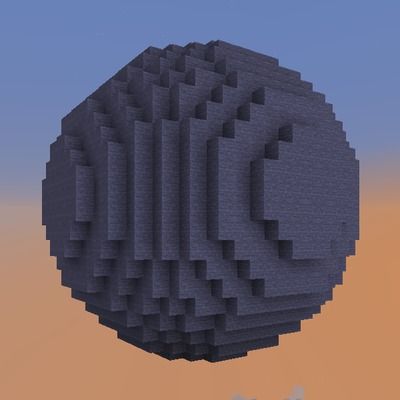
Gravity from what you build: a ball of blocks hanging in the air pulls, thrown items orbit it and a smaller ball becomes its moon.
Quick answer
Build Your Own Gravity 1.0.0 (Fabric, MC 1.21.1) targets 1.21.1 with Fabric. The project page does not say whether this file belongs on the client, dedicated server, or both. All 1 required mods have matching files.
Where it goes
The project page does not say whether this file belongs on the client, dedicated server, or both.
The source does not explicitly classify this release as client-only or server-only.
Build Your Own Gravity 1.0.0 (Fabric, MC 1.21.1). Change the file and its required mods may change too.
Install Fabric API first. We found matching files for this game-version and loader setup.
We only count dependency files that match this setup. A file for another loader does not fill the gap.
Before you install it
Built for Build Your Own Gravity 1.0.0 (Fabric, MC 1.21.1). Pick another file and the loader, install side or required mods may change.
Use Build Your Own Gravity 1.0.0 (Fabric, MC 1.21.1). It targets 1.21.1 with Fabric; another release may have different loader, side or dependency requirements.
Install Fabric API first. We found matching files for this game-version and loader setup.
The project page does not say whether this file belongs on the client, dedicated server, or both.
Use the “Get this file” button beside Build Your Own Gravity 1.0.0 (Fabric, MC 1.21.1). It opens that exact file at the source.
About this project
Every block you place has a mass. Build a big ball of stone hanging in the air and it starts to pull: items you throw next to it go into orbit, and a second, smaller ball lets go of the world and circles it as a moon. Let a moon fall and it crashes into the planet and blows a crater.
/grawitacja kula 8 (a stone ball with a radius of 8, 4 blocks in front of you)./grawitacja kula 3 minecraft:iron_block a bit further away. After a few seconds the small ball becomes a moon./grawitacja, operators)kula <radius> [block] [centre] builds a ball of placed blocks (stone by default)info lists the bodies within 256 blocks: mass, radius, pull at the surface, and moonszaznacz <from> <to> marks an area as built (for buildings made before you installed the mod or with WorldEdit)pusc makes the nearest body let go right nowpredkosc <percent> sets the speed of the nearest moon (0 = it falls onto the planet, 140 = a long ellipse)zatrzymaj stops all moons where they are, as plain blockszapomnij forgets all placed blocks in this dimensionOptions > More mods... > Grawitacja... (no Mod Menu needed): gravity strength, throw into orbit, craters from crashes and the time before a body lets go.
"Grawitacja" is Polish for "gravity". The mod is in English and Polish.
Project description from CurseForge.
Pick your setup
Choose the version and loader you play, then open the matching release.
Check the dependencies, then try the file in a copied instance before changing a world you care about.
Recent files
build-your-own-gravity-1.0.0-mc1.21.1.jar
12 Nov 2026
build-your-own-gravity-1.0.0-mc26.2.jar
12 Nov 2026
Looking for an older file? The official CurseForge project page is in Resources.
 mod
A new life for the mod by Alex Crish, creator of the Minecraft for Noobs series - his pre-Forge build reborn on Forge 1.7.10: alpha lighting, nature ambience, harsher survival, the Green Lands, windmills, sawmills and animated blocks.
 mod
A simple mod that makes poison potatoes finally useful
 mod
Create Crystal Industry is a resource production mod built around budding blocks, adding crystal-growing production lines and quality-of-life tools and items.