Combat Hitboxes Optional for Spear+CombatHitboxes 1.1.1 - Minecraft 26.2 - NeoForge (revision 2)
optionalNo matching file
CurseForge · Minecraft mod
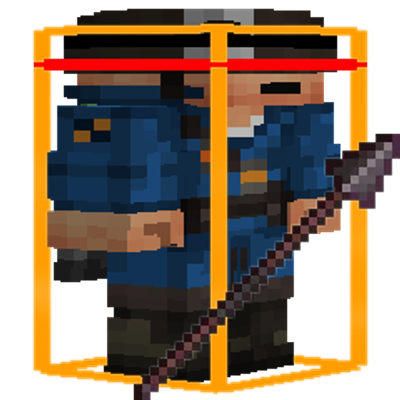
See when a target is in spear or melee reach with customizable hitbox colors, even while holding another item.
Quick answer
Spear+CombatHitboxes 1.1.1 - Minecraft 26.2 - NeoForge (revision 2) targets 26.2 with NeoForge. The project page does not say whether this file belongs on the client, dedicated server, or both. No extra mods listed for this file.
Where it goes
The project page does not say whether this file belongs on the client, dedicated server, or both.
The source does not explicitly classify this release as client-only or server-only.
1.1.1 - Minecraft 26.2 - NeoForge (revision 2) on 26.2 NeoForge. Every mod below is checked against that same setup.
This file does not list any required mods. Do not add a library just because a different file uses it.
We only count dependency files that match this setup. A file for another loader does not fill the gap.
Before you install it
Built for Spear+CombatHitboxes 1.1.1 - Minecraft 26.2 - NeoForge (revision 2) on 26.2 NeoForge. Pick another file and the loader, install side or required mods may change.
Use 1.1.1 - Minecraft 26.2 - NeoForge (revision 2). It targets 26.2 with NeoForge; another release may have different loader, side or dependency requirements.
This file does not list any required mods. Do not add a library just because a different file uses it.
The project page does not say whether this file belongs on the client, dedicated server, or both.
Use the “Get this file” button beside 1.1.1 - Minecraft 26.2 - NeoForge (revision 2). It opens that exact file at the source.
About this project
Turn on hitboxes with F3+B and keep a spear anywhere in your hotbar. Aim at a living target. Its outline turns orange when your spear can reach it and red when it is close enough for ordinary melee. You can keep another item selected.
Customize both colors and the line widths in the Spear settings. Enable the optional accurate hitbox overlay to see the extra targeting margin around the original white hitbox. The overlay starts disabled.
Works standalone on Fabric and NeoForge. On Fabric, Combat Hitboxes and Combat Hitboxes+ are optional alternatives that integrate the Spear settings into their own menus. Install Cloth Config for the settings screen and Mod Menu on Fabric.
Project description from CurseForge.
Pick your setup
Choose the version and loader you play, then open the matching release.
Check the dependencies, then try the file in a copied instance before changing a world you care about.
Recent files
Spear-CombatHitboxes-26.2-neoforge-1.1.1.jar
16 Nov 2026
Looking for an older file? The official CurseForge project page is in Resources.
