
Minecraft version
Back to mods 
CurseForge · Minecraft mod
Sticky Notes
Colourful paper notes you can write on and stick to any block face. For Fabric and NeoForge.
Choose a version Pick your version below, then grab the matching file.
Quick answer
Which Sticky Notes release should I use?
Latest stable file stickynotes-1.0.1+mc26.3-neoforge.jar
Game version 26.3
Loader NeoForge
Sticky Notes stickynotes-1.0.1+mc26.3-neoforge.jar targets 26.3 with NeoForge. The project page does not say whether this file belongs on the client, dedicated server, or both. No extra mods listed for this file.
Where it goes
Is Sticky Notes required on the client, server, or both?
The project page does not say whether this file belongs on the client, dedicated server, or both.
Client Source doesn’t say
Dedicated server Source doesn’t say
Loader for this release NeoForge
Required install it here Optional supported, not mandatory Not supported do not install here Source doesn’t say do not assume
The source does not explicitly classify this release as client-only or server-only.
What else does Sticky Notes stickynotes-1.0.1+mc26.3-neoforge.jar need?
stickynotes-1.0.1+mc26.3-neoforge.jar. Change the file and its required mods may change too.
This file does not list any required mods. Do not add a library just because a different file uses it.
This file does not list any required or optional mods.
Before you install it
Add Sticky Notes without breaking your instance.
Built for Sticky Notes stickynotes-1.0.1+mc26.3-neoforge.jar. Pick another file and the loader, install side or required mods may change.
- 01
Stick to this file
Use stickynotes-1.0.1+mc26.3-neoforge.jar. It targets 26.3 with NeoForge; another release may have different loader, side or dependency requirements.
- 02
Bring the mods it needs
This file does not list any required mods. Do not add a library just because a different file uses it.
- 03
Put it on the correct side
The project page does not say whether this file belongs on the client, dedicated server, or both.
- 04
Pick the file you checked
Use the “Get this file” button beside stickynotes-1.0.1+mc26.3-neoforge.jar. It opens that exact file at the source.
About this project
What does Sticky Notes add?
Sticky Notes
Colourful paper notes you can write on and stick to any block face. Works on Fabric and NeoForge.




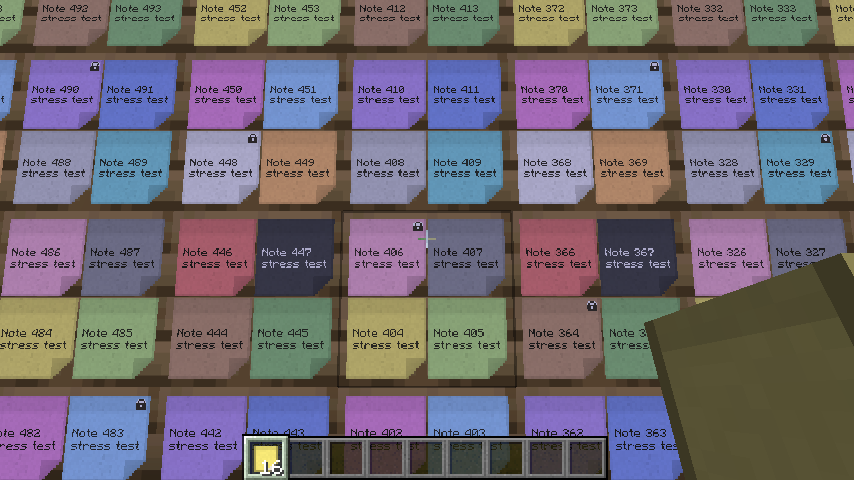
Why Sticky Notes?
- Notes stick flat to walls, floors, ceilings, chests and doors - up to four per block face, no blocks, no entities.
- A click on a note opens the note, not the chest or door behind it.
- A hand-made note editor instead of a recoloured sign screen: a big sheet in the note's colour with paper grain and a folded corner.
- Owners and locks for multiplayer, every action checked by the server.
- 16 colours, and two dyes mix like paint: yellow + blue = green.
How to use
- Right-click a block face with a note to stick it on - the editor opens.
- Right-click a note to read or edit it; Shift + right-click edits your own locked note.
- Shift + left-click your note to take it back - it keeps its text, colour and lock.
- Unlocked notes can be edited by everybody, locked notes only by their owner.
Crafting
- Paper + Slime Ball (shapeless): 4 yellow notes
- Sticky Note + dye: a note in that colour
- Sticky Note + 2 dyes: a note in the mixed colour
Compatibility
- Uses the loaders' chunk data attachments and the vanilla render pipeline; no conflicts with block or entity mods are known.
- Players without the mod see no notes.
- Notes do not move with pistons or doors - they drop as items.
Versions
Minecraft 1.21.1, 1.21.11 and 26.3, Fabric and NeoForge. One file per game version and loader; pick the file whose name contains your Minecraft version.
Performance
- One rough measurement in a development client: 804 notes in view at about 281 FPS, the same view without notes at about 475 FPS (854x480, VSync off). Readings vary between runs; not a promise for every computer.
Requirements
- Fabric: Fabric API.
- NeoForge: nothing else.
- Install on both client and server.
Modpacks
You may include Sticky Notes in any modpack, public or private, free or paid, as long as the jar files stay exactly as published.
License
Sticky Notes is made by cptgummiball. All rights reserved: modifying, decompiling or re-uploading Sticky Notes outside of modpacks is not allowed. Mod developers may compile against the Sticky Notes API. Full license: https://github.com/CptGummiball/StickyNotes/blob/main/LICENSE
Project description from CurseForge.
Pick your setup
Sticky Notes by Minecraft version and loader
Choose the version and loader you play, then open the matching release.
Minecraft version
1.21.11
2 loader buildsMinecraft version
1.21.1
2 loader buildsCheck the dependencies, then try the file in a copied instance before changing a world you care about.
Recent files
Sticky Notes versions and loaders
stickynotes-1.0.1+mc26.3-neoforge.jar
stickynotes-1.0.1-mc26.3-neoforge.jar
18 Nov 2026
Client Source doesn’t say Server Source doesn’t say Dependencies No extras listed Listed on Release listing
Check the 26.3 · NeoForge setup NeoForge26.3 release
stickynotes-1.0.1+mc1.21.11-neoforge.jar
stickynotes-1.0.1-mc1.21.11-neoforge.jar
18 Nov 2026
Client Source doesn’t say Server Source doesn’t say Dependencies No extras listed Listed on Release listing
Check the 1.21.11 · NeoForge setup NeoForge1.21.11 release
stickynotes-1.0.1+mc1.21.1-neoforge.jar
stickynotes-1.0.1-mc1.21.1-neoforge.jar
18 Nov 2026
Client Source doesn’t say Server Source doesn’t say Dependencies No extras listed Listed on Release listing
Check the 1.21.1 · NeoForge setup 1.21.1NeoForge release
stickynotes-1.0.1+mc26.3-fabric.jar
stickynotes-1.0.1-mc26.3-fabric.jar
18 Nov 2026
Client Source doesn’t say Server Source doesn’t say Dependencies 1 required · 1 unchecked Listed on Release listing
Check the 26.3 · Fabric setup Fabric26.3 release
stickynotes-1.0.1+mc1.21.11-fabric.jar
stickynotes-1.0.1-mc1.21.11-fabric.jar
18 Nov 2026
Client Source doesn’t say Server Source doesn’t say Dependencies 1 required · 1 unchecked Listed on Release listing
Check the 1.21.11 · Fabric setup Fabric1.21.11 release
stickynotes-1.0.1+mc1.21.1-fabric.jar
stickynotes-1.0.1-mc1.21.1-fabric.jar
18 Nov 2026
Client Source doesn’t say Server Source doesn’t say Dependencies 1 required · 1 unchecked Listed on Release listing
Check the 1.21.1 · Fabric setup Fabric1.21.1 release
stickynotes-1.0.0+mc26.3-fabric.jar
stickynotes-1.0.0-mc26.3-fabric.jar
17 Nov 2026
Client Source doesn’t say Server Source doesn’t say Dependencies No extras listed Listed on Release listing
Check the 26.3 · Fabric setup Fabric26.3 release
stickynotes-1.0.0+mc26.3-neoforge.jar
stickynotes-1.0.0-mc26.3-neoforge.jar
17 Nov 2026
Client Source doesn’t say Server Source doesn’t say Dependencies No extras listed Listed on Release listing
Check the 26.3 · NeoForge setup NeoForge26.3 release
stickynotes-1.0.0+mc1.21.11-neoforge.jar
stickynotes-1.0.0-mc1.21.11-neoforge.jar
17 Nov 2026
Client Source doesn’t say Server Source doesn’t say Dependencies No extras listed Listed on Release listing
Check the 1.21.11 · NeoForge setup NeoForge1.21.11 release
stickynotes-1.0.0+mc1.21.1-neoforge.jar
stickynotes-1.0.0-mc1.21.1-neoforge.jar
17 Nov 2026
Client Source doesn’t say Server Source doesn’t say Dependencies No extras listed Listed on Release listing
Check the 1.21.1 · NeoForge setup 1.21.1NeoForge release
stickynotes-1.0.0+mc1.21.11-fabric.jar
stickynotes-1.0.0-mc1.21.11-fabric.jar
17 Nov 2026
Client Source doesn’t say Server Source doesn’t say Dependencies 1 required · 1 unchecked Listed on Release listing
Check the 1.21.11 · Fabric setup Fabric1.21.11 release
stickynotes-1.0.0+mc1.21.1-fabric.jar
stickynotes-1.0.0-mc1.21.1-fabric.jar
17 Nov 2026
Client Source doesn’t say Server Source doesn’t say Dependencies 1 required · 1 unchecked Listed on Release listing
Check the 1.21.1 · Fabric setup Fabric1.21.1 release
Looking for an older file? The official CurseForge project page is in Resources.
 mod
CurseForge + Modrinth · Minecraft
Adventure Item Names
Unique names for weapons, tools, armour and items found throughout your world.
 mod
CurseForge · Minecraft
Cobblemon Utility Items (No recipes)
Same items as Cobblemon Utility Items (IVs, EVs, level, shiny, Alpha, fossils and more) but with no crafting recipes, for packs that bring their own. NeoForge and Fabric.
 mod
CurseForge · Minecraft
Mediumcore Port
A difficulty option between Hardcore and Regular Survival. A port of AlexModGuy's Mediumcore mod.