Fabric API Needed by Sticky Notes stickynotes-1.0.1+mc26.3-fabric.jar
requiredMatching file found Matched file: [26.3] Fabric API 0.166.2+26.3

CurseForge · Minecraft mod
Colourful paper notes you can write on and stick to any block face. For Fabric and NeoForge.
Quick answer
Sticky Notes stickynotes-1.0.1+mc26.3-fabric.jar targets 26.3 with Fabric. The project page does not say whether this file belongs on the client, dedicated server, or both. All 1 required mods have matching files.
Where it goes
The project page does not say whether this file belongs on the client, dedicated server, or both.
The source does not explicitly classify this release as client-only or server-only.
stickynotes-1.0.1+mc26.3-fabric.jar on Fabric. Every mod below is checked against that same setup.
Install Fabric API first. We found matching files for this game-version and loader setup.
We only count dependency files that match this setup. A file for another loader does not fill the gap.
Before you install it
Built for Sticky Notes stickynotes-1.0.1+mc26.3-fabric.jar on Fabric. Pick another file and the loader, install side or required mods may change.
Use stickynotes-1.0.1+mc26.3-fabric.jar. It targets 26.3 with Fabric; another release may have different loader, side or dependency requirements.
Install Fabric API first. We found matching files for this game-version and loader setup.
The project page does not say whether this file belongs on the client, dedicated server, or both.
Use the “Get this file” button beside stickynotes-1.0.1+mc26.3-fabric.jar. It opens that exact file at the source.
About this project
Colourful paper notes you can write on and stick to any block face. Works on Fabric and NeoForge.




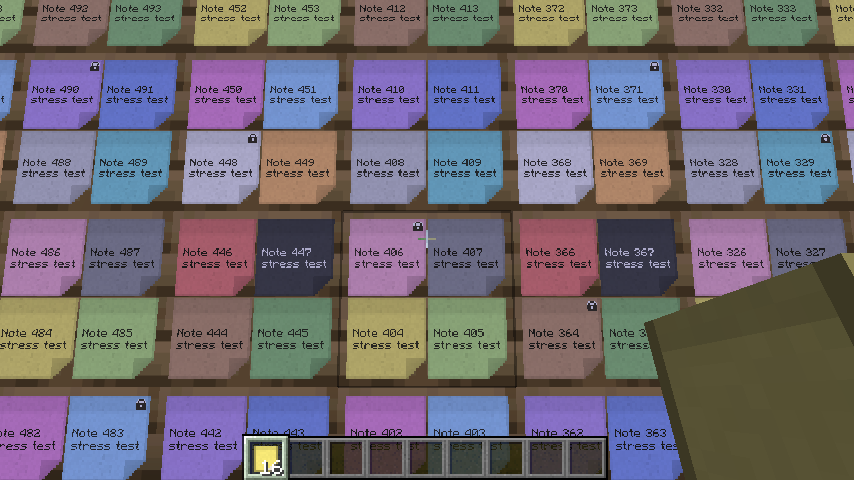
Minecraft 1.21.1, 1.21.11 and 26.3, Fabric and NeoForge. One file per game version and loader; pick the file whose name contains your Minecraft version.
You may include Sticky Notes in any modpack, public or private, free or paid, as long as the jar files stay exactly as published.
Sticky Notes is made by cptgummiball. All rights reserved: modifying, decompiling or re-uploading Sticky Notes outside of modpacks is not allowed. Mod developers may compile against the Sticky Notes API. Full license: https://github.com/CptGummiball/StickyNotes/blob/main/LICENSE
Project description from CurseForge.
Pick your setup
Choose the version and loader you play, then open the matching release.
Check the dependencies, then try the file in a copied instance before changing a world you care about.
Recent files
stickynotes-1.0.1-mc26.3-fabric.jar
18 Nov 2026
stickynotes-1.0.1-mc1.21.11-fabric.jar
18 Nov 2026
stickynotes-1.0.1-mc1.21.1-fabric.jar
18 Nov 2026
stickynotes-1.0.0-mc26.3-fabric.jar
17 Nov 2026
stickynotes-1.0.0-mc1.21.11-fabric.jar
17 Nov 2026
stickynotes-1.0.0-mc1.21.1-fabric.jar
17 Nov 2026
Looking for an older file? The official CurseForge project page is in Resources.
 mod
Client-side visual body-profile mod offering Vanilla and Chibi profiles without altering player hitboxes.
 mod
Makes the creative inventory page navigation buttons loop endlessly! Jump straight from the first page to the last, and from the last page back to the first with a single click.
 mod
Same items as Cobblemon Utility Items (IVs, EVs, level, shiny, Alpha, fossils and more) but with no crafting recipes, for packs that bring their own. NeoForge and Fabric.
