Architectury API Needed by tryitout-neoforge-0.1.0-beta.jar
requiredMatching file found Matched file: [NeoForge 1.21] v13.0.12
CurseForge · Minecraft mod
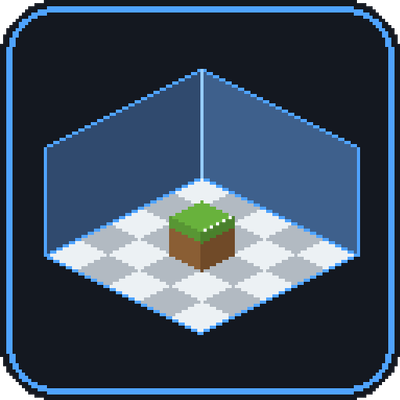
Hold W over any block or item to try it in a small interactive test room, without leaving your world.
Quick answer
tryitout-neoforge-0.1.0-beta.jar targets 1.21.1 with NeoForge. The project page does not say whether this file belongs on the client, dedicated server, or both. All 1 required mods have matching files.
Where it goes
The project page does not say whether this file belongs on the client, dedicated server, or both.
The source does not explicitly classify this release as client-only or server-only.
tryitout-neoforge-0.1.0-beta.jar. Change the file and its required mods may change too.
Install Architectury API first. We found matching files for this game-version and loader setup.
We only count dependency files that match this setup. A file for another loader does not fill the gap.
Before you install it
Built for tryitout-neoforge-0.1.0-beta.jar. Pick another file and the loader, install side or required mods may change.
Use tryitout-neoforge-0.1.0-beta.jar. It targets 1.21.1 with NeoForge; another release may have different loader, side or dependency requirements.
Install Architectury API first. We found matching files for this game-version and loader setup.
The project page does not say whether this file belongs on the client, dedicated server, or both.
Use the “Get this file” button beside tryitout-neoforge-0.1.0-beta.jar. It opens that exact file at the source.
About this project




TryItOut lets you try any block or item without leaving your world. Hover it in your inventory, JEI or EMI, hold W, and a small interactive room opens on top of your game. Place it, light it, power it, swing a sword at a dummy. No Creative world, no loading screen, no mess.
Want the real thing? Step into a Test World: a separate dimension with its own inventory and real game mechanics, while your real character and world stay untouched.
Requires Architectury API · Minecraft 1.21.1 (NeoForge 21.1+). Fabric is planned.

T) and use blocks. Doors, beds and double plants place correctly, connected textures join up.+ slot (or B) lists every placeable block with search. Right-click a slot to remove it.V, Ctrl + wheel 0-15). Lamps, torches, repeaters, particles and animations run at 20 TPS.
Needs the mod on the server too (always true in singleplayer). Press Test world in the scene and your build is copied into a real dimension.
config/tryitout-server.json.
| Key | Where | What |
|---|---|---|
Hold W |
Inventory / JEI / EMI | Open the Pocket Scene |
B |
Pocket Scene | Block picker |
T |
Pocket Scene | Rotate the block under the cursor |
1-9 |
Pocket Scene | Palette slot |
L / N / V |
Pocket Scene | Light overlay / day-night / virtual power |
R |
Pocket Scene | Reset camera |
Y |
Test World | Leave |
All keys can be changed in Controls. Test settings, test worlds and quick save have no default key.

| Required | Version | |
|---|---|---|
| Minecraft | yes | 1.21.1 |
| NeoForge | yes | 21.1+ |
| Architectury API | yes | 13+ |
| Create Aeronautics | no | Ships in the Test World |
| Immersive Engineering | no | Multiblock layouts |
| Mekanism | no | Multiblocks in the Pocket Scene |
| JEI / EMI | no | Hover support |
Works with shaders (the room shows a small warning) and with Sodium.

Is it safe for my inventory? The Test World uses a separate profile, and your real one is saved to disk before you enter and restored when you leave, even after a crash. This is a beta: back up your world before you try it.
Does it work on a server without the mod? The Pocket Scene does, since it is client-only. The Test World needs the mod on the server.
Why doesn't my machine work in the Pocket Scene? Anything that needs the server's logic (smelting, comparators, forming multiblocks) doesn't run there. Use the Test World for that.
Is there a Fabric or Forge version? Not yet. TryItOut is NeoForge 1.21.1 for now, a Fabric version is planned.
Known limits. In an unlimited area only the bordered part is saved. Land-claim mods (like FTB Chunks) aren't blocked inside the test world. A 101×101 room can stutter briefly on each edit.
Found a bug? Please report it with your latest.log. Mod ID: tryitout.
Licensed under the Mozilla Public License 2.0.
Project description from CurseForge.
Pick your setup
Choose the version and loader you play, then open the matching release.
Check the dependencies, then try the file in a copied instance before changing a world you care about.
Recent files
18 Nov 2026
Looking for an older file? The official CurseForge project page is in Resources.
 mod
A growing collection of quality-of-life tweaks, bug fixes, and cross-mod integrations for modpack creators!
 mod
Allows one to enable or disable the hunger system for individuals. Compatible with LuckPerms.
 mod
This mod turns boring tooltips into awesome RPG ones, with automatic support for other mods.
