Minecraft version
Back to mods 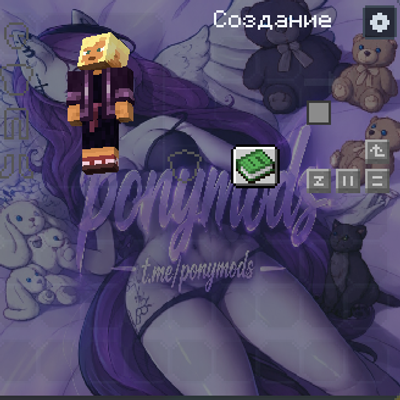
CurseForge · Minecraft mod
Custom Inventory
This mod allows you to change the background of your inventory to any photo or GIF.
Choose a version Pick your version below, then grab the matching file.
Quick answer
Which Custom Inventory release should I use?
Latest stable file custom-inventory-26.1.2-1.0.0.jar
Game version 26.1.2
Loader Fabric
Custom Inventory custom-inventory-26.1.2-1.0.0.jar targets 26.1.2 with Fabric. The project page does not say whether this file belongs on the client, dedicated server, or both. No extra mods listed for this file.
Where it goes
Is Custom Inventory required on the client, server, or both?
The project page does not say whether this file belongs on the client, dedicated server, or both.
Client Source doesn’t say
Dedicated server Source doesn’t say
Loader for this release Fabric
Required install it here Optional supported, not mandatory Not supported do not install here Source doesn’t say do not assume
The source does not explicitly classify this release as client-only or server-only.
What else does Custom Inventory custom-inventory-26.1.2-1.0.0.jar need?
custom-inventory-26.1.2-1.0.0.jar. Change the file and its required mods may change too.
This file does not list any required mods. Do not add a library just because a different file uses it.
This file does not list any required or optional mods.
Before you install it
Add Custom Inventory without breaking your instance.
Built for Custom Inventory custom-inventory-26.1.2-1.0.0.jar. Pick another file and the loader, install side or required mods may change.
- 01
Stick to this file
Use custom-inventory-26.1.2-1.0.0.jar. It targets 26.1.2 with Fabric; another release may have different loader, side or dependency requirements.
- 02
Bring the mods it needs
This file does not list any required mods. Do not add a library just because a different file uses it.
- 03
Put it on the correct side
The project page does not say whether this file belongs on the client, dedicated server, or both.
- 04
Pick the file you checked
Use the “Get this file” button beside custom-inventory-26.1.2-1.0.0.jar. It opens that exact file at the source.
About this project
What does Custom Inventory add?
Custom Inventory — Bring your Minecraft UI to life with custom wallpapers, smooth GIF animations, and sleek Light & Dark themes.
Personalize your inventory on the fly without ever restarting the game. Simply press K (or click the quick-settings button in the corner of your inventory) to open a clean customization menu, drop your favorite images or animated GIFs into the folder, and watch your inventory transform in real time.
✨ Features
Any Image or GIF: Full support for
.png,.jpg,.webp, and multi-frame animated.gifbackgrounds with smooth, lag-free playback.Crisp & Readable Slots: Every item slot stays sharp and perfectly aligned over your background, complete with customizable rounded styles and opacity sliders.
Light & Dark Themes: Switch between a sleek Dark theme and a clean Light theme in one click, with automatic text contrast adjustment.
Live Preview & Instant Reload: Add new files anytime, preview changes live in the menu, and adjust scaling modes to fit your style.

Project description from CurseForge.
Pick your setup
Custom Inventory by Minecraft version and loader
Choose the version and loader you play, then open the matching release.
Minecraft version
26.2
1 loader buildMinecraft version
26.1.2
1 loader buildCheck the dependencies, then try the file in a copied instance before changing a world you care about.
Recent files
Custom Inventory versions and loaders
custom-inventory-26.1.2-1.0.0.jar
20 Nov 2026
Client Source doesn’t say Server Source doesn’t say Dependencies No extras listed Listed on Release listing
Check the 26.1.2 · Fabric setup Fabric26.1.2 release
custom-inventory-26.2-1.0.0.jar
20 Nov 2026
Client Source doesn’t say Server Source doesn’t say Dependencies No extras listed Listed on Release listing
Check the 26.2 · Fabric setup Fabric26.2 release
custom-inventory-26.3.jar
living-inventory-1.0.0.jar
19 Nov 2026
Client Source doesn’t say Server Source doesn’t say Dependencies No extras listed Listed on Release listing
Check the 26.3 · Fabric setup Fabric26.3 release
Looking for an older file? The official CurseForge project page is in Resources.
 mod
CurseForge + Modrinth · Minecraft
TofuCraftReload
This mod is a remake of Old Mod TofuCraft made by tsuteto. add soybean As a new all-purpose food!
 mod
CurseForge + Modrinth · Minecraft
Field Guide
Discover Plants, Animals and Monsters with a Spyglass. Collect them all and take notes in your personal Field Guide!
 mod
CurseForge + Modrinth · Minecraft
Gouge
Slam your pickaxe into a wall mid-fall to slow your descent or lock yourself in place before you hit the ground.