Minecraft version
Back to mods 
CurseForge · Minecraft mod
Hex Color Blocks
Customize over 50 block types with your own HEX colors! Create unique color palettes and bring your Minecraft builds to life with customizable blocks and a dedicated painting tool.
Choose a version Pick your version below, then grab the matching file.
Quick answer
Which Hex Color Blocks release should I use?
Latest stable file hexcolorblocks-1.21.1-release.jar
Game version 1.21.1
Loader Fabric
Hex Color Blocks hexcolorblocks-1.21.1-release.jar targets 1.21.1 with Fabric. The project page does not say whether this file belongs on the client, dedicated server, or both. No extra mods listed for this file.
Where it goes
Is Hex Color Blocks required on the client, server, or both?
The project page does not say whether this file belongs on the client, dedicated server, or both.
Client Source doesn’t say
Dedicated server Source doesn’t say
Loader for this release Fabric
Required install it here Optional supported, not mandatory Not supported do not install here Source doesn’t say do not assume
The source does not explicitly classify this release as client-only or server-only.
What else does Hex Color Blocks hexcolorblocks-1.21.1-release.jar need?
hexcolorblocks-1.21.1-release.jar. Change the file and its required mods may change too.
This file does not list any required mods. Do not add a library just because a different file uses it.
This file does not list any required or optional mods.
Before you install it
Add Hex Color Blocks without breaking your instance.
Built for Hex Color Blocks hexcolorblocks-1.21.1-release.jar. Pick another file and the loader, install side or required mods may change.
- 01
Stick to this file
Use hexcolorblocks-1.21.1-release.jar. It targets 1.21.1 with Fabric; another release may have different loader, side or dependency requirements.
- 02
Bring the mods it needs
This file does not list any required mods. Do not add a library just because a different file uses it.
- 03
Put it on the correct side
The project page does not say whether this file belongs on the client, dedicated server, or both.
- 04
Pick the file you checked
Use the “Get this file” button beside hexcolorblocks-1.21.1-release.jar. It opens that exact file at the source.
About this project
What does Hex Color Blocks add?
Hex Color Blocks
Your Minecraft world. Your colors. Your creativity.
Hex Color Blocks gives you complete creative freedom to customize the appearance of your Minecraft builds. Choose virtually any color using HEX codes or the built-in color picker, and apply it to a wide variety of blocks.
With over 160 selectable block entries, a dedicated color selection interface, and tools designed for flexible building workflows, you can create unique structures, detailed interiors, modern architecture, and personalized environments.
Features
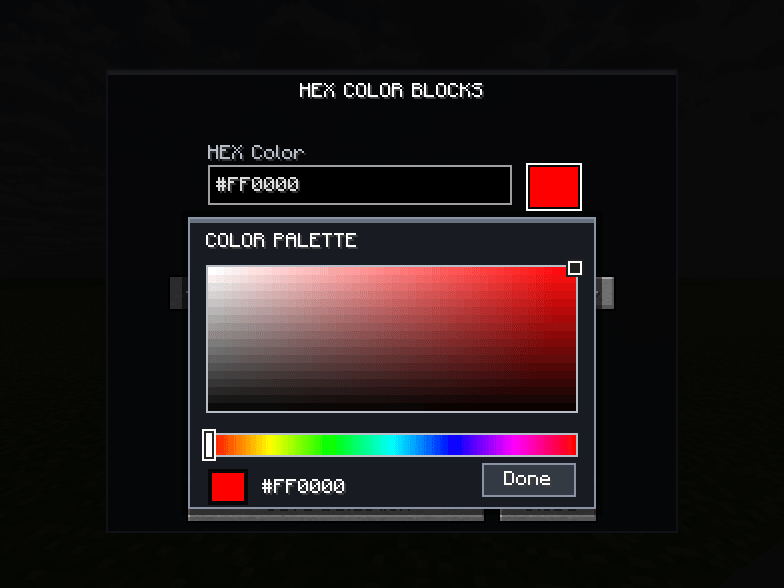
🎨 Advanced HEX Color Selector
Enter custom HEX color codes directly.
Choose colors using the integrated HSV color picker.
Adjust hue, saturation, and brightness with interactive controls.
Preview your selected color before applying it.
Select virtually any RGB color you want.
🧱 160+ Customizable Block Entries
Customize a wide variety of Minecraft blocks, including:
Concrete and rough concrete.
Glass and frosted glass.
Glass panes and frosted glass panes.
Wool and carpets.
Terracotta and decorative blocks.
Wood and natural building materials.
Stone, metal, and other construction blocks.
Lighting blocks and additional decorative elements.
🖌️ HEX Painting Tool
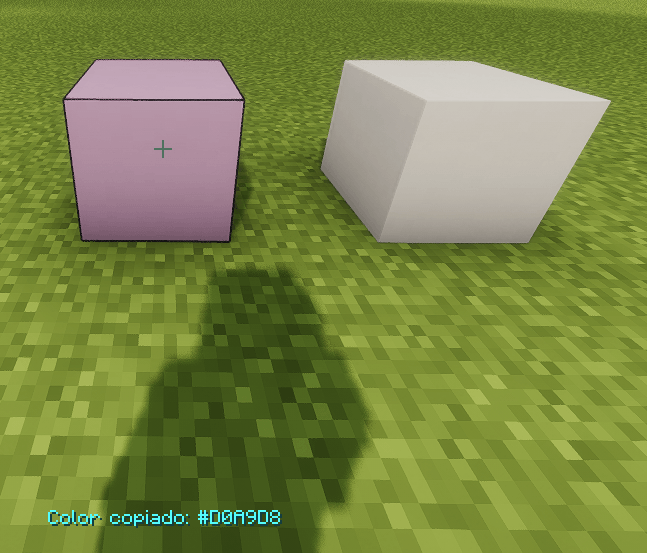
Apply custom colors to blocks using the dedicated painting tool, making it easier to customize your constructions without manually replacing every block.
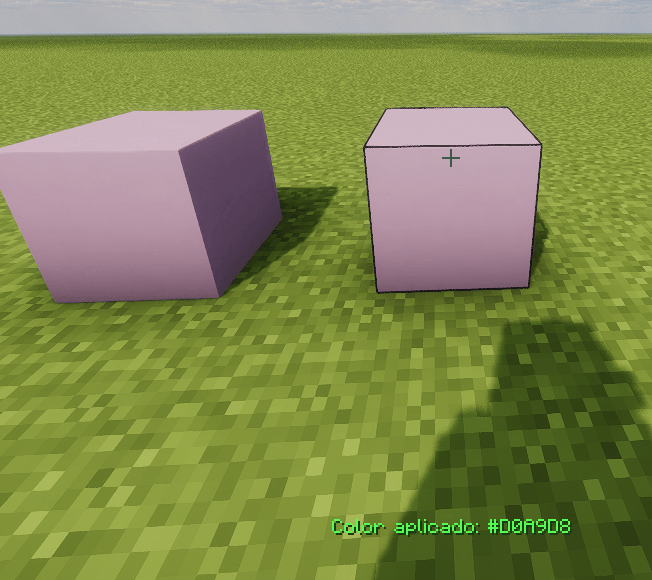
📦 Custom Block Storage
Preserve the custom colors associated with your blocks when storing, picking, and placing them, helping maintain your original designs.
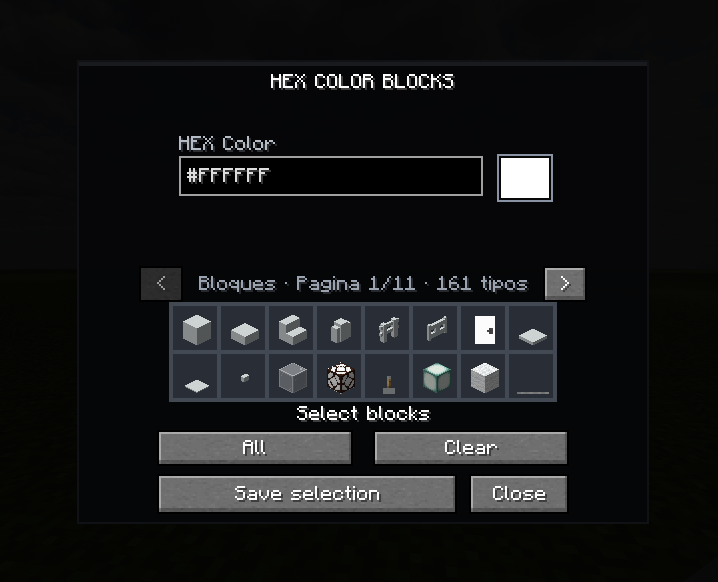
☑️ Multiple Block Selection
Select multiple block types at once.
Use the Select All option to select everything.
Clear your selection whenever needed.
Save your block selection for a more convenient workflow.
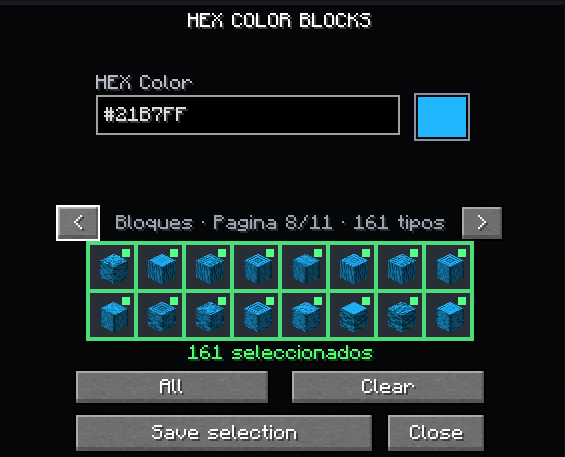
🏗️ Building-Oriented Design
Hex Color Blocks is designed for creative building and architectural projects. Its customizable blocks can be used alongside building workflows and tools such as WorldEdit and Effortless Building.
How to Use
1. Open the HEX Color Blocks selector
Access the dedicated HEX Color Blocks interface to browse the available blocks.
2. Choose your color
Enter a HEX code manually or click the color preview square to open the HSV color palette.
3. Select your blocks
Browse the catalog and select individual blocks, multiple blocks, or all available entries.
4. Apply your selection
Use the painting tool and the available color application workflow to customize your blocks.
5. Start building!
Use your newly colored blocks to create structures with your own custom color palette.
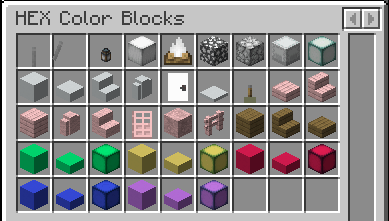
Designed for Creative Builders
Whether you're designing modern houses, building entire cities, creating detailed interiors, or working on large architectural projects, Hex Color Blocks gives you greater control over the appearance of your Minecraft world.
Stop limiting your builds to standard Minecraft colors. Create your own palette and bring your ideas to life!

Minecraft Version: 1.21.1
Mod Loader: Fabric
Project description from CurseForge.
Pick your setup
Hex Color Blocks by Minecraft version and loader
Choose the version and loader you play, then open the matching release.
Check the dependencies, then try the file in a copied instance before changing a world you care about.
Recent files
Hex Color Blocks versions and loaders
hexcolorblocks-1.21.1-release.jar
24 Nov 2026
Client Source doesn’t say Server Source doesn’t say Dependencies No extras listed Listed on Release listing
Check the 1.21.1 · Fabric setup Fabric1.21.1 release
Looking for an older file? The official CurseForge project page is in Resources.
 mod
CurseForge + Modrinth · Minecraft
Antarchy
Adding 45+ mobs, 8+ bosses, 3 fleshed out dimensions, and more
 mod
CurseForge + Modrinth · Minecraft
Open In Inventory
Open guidebooks, backpacks, handhelds and more with a single click in inventory
 mod
CurseForge · Minecraft
GregTech Quallity of Life Addon
Adds lot things i think be missed in GregTech CEu Modern.