Minecraft version
Back to mods 
CurseForge · Minecraft mod
OP Insecurities (gamemode) (commands)
Configurable OP command restrictions with custom access levels and command exceptions.
Choose a version Pick your version below, then grab the matching file.
Quick answer
Which OP Insecurities (gamemode) (commands) release should I use?
Latest stable file OP Insecurities 1.21-1.21.1
Game version 1.21, 1.21.1
Loader Forge
OP Insecurities (gamemode) (commands) OP Insecurities 1.21-1.21.1 targets 1.21, 1.21.1 with Forge. The project page does not say whether this file belongs on the client, dedicated server, or both. No extra mods listed for this file.
Where it goes
Is OP Insecurities (gamemode) (commands) required on the client, server, or both?
The project page does not say whether this file belongs on the client, dedicated server, or both.
Client Source doesn’t say
Dedicated server Source doesn’t say
Loader for this release Forge
Required install it here Optional supported, not mandatory Not supported do not install here Source doesn’t say do not assume
The source does not explicitly classify this release as client-only or server-only.
What else does OP Insecurities (gamemode) (commands) OP Insecurities 1.21-1.21.1 need?
OP Insecurities 1.21-1.21.1. Change the file and its required mods may change too.
This file does not list any required mods. Do not add a library just because a different file uses it.
This file does not list any required or optional mods.
Before you install it
Add OP Insecurities (gamemode) (commands) without breaking your instance.
Built for OP Insecurities (gamemode) (commands) OP Insecurities 1.21-1.21.1. Pick another file and the loader, install side or required mods may change.
- 01
Stick to this file
Use OP Insecurities 1.21-1.21.1. It targets 1.21, 1.21.1 with Forge; another release may have different loader, side or dependency requirements.
- 02
Bring the mods it needs
This file does not list any required mods. Do not add a library just because a different file uses it.
- 03
Put it on the correct side
The project page does not say whether this file belongs on the client, dedicated server, or both.
- 04
Pick the file you checked
Use the “Get this file” button beside OP Insecurities 1.21-1.21.1. It opens that exact file at the source.
About this project
What does OP Insecurities (gamemode) (commands) add?
code works for any game listed on wabbanode, not only tied to minecraft servers or my modpack
OP Insecurities
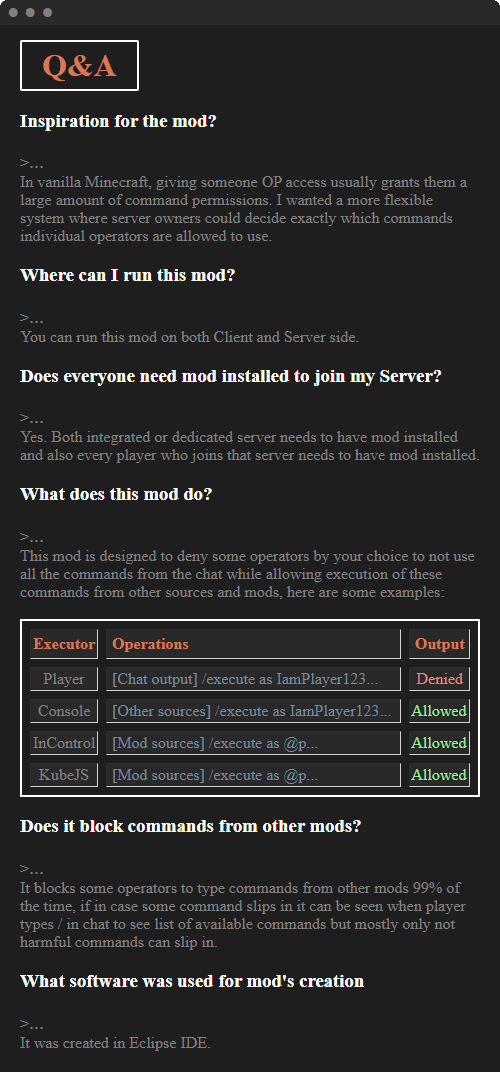
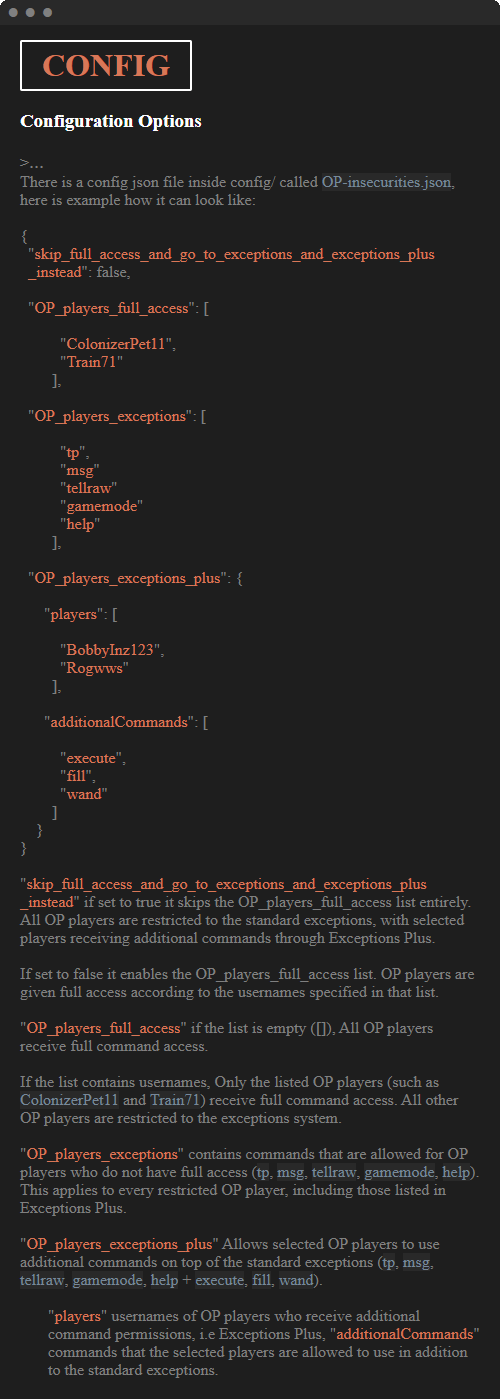
OP Insecurities does not grant or revoke OP permissions. Players must be manually OP'ed using /op player. The mod checks whether a player is an OP and uses their username to determine which commands they can execute through chat, offering configurable Full Access, Exceptions, and Exceptions Plus permission levels.
Restrictions apply only to commands manually entered by players in chat. Commands executed through the server console, KubeJS, InControl, or other server-side sources remain unaffected, even when executed as a restricted player.
For example, a player may be forbidden from manually using /execute, while KubeJS or InControl can still execute /execute as Player run time set day on their behalf.
Project description from CurseForge.
Pick your setup
OP Insecurities (gamemode) (commands) by Minecraft version and loader
Choose the version and loader you play, then open the matching release.
Minecraft version
1.21
1 loader buildMinecraft version
1.20.6
1 loader buildMinecraft version
1.20.1
1 loader buildMinecraft version
1.19.4
1 loader buildMinecraft version
1.19.2
1 loader buildCheck the dependencies, then try the file in a copied instance before changing a world you care about.
Recent files
OP Insecurities (gamemode) (commands) versions and loaders
OP Insecurities 1.21-1.21.1
op_insecurities-release-1.21-1.21.1.jar
23 Nov 2026
Client Source doesn’t say Server Source doesn’t say Dependencies No extras listed Listed on Release listing
Check the 1.21.1 · Forge setup 1.21Forge1.21.1 release
OP Insecurities 1.20.6
op_insecurities-release-1.20.6.jar
23 Nov 2026
Client Source doesn’t say Server Source doesn’t say Dependencies No extras listed Listed on Release listing
Check the 1.20.6 · Forge setup Forge1.20.6 release
OP Insecurities 1.20.1
op_insecurities-release-1.20.1.jar
22 Nov 2026
Client Source doesn’t say Server Source doesn’t say Dependencies No extras listed Listed on Release listing
Check the 1.20.1 · Forge setup 1.20.1Forge release
OP Insecurities 1.19.4
op_insecurities-release-1.19.4.jar
22 Nov 2026
Client Source doesn’t say Server Source doesn’t say Dependencies No extras listed Listed on Release listing
Check the 1.19.4 · Forge setup 1.19.4Forge release
OP Insecurities 1.19.2
op_insecurities-release-1.19.2.jar
22 Nov 2026
Client Source doesn’t say Server Source doesn’t say Dependencies No extras listed Listed on Release listing
Check the 1.19.2 · Forge setup Forge1.19.2 release
Looking for an older file? The official CurseForge project page is in Resources.
 mod
CurseForge · Minecraft
Coven & Clutter
Cosmetic or appropriate decoration category
 mod
CurseForge · Minecraft
QMine
QMine is a vein mining, terraforming, and mass-harvesting mod for Fabric. It provides multi-block harvesting with real-time in-world wireframe previews, customizable excavation patterns, tree felling, and built-in tool safety protections.
 mod
CurseForge · Minecraft
Style Blocks
11 decorative car-logo blocks for garages, signs and roleplay builds.