
Minecraft version
Back to mods 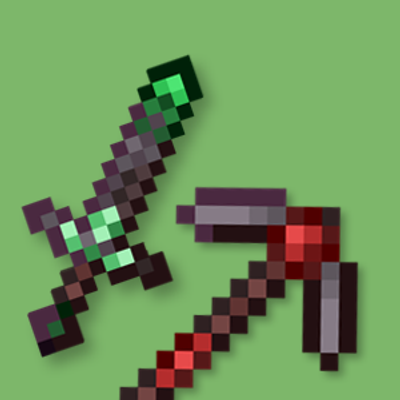
CurseForge · Minecraft mod
Tools & Trims
Adds Smithing Table Recipes for all tools!
Choose a version Pick your version below, then grab the matching file.
Quick answer
Which Tools & Trims release should I use?
beta file Tools & Trims 0.1.0-beta.1+1.21.11
Game version 1.21.11
Loader Fabric
Tools & Trims 0.1.0-beta.1+1.21.11 targets 1.21.11 with Fabric. The project page does not say whether this file belongs on the client, dedicated server, or both. No extra mods listed for this file.
Where it goes
Is Tools & Trims required on the client, server, or both?
The project page does not say whether this file belongs on the client, dedicated server, or both.
Client Source doesn’t say
Dedicated server Source doesn’t say
Loader for this release Fabric
Required install it here Optional supported, not mandatory Not supported do not install here Source doesn’t say do not assume
The source does not explicitly classify this release as client-only or server-only.
What else does Tools & Trims 0.1.0-beta.1+1.21.11 need?
Tools & Trims 0.1.0-beta.1+1.21.11. Change the file and its required mods may change too.
This file does not list any required mods. Do not add a library just because a different file uses it.
This file does not list any required or optional mods.
Before you install it
Add Tools & Trims without breaking your instance.
Built for Tools & Trims 0.1.0-beta.1+1.21.11. Pick another file and the loader, install side or required mods may change.
- 01
Stick to this file
Use Tools & Trims 0.1.0-beta.1+1.21.11. It targets 1.21.11 with Fabric; another release may have different loader, side or dependency requirements.
- 02
Bring the mods it needs
This file does not list any required mods. Do not add a library just because a different file uses it.
- 03
Put it on the correct side
The project page does not say whether this file belongs on the client, dedicated server, or both.
- 04
Pick the file you checked
Use the “Get this file” button beside Tools & Trims 0.1.0-beta.1+1.21.11. It opens that exact file at the source.
About this project
What does Tools & Trims add?


Customize your tools with all 18 vanilla armor trims.
Tools & Trims lets you customize your swords, pickaxes, axes, shovels, and hoes with the existing armor trim patterns.
Use the smithing table to create thousands of unique visual combinations without changing your tools' stats.
Download the mod
The mod is available to download on CurseForge, Modrinth and GitHub.
Features
Tools & Trims gives you full visual customization for your survival tools.
- All 18 vanilla armor trim patterns available for tools.
- Customize swords, pickaxes, axes, shovels, and hoes.
- Use the vanilla smithing table and existing progression.
- Thousands of possible visual combinations.
- Tool stats and gameplay balance remain unchanged.
Compatibility
Tools & Trims currently supports Fabric, with planned expansions for NeoForge, Forge, and Quilt across versions 1.21.1 to 26.3.
Future updates are planned to introduce trims for Maces, Tridents, Bows, and Crossbows, alongside glowing trims, unique custom designs, and additional ways to style your survival gear.
Links
- GitHub Repository
- Available Versions
- Documentation Wiki
- Installation Guide
- Recipes
- Help
- Issue Tracker
- Contact
License
Tools & Trims is licensed under the ARR License.
Project description from CurseForge.
Pick your setup
Tools & Trims by Minecraft version and loader
Choose the version and loader you play, then open the matching release.
Minecraft version
1.21.10
1 loader buildMinecraft version
1.21.9
1 loader buildMinecraft version
1.21.8
1 loader buildMinecraft version
1.21.7
1 loader buildMinecraft version
1.21.6
1 loader buildMinecraft version
1.21.5
1 loader buildMinecraft version
1.21.4
1 loader buildMinecraft version
1.21.3
1 loader buildMinecraft version
1.21.2
1 loader buildMinecraft version
1.21.1
1 loader buildCheck the dependencies, then try the file in a copied instance before changing a world you care about.
Recent files
Tools & Trims versions and loaders
Tools & Trims 0.1.0-beta.1+1.21.11
tools-and-trims-fabric-1.21.11-0.1.0-beta.1.jar
22 Nov 2026
Client Source doesn’t say Server Source doesn’t say Dependencies No extras listed Listed on Release listing
Check the 1.21.11 · Fabric setup Fabric1.21.11 beta
Tools & Trims 0.1.0-beta.1+1.21.9
tools-and-trims-fabric-1.21.9-1.21.10-0.1.0-beta.1.jar
22 Nov 2026
Client Source doesn’t say Server Source doesn’t say Dependencies No extras listed Listed on Release listing
Check the 1.21.10 · Fabric setup Fabric1.21.91.21.10 beta
Tools & Trims 0.1.0-beta.1+1.21.5
tools-and-trims-fabric-1.21.5-1.21.8-0.1.0-beta.1.jar
22 Nov 2026
Client Source doesn’t say Server Source doesn’t say Dependencies No extras listed Listed on Release listing
Check the 1.21.8 · Fabric setup Fabric1.21.81.21.51.21.6 beta
Tools & Trims 0.1.0-beta.1+1.21.4
tools-and-trims-fabric-1.21.4-0.1.0-beta.1.jar
22 Nov 2026
Client Source doesn’t say Server Source doesn’t say Dependencies No extras listed Listed on Release listing
Check the 1.21.4 · Fabric setup Fabric1.21.4 beta
Tools & Trims 0.1.0-beta.1+1.21.1
tools-and-trims-fabric-1.21.1-1.21.3-0.1.0-beta.1.jar
22 Nov 2026
Client Source doesn’t say Server Source doesn’t say Dependencies No extras listed Listed on Release listing
Check the 1.21.3 · Fabric setup Fabric1.21.11.21.31.21.2 beta
Looking for an older file? The official CurseForge project page is in Resources.
 mod
CurseForge · Minecraft
Ex Nihilo: Satellitium
A standalone Ex Nihilo‑inspired skyblock resource mod with sieves, barrels, automation, and cross‑mod compatibility for 1.21.1 NeoForge and 1.20.1 Forge.
 mod
CurseForge + Modrinth · Minecraft
TACZ Turrets
Simple automated turrets for TACZ guns!
 mod
CurseForge · Minecraft
Kingdoms: Heritage
Data-driven starting locations and loadouts