Minecraft version
Back to mods 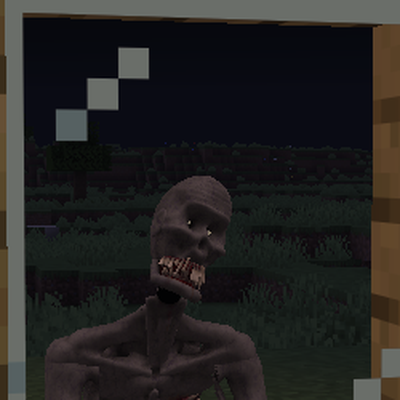
CurseForge · Minecraft mod
Lightless: Seven Nights
A figure watches you by day and waits for you to sleep at night. You have seven nights. A horror mod with flashing lights and loud sounds, all adjustable.
Choose a version Pick your version below, then grab the matching file.
Quick answer
Which Lightless: Seven Nights release should I use?
Latest stable file Lightless 1.2.0 (NeoForge 26.3)
Game version 26.3
Loader NeoForge
Lightless: Seven Nights Lightless 1.2.0 (NeoForge 26.3) targets 26.3 with NeoForge. The project page does not say whether this file belongs on the client, dedicated server, or both. No extra mods listed for this file.
Where it goes
Is Lightless: Seven Nights required on the client, server, or both?
The project page does not say whether this file belongs on the client, dedicated server, or both.
Client Source doesn’t say
Dedicated server Source doesn’t say
Loader for this release NeoForge
Required install it here Optional supported, not mandatory Not supported do not install here Source doesn’t say do not assume
The source does not explicitly classify this release as client-only or server-only.
What else does Lightless: Seven Nights Lightless 1.2.0 (NeoForge 26.3) need?
Lightless 1.2.0 (NeoForge 26.3). Change the file and its required mods may change too.
This file does not list any required mods. Do not add a library just because a different file uses it.
This file does not list any required or optional mods.
Before you install it
Add Lightless: Seven Nights without breaking your instance.
Built for Lightless: Seven Nights Lightless 1.2.0 (NeoForge 26.3). Pick another file and the loader, install side or required mods may change.
- 01
Stick to this file
Use Lightless 1.2.0 (NeoForge 26.3). It targets 26.3 with NeoForge; another release may have different loader, side or dependency requirements.
- 02
Bring the mods it needs
This file does not list any required mods. Do not add a library just because a different file uses it.
- 03
Put it on the correct side
The project page does not say whether this file belongs on the client, dedicated server, or both.
- 04
Pick the file you checked
Use the “Get this file” button beside Lightless 1.2.0 (NeoForge 26.3). It opens that exact file at the source.
About this project
What does Lightless: Seven Nights add?
⚠ Flashing lights and loud sounds. This mod uses flickering light, flashing static, sudden screams and full-screen jumpscares. It is not suitable for younger players, and it may not be safe for people with photosensitive epilepsy.
To turn it down: open
config/lightless-client.jsonand set"reduceFlashing": true(no flicker, no red flash, no shake, no strobing static),"jumpscares": false(no full-screen face or lunge, and the scream is much quieter) and"scareVolume"to a number from 0 to 1. Or type/lightless optoutin game and it will leave you alone (/lightless optinundoes it). The scare sounds also follow the Hostile Creatures volume slider.
A mature horror mod for Minecraft Java Edition: Fabric (26.3, 1.21.11, 1.21.1, 1.20.1), NeoForge (26.3, 1.21.1) and Forge (1.20.1).
By day, a figure watches you from the distance. Every day it is a little closer. At night, it waits for you to fall asleep.
You have seven nights.
The idea
A tall, starved thing called the Unlit stands far off, half hidden behind a tree or the corner of a wall. A few other visitors come with it, mostly at night, mostly around your bed. Each of the seven days is worse than the last, and the seventh night is a hunt.
Survive until dawn and it is gone… for now. Or find where it sleeps, and end it.
There is no tutorial. You work out the rules by watching, or you find the pages of someone else's diary, who worked them out before you.
The rules you will want to know
- Watch it and it does not move. Look away, and when you look back it is closer.
- Light holds it back. A torch is not the same as a bright room.
- Do not open the door to a voice you know.
- It cannot be skipped. Hiding in the Nether does not end the night. It waits.
Everything else is for you to find out.
What is new in 1.2.0
- Play it with friends. A new server option,
together, gives the world one shared story. Two or three of you can film the same night. See "Playing with friends" below. - Quick mode.
storyNights(3 to 7) squeezes the story into fewer nights. With 3, the scares start on night one and the hunt is night three. See "Quick mode" below. - An advancement tab. A new "Lightless" tab keeps track of what you have learned the hard way, and what you have survived. Nothing is spoiled until you earn it.
- The land makes a difference. The visitors now take a little of where you are: cold breath and footprints in the snow, sand and heat haze in deserts, something wading in swamps, branches snapping in dark woods. Modded biomes work too.
- An abandoned cabin. A rare, dark cabin in the Overworld. Someone slept here before you. Their last pages are inside, and a few things that might help. It never generates near the world spawn.
- A nest, and an ending. From the fifth day, there is a place you can find. The diary tells you which way to walk. It is possible to end this for good, and not only to outlast it. Surviving the old way still works.
- The Nightmare. On one night in the middle of the story, going to sleep may not take you where you expect: a graveyard under a bruised sky, a manor that is not quite right, dead woods, and past them somewhere worse. There is no waking up until you find the way out. Nothing you carry is ever lost, nothing there can kill you (never on Hardcore), and failing only makes the next night harder. Operators can go in at any time with
/lightless nightmare. - More builds. Fabric now also runs on 1.21.1 and 1.20.1, and there are builds for Minecraft 26.3 (Fabric and NeoForge).
- A smaller download. Each file is about 8 MB, down from about 15 MB, with no visible change to the creatures.
Everything in 1.2.0 has its own switch in the config (see below), and the rules from 1.1 still hold: private and safe on servers by default, nothing destroyed, no items lost, never lethal on Hardcore.
<details> <summary>What was new in 1.1.0</summary>
- Private to you. Everything it does is shown only to the player being haunted, so one player's night is never played out on everyone else's screen. It is safe to add to a server.
- Settings, for players and for server owners. A config file for each, and a per-player opt-out.
- Never lethal on Hardcore. Being taken leaves you at half a heart there instead of killing you.
- The diary. A torn page of the last sleeper's diary turns up beside your bed each morning.
- The Return. Survive the seventh night and, after a quiet week, it comes back harder.
- Ways to fight back. The Vigil Candle and salt.
- Fourth-wall touches. It knows what you are called.
- Darker nights. Fog and a slight dim, outdoors, on haunted nights.
- Every sound re-made (41 in all), and the creatures' models rebuilt.
</details>
The creatures
- The Unlit. Three blocks tall and starved thin, with grey veined skin and a jaw full of crooked teeth. It watches, it creeps, and on the last night it hunts.
- Under the Bed. Long grey arms with dirty nails, and something scratching beneath the floor.
- The Mimic. A man, nearly. Too tall, neck too long, eyes black all the way through, and a grin that is far too wide.
- The Faceless. A tall figure in a rotting burial shroud with smooth skin where its face should be.
Fighting back
- Vigil Candle. A candle, a honeycomb and a soul torch, crafted together (shapeless). Lit beside you, it burns for one night and keeps part of the haunting at a distance. It is not a guarantee.
- Salt. A bone meal, a gunpowder and a sugar, crafted together (shapeless), make four salt. Lay it like redstone dust across a doorway. It turns away only one of the visitors.
The server can switch both off (fightBack).
Playing with friends
Set "together": true in the server's config/lightless.json and the world has one shared story instead of one each. (In single-player and on a world opened to LAN, the game reads config/lightless.json in your own game folder, so set it there before you launch the game, or type /lightless reload after changing it.)
- One day counter for everyone in the Overworld.
- Visitors and sounds are seen and heard by every player within 48 blocks of them, not only the player it came for. Each player's own client settings and
/lightless optoutstill apply on their own screen. - Who a scare is aimed at rotates between players, so nobody gets all of it.
- Night seven hunts the whole group.
- The Mimic's chat lines use each viewer's own name. Advancements for a scare you witnessed go to everyone who saw it; salt, the candle and surviving are earned by the player who did them.
- The shared story is saved with the world, so a restart or a new player joining picks up where it is.
With together off (the default), everyone has a private haunting, exactly as before.
Quick mode
Not everyone has seven nights to spare. Set "storyNights" to a number from 3 to 7 (default 7). The same story is spread over fewer nights, and the last night is always the hunt. With 3, the scares start on night one and the hunt is night three. The diary catches up, so a page you would have found on a night that is now skipped still turns up. /lightless status shows the length of the story.
It works with together, and with the Return. It is meant for videos, short servers and impatient friends.
Which file do I need?
| Minecraft | Loader | File |
|---|---|---|
| 26.3 | Fabric (needs Fabric API) | Lightless 1.2.0 (Fabric 26.3) |
| 26.3 | NeoForge | Lightless 1.2.0 (NeoForge 26.3) |
| 1.21.11 | Fabric (needs Fabric API) | Lightless 1.2.0 (Fabric 1.21.11) |
| 1.21.1 | Fabric (needs Fabric API) | Lightless 1.2.0 (Fabric 1.21.1) |
| 1.21.1 | NeoForge | Lightless 1.2.0 (NeoForge 1.21.1) |
| 1.20.1 | Fabric (needs Fabric API) | Lightless 1.2.0 (Fabric 1.20.1) |
| 1.20.1 | Forge | Lightless 1.2.0 (Forge 1.20.1) |
Pick the file that matches your Minecraft version and loader on the Files tab. It plays the same on every loader.
Playing it
Installing
- Install the loader for your version: Fabric Loader (0.18.4 or newer, on every Minecraft version) with Fabric API, NeoForge, or Forge. Minecraft 26.3 needs Java 25; 1.21.x needs Java 21; 1.20.1 needs Java 17.
- Add the Lightless file that matches your Minecraft version and loader.
- Start a new survival world, play normally, and keep an eye on the horizon.
Who it affects: it haunts survival and adventure players in the Overworld. It pauses on Peaceful and leaves creative and spectator players alone. Each player has their own seven nights, unless the server turns on together.
Hardcore: it will not kill you there.
Servers and modpacks
It is safe to add to a server or a modpack. Install it on the server and on every player's game. Everything it does is private to the haunted player (or, with together, to the players near it), and each player gets a chat line the first time they join that world, which warns them about the flashing lights and names the opt-out command.
The server owner can change config/lightless.json (read at start, or type /lightless reload):
| Option | Default | What it does |
|---|---|---|
tampering |
"gentle" |
"off": it never touches or sounds anything of yours. "gentle": doors, sounds, handprints and signs. "full": also torches and the chests beside your own bed. |
takenIsLethal |
true |
Being taken on night seven kills. Never on Hardcore. |
hauntNewPlayers |
true |
false: new players start opted out and use /lightless optin. |
heldLightCounts |
true |
A light-emitting block in either hand counts as light 12 (for dynamic-light packs). |
diary |
true |
The morning diary page. |
returns |
true |
The harder second cycle after survival. false: surviving ends it for good. |
quietDays |
7 |
Quiet days before the Return, 1 to 30. |
fightBack |
true |
Vigil Candle and salt work. |
fourthWall |
true |
Uses the player's own name (a sign, a "joined the game" line, the pause menu). |
darkerNights |
true |
Fog and a slight dim, outdoors, on haunted nights. |
together |
false |
One shared story for the whole world instead of one per player. See "Playing with friends". |
storyNights |
7 |
How many nights the story lasts, 3 to 7. The last one is always the hunt. |
biomeFlavour |
true |
The visitors take a touch of the biome: breath and footprints in snow, sand and heat haze, wading, snapping branches. Snow footprints are put back, and only happen with tampering not "off" and mobGriefing on. |
abandonedHouse |
true |
The rare abandoned cabin can generate in new chunks. Read when a chunk is generated, so it does not change chunks that already exist. |
nest |
true |
From the fifth day the nest exists for the haunted player (or the group), and it is a way to end the haunting for good. It is made of ordinary blocks, put back afterwards, and only made with mobGriefing on. false: no nest. |
nightmare |
true |
The Nightmare: once, on the middle night of the story (night four of seven; night two of three or four; night three of five or six), going to sleep takes the player into a dark place they cannot leave until they find the way out. Their things are kept and given back, they cannot be killed there, and failing only makes the next night harder. false: that night is an ordinary one. |
Players have their own config/lightless-client.json (reduceFlashing, jumpscares, scareVolume from 0 to 1, fourthWall, and darkness from 0 to 1).
A config file that cannot be read is moved to lightless.json.bak and replaced by the defaults. A storyNights outside 3 to 7 is put right and noted in the log.
The cabin can also be removed with a data pack (empty its structure set, lightless:abandoned_house).
Commands
For everyone:
/lightless optoutand/lightless optin: stop or allow the haunting for yourself.
For operators (the player argument is optional):
/lightless status [player]: where you are in the story, how long it is, and whether it has ended/lightless day <n> [player]: jump to a day of the story/lightless cycle <1-2> [player]: choose the first cycle or the Return/lightless hunt [player]: start the final night/lightless nest [player]: make the nest, or show where it is/lightless nightmare [player]: send someone into the Nightmare now (or out of it, if they are in it)/lightless sighting,lurk,window,tamper,faceless,mimic,mirror,underbedorjumpscare[player]: make a single thing happen now/lightless reload: re-read the config
/locate structure lightless:abandoned_house finds the cabin.
About the images and videos
Every image and clip on this page is recorded in the game (Fabric 1.21.11) with the mod doing what it really does. A script places the camera and stages each moment with the mod's own commands and code (the day of the story, the hunt, a visitor at the door, a lit candle, a figure at dusk, the nest); the hunters in the hunt shots were put in the field by that script, then left to their own rules. Some sets (a candle-lit bedroom, a hallway to the front door, a cellar, a farm's edge at dusk, the field for night seven) are built from ordinary blocks, and the only light in them comes from ordinary blocks placed there: candles, a porch lantern in the yard, a soul lantern in the cellar. The 1.2 pictures go out into the world: the snow, desert and swamp shots are taken in real biomes of a normal world (the grass round the camera was cleared, so the figure stands in the open), and the cabin is one the world generated (some of the birch wood round it was cleared so it could be seen, and we lit its own candles and fireplace, as you would; nothing else lights it). The nest was placed by the mod's own code at a spot picked for the picture, with a few trees planted behind it. Nothing was added to the picture: no extra fog, lighting, shader or effects, no night vision, and brightness is left at the default. For the recording only:
- render distance 16, FOV effects and distortion effects off, view bobbing off, biome blend at maximum;
- the HUD, the hand and the advancement pop-ups hidden (the "Let me in" and "Waking" screenshots keep the chat line, and "It's over" the title line, and only those);
- the player is called "Ollzki" (the test client's default name is "Player0");
- the test client can run only one player, so in the "Not alone" picture the friend is a stand-in: a vanilla mannequin, which looks like a player;
- in three of the Nightmare's pictures the creature was put there by the script, with the mod's own code (in play it finds you itself), and in "Down into hell" the camera is out over the ravine's edge, where you cannot stand;
- the advancement screenshot is part-way through a story, with six of the ten advancements given by command;
- the first image is zoomed in (field of view 30) and says so; the Vigil Candle clip is at 50 (the rest at 70);
- in the videos, chat lines are re-drawn in the game's own font, and the bed scene's last line is moved up a few seconds;
- one Short is cropped from a landscape recording and scaled up, and in the trailer the dusk figure and the knock at the door are cropped in (scaled up from part of the frame);
- time between moments is cut, and each video cuts to black before the full-screen jumpscare face.
The sound is the game's own: the mod's synthesised sounds and vanilla's, mixed in time at the volumes the game played them. No music.
The videos are from 1.1.1 (the creatures look the same in 1.2.0). The Nightmare's pictures are taken the same way inside the Dark, after falling asleep on the night it comes, and lit only by what is there: its candles, lanterns and lava, the candle the mod gives you, and the cold light of the way out (the mod's own light, as in play). "The last pages" is one of the cabin's diary pages, read in the cabin.
FAQ
Is it scary? It is meant to be. Play at night, with the sound on, or turn it down with the options above.
Can I escape the last night in the Nether? No. It waits for the next night.
Will it ruin my world? No. Nothing is destroyed and no items are lost. Snuffed torches drop so you can put them back, and everything respects the mobGriefing game rule.
Was AI used? Yes. The code was written with AI assistance (Claude, by Anthropic). The creature models are built in Blender by our own scripts, also written with AI assistance, with skin and cloth detail from public-domain (CC0) photo scans by Poly Haven. The sounds are synthesised by code. No AI image, model or sound generators were used. The images and videos on this page are in-game screenshots and in-game footage (see "About the images and videos").
Can I use it in a modpack or a video? Yes to both, including monetised videos. Please link back to this page. Re-uploading the file elsewhere is not allowed.
Can I film it with a friend? Yes. Use together on a server or an open-to-LAN world, and storyNights if you want it short. Each player can still turn their own flashing lights and jumpscares down.
Also by Ollzki
Gates of Hell: build a Gate, turn the Key, and Hell opens in your world. Demons, a five-region Hell, four bosses and a quest to seal the gate for good.
Fieldcraft (formerly Survival Helper Toolkit): a tree feller, vein miner, 5x5 digging and a 3D rucksack that catches everything you chop and mine, plus a lantern for you and your pets, a Harvest Sickle and a Bedroll. Eight survival helpers in one mod.
Lantern Nights: a light shader pack for moonlit nights and warm lantern light. Vanilla-friendly and runs on low-end PCs.
Lightless is not an official Minecraft product. It is not approved by or associated with Mojang or Microsoft.
Project description from CurseForge.
Pick your setup
Lightless: Seven Nights by Minecraft version and loader
Choose the version and loader you play, then open the matching release.
Minecraft version
1.21.11
1 loader buildMinecraft version
1.21.1
2 loader buildsMinecraft version
1.20.1
2 loader buildsCheck the dependencies, then try the file in a copied instance before changing a world you care about.
Recent files
Lightless: Seven Nights versions and loaders
Lightless 1.2.0 (NeoForge 26.3)
lightless-neoforge-1.2.0-26.3.jar
29 Nov 2026
Client Source doesn’t say Server Source doesn’t say Dependencies No extras listed Listed on Release listing
Check the 26.3 · NeoForge setup NeoForge26.3 release
Lightless 1.2.0 (NeoForge 1.21.1)
lightless-neoforge-1.2.0-1.21.1.jar
29 Nov 2026
Client Source doesn’t say Server Source doesn’t say Dependencies No extras listed Listed on Release listing
Check the 1.21.1 · NeoForge setup 1.21.1NeoForge release
Lightless 1.2.0 (Forge 1.20.1)
lightless-forge-1.2.0-1.20.1.jar
29 Nov 2026
Client Source doesn’t say Server Source doesn’t say Dependencies No extras listed Listed on Release listing
Check the 1.20.1 · Forge setup 1.20.1Forge release
Lightless 1.2.0 (Fabric 26.3)
lightless-fabric-1.2.0-26.3.jar
29 Nov 2026
Client Source doesn’t say Server Source doesn’t say Dependencies 1 required · 1 unchecked Listed on Release listing
Check the 26.3 · Fabric setup Fabric26.3 release
Lightless 1.2.0 (Fabric 1.21.11)
lightless-fabric-1.2.0-1.21.11.jar
29 Nov 2026
Client Source doesn’t say Server Source doesn’t say Dependencies 1 required · 1 unchecked Listed on Release listing
Check the 1.21.11 · Fabric setup Fabric1.21.11 release
Lightless 1.2.0 (Fabric 1.21.1)
lightless-fabric-1.2.0-1.21.1.jar
29 Nov 2026
Client Source doesn’t say Server Source doesn’t say Dependencies 1 required · 1 unchecked Listed on Release listing
Check the 1.21.1 · Fabric setup Fabric1.21.1 release
Lightless 1.2.0 (Fabric 1.20.1)
lightless-fabric-1.2.0-1.20.1.jar
29 Nov 2026
Client Source doesn’t say Server Source doesn’t say Dependencies 1 required · 1 unchecked Listed on Release listing
Check the 1.20.1 · Fabric setup Fabric1.20.1 release
Lightless 1.1.1 (Fabric 1.21.11)
lightless-fabric-1.1.1-1.21.11.jar
24 Nov 2026
Client Source doesn’t say Server Source doesn’t say Dependencies 1 required · 1 unchecked Listed on Release listing
Check the 1.21.11 · Fabric setup Fabric1.21.11 release
Lightless 1.1.1 (NeoForge 1.21.1)
lightless-neoforge-1.1.1-1.21.1.jar
24 Nov 2026
Client Source doesn’t say Server Source doesn’t say Dependencies No extras listed Listed on Release listing
Check the 1.21.1 · NeoForge setup 1.21.1NeoForge release
Lightless 1.1.1 (Forge 1.20.1)
lightless-forge-1.1.1-1.20.1.jar
24 Nov 2026
Client Source doesn’t say Server Source doesn’t say Dependencies No extras listed Listed on Release listing
Check the 1.20.1 · Forge setup 1.20.1Forge release
Lightless 1.1.0 (Forge 1.20.1)
lightless-forge-1.1.0-1.20.1.jar
23 Nov 2026
Client Source doesn’t say Server Source doesn’t say Dependencies No extras listed Listed on Release listing
Check the 1.20.1 · Forge setup 1.20.1Forge release
Lightless 1.1.0 (NeoForge 1.21.1)
lightless-neoforge-1.1.0-1.21.1.jar
23 Nov 2026
Client Source doesn’t say Server Source doesn’t say Dependencies No extras listed Listed on Release listing
Check the 1.21.1 · NeoForge setup 1.21.1NeoForge release
Looking for an older file? The official CurseForge project page is in Resources.
 mod
CurseForge + Modrinth · Minecraft
PolyCrosshair
An extremely customizable crosshair mod. By Polyfrost, best with OneClient.
 mod
CurseForge + Modrinth · Minecraft
OverflowParticles
Advanced particles mod. By Polyfrost, best with OneClient.
 mod
Modrinth · Minecraft
Biology Dictionary
Discover, highlight, inspect, modify - your vanilla & modded mob encyclopedia