Create Aeronautics Optional for Elomod 1.1.3-Patch6
optionalMatching file found Matched file: 1.3.2+mc1.21.1
Modrinth · Minecraft mod
An expensive survival & tech mod adding cameras, monitors, thermal vision, new ores, and more !
Quick answer
Elomod 1.1.3-Patch6 targets 1.21.1 with NeoForge. Installation on the client is optional. Installation on the dedicated server is optional. No extra mods listed for this file.
Where it goes
Installation on the client is optional. Installation on the dedicated server is optional.
The source marks this as usable on both the client and server.
1.1.3-Patch6. Change the file and its required mods may change too.
This file does not list any required mods. Do not add a library just because a different file uses it.
2 extra mods were pulled in by other dependencies. Indented rows show who needs each one. We only count dependency files that match this setup. A file for another loader does not fill the gap.
Before you install it
Built for Elomod 1.1.3-Patch6. Pick another file and the loader, install side or required mods may change.
Use 1.1.3-Patch6. It targets 1.21.1 with NeoForge; another release may have different loader, side or dependency requirements.
This file does not list any required mods. Do not add a library just because a different file uses it.
Installation on the client is optional. Installation on the dedicated server is optional.
Use the “Get this file” button beside 1.1.3-Patch6. It opens that exact file at the source.
About this project

Elomod is a survival & tech mod adding cameras, monitors, thermal vision, new ores, and more !
The mod introduces several custom resources that can be mined:
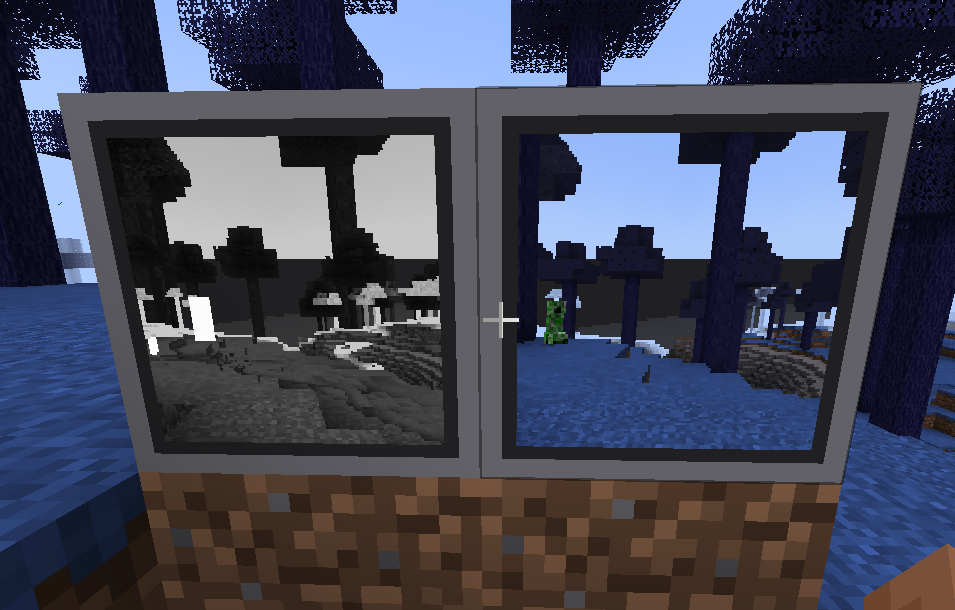
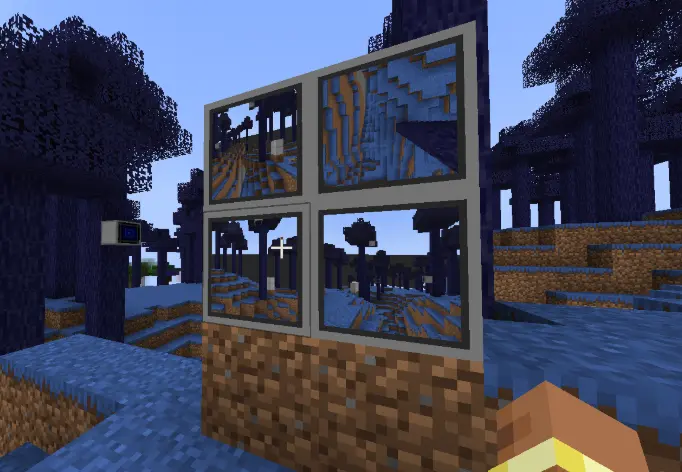
Yes, there is two type of cameras :
Security cameras: a normal camera
Thermal camera: for white hot thermal view
added the Bluey biome (i name it bluey idk why) and the Jay Biome
To be clear : Elomod's development was accelerated using a little AI assistance for some code debugging, and bypassing some of MCreator's limitations.
Thats it !
Project description from Modrinth.
Pick your setup
Choose the version and loader you play, then open the matching release.
Check the dependencies, then try the file in a copied instance before changing a world you care about.
Recent files
elomod-1.1.3-Patch6-neoforge-1.21.1.jar
2 Oct 2026
elomod-1.1.3-Patch5-neoforge-1.21.1.jar
29 Sept 2026
elomod-1.1.3-Patch4-neoforge-1.21.1.jar
18 Sept 2026
elomod-1.1.3-Patch3-neoforge-1.21.1.jar
17 Sept 2026
elomod-1.1.3-Patch2-neoforge-1.21.1.jar
11 Sept 2026
elomod-1.1.3-Patch1-neoforge-1.21.1.jar
30 Aug 2026
elomod-1.1.3-neoforge-1.21.1.jar
28 Aug 2026
elomod-1.1.2-Patch3-neoforge-1.21.1.jar
28 Aug 2026
elomod-1.1.2-Patch2-neoforge-1.21.1.jar
26 Aug 2026
elomod-1.1.2-Patch1-neoforge-1.21.1.jar
25 Aug 2026
elomod-1.1.2-neoforge-1.21.1.jar
24 Aug 2026
elomod-1.1.1-neoforge-1.21.8.jar
10 Aug 2026
Looking for an older file? The official Modrinth project page is in Resources.
 mod
modAdventure time inspired dungeon crawler on a train. Procedurally generated carriages on a infinite sable physics train. Rich narrative, with custom made mods for a completely unique experience.
 mod
modTime dilation, 5 Cyberware spines, bullet-time with modern gun mods (TACZ/Point Blank), blade parrying, and dynamic Cyberpsychosis.
 mod
modChoose your element and become a bender: 16 abilities with custom visual effects, an XP and skill tree progression system, and full multiplayer support.