Minecraft version
Back to mods 
Modrinth · Minecraft mod
Kev's Attributes Panel
Adds an attributes panel to look at your plentiful stats!
Choose a version Pick your version below, then grab the matching file.
Quick answer
Which Kev's Attributes Panel release should I use?
Latest stable file 1.3.7
Game version 1.21.1
Loader Fabric
Kev's Attributes Panel 1.3.7 targets 1.21.1 with Fabric. Installation on the client is optional. Installation on the dedicated server is optional. No extra mods listed for this file.
Where it goes
Is Kev's Attributes Panel required on the client, server, or both?
Installation on the client is optional. Installation on the dedicated server is optional.
Client Optional
Dedicated server Optional
Loader for this release Fabric
Required install it here Optional supported, not mandatory Not supported do not install here Source doesn’t say do not assume
The source marks this as usable on both the client and server.
What else does Kev's Attributes Panel 1.3.7 need?
1.3.7. Change the file and its required mods may change too.
This file does not list any required mods. Do not add a library just because a different file uses it.
This file does not list any required or optional mods.
Before you install it
Add Kev's Attributes Panel without breaking your instance.
Built for Kev's Attributes Panel 1.3.7. Pick another file and the loader, install side or required mods may change.
- 01
Stick to this file
Use 1.3.7. It targets 1.21.1 with Fabric; another release may have different loader, side or dependency requirements.
- 02
Bring the mods it needs
This file does not list any required mods. Do not add a library just because a different file uses it.
- 03
Put it on the correct side
Installation on the client is optional. Installation on the dedicated server is optional.
- 04
Pick the file you checked
Use the “Get this file” button beside 1.3.7. It opens that exact file at the source.
About this project
What does Kev's Attributes Panel add?
Kev's Attributes Panel
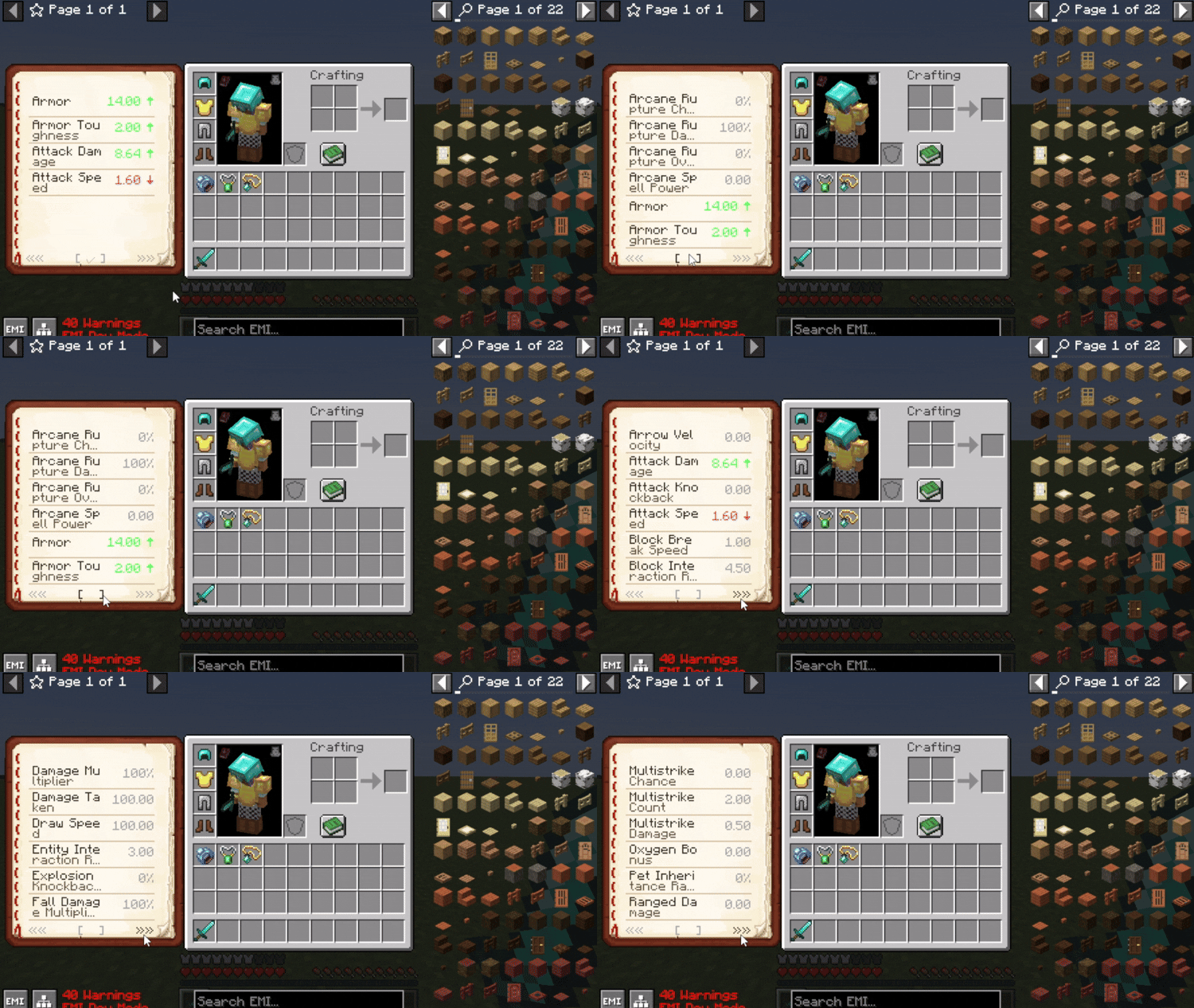
See every stat your character has, and exactly where each bonus comes from.
 |
 |
✨ Features
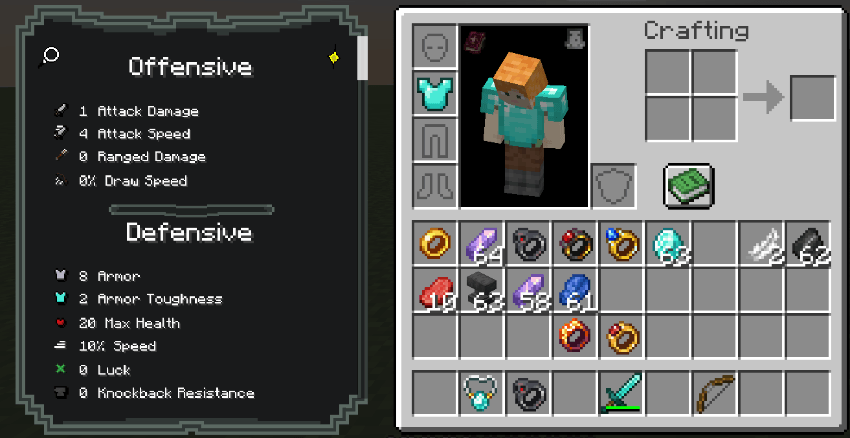
- Attribute panel beside your inventory, in three styles: Compact, Book and Vanilla
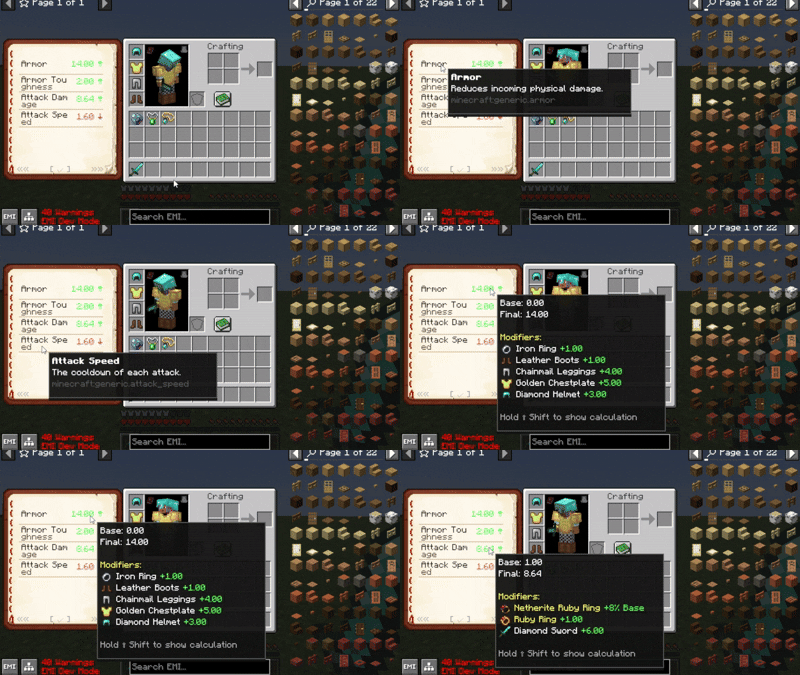
- Source breakdown: hover a stat to see every bonus with the item, trinket, effect or skill it came from
- Full calculation: hold Shift to see how the final value is worked out
- Custom headers and icons, set up in Mod Menu or the config file
- Animated textures: resource packs can animate the panel (
.mcmeta, like vanilla) - Attribute descriptions for vanilla and modded stats, extendable with a resource pack
Showcase resource pack: EaglesEye's Tooltip Attribute Icons with Icon Leading Tooltip.
🧩 Built-in support
| Mod | 1.21.1 | 1.21.11 |
|---|---|---|
| Trinkets | ✅ | ✅ (Trinkets Continued / Updated) |
| Curios | ✅ | ✅ |
| Accessories | ✅ | ⏳ when it updates |
| TieredZ | ✅ | - |
| Apotheosis | ✅ | — |
| Pufferfish's Skill Trees | ✅ | - |
| Reskillable Reimagined | ✅ | — |
| RPG Systems (incl. Titles) | ✅ | — |
| Spell Engine (Set Equipment) | ✅ | — |
| More Quest Types (Rewards) | ✅ | — |
📝 Adding descriptions to attributes
Make a resource pack with assets/<your_namespace>/lang/en_us.json:
{
  "description.attribute.name.modid.attributename": "Your attribute description here.",
  "description.attribute.name.spell_engine.healing_taken": "Modifies how much healing is received."
}
🏷️ Custom bonus names
Give a modifier an id like minecraft:diamond_sword.hello_world and the panel shows it with a diamond sword icon, named "Hello World".

Project description from Modrinth.
Pick your setup
Kev's Attributes Panel by Minecraft version and loader
Choose the version and loader you play, then open the matching release.
Minecraft version
1.20.1
2 loader buildsCheck the dependencies, then try the file in a copied instance before changing a world you care about.
Recent files
Kev's Attributes Panel versions and loaders
1.3.7
kevs_attributes_panel-fabric-1.3.7.jar
16 Nov 2026
Client Optional Server Optional Dependencies No extras listed Listed on Release listing
Check the 1.21.1 · Fabric setup 1.21.1Fabric release
1.3.7
kevs_attributes_panel-neoforge-1.3.7.jar
16 Nov 2026
Client Optional Server Optional Dependencies No extras listed Listed on Release listing
Check the 1.21.1 · NeoForge setup 1.21.1NeoForge release
1.3.7
kevs_attributes_panel-neoforge-1.3.7.jar
16 Nov 2026
Client Optional Server Optional Dependencies No extras listed Listed on Release listing
Check the 1.21.1 · NeoForge setup 1.21.1NeoForge release
1.3.7
kevs_attributes_panel-fabric-1.3.7.jar
16 Nov 2026
Client Optional Server Optional Dependencies No extras listed Listed on Release listing
Check the 1.21.1 · Fabric setup 1.21.1Fabric release
1.3.6
kevs_attributes_panel-fabric-1.3.6.jar
4 Nov 2026
Client Optional Server Optional Dependencies No extras listed Listed on Release listing
Check the 1.21.1 · Fabric setup 1.21.1Fabric release
1.3.6
kevs_attributes_panel-neoforge-1.3.6.jar
4 Nov 2026
Client Optional Server Optional Dependencies No extras listed Listed on Release listing
Check the 1.21.1 · NeoForge setup 1.21.1NeoForge release
1.3.5
kevs_attributes_panel-fabric-1.3.5.jar
8 Oct 2026
Client Optional Server Optional Dependencies No extras listed Listed on Release listing
Check the 1.20.1 · Fabric setup 1.20.1Fabric release
1.3.5
kevs_attributes_panel-forge-1.3.5.jar
8 Oct 2026
Client Optional Server Optional Dependencies No extras listed Listed on Release listing
Check the 1.20.1 · Forge setup 1.20.1Forge release
1.3.5
kevs_attributes_panel-fabric-1.3.5.jar
8 Oct 2026
Client Optional Server Optional Dependencies No extras listed Listed on Release listing
Check the 1.21.1 · Fabric setup 1.21.1Fabric release
1.3.5
kevs_attributes_panel-neoforge-1.3.5.jar
8 Oct 2026
Client Optional Server Optional Dependencies No extras listed Listed on Release listing
Check the 1.21.1 · NeoForge setup 1.21.1NeoForge release
1.3.4
kevs_attributes_panel-forge-1.3.4.jar
31 Aug 2026
Client Optional Server Optional Dependencies No extras listed Listed on Release listing
Check the 1.20.1 · Forge setup 1.20.1Forge release
1.3.4
kevs_attributes_panel-fabric-1.3.4.jar
31 Aug 2026
Client Optional Server Optional Dependencies No extras listed Listed on Release listing
Check the 1.20.1 · Fabric setup 1.20.1Fabric release
Looking for an older file? The official Modrinth project page is in Resources.
 mod
CurseForge + Modrinth · Minecraft
Elytra Trims
Lightweight and customizable support for elytra trims, patterns and dyes
 mod
Modrinth · Minecraft
Hostile Civilization
"They were here before you came and they are not happy about your visit..."
 mod
Modrinth · Minecraft
CombatAdditions
This is a mod I made to improve the vanilla combat experience, by adding magic, new enchantments and various other features to aid you in combat!