Quick answer
Which L2 Backpack release should I use?
Latest stable file 3.1.5
Game version 1.21.1
Loader NeoForge
L2 Backpack 3.1.5 targets 1.21.1 with NeoForge. Installation on the client is optional. Installation on the dedicated server is optional. All 1 required mods have matching files.
Where it goes
Is L2 Backpack required on the client, server, or both?
Installation on the client is optional. Installation on the dedicated server is optional.
Client Optional
Dedicated server Optional
Loader for this release NeoForge
Required install it here Optional supported, not mandatory Not supported do not install here Source doesn’t say do not assume
The source marks this as usable on both the client and server.
What else does L2 Backpack 3.1.5 need?
3.1.5. Change the file and its required mods may change too.
Install L2 Library first. We found matching files for this game-version and loader setup. 19 come through another mod in the chain.
5 listed on this file 19 pulled in by those mods
Matching file found Matched file: 9.5.1+1.21.1
Matching file found Matched file: 3.0.8
Matching file found Matched file: 3.1.42
Matching file found Matched file: 1.21-2.26.1-neoforge
Matching file found Matched file: 3.1.3
Matching file found Matched file: 4.9.2
Matching file found Matched file: 3.0.4
Create Needed by Modular Golems pulled inMatching file found Matched file: 6.0.10+mc1.21.1
Matching file found Matched file: 1.5.3-neoforge+mc1.21.1
Matching file found Matched file: 3.32
Matching file found Matched file: 3.1.4
Matching file found Matched file: 3.1.5
No matching file
Matching file found Matched file: 19.43.0.393
Matching file found Matched file: 1.21.1-93-neoforge
Matching file found Matched file: 3.0.18
Matching file found Matched file: 5.13.0
Matching file found Matched file: 21.1.10
Matching file found Matched file: 3.0.7
Matching file found Matched file: 21.1.81
Matching file found Matched file: 1.21-2.3.3
Matching file found Matched file: 3.1
No matching file
Matching file found Matched file: 0.7.7.7
19
extra mods were pulled in by other dependencies.
Indented rows show who needs each one. We only count dependency files that match this setup. A file for another loader does not fill the gap.
Before you install it
Add L2 Backpack without breaking your instance.
Built for L2 Backpack 3.1.5. Pick another file and the loader, install side or required mods may change.
- 01
Stick to this file
Use 3.1.5. It targets 1.21.1 with NeoForge; another release may have different loader, side or dependency requirements.
- 02
Bring the mods it needs
Install L2 Library first. We found matching files for this game-version and loader setup. 19 come through another mod in the chain.
- 03
Put it on the correct side
Installation on the client is optional. Installation on the dedicated server is optional.
- 04
Pick the file you checked
Use the “Get this file” button beside 3.1.5. It opens that exact file at the source.
About this project
What does L2 Backpack add?
L2Backpack
Discord: https://discord.gg/BCHNhsDMXz
Dependency: L2Library
(Optional Compatilibity) It supports Modular Golems in the way that humanoid golems can use quivers from this mod, but you need to make sure Modular Golem version is at least 1.7.3
Contents
Backpack
Expand
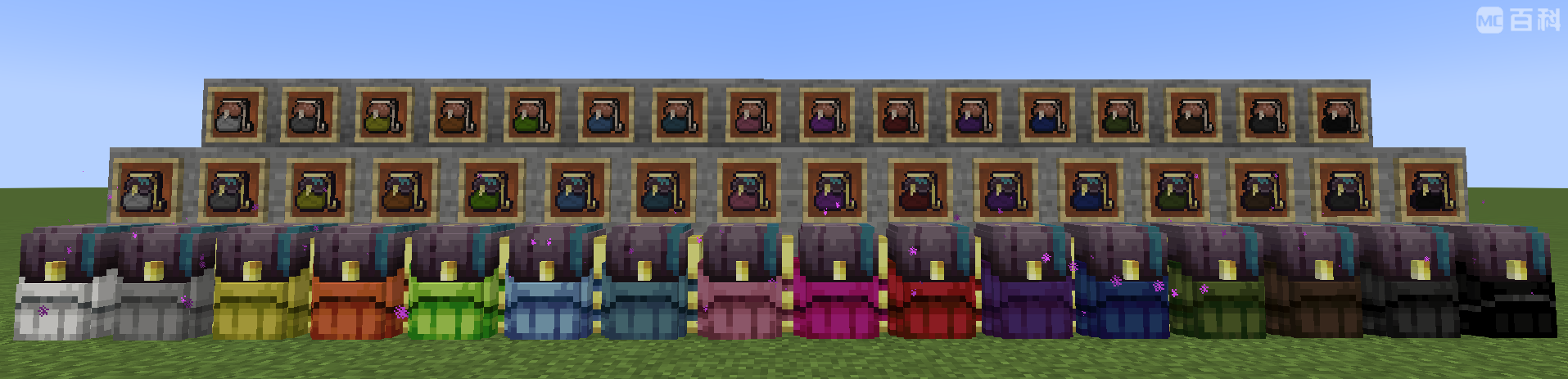
A simple backpack similar to backpacks in every backpack mod. You can color them to tell them apart from each other without hovering them. It has quick access support that differentiates itself from most other backpack mods. It has 9 slots at the beginning, and can be upgraded in smithing table using ender pocket, up to 54 slots (large chest).
### Features
- **wearable**: They can be worn in chest slot or back slot of Curios, and opened with a key bind (default: B)
- **quick-access**(limited): They can be opened in right hand, or in some inventories directly by right clicking this item in GUI. Supported inventories: player inventory, ender chest, dimensional storage.
- **quick-dump**: You can dump all items in this backpack into block containers, such as chests, by shift-right clicking the container block.
- **quick-load**: You can extract as much items as possible from a block container, by shift-LEFT clicking the container block.
- **container-item**: This is a container item in vanilla definition. This means that it cannot exist in another container item, such as shulker box. This feature prevents NBT-overflow that can crash server and corrupt chunks. Ender Backpack
Expand
A portable ender chest. Nothing special.
### Features
- **wearable**: They can be worn in chest slot or back slot of Curios, and opened with a key bind (default: B)
- **quick-access**(full): They can be opened in right hand, or in any inventory directly by right clicking this item in GUI.
- **off-loaded**: This is not a container item, so you can put backpacks in it and put it in backpacks. The data is stored on player.
Dimensional Storage
Expand
A backpack that stores item in the end dimension. Dimensional Storage must be bind to a player to use, and the ones that bind to the same player and have the same color will bind to the same storage space. Once it's bound to a player, the owner can give it to others to allow other players to access this storage space. But note: one player only have 16 storage spaces, each corresponds to a color.This item can also be placed on ground. Then it acts as a cross-dimensional item teleport chest, similar to Ender Storage. This chest can help you to teleport items from one factory to another, but it does not load the chunk.
Features
- wearable: They can be worn in chest slot or back slot of Curios, and opened with a key bind (default: B)
- quick-access(full): They can be opened in right hand, or in any inventory directly by right clicking this item in GUI.
- off-loaded: This is not a container item, so you can put backpacks in it and put it in backpacks. The data is stored in the world.
- placeable: This item can be placed down as a block. To place it, do shift+right click.
Armor Bag / Book Bag
Expand
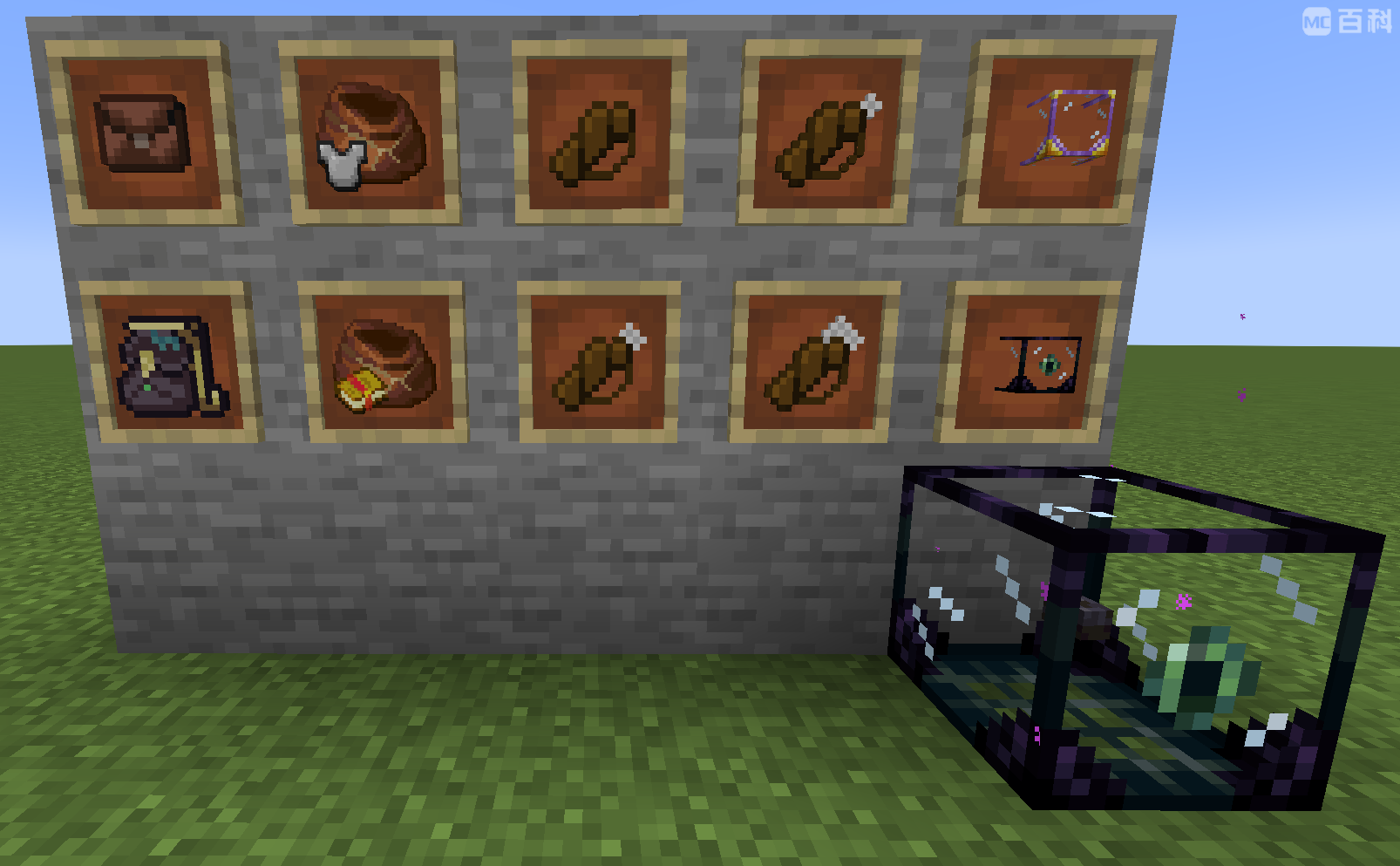
A bag that stores up to 64 unstackable items. Armor bag stores items with durability, and book bag stores enchanted books. This is a temporary storage space: It does not have a GUI. Instead, player right click with it to collect all matching items into this bag, and shift-right click with it to pour every out.These bags are useful only in RPG modpacks where you can get a lot of loots of equipments or enchanted books. They fills the inventory very quickly. These bags can help you to store them somewhere before you go back to home and sort them. To make sure it does not take your armor / weapon away, it only collect items in your inventory, not the hotbar or armor slots.
Features
- quick-dump: You can dump all items in this bag into block containers, such as chests, by shift-right clicking the container block.
- quick-load: You can extract as much items as possible from a block container, by shift-LEFT clicking the container block.
- quick-collect: Right click to collect all matching items from your inventory except the hotbar
- quick-extract: Shift-right click to pour out all items from the bag
Quiver
Expand
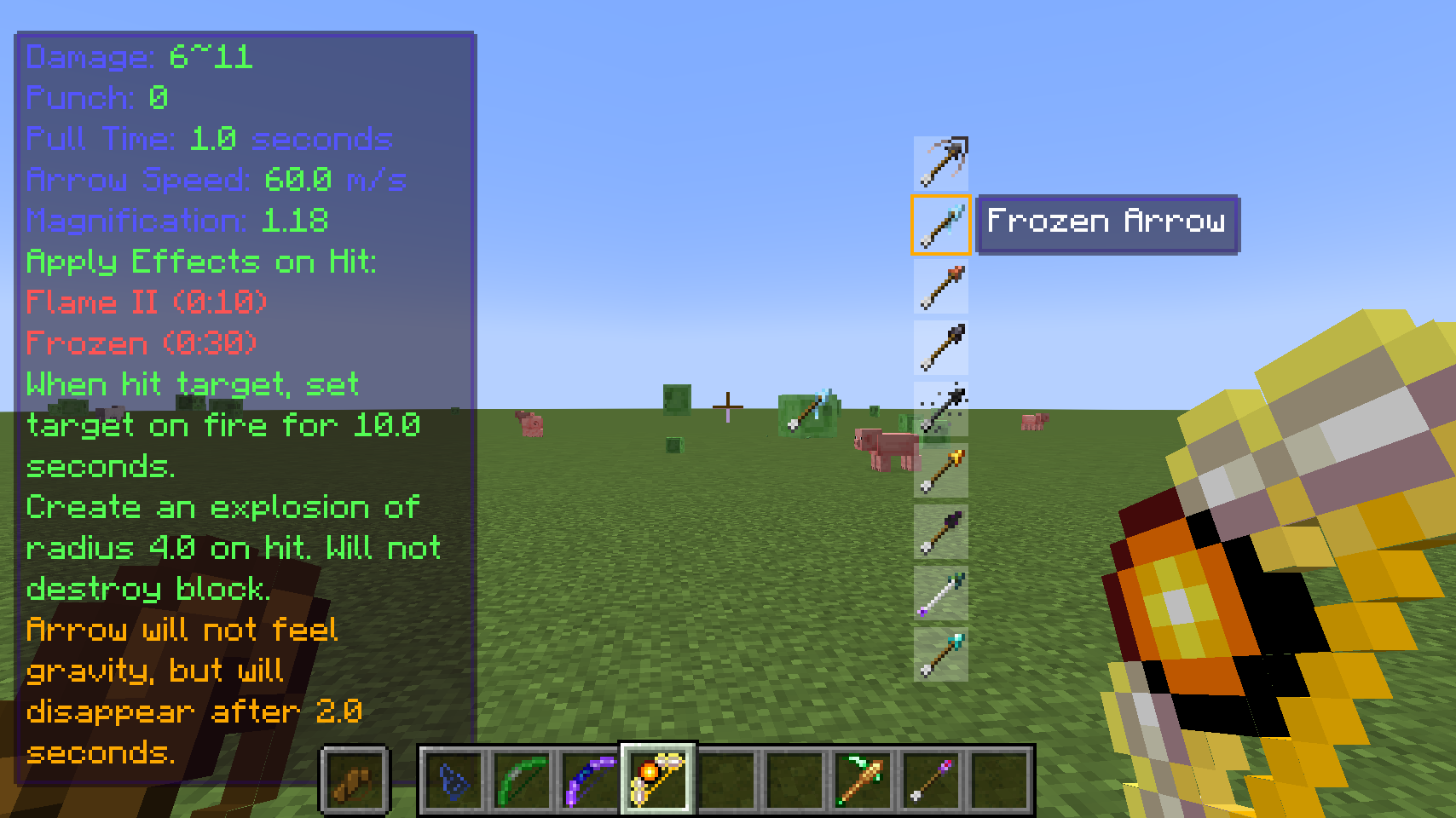
A unique backpack that allows you to preview, select, and shoot arrows from 9 candidates all while holding a bow. This feature allows players to quickly select arrows to shoot without switching items or open inventory. Quiver has 9 slot only and cannot be upgraded. To use it, put it in offhand, chest slot, or back slot of Curios. When holding a bow, player will see all arrows in the Quiver, the currently selected one, and whether this arrow is acceptable by the bow. Press shift+number key to select arrow, or up/down keys (configurable) to switch arrows.Features
- wearable: They can be worn in chest slot or back slot of Curios, and opened with a key bind (default: B)
- quick-access(limited): They can be opened in right hand, or in some inventories directly by right clicking this item in GUI. Supported inventories: player inventory, ender chest, dimensional storage.
- quick-dump: You can dump all items in this backpack into block containers, such as chests, by shift-right clicking the container block.
- quick-load: You can extract as much items as possible from a block container, by shift-LEFT clicking the container block.
- container-item: This is a container item in vanilla definition. This means that it cannot exist in another container item, such as shulker box. This feature prevents NBT-overflow that can crash server and corrupt chunks.
Tool Swap / Armor Swap / Combined Swap
Expand
Similar to quiver, these swaps allow you to preview, select, swap tools/armors from 9 candidates without opening any GUI. This feature allows players to quickly switch between mining/travel/battle gears without open inventory. When holding a tool, player will see all tools in the tool swap. Press shift+number key to select tool, or up/down keys (configurable) to select. Then press return to swap the select tool with the tool in hand. For armors, having an empty main hand opens the list for armor. Combined Swap is the combined version of quiver, tool swap, and armor swap. Holding corresponding items to trigger each of them. You can also press alt (configurable) to show the tool list when holding nothing.
Ender Swap combines combined swap and ender backpack, saving one backpack slot. Though the items is swap are still stored on the item, not the ender chest inventory.
Features
- wearable: They can be worn in chest slot or back slot of Curios, and opened with a key bind (default: B)
- quick-access(limited): They can be opened in right hand, or in some inventories directly by right clicking this item in GUI. Supported inventories: player inventory, ender chest, dimensional storage.
- quick-dump: You can dump all items in this backpack into block containers, such as chests, by shift-right clicking the container block.
- quick-load: You can extract as much items as possible from a block container, by shift-LEFT clicking the container block.
- container-item: This is a container item in vanilla definition. This means that it cannot exist in another container item, such as shulker box. This feature prevents NBT-overflow that can crash server and corrupt chunks.
Portable Drawers
Expand
Similar to the drawers in drawer mod. The only difference is that it is portable! It can only store one kind of item and the item must not have any NBT, but can store up to 64 stacks. It cannot be placed down, and player can access it through inventory.To put items in, in any GUI, left click the drawer with the item you want to store in. To take items out, in any GUI, right click it to take out a stack. This also support quick-dump and quick-load, so you can fast transport items from one drawer block to another, if you have drawer mod installed. This also support quick-collect and quick-extract, so you can clear cobblestones in your inventory or take out a stack quickly when you need.
Features
- quick-dump: You can dump all items in this backpack into block containers, such as chests, by shift-right clicking the container block.
- quick-load: You can extract as much items as possible from a block container, by shift-LEFT clicking the container block.
- quick-collect: Right click to collect all matching items from your inventory including the hotbar. When it has no item, it will collect the kind of item that has the largest count in your inventory.
- quick-extract: Shift-right click to pour out one stack of items from the drawer
Ender Drawers
Expand
A portable drawer, but store items in the end dimension. You can access it as if it is a simple portable drawer, but it does not have the quick dump and quick load feature. Instead, it can be placed down as a block, and act as a cross-dimensional item teleport station. To use it, first left click it with an item to set its binding. It will bind to the item even it contains none.Similar to dimensional storage, it has to be bind to a player to be functional. ender drawers that binds to the same player and set with the same item will be bind to the same storage space. But better than dimensional storage, player can have as many ender drawer space as they want, one for each kind of item. This is very powerful in automated production lines
For ender drawer block, right click to store items or take items out. To bulk store / take, use portable drawer to quick-dump or quick-load
Features
- quick-collect: Right click to collect all matching items from your inventory including the hotbar. When it has no item, it will collect the kind of item that has the largest count in your inventory.
- quick-extract: Shift-right click to pour out one stack of items from the drawer
- placeable: This item can be placed down as a block. To place it, do shift+right click
Project description from Modrinth.
Pick your setup
L2 Backpack by Minecraft version and loader
Choose the version and loader you play, then open the matching release.
Minecraft version
1.21.1
1
loader build Minecraft version
1.21
1
loader build Minecraft version
1.20.1
2
loader builds Minecraft version
1.19.2
1
loader build Check the dependencies, then try the file in a copied instance before changing a world you care about.
Recent files
L2 Backpack versions and loaders
l2backpack-2.6.0.jar
24 May 2026
Client Optional Server Optional Dependencies 1 required · 1 unchecked Listed on Release listing
Check the 1.20.1 · Forge setup → 1.20.1ForgeNeoForge release
l2backpack-2.5.8.jar
25 Mar 2026
Client Optional Server Optional Dependencies 1 required · 1 unchecked Listed on Release listing
Check the 1.20.1 · Forge setup → 1.20.1ForgeNeoForge release
l2backpack-2.5.7.jar
2 Mar 2026
Client Optional Server Optional Dependencies 1 required · 1 unchecked Listed on Release listing
Check the 1.20.1 · Forge setup → 1.20.1ForgeNeoForge release
l2backpack-2.5.6.jar
20 Dec 2025
Client Optional Server Optional Dependencies 1 required · 1 unchecked Listed on Release listing
Check the 1.20.1 · Forge setup → 1.20.1ForgeNeoForge release