Minecraft version
Back to mods 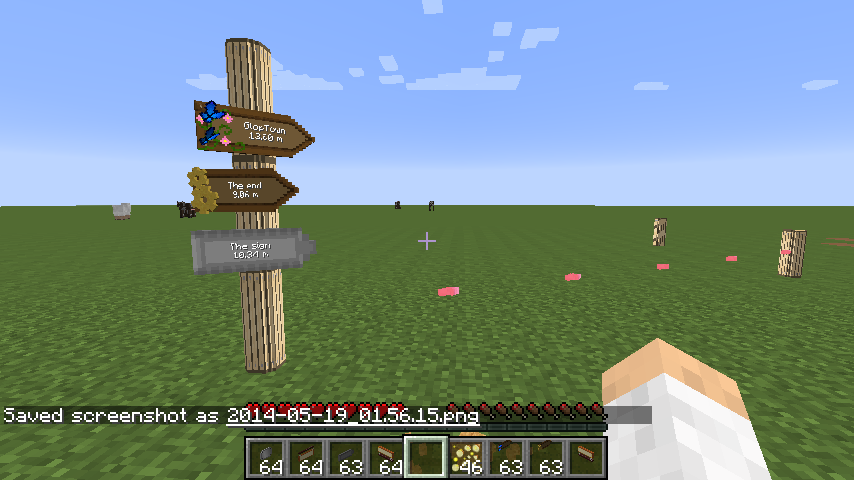
CurseForge · Minecraft mod
RPG Advanced Mod
This is a mod intended to add a few RPG features inside Minecraft. #Modjam4 mod.
Choose a version Pick your version below, then grab the matching file.
Quick answer
Which RPG Advanced Mod release should I use?
Latest stable file RPGAdvMod-1.0.0_1.7.10.jar
Game version 1.7.10
Loader Not required
RPG Advanced Mod RPGAdvMod-1.0.0_1.7.10.jar targets 1.7.10. The project page does not say whether this file belongs on the client, dedicated server, or both. No extra mods listed for this file.
Where it goes
Is RPG Advanced Mod required on the client, server, or both?
The project page does not say whether this file belongs on the client, dedicated server, or both.
Client Source doesn’t say
Dedicated server Source doesn’t say
Loader for this release No loader listed
Required install it here Optional supported, not mandatory Not supported do not install here Source doesn’t say do not assume
The source does not explicitly classify this release as client-only or server-only.
What else does RPG Advanced Mod RPGAdvMod-1.0.0_1.7.10.jar need?
RPGAdvMod-1.0.0_1.7.10.jar. Change the file and its required mods may change too.
This file does not list any required mods. Do not add a library just because a different file uses it.
This file does not list any required or optional mods.
Before you install it
Add RPG Advanced Mod without breaking your instance.
Built for RPG Advanced Mod RPGAdvMod-1.0.0_1.7.10.jar. Pick another file and the loader, install side or required mods may change.
- 01
Stick to this file
Use RPGAdvMod-1.0.0_1.7.10.jar. It targets 1.7.10; another release may have different loader, side or dependency requirements.
- 02
Bring the mods it needs
This file does not list any required mods. Do not add a library just because a different file uses it.
- 03
Put it on the correct side
The project page does not say whether this file belongs on the client, dedicated server, or both.
- 04
Pick the file you checked
Use the “Get this file” button beside RPGAdvMod-1.0.0_1.7.10.jar. It opens that exact file at the source.
About this project
What does RPG Advanced Mod add?
RPGModAdv adds 3 types of items. Poles and wallsigns are used to create waypoints. Signs are then places on poles. When a sign is placed, you can choose a waypoint and the sign will automatically point toward the waypoint, showing the distance and the name of the waypoint (or a custom name is you wish so). Right clicking on a sign will display a "flypath" to the destination waypoint.
It also adds some breadcrumbs (glowcrumbs) that will drop on the ground automatically (when in the hotbar). Breadcrumbs are only visible by the player dropping them, decay in ~1h and are visible in low light level.
If a stack of breadcrumb is used on a sign, they will become linked. You can now walk to your destination following the path you want. Once you reach your destination, the path is set and right clicking on the sign will show the custom path instead of the "flypath". Custom path can be reinitialised by shift+right cliking the sign.
2 keybindings are included to clear the display of the path (Numpad 9) and hide/show the breadcrumbs (Numpad 8).
Project description from CurseForge.
Pick your setup
RPG Advanced Mod by Minecraft version and loader
Choose the version and loader you play, then open the matching release.
Minecraft version
1.7.2
1 loader buildCheck the dependencies, then try the file in a copied instance before changing a world you care about.
Recent files
RPG Advanced Mod versions and loaders
RPGAdvMod-1.0.0_1.7.10.jar
21 Jul 2014
Client Source doesn’t say Server Source doesn’t say Dependencies No extras listed Listed on Release listing
Check the 1.7.10 setup 1.7.10 release
RPGAdvMod-1.0.0.jar
29 May 2014
Client Source doesn’t say Server Source doesn’t say Dependencies No extras listed Listed on Release listing
Check the 1.7.2 setup 1.7.2 release
RPGAdvMod-0.0.1.jar
19 May 2014
Client Source doesn’t say Server Source doesn’t say Dependencies No extras listed Listed on Release listing
Check the 1.7.2 setup 1.7.2 beta
Looking for an older file? The official CurseForge project page is in Resources.
 mod
mod CurseForge · Minecraft
Mo' Bends [MODERN PORT]
A port of the Mo' Bends mod to Minecraft 1.20.1
 mod
mod CurseForge · Minecraft
Dynamic Glass
Place connected glass by default, and normal glass when you hold Shift
 mod
mod CurseForge + Modrinth · Minecraft
TofuCraftReload
This mod is a remake of Old Mod TofuCraft made by tsuteto. add soybean As a new all-purpose food!