Minecraft version
Back to mods 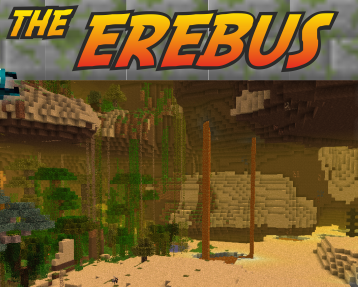
CurseForge · Minecraft mod
The Erebus
A dimension ruled by colossal invertebrates... Enter the darkness and uncover its secrets.
Choose a version Pick your version below, then grab the matching file.
Quick answer
Which The Erebus release should I use?
beta file Erebus-1.0.32.jar
Game version 1.12.2
Loader Forge
The Erebus Erebus-1.0.32.jar targets 1.12.2 with Forge. The project page does not say whether this file belongs on the client, dedicated server, or both. No extra mods listed for this file.
Where it goes
Is The Erebus required on the client, server, or both?
The project page does not say whether this file belongs on the client, dedicated server, or both.
Client Source doesn’t say
Dedicated server Source doesn’t say
Loader for this release Forge
Required install it here Optional supported, not mandatory Not supported do not install here Source doesn’t say do not assume
The source does not explicitly classify this release as client-only or server-only.
What else does The Erebus Erebus-1.0.32.jar need?
Erebus-1.0.32.jar. Change the file and its required mods may change too.
This file does not list any required mods. Do not add a library just because a different file uses it.
This file does not list any required or optional mods.
Before you install it
Add The Erebus without breaking your instance.
Built for The Erebus Erebus-1.0.32.jar. Pick another file and the loader, install side or required mods may change.
- 01
Stick to this file
Use Erebus-1.0.32.jar. It targets 1.12.2 with Forge; another release may have different loader, side or dependency requirements.
- 02
Bring the mods it needs
This file does not list any required mods. Do not add a library just because a different file uses it.
- 03
Put it on the correct side
The project page does not say whether this file belongs on the client, dedicated server, or both.
- 04
Pick the file you checked
Use the “Get this file” button beside Erebus-1.0.32.jar. It opens that exact file at the source.
About this project
What does The Erebus add?
{width=899 height=409}
The Erebus focuses on adding a whole new dimension to Minecraft, with many new creatures to slay, things to create and lands to explore. Other things, such as an in-depth magic system and many dungeons are planned as well.
This dimension is designed to provide full survivability, giving you the ability to start from scratch there if you so desire. This is, however, not recommended, as mobs are a lot tougher. The mobs are rather diverse in their AI, and even the passive mobs are not completely harmless.
This mod plays well with other mods, and is designed for compatibility with both magic and tech mods. You can turn on a variety of ores commonly used in mods, such as Copper, Tin, Silver, Lead and Aluminum, so you never have to leave!

Quick introduction:
This is what you'll need to do to get to the erebus:
Craft an Offering Altar (Smooth stone in the corners!):
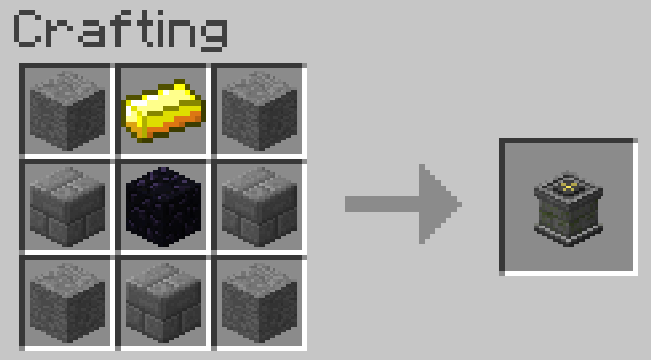
The offering altar takes 3 items in and crafts them into 1 (You can use NEI to look recipes for it!). However, the only recipe you need to worry about now is the one to craft the Gaean Gem which is part of the portal activator recipe. You'll need an obsidian, an emerald and a diamond! Right-click the altar with those items in your hand to put them in.
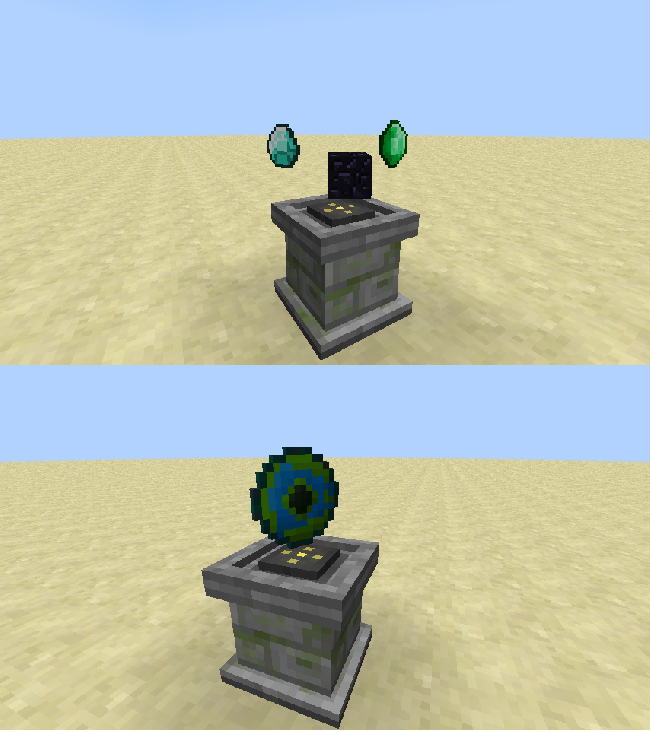
To take an item out you'll need to shift right-click with an empty hand and the item will pop right out.
Once you have the gaean stone craft the portal activator (now named Staff of Gaea) thusly:
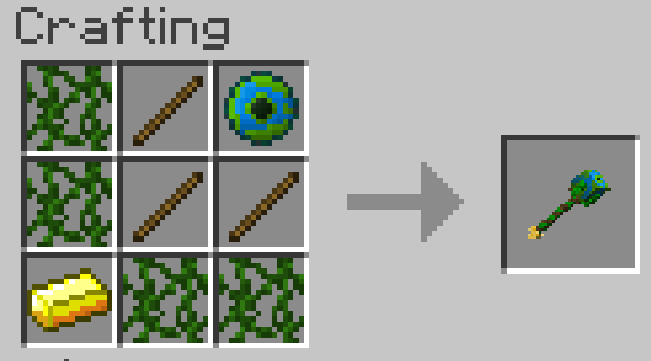
Now onto actually building the portal!
You'll need a Gaean Keystone:
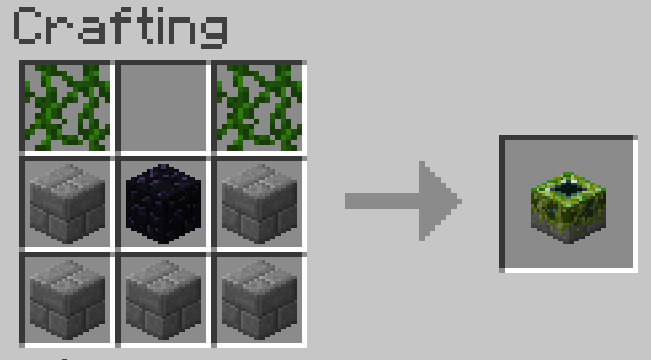
Build a portal frame out of nearly any block (except leaves). You can get creative here, any shape will do. Doesn't even need to be vertical!
{width=467 height=335}{width=387 height=317}
Now fill that baby up with leaves (any leaves should work, even from other mods):
{width=434 height=313}{width=349 height=312}
Place the keystone in front of the portal:
{width=430 height=368}{width=385 height=355}
And now right-click the keystone using your Staff of Gaea!
{width=398 height=315}{width=322 height=316}
Now jump through and have a blast! (or die in one)
Terms of use:
By downloading the mod, you agree to the following terms of use.
You are allowed to:
- Use the mod, create videos and screenshots
- Share the mod by reffering to this topic
- Decompile and modify the mod
- Add the mod to your modpack, public or whatever (do link back to the MCF page please).
You are forbidden to:
- Reupload the mod or a modification of it
- Claim the mod or any part of it as yours
- Profit from the mod in any way
Be sure to check out our MCF page.
Project description from CurseForge.
Pick your setup
The Erebus by Minecraft version and loader
Choose the version and loader you play, then open the matching release.
Minecraft version
1.7.10
1 loader buildMinecraft version
1.6.4
1 loader buildCheck the dependencies, then try the file in a copied instance before changing a world you care about.
Recent files
The Erebus versions and loaders
Erebus-1.0.32.jar
21 Feb 2021
Client Source doesn’t say Server Source doesn’t say Dependencies No extras listed Listed on Release listing
Check the 1.12.2 · Forge setup Forge1.12.2 beta
Erebus-1.0.31.jar
24 Nov 2019
Client Source doesn’t say Server Source doesn’t say Dependencies No extras listed Listed on Release listing
Check the 1.12.2 · Forge setup Forge1.12.2 beta
Erebus-1.0.30.jar
21 Jun 2019
Client Source doesn’t say Server Source doesn’t say Dependencies No extras listed Listed on Release listing
Check the 1.12.2 setup 1.12.2 beta
Erebus-1.0.29.jar
26 Mar 2019
Client Source doesn’t say Server Source doesn’t say Dependencies No extras listed Listed on Release listing
Check the 1.12.2 setup 1.12.2 beta
Erebus-1.0.28.jar
13 Mar 2019
Client Source doesn’t say Server Source doesn’t say Dependencies No extras listed Listed on Release listing
Check the 1.12.2 setup 1.12.2 beta
Erebus-1.0.26.jar
24 Feb 2019
Client Source doesn’t say Server Source doesn’t say Dependencies No extras listed Listed on Release listing
Check the 1.12.2 setup 1.12.2 beta
Erebus-1.0.25.jar
15 Dec 2018
Client Source doesn’t say Server Source doesn’t say Dependencies No extras listed Listed on Release listing
Check the 1.12.2 setup 1.12.2 beta
Erebus-1.0.23.jar
9 Sept 2018
Client Source doesn’t say Server Source doesn’t say Dependencies No extras listed Listed on Release listing
Check the 1.12.2 setup 1.12.2 beta
Erebus-1.0.22.jar
16 Mar 2018
Client Source doesn’t say Server Source doesn’t say Dependencies No extras listed Listed on Release listing
Check the 1.12.2 setup 1.12.2 beta
Erebus-1.0.21.jar
27 Feb 2018
Client Source doesn’t say Server Source doesn’t say Dependencies No extras listed Listed on Release listing
Check the 1.12.2 setup 1.12.2 beta
Erebus-1.0.20.jar
24 Feb 2018
Client Source doesn’t say Server Source doesn’t say Dependencies No extras listed Listed on Release listing
Check the 1.12.2 setup 1.12.2 beta
Erebus-1.0.19.jar
23 Feb 2018
Client Source doesn’t say Server Source doesn’t say Dependencies No extras listed Listed on Release listing
Check the 1.12.2 setup 1.12.2 beta
Looking for an older file? The official CurseForge project page is in Resources.