Minecraft version
Back to mods 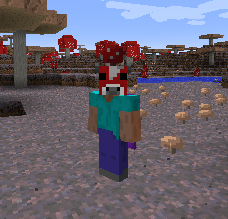
CurseForge · Minecraft mod
Headcrumbs
Celebrities heads as dungeon loot + heads for all the mobs you can think of!
Choose a version Pick your version below, then grab the matching file.
Quick answer
Which Headcrumbs release matches 1.10.2?
Best match for your filters Headcrumbs-2.0.3.jar
Game version 1.10.2
Loader Not required
Headcrumbs-2.0.3.jar targets 1.10.2. The project page does not say whether this file belongs on the client, dedicated server, or both. No extra mods listed for this file.
Where it goes
Is Headcrumbs required on the client, server, or both?
The project page does not say whether this file belongs on the client, dedicated server, or both.
Client Source doesn’t say
Dedicated server Source doesn’t say
Loader for this release No loader listed
Required install it here Optional supported, not mandatory Not supported do not install here Source doesn’t say do not assume
The source does not explicitly classify this release as client-only or server-only.
What else does Headcrumbs-2.0.3.jar need?
Headcrumbs-2.0.3.jar on 1.10.2. Every mod below is checked against that same setup.
This file does not list any required mods. Do not add a library just because a different file uses it.
This file does not list any required or optional mods.
Before you install it
Add Headcrumbs without breaking your instance.
Built for Headcrumbs-2.0.3.jar on 1.10.2. Pick another file and the loader, install side or required mods may change.
- 01
Stick to this file
Use Headcrumbs-2.0.3.jar. It targets 1.10.2; another release may have different loader, side or dependency requirements.
- 02
Bring the mods it needs
This file does not list any required mods. Do not add a library just because a different file uses it.
- 03
Put it on the correct side
The project page does not say whether this file belongs on the client, dedicated server, or both.
- 04
Pick the file you checked
Use the “Get this file” button beside Headcrumbs-2.0.3.jar. It opens that exact file at the source.
About this project
What does Headcrumbs add?
This mod used to be a simple feature from Gany's End but by popular demand I decided to release it as a separate mod.
What the mod adds:
-Vanilla mobs/animals heads
-Thermal Foundation
-Twilight Forrest mobs heads
-Natura mobs heads
-Thaumcraft mobs heads
-Primitive Mobs heads
-Grimoire of Gaia heads
-Laser Creeper Robot Dino Riders From Space heads
-Minecraft celebrities heads as dungeon loot
-All of the heads added by this mod are wearable!
-MOBS! Find your favourite modder/youtuber/streamer/friend as a mob in the world! But careful, they don't like you! (and I don't blame them, look at yourself). Any names added to the config file will also spawn in the world!
You can, of course, remove and add names to the celebrities list at any time using the configs!
You can also make player statues by crafting a player head with 2 clay blocks underneath it!!!
Suggestions:
Suggestions are always welcome! Feel free to request features you feel this mod is lacking (mod support, new config options, etc)
Frequently asked questions:
Q: Can Headcrumbs's heads stabilise Thaumcraft's infusion?
A: Yes, they can!
Q: Does the beheading aspect from Tinker's Construct influence on the head drop rate of Headcrumbs?
A: Yes, it does!
Modpacks:
You can use this in any pack public or private. Don't ask for permission, you already have it.
You are also allowed to modify the mechanics of this mod in any way you want (recipes, ore dictionary names and etc), as long as it's done by a third party mod and keeping this mod file intact.
Adding/Removing heads:
Since I've noticed some people are having difficulties adding and removing heads using the config file, I decided to write a quick tutorial for it!
With the mod properly installed, load up minecraft (duh).
In the main mene, click the Mods button.
{width=520 height=329}
It will open up a menu with a list of names of all the mods you have installed. Find Headcrumbs on that list and click on it!
The Config button will show up on the bottom of the list, click on it to open the next menu.
{width=490 height=274}
Now you'll see just two buttons, click on the "heads" buttons to add/remove heads. The "general" buttons is for other settings of the mod such as turning off heads drops, controlling how rare they are, if they should drop when mobs are killed by charged creepers and so on. I recommend checking it out too :)
{width=505 height=283}
Once you click on the heads buttons a list of categories will show up, It doesn't matter which category you add your usernames to, I only have it setup that way because the default list was pretty big, so I thought it would be easier to split it up. It makes absolutely no difference, when in game, the category that you add your names to. In this tutorial I've chosen the "others" category.
{width=488 height=274}
Now that you clicked on a category you'll see the list of names currently in that category. To remove a name click on the red "X" button besides that name.
To add a name click on the bottom-most "+" button.
{width=512 height=287}
Type in the username exactly as they are (capitals matter!!!) and you're done! If you want to add or remove more usernames just repeat the previous step. When you're done click the done button and it will take you back to the main menu. You might need to restart minecraft in order to your changes to take effect.
{width=493 height=275}
For modders and advanced users:
If you'd like to use this mods heads with your mod and you know how to use reflection:
ganymedes01.headcrumbs.utils.HeadUtils.createHeadFor(EntityPlayer player)
or
ganymedes01.headcrumbs.utils.HeadUtils.createHeadFor(String username)
will return an ItemStack containing one head of the passed player. Feel free to use them anyway you'd like.
Project description from CurseForge.
Pick your setup
Headcrumbs by Minecraft version and loader
Choose the version and loader you play, then open the matching release.
Minecraft version
1.11.2
1 loader buildMinecraft version
1.10.2
1 loader buildMinecraft version
1.9.4
1 loader buildMinecraft version
1.7.10
1 loader buildCheck the dependencies, then try the file in a copied instance before changing a world you care about.
Recent files
Headcrumbs versions and loaders
Headcrumbs-2.0.3.jar
27 Mar 2017
Client Source doesn’t say Server Source doesn’t say Dependencies No extras listed Listed on Release listing
Check the 1.10.2 setup 1.10.2 release
Headcrumbs-2.0.2.jar
27 Mar 2017
Client Source doesn’t say Server Source doesn’t say Dependencies No extras listed Listed on Release listing
Check the 1.10.2 setup 1.10.2 release
Looking for an older file? The official CurseForge project page is in Resources.