Minecraft version
Back to mods 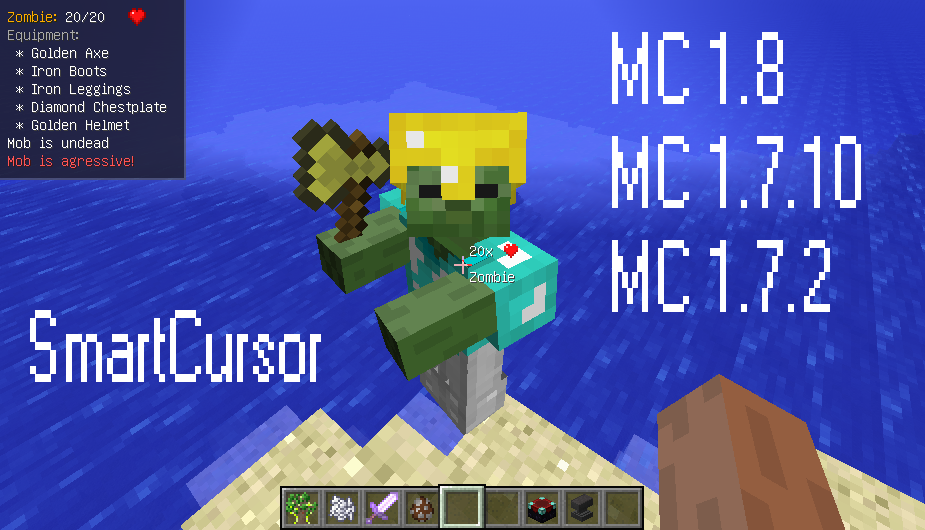
CurseForge · Minecraft mod
SmartCursor
Easy solution to watch important information on your screen (Now with API!)
Choose a version Pick your version below, then grab the matching file.
Quick answer
Which SmartCursor release matches 1.12.2?
beta file 1.5.1-MC1.12.2
Game version 1.12.2
Loader Not required
SmartCursor 1.5.1-MC1.12.2 targets 1.12.2. The project page does not say whether this file belongs on the client, dedicated server, or both. No extra mods listed for this file.
Where it goes
Is SmartCursor required on the client, server, or both?
The project page does not say whether this file belongs on the client, dedicated server, or both.
Client Source doesn’t say
Dedicated server Source doesn’t say
Loader for this release No loader listed
Required install it here Optional supported, not mandatory Not supported do not install here Source doesn’t say do not assume
The source does not explicitly classify this release as client-only or server-only.
What else does SmartCursor 1.5.1-MC1.12.2 need?
1.5.1-MC1.12.2 on 1.12.2. Every mod below is checked against that same setup.
This file does not list any required mods. Do not add a library just because a different file uses it.
This file does not list any required or optional mods.
Before you install it
Add SmartCursor without breaking your instance.
Built for SmartCursor 1.5.1-MC1.12.2 on 1.12.2. Pick another file and the loader, install side or required mods may change.
- 01
Stick to this file
Use 1.5.1-MC1.12.2. It targets 1.12.2; another release may have different loader, side or dependency requirements.
- 02
Bring the mods it needs
This file does not list any required mods. Do not add a library just because a different file uses it.
- 03
Put it on the correct side
The project page does not say whether this file belongs on the client, dedicated server, or both.
- 04
Pick the file you checked
Use the “Get this file” button beside 1.5.1-MC1.12.2. It opens that exact file at the source.
About this project
What does SmartCursor add?
SmartCursor - good replacement for WAWLA (With API and for MC1.12.2).
Last Version: 1.5.0
Require: Minecraft Forge
Localization: EN, RU, CN
Works on: MC 1.12.2, 1.7.2, 1.7.10, 1.8
Mod is updated to the latest version of Minecraft 1.12.2
If there are any issues, feel free to post a comment, write me in DM or open issue at GitHub!
This mod provides a lot of indicators and tooltips for ingame screen and for cursor. With this mod you can see information about objects looking at: mobs, blocks, players, drops etc. You can configure mod as you want - it's has special configuration menu that you can activate by F key.
For modders released plugins system. How to work with API watch at the end of the post.
Let's look at the main features!
We can see information about players and mobs:
{width=758 height=434}
The feature has different styles (under spoiler):
We can see information about blocks:
{width=758 height=434}{width=758 height=434}
We can see information about dropped items:
{width=758 height=434}
The feature has different styles (under spoiler):
It works also for experience:
As a small piece of cake - mod can display percentage damage for blocks ^_^ (also has different styles):
SmartCursor can be used on multiplayer:
{width=758 height=434}
Sources: Mod is open-source, that means that everybody can help with improvement. If you want, follow this link: https://github.com/asaskevich/SmartCursor
Contribution: If you do have a contribution(code or idea) for the mod feel free to put up a Pull Request or open Issue on GitHub or write me a PM.
API Tutorial:
At the first step, you should get API sources here: https://db.tt/W8xJ3fhH
Then you should create a new empty mod for MC 1.12.2, or 1.7.10 or MC 1.7.2.
Specify dependencies for the mod:
Mod(modid = ..., dependencies="required-after:SmartCursor")Create a new empty class that implements one of:
- IEntityProcessor
- IBlockProcessor
- IDropProcessor
- IPlayerProcessor
- Implement all necessary methods. Example:
package example.mod;import java.util.List;import net.minecraft.entity.Entity;import com.asaskevich.smartcursor.api.IEntityProcessor;public class ExampleModule implements IEntityProcessor { @Override public String getModuleName() { return "Example mod"; } @Override public String getAuthor() { return "user"; } @Override public void process(List list, Entity entity) { list.add("Some text"); }}
- Connect your module to SmartCursor core:
import com.asaskevich.smartcursor.api.ModuleConnector;...ModuleConnector.connectModule(new ExampleModule());
- Build and test your mod!
Alternatively, you can download all sources from GitHub and play with them.
Releases:
1.5.0: MC 1.12.2 | MC 1.8 | MC 1.7.10 | MC 1.7.2
- Colored tooltips
- New modules
- Beta support of 1.8
- Fixes
1.4.0: Download for MC 1.7.10 | Download for MC 1.7.2
1.3.0: Download for MC 1.7.10 | Download for MC 1.7.2
1.2.0: Download for MC 1.7.10 | Download for MC 1.7.2
1.1.6: Download for MC 1.7.10 | Download for MC 1.7.2
1.1.5: Download for MC 1.7.10 | Download for MC 1.7.2
1.1.0: Download
1.0.0: Download
0.0.1: Download
Reviews: All video reviews that I found on YouTube under spoiler:
Review for 1.2.0: http://www.youtube.com/watch?v=kUQZ8BQJJv4
Review for 1.0.0: http://www.youtube.com/watch?v=t3iX1nISC4M
Review for 0.0.1: http://www.youtube.com/watch?v=a0gb9XhpzUg
Another resources where I created a topic about this mod:
Project description from CurseForge.
Pick your setup
SmartCursor by Minecraft version and loader
Choose the version and loader you play, then open the matching release.
Minecraft version
1.8
1 loader buildMinecraft version
1.7.10
1 loader buildMinecraft version
1.7.2
1 loader buildCheck the dependencies, then try the file in a copied instance before changing a world you care about.
Recent files
SmartCursor versions and loaders
1.5.1-MC1.12.2
smartcursor-1.5.1.jar
10 Sept 2018
Client Source doesn’t say Server Source doesn’t say Dependencies No extras listed Listed on Release listing
Check the 1.12.2 setup 1.12.2 beta
Looking for an older file? The official CurseForge project page is in Resources.
 mod
CurseForge + Modrinth · Minecraft
PolyBlur
Apply motion blur in-game in way, way too many options. By Polyfrost, best with OneClient.
 mod
CurseForge · Minecraft
Sky’s Terrain Smoother - Biomes O' Plenty Add-On
Extends Sky’s Terrain Smoother to Biomes O’ Plenty, with matching grass and soil slabs, steps and corners for smoother hillsides and cave floors.
 mod
CurseForge · Minecraft
Sky’s Terrain Smoother
Smooth new terrain and cave floors with slabs, steps and corners, choose from three smoothing levels, with built in Mineralogy support.