Minecraft version
Back to mods 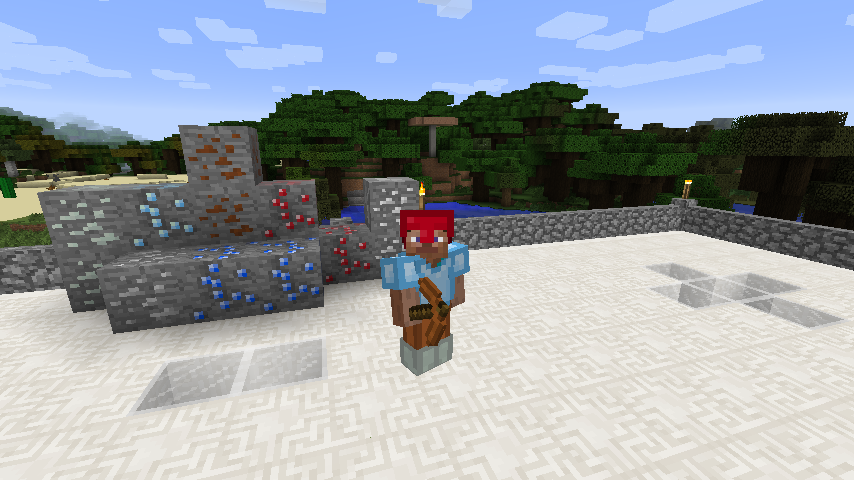
CurseForge · Minecraft mod
The Mining Mod
This mod will extend your mining possibilities! It adds new ores, tools and armor sets which vary from eachother. Mithril will give you maybe the biggest challenge ever. This ore is extremely rare, but the armor and tools are insanely strong!
Choose a version Pick your version below, then grab the matching file.
Quick answer
Which The Mining Mod release matches 1.7.10?
Best match for your filters The Mining Mod v1.0 - MC 1.7.10
Game version 1.7.10
Loader Not required
The Mining Mod v1.0 - MC 1.7.10 targets 1.7.10. The project page does not say whether this file belongs on the client, dedicated server, or both. No extra mods listed for this file.
Where it goes
Is The Mining Mod required on the client, server, or both?
The project page does not say whether this file belongs on the client, dedicated server, or both.
Client Source doesn’t say
Dedicated server Source doesn’t say
Loader for this release No loader listed
Required install it here Optional supported, not mandatory Not supported do not install here Source doesn’t say do not assume
The source does not explicitly classify this release as client-only or server-only.
What else does The Mining Mod v1.0 - MC 1.7.10 need?
The Mining Mod v1.0 - MC 1.7.10 on 1.7.10. Every mod below is checked against that same setup.
This file does not list any required mods. Do not add a library just because a different file uses it.
This file does not list any required or optional mods.
Before you install it
Add The Mining Mod without breaking your instance.
Built for The Mining Mod v1.0 - MC 1.7.10 on 1.7.10. Pick another file and the loader, install side or required mods may change.
- 01
Stick to this file
Use The Mining Mod v1.0 - MC 1.7.10. It targets 1.7.10; another release may have different loader, side or dependency requirements.
- 02
Bring the mods it needs
This file does not list any required mods. Do not add a library just because a different file uses it.
- 03
Put it on the correct side
The project page does not say whether this file belongs on the client, dedicated server, or both.
- 04
Pick the file you checked
Use the “Get this file” button beside The Mining Mod v1.0 - MC 1.7.10. It opens that exact file at the source.
About this project
What does The Mining Mod add?
The Mining Mod - By CookieCake - MC 1.7.10
For both client and server
The Miningmod started about 3 years ago. I just learned to write a basic mod at that moment and decided to publish a simple mod which added some new tools and armor. Many people seemed to like the idea of a simple mining mod! A simple mod became a popular mod with over 45k downloads. Unfortunately, thanks to school I had to stop updating the mod. This was at the 1.5 update. It just took too much of my time to update the mod at this point. For over 1.5 year the mod wasn't updated, untill now!
Features
- Sapphire ore, with tool and armor sets
- Ruby ore, with tool and armor sets
- Copper ore, used to make bronze
- Tin ore, used to make bronze
- Bronze, with tool and armor sets
- Mithril, with tool and armor sets
- Silver, with tool and armor sets
A list of the sets from worst to best:
- Crystal (200 tool uses, 3.0F speed)
- Silver (400 tool uses, 3.5F speed)
- Bronze (500 tool uses, 4.0F speed)
- Ruby/Sapphire (600 tool uses, 9.0F speed)
- Mithril (10.000 tool uses, 15.0F speed)
As you can see, mithril is quite overpowered. This is balanced by the fact that it's extremely hard to get. I might adjust it a little bit if I get any complaints about it.
For the recipes, I recommend using a mod like Not Enough Items. You can see any recipe you want with this mod.
ImagesA small gallery with images can be found here
Installing the client
- Download and install Minecraft Forge for the appropriate version
- Download the Mining Mod
- Open your .minecraft folder, by typing %AppData% in your explore
- Drag and drop the Mining Mod jar file into the mods folder, which was created by installing Forge
- Start up Minecraft, it should work!
Installing the server
- Download and install Minecraft Forge on your server
- Download the Mining Mod
- Open your server folder and drag and drop the Mining Mod jar file into the mods folder, which was created when Forge installed itself for your server
- Start up your server and join it! It should work!
Known bugs
So far, none. Please report them to me so I can fix them!
Project description from CurseForge.
Pick your setup
The Mining Mod by Minecraft version and loader
Choose the version and loader you play, then open the matching release.
Check the dependencies, then try the file in a copied instance before changing a world you care about.
Recent files
The Mining Mod versions and loaders
The Mining Mod v1.0 - MC 1.7.10
miningmod-1.7.10-1.0.jar
11 Sept 2014
Client Source doesn’t say Server Source doesn’t say Dependencies No extras listed Listed on Release listing
Check the 1.7.10 setup 1.7.10 release
Looking for an older file? The official CurseForge project page is in Resources.
 mod
CurseForge · Minecraft
MEGATON NUCLEAR WARFARE Pro Edition
114 nukes, from a briefcase bomb to the Tsar Bomba. Real craters, tsunamis and fallout, ICBMs with live missile cameras, plus tanks, a bomber and rocket artillery to deliver them.
 mod
CurseForge · Minecraft
Baubles-Expanded-GTNH
expand the horizons of baubles !
 mod
CurseForge · Minecraft
Anvil reset scroll
This mod introduces Reset Scroll. It allows you to keep your gear forever without worrying about the vanilla anvil repair limits.No Anvil Expensive,No Expensive Never Too Expensive