Minecraft version
Back to mods 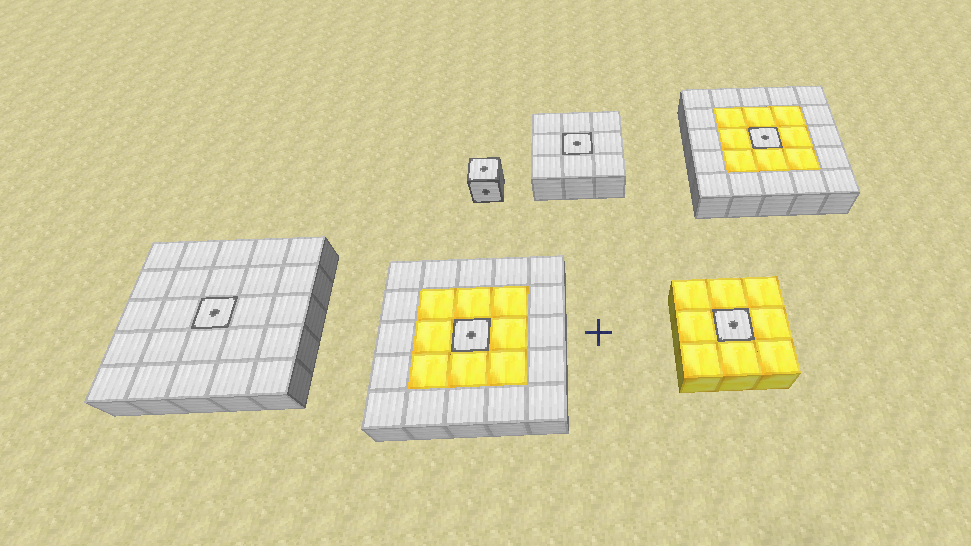
CurseForge · Minecraft mod
Thut's Elevators
Adds elevators to minecraft
Choose a version Pick your version below, then grab the matching file.
Quick answer
Which Thut's Elevators release should I use?
Latest stable file thuttech-1.21-10.0.0.jar
Game version 1.21.1
Loader NeoForge
Thut's Elevators thuttech-1.21-10.0.0.jar targets 1.21.1 with NeoForge. The project page does not say whether this file belongs on the client, dedicated server, or both. No extra mods listed for this file.
Where it goes
Is Thut's Elevators required on the client, server, or both?
The project page does not say whether this file belongs on the client, dedicated server, or both.
Client Source doesn’t say
Dedicated server Source doesn’t say
Loader for this release NeoForge
Required install it here Optional supported, not mandatory Not supported do not install here Source doesn’t say do not assume
The source does not explicitly classify this release as client-only or server-only.
What else does Thut's Elevators thuttech-1.21-10.0.0.jar need?
thuttech-1.21-10.0.0.jar. Change the file and its required mods may change too.
This file does not list any required mods. Do not add a library just because a different file uses it.
This file does not list any required or optional mods.
Before you install it
Add Thut's Elevators without breaking your instance.
Built for Thut's Elevators thuttech-1.21-10.0.0.jar. Pick another file and the loader, install side or required mods may change.
- 01
Stick to this file
Use thuttech-1.21-10.0.0.jar. It targets 1.21.1 with NeoForge; another release may have different loader, side or dependency requirements.
- 02
Bring the mods it needs
This file does not list any required mods. Do not add a library just because a different file uses it.
- 03
Put it on the correct side
The project page does not say whether this file belongs on the client, dedicated server, or both.
- 04
Pick the file you checked
Use the “Get this file” button beside thuttech-1.21-10.0.0.jar. It opens that exact file at the source.
About this project
What does Thut's Elevators add?
This mod adds dynamic elevators to minecraft. It currently has support for up to 64 floors, with many controllers per floor, so long as they are directly touching each other.
Versions for MC 1.8.9+ require ThutCore which can be found here: https://minecraft.curseforge.com/projects/thutcore
For oc version, the following methods are available in open computers:
- callFloor(floor:number) -- Calls the Lift to the specified Floor
- callYValue(yValue:number) -- Calls the Lift to the specified Y level
- callXValue(xValue:number) -- Calls the Lift to the specified X location
- callZValue(zValue:number) -- Calls the Lift to the specified Z location
- setFloor(floor:number) -- Sets the floor assosiated to the Controller
- getYValue() -- returns the current Y value of the lift
- getXValue() -- returns the current X value of the lift
- getZValue() -- returns the current Z value of the lift
- getFloor() -- returns the Floor assigned to the Controller
- getFloorYValue(floor:number) -- returns the y value of the specified floor
- isReady() -- returns if the elevator is not currently called to a floor
To set the Controller block face on, right click it with a stick or device linker. to change the page of the controller face, right click with a linker.
to set the floor, shift right click with the linker. Physically touching controller blocks will automatically link together as the same floor, this allows you to make larger control panels.
To remove an elevator, shift right click it with a vanilla stick or a wrench from another mod
for version 2.0 and later, the lifts have been changed to only require the base to be built. the walls and roof are no longer required.
Old instructions (do not apply to 1.8.9+ builds)
The following instructions are a bit outdated, only the bottom layer is needed now
If you break the rails it will start rotating rapidly, so either re-place the rail, or remove as mentioned.
For build and usage instructions, see Elevator Instructions
For other sizes, see Elevator Instructions 2
You can contact me here on Discord: https://discordapp.com/invite/medHvkA
If you're interested in hosting a server, click the image below!
Thut's Elevators is partnered with BisectHosting!
BisectHosting offers a quick, simple and quality solution. After your purchase, the server is already configured and ready to use. Use the code "Thutmose" to get 25% off your first month as a new client for any of their gaming servers.
Project description from CurseForge.
Pick your setup
Thut's Elevators by Minecraft version and loader
Choose the version and loader you play, then open the matching release.
Minecraft version
1.19.2
1 loader buildMinecraft version
1.18.2
1 loader buildMinecraft version
1.18.1
1 loader buildMinecraft version
1.16.5
1 loader buildMinecraft version
1.16.4
2 loader buildsMinecraft version
1.16.3
1 loader buildMinecraft version
1.15.2
2 loader buildsMinecraft version
1.14.4
1 loader buildMinecraft version
1.12.2
1 loader buildCheck the dependencies, then try the file in a copied instance before changing a world you care about.
Recent files
Thut's Elevators versions and loaders
thuttech-1.21-10.0.0.jar
6 May 2025
Client Source doesn’t say Server Source doesn’t say Dependencies No extras listed Listed on Release listing
Check the 1.21.1 · NeoForge setup NeoForge1.21.1 release
thuttech-1.19.2-9.3.3.jar
11 Nov 2022
Client Source doesn’t say Server Source doesn’t say Dependencies 1 required · 1 unchecked Listed on Release listing
Check the 1.19.2 · Forge setup 1.19.2Forge release
thuttech-1.19.2-9.3.2.jar
9 Nov 2022
Client Source doesn’t say Server Source doesn’t say Dependencies 1 required · 1 unchecked Listed on Release listing
Check the 1.19.2 · Forge setup 1.19.2Forge release
thuttech-1.19.2-9.3.1.jar
8 Nov 2022
Client Source doesn’t say Server Source doesn’t say Dependencies 1 required · 1 unchecked Listed on Release listing
Check the 1.19.2 · Forge setup 1.19.2Forge release
thuttech-1.19.2-9.3.0.jar
8 Nov 2022
Client Source doesn’t say Server Source doesn’t say Dependencies 1 required · 1 unchecked Listed on Release listing
Check the 1.19.2 · Forge setup 1.19.2Forge release
thuttech-1.19.2-9.2.6.jar
14 Sept 2022
Client Source doesn’t say Server Source doesn’t say Dependencies 1 required · 1 unchecked Listed on Release listing
Check the 1.19.2 · Forge setup 1.19.2Forge release
thuttech-1.18.2-9.2.6.jar
14 Sept 2022
Client Source doesn’t say Server Source doesn’t say Dependencies 1 required · 1 unchecked Listed on Release listing
Check the 1.18.2 · Forge setup 1.18.2Forge release
thuttech-1.18.2-9.2.5.jar
14 Sept 2022
Client Source doesn’t say Server Source doesn’t say Dependencies 1 required · 1 unchecked Listed on Release listing
Check the 1.18.2 · Forge setup 1.18.2Forge release
thuttech-1.18.2-9.2.4.jar
6 Aug 2022
Client Source doesn’t say Server Source doesn’t say Dependencies 1 required · 1 unchecked Listed on Release listing
Check the 1.18.2 · Forge setup 1.18.2Forge release
thuttech-1.18.1-9.1.6.jar
16 Jan 2022
Client Source doesn’t say Server Source doesn’t say Dependencies 1 required · 1 unchecked Listed on Release listing
Check the 1.18.1 · Forge setup 1.18.1Forge release
thuttech-1.18.1-9.1.5.jar
8 Jan 2022
Client Source doesn’t say Server Source doesn’t say Dependencies 1 required · 1 unchecked Listed on Release listing
Check the 1.18.1 · Forge setup 1.18.1Forge release
thuttech-1.18.1-9.1.4.jar
18 Dec 2021
Client Source doesn’t say Server Source doesn’t say Dependencies 1 required · 1 unchecked Listed on Release listing
Check the 1.18.1 · Forge setup 1.18.1Forge release
Looking for an older file? The official CurseForge project page is in Resources.
 mod
mod CurseForge + Modrinth · Minecraft
Secure Trade
Player Trade from anywhere: exchange items and XP across distance and dimensions with a custom GUI and configurable server-side limits.
 mod
mod CurseForge + Modrinth · Minecraft
Reconnectible Chains
A multiloader fork of Connectible Chains: Connect your fences/walls with a decorative chain!
 mod
mod CurseForge + Modrinth · Minecraft
Player Statues
Adds a armor stand like entity with player skins