ThutCore Needed by Thut's Elevators thuttech-1.16.3-9.0.0.jar
requiredMatching file found Matched file: thutcore-1.16.3-8.0.0.jar
CurseForge · Minecraft mod
Adds elevators to minecraft
Quick answer
Thut's Elevators thuttech-1.16.3-9.0.0.jar targets 1.16.3. The project page does not say whether this file belongs on the client, dedicated server, or both. All 1 required mods have matching files.
Where it goes
The project page does not say whether this file belongs on the client, dedicated server, or both.
The source does not explicitly classify this release as client-only or server-only.
thuttech-1.16.3-9.0.0.jar on 1.16.3. Every mod below is checked against that same setup.
Install ThutCore first. We found matching files for this game-version and loader setup.
We only count dependency files that match this setup. A file for another loader does not fill the gap.
Before you install it
Built for Thut's Elevators thuttech-1.16.3-9.0.0.jar on 1.16.3. Pick another file and the loader, install side or required mods may change.
Use thuttech-1.16.3-9.0.0.jar. It targets 1.16.3; another release may have different loader, side or dependency requirements.
Install ThutCore first. We found matching files for this game-version and loader setup.
The project page does not say whether this file belongs on the client, dedicated server, or both.
Use the “Get this file” button beside thuttech-1.16.3-9.0.0.jar. It opens that exact file at the source.
About this project
This mod adds dynamic elevators to minecraft. It currently has support for up to 64 floors, with many controllers per floor, so long as they are directly touching each other.
Versions for MC 1.8.9+ require ThutCore which can be found here: https://minecraft.curseforge.com/projects/thutcore
For oc version, the following methods are available in open computers:
To set the Controller block face on, right click it with a stick or device linker. to change the page of the controller face, right click with a linker.
to set the floor, shift right click with the linker. Physically touching controller blocks will automatically link together as the same floor, this allows you to make larger control panels.
To remove an elevator, shift right click it with a vanilla stick or a wrench from another mod
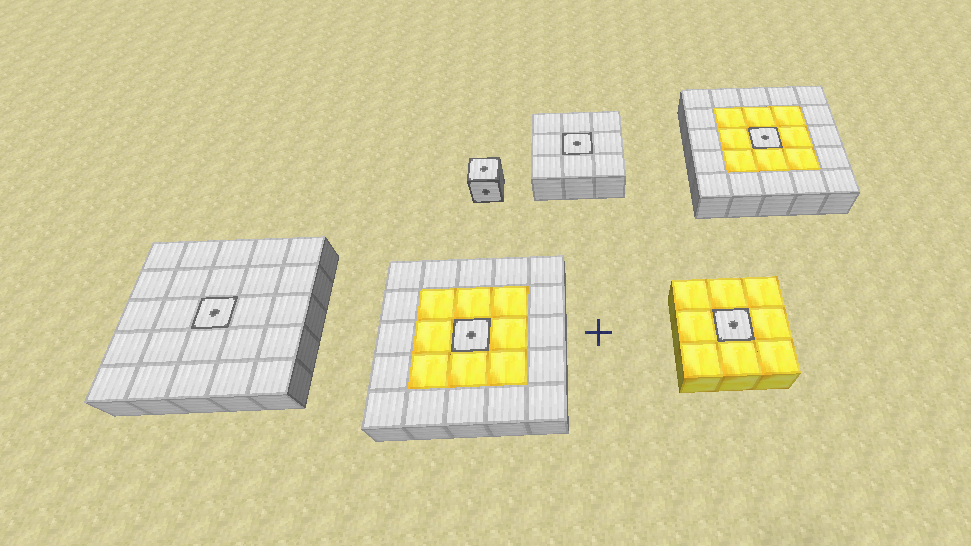
for version 2.0 and later, the lifts have been changed to only require the base to be built. the walls and roof are no longer required.
Old instructions (do not apply to 1.8.9+ builds)
The following instructions are a bit outdated, only the bottom layer is needed now
If you break the rails it will start rotating rapidly, so either re-place the rail, or remove as mentioned.
For build and usage instructions, see Elevator Instructions
For other sizes, see Elevator Instructions 2
You can contact me here on Discord: https://discordapp.com/invite/medHvkA
If you're interested in hosting a server, click the image below!
Thut's Elevators is partnered with BisectHosting!
BisectHosting offers a quick, simple and quality solution. After your purchase, the server is already configured and ready to use. Use the code "Thutmose" to get 25% off your first month as a new client for any of their gaming servers.
Project description from CurseForge.
Pick your setup
Choose the version and loader you play, then open the matching release.
Check the dependencies, then try the file in a copied instance before changing a world you care about.
Recent files
5 Oct 2020
Looking for an older file? The official CurseForge project page is in Resources.
 mod
modShow mob health and names, and customize mob health and damage in Minecraft.
 mod
modErgonomic multiloader configuration library with sync support.
 mod
modTesseract allows you to transport Items, Fluid and Energy