Minecraft version
Back to mods 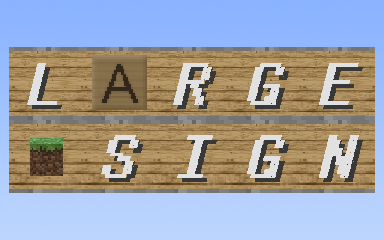
CurseForge · Minecraft mod
Large Sign 2.0
"Large Sign" which has bigger block size and font size.You can edit text or insert item icon on it.
Choose a version Pick your version below, then grab the matching file.
Quick answer
Which Large Sign 2.0 release should I use?
Latest stable file [1.7.10-10.13.2.1230]Large Sign-2.0
Game version 1.7.10
Loader Not required
Large Sign 2.0 [1.7.10-10.13.2.1230]Large Sign-2.0 targets 1.7.10. The project page does not say whether this file belongs on the client, dedicated server, or both. No extra mods listed for this file.
Where it goes
Is Large Sign 2.0 required on the client, server, or both?
The project page does not say whether this file belongs on the client, dedicated server, or both.
Client Source doesn’t say
Dedicated server Source doesn’t say
Loader for this release No loader listed
Required install it here Optional supported, not mandatory Not supported do not install here Source doesn’t say do not assume
The source does not explicitly classify this release as client-only or server-only.
What else does Large Sign 2.0 [1.7.10-10.13.2.1230]Large Sign-2.0 need?
[1.7.10-10.13.2.1230]Large Sign-2.0. Change the file and its required mods may change too.
This file does not list any required mods. Do not add a library just because a different file uses it.
This file does not list any required or optional mods.
Before you install it
Add Large Sign 2.0 without breaking your instance.
Built for Large Sign 2.0 [1.7.10-10.13.2.1230]Large Sign-2.0. Pick another file and the loader, install side or required mods may change.
- 01
Stick to this file
Use [1.7.10-10.13.2.1230]Large Sign-2.0. It targets 1.7.10; another release may have different loader, side or dependency requirements.
- 02
Bring the mods it needs
This file does not list any required mods. Do not add a library just because a different file uses it.
- 03
Put it on the correct side
The project page does not say whether this file belongs on the client, dedicated server, or both.
- 04
Pick the file you checked
Use the “Get this file” button beside [1.7.10-10.13.2.1230]Large Sign-2.0. It opens that exact file at the source.
About this project
What does Large Sign 2.0 add?

About
This Mod adds an item which name is Large Sign.Block size and text size of Large Sign is bigger than Sign, and you can choose one of all items icons showing on it ,like Item Frame but not need to consume items.
Direction
There is two mode in the current version,Text Mode and Item Icon Mode.In Text Mode,you can input text and edit it font style and more.InItem Icon Mode,you can choose an items icon showing on the sign. Large Sign only be placed on the walls,it can not stand on the floor.
Text Mode

Above is Text Mode GUI screenshot.Using Font Styles controls to edit the font Style of showing text,and using Adjustor controls to move or scale showing text.Color Switcher controls is used to change the color of showing text.You can edit message at the inputbox.
Font Styles
To edit font style correctly,you have to use style carets.In this Mod,style carets are different with original carets,you can see the screenshot as above,style carets show in the inputbox,and the font style of each character are displayed on the Large Sign separately.you can manually enter them or click the button.
Adjustor
You can adjust "X pos." and "Y pos." to move the position of showing text.Adjusting "Scale" to resize showing text.
Color Switcher
This controls using RGBA to represent color.You can adjust the value or click color blocks to change text color.
Item Icon Mode

Above is Item Icon Mode GUI screenshot.There is an list of all items display at right side.Just click the item icon which you want and it will show on the sign and click "prev" or "next" to change page.You do not need to consume items.
Recipes
Recipe of Large Sign as below:

Another
Source code is available on GitHub.
Project description from CurseForge.
Pick your setup
Large Sign 2.0 by Minecraft version and loader
Choose the version and loader you play, then open the matching release.
Check the dependencies, then try the file in a copied instance before changing a world you care about.
Recent files
Large Sign 2.0 versions and loaders
[1.7.10-10.13.2.1230]Large Sign-2.0
[1.7.10-10.13.2.1230]Large Sign-2.0.jar
12 Dec 2014
Client Source doesn’t say Server Source doesn’t say Dependencies No extras listed Listed on Release listing
Check the 1.7.10 setup 1.7.10 release
[1.7.10-10.13.2.1230]Large Sign-1.2
[1.7.10-10.13.2.1230]Large Sign-1.2.jar
18 Nov 2014
Client Source doesn’t say Server Source doesn’t say Dependencies No extras listed Listed on Release listing
Check the 1.7.10 setup 1.7.10 release
[1.7.10-10.13.2.1230]Large Sign-1.1
[1.7.10-10.13.2.1230]Large Sign-1.1.jar
11 Nov 2014
Client Source doesn’t say Server Source doesn’t say Dependencies No extras listed Listed on Release listing
Check the 1.7.10 setup 1.7.10 release
[1.7.10-10.13.2.1230]Large Sign-1.0
[1.7.10-10.13.2.1230]Large Sign-1.0.jar
2 Nov 2014
Client Source doesn’t say Server Source doesn’t say Dependencies No extras listed Listed on Release listing
Check the 1.7.10 setup 1.7.10 release
Looking for an older file? The official CurseForge project page is in Resources.
 mod
CurseForge · Minecraft
Fudu Flora
Adds ornamental trees, shrubs, and detailed flowers for gardens and landscaping.
 mod
CurseForge · Minecraft
Hunting Menu
Skyrim-style compass menu (Tab), magic from Iron’s, Ars, and Epic Fight, shared mana, guild tab (Q), and home screen
 mod
CurseForge + Modrinth · Minecraft
ArborFirmaCraft
An addon for TerraFirmaCraft (TFC) adding new trees, new wood types, and tree-tapping recipes.