Minecraft version
Back to mods 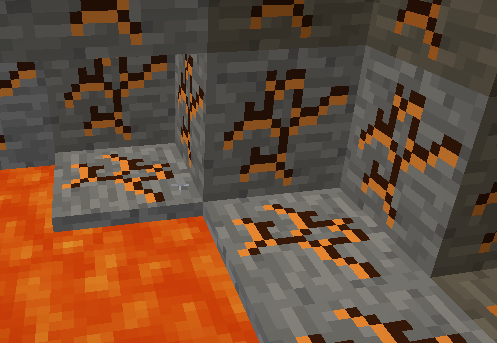
CurseForge · Minecraft mod
Real Blocks
Blocks that add some realism to minecraft
Choose a version Pick your version below, then grab the matching file.
Quick answer
Which Real Blocks release matches 1.8?
Best match for your filters Real Blocks-v0.1.2.jar
Game version 1.8, 1.8.1
Loader Not required
Real Blocks-v0.1.2.jar targets 1.8, 1.8.1. The project page does not say whether this file belongs on the client, dedicated server, or both. No extra mods listed for this file.
Where it goes
Is Real Blocks required on the client, server, or both?
The project page does not say whether this file belongs on the client, dedicated server, or both.
Client Source doesn’t say
Dedicated server Source doesn’t say
Loader for this release No loader listed
Required install it here Optional supported, not mandatory Not supported do not install here Source doesn’t say do not assume
The source does not explicitly classify this release as client-only or server-only.
What else does Real Blocks-v0.1.2.jar need?
Real Blocks-v0.1.2.jar on 1.8. Every mod below is checked against that same setup.
This file does not list any required mods. Do not add a library just because a different file uses it.
This file does not list any required or optional mods.
Before you install it
Add Real Blocks without breaking your instance.
Built for Real Blocks-v0.1.2.jar on 1.8. Pick another file and the loader, install side or required mods may change.
- 01
Stick to this file
Use Real Blocks-v0.1.2.jar. It targets 1.8, 1.8.1; another release may have different loader, side or dependency requirements.
- 02
Bring the mods it needs
This file does not list any required mods. Do not add a library just because a different file uses it.
- 03
Put it on the correct side
The project page does not say whether this file belongs on the client, dedicated server, or both.
- 04
Pick the file you checked
Use the “Get this file” button beside Real Blocks-v0.1.2.jar. It opens that exact file at the source.
About this project
What does Real Blocks add?
Currently adds a block with lava cracks to the world, for a small change in scenery when mining diamonds.
Be careful, it has a few surprises for the unwary player!
Fully configurable, simply place in your mods folder, requires forge 1.8
Mod Packs
The code of “Real Blocks for Minecraft” in source or binary form is the intellectual property of anxcon. See below for copyright, terms and conditions.
You want Real Blocks in your mod pack? All you need to meet are conditions:
- Your mod pack needs a link back to this forum post.
- You cannot make any money off of the mod pack (adfly, etc, or donations exceeding server hosting costs, selling server listings in multiplayer menu, etc i reserve the right to add in the future because people look for loopholes).
- Your mod pack may give out the server files, as long as they are used for private hosting elsewhere (your server is the only one publicly accessable).
- You cannot claim that you made any part of the mod, and you must give credit to the author of the mod (anxcon).
- If I ever ask you to remove my mod from your pack, for whatever reason, you do so.
- Handle any queries and bug reports internally first. This is one of the main reasons I did not share my work before, as most bug issues aren't related to my code at all, people are quick to assume things and bug the first person they see.
- You do not edit this mod in any way. If there is a bug, or you have a feature to add, I will almost always fix/add it. But I maintain the integrity of my mods, features that harm that integrity can go in a different mod :)
- You have permission to use all other mods in your modpack (by their most recent permissions, no saying you had permission 3 years ago before permissions changed).
If these eight conditions are met, then you have my permission to use it in a mod pack
Project description from CurseForge.
Pick your setup
Real Blocks by Minecraft version and loader
Choose the version and loader you play, then open the matching release.
Minecraft version
1.8
1 loader buildCheck the dependencies, then try the file in a copied instance before changing a world you care about.
Recent files
Real Blocks versions and loaders
Real Blocks-v0.1.2.jar
21 Dec 2014
Client Source doesn’t say Server Source doesn’t say Dependencies No extras listed Listed on Release listing
Check the 1.8 setup 1.81.8.1 release
Looking for an older file? The official CurseForge project page is in Resources.