Minecraft version
Back to mods 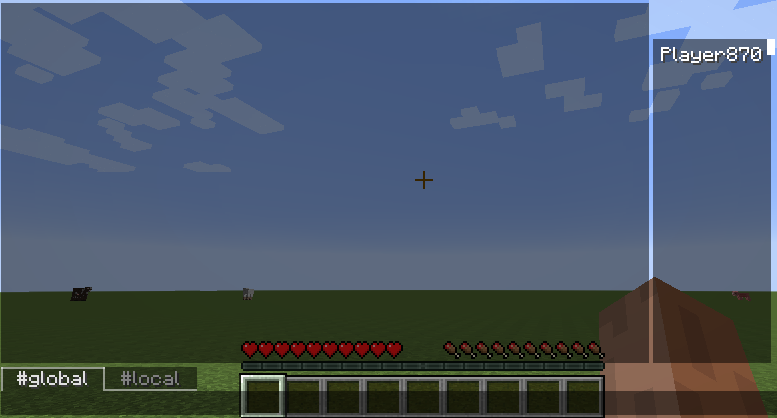
CurseForge · Minecraft mod
Prattle
Chat modification to make support multiple channels
Choose a version Pick your version below, then grab the matching file.
Quick answer
Which Prattle release matches 1.7.10?
beta file Prattle-0.0.9a.jar
Game version 1.7.10
Loader Not required
Prattle-0.0.9a.jar targets 1.7.10. The project page does not say whether this file belongs on the client, dedicated server, or both. No extra mods listed for this file.
Where it goes
Is Prattle required on the client, server, or both?
The project page does not say whether this file belongs on the client, dedicated server, or both.
Client Source doesn’t say
Dedicated server Source doesn’t say
Loader for this release No loader listed
Required install it here Optional supported, not mandatory Not supported do not install here Source doesn’t say do not assume
The source does not explicitly classify this release as client-only or server-only.
What else does Prattle-0.0.9a.jar need?
Prattle-0.0.9a.jar on 1.7.10. Every mod below is checked against that same setup.
This file does not list any required mods. Do not add a library just because a different file uses it.
This file does not list any required or optional mods.
Before you install it
Add Prattle without breaking your instance.
Built for Prattle-0.0.9a.jar on 1.7.10. Pick another file and the loader, install side or required mods may change.
- 01
Stick to this file
Use Prattle-0.0.9a.jar. It targets 1.7.10; another release may have different loader, side or dependency requirements.
- 02
Bring the mods it needs
This file does not list any required mods. Do not add a library just because a different file uses it.
- 03
Put it on the correct side
The project page does not say whether this file belongs on the client, dedicated server, or both.
- 04
Pick the file you checked
Use the “Get this file” button beside Prattle-0.0.9a.jar. It opens that exact file at the source.
About this project
What does Prattle add?
PRATTLE: Prof & Razz's Alternate Tabbed Talk: Loquacious Edition
IRC like take on MC chat system with full PM support, zoned chat, local chat, channel creation and 100+ chars input !
CONTROL :
You can keybind to open the chat, open it with the command symbol already typed, or open the latest chan you got a msg in.
You can switch tabs by clicking on them, and middle click will automatically part from the clicked channel.
COMMANDS :
"/join <channel>" : Join a given channel, create it if it doesn't exist. Creation of channels by normal users is configurable.
"/part <channel>" : Leave a channel
"/invite <channel> <player>" : Invite a player to a channel if the channel is Private (Owner and OPs only)
"/revoke <channel> <player>" : Revoke an invitation and kick out the player from the channel (Owner and OPs only)
"/chatzone <channel> <start|stop|remove>" : Start/stop/remove a chat zone (a chat that people will autojoin when they walk in the zone).
"/channel" : Multi command to handle channels access rights and flags.
"/channel help" will give a detailled list of possible usages (transfert ownership, add/rm OPs, switch flags to create private local channels, etc).
Project description from CurseForge.
Pick your setup
Prattle by Minecraft version and loader
Choose the version and loader you play, then open the matching release.
Check the dependencies, then try the file in a copied instance before changing a world you care about.
Recent files
Prattle versions and loaders
Prattle-0.0.9a.jar
19 Apr 2015
Client Source doesn’t say Server Source doesn’t say Dependencies No extras listed Listed on Release listing
Check the 1.7.10 setup 1.7.10 beta
Prattle-0.0.9.jar
18 Apr 2015
Client Source doesn’t say Server Source doesn’t say Dependencies No extras listed Listed on Release listing
Check the 1.7.10 setup 1.7.10 beta
Prattle-0.0.8.jar
26 Mar 2015
Client Source doesn’t say Server Source doesn’t say Dependencies No extras listed Listed on Release listing
Check the 1.7.10 setup 1.7.10 beta
Prattle-0.0.7.jar
26 Mar 2015
Client Source doesn’t say Server Source doesn’t say Dependencies No extras listed Listed on Release listing
Check the 1.7.10 setup 1.7.10 beta
Prattle-0.0.6.jar
22 Mar 2015
Client Source doesn’t say Server Source doesn’t say Dependencies No extras listed Listed on Release listing
Check the 1.7.10 setup 1.7.10 beta
Prattle-0.0.5.jar
20 Mar 2015
Client Source doesn’t say Server Source doesn’t say Dependencies No extras listed Listed on Release listing
Check the 1.7.10 setup 1.7.10 beta
Looking for an older file? The official CurseForge project page is in Resources.